
Solved Trouble with Win7 installation

erelim

New member
Local time
4:31 AM
Messages
3
Hello to everyone.
I recently wanted to re-install Win7 on my pc and bump on a weird problem.
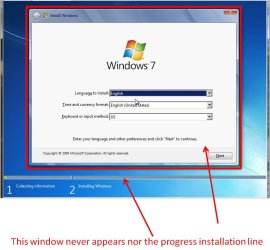
When i try to boot from the cd the cd boots fine but it will never show the first install screen of the windows installer. The wallpaper and the mouse cursor appears. I tried with 3 different discs and from bootable usb flash. The discs are fine because I tested them both on different pc and virtual machine and it boots and installs fine. At the moment I am posting from the win7 installation on the same pc, from the same disk i did the installation 1,5 year ago. To be honest I don't remember if i made any hardware changes to my pc but i think i didn't. I also tried to reset my bios settings to default but same thing happened.

My pc specs are
Asus P5kPremium deluxe (intel p35)
8GB Ram
Intel Core 2 Quad Q6600 @ 2400MHz
ATI Radeon HD 4850
3x500GB HDD (2xWD + Seagate)

The versions of windows I tried are
Win7 Ultimate x64 retail disk
Win7 Ultimate x64 disk (containing both 32bit and 64bit)

I attatched a pic to explain better what i mean
 

Attachments
  • win7.jpg
    win7.jpg
    68.2 KB · Views: 9

My Computer

OS
Windows 7 Ultimate x64
How long did you wait? -also i gather you cant get to custom install - mine similarily seems to freeze on that same screen(wallpaper and mouse) for about 15 minutes - could be a little more with yours, so i ask how long did you wait? - then it seemingling hangs again for about 15minutes before it continues - annoying, but it is doing something in the background as it takes about 40minutes in total to install.
 
Last edited:

My Computer

OS
XP, Vista, W7 64bit Home Premium
CPU
Intel Core Duo 6850 3.0 ghz @ 3.7 ghz
Motherboard
Asus P5E
Memory
4GB Corsair DDR 2 PC-6400
Graphics Card(s)
Ati 4870 1ghz
Sound Card
Supreme FX 11
Monitor(s) Displays
View Sonic VX1962wm
Screen Resolution
1680 X1050
Hard Drives
3 Seagate Sata Drives 160gb 250gb 500gb
PSU
Thermaltake 600 watt
Case
NZXT Alpha
Cooling
3X120cm Fans
Keyboard
Microsoft Digital Media Pro Keyboard
Mouse
Microsoft Wheel Mouse Optical
Internet Speed
1.5Mb to 8Mb/384k
Do you have more than one optical drive? It's quite possible that the laser optics is not reading the disk correctly.

Also, check the disk for hairline cracks that emanate from the hole in the centre of the disk.

Not so long back an optical drive in my then Dell computer cracked several disks in that manner before I realised what was going on. Apparently the the drive wasn't aligned properly and was vibrating while the disk was spinning, which caused the disk to splinter.

Whest is right though, an upgrade installation takes a lot longer than a clean install.
 

My Computer

Computer Manufacturer/Model Number
HP Pavilion Elite 495UK
OS
Windows 7 Ultimate SP1 64-Bit
CPU
Intel Core i7 870 @ 2.93GHz
Motherboard
MSI 2A9C (CPU1)
Memory
8Gb Dual-Channel DDR3 @ 664MHz
Graphics Card(s)
nVidia GeForce GTX 460 1024MB dedicated RAM
Sound Card
Realtek HD Audio
Monitor(s) Displays
HP2310i
Screen Resolution
1920 x 1080
Hard Drives
1x1954GB Hitachi HDS22020ALA 330 (RAID), 1x1954GB Hitachi External for backup and storage
PSU
460W
Case
HP Elite
Cooling
Air cooled
Keyboard
Logitech K750 solar-powered keyboard
Mouse
Logitech Wireless M180 mouse
Internet Speed
2Mb
Other Info
Pure Avanti Flow Internet Radio with iPod Dock, 64Gb iPod, HP USB Speakers, Sony MDR-V500 Headphones, Sony Vaio F-Series Laptop
Try with only 2gb of ram.

just tried without success

How long did you wait? -also i gather you cant get to custom install - mine similarily seems to freeze on that same screen(wallpaper and mouse) for about 15 minutes - could be a little more with yours, so i ask how long did you wait? - then it seemingling hangs again for about 15minutes before it continues - annoying, but it is doing something in the background as it takes about 40minutes in total to install.

If this isn't the case have you tried updating the bios?:
ASUSTeK Computer Inc. -Support-
I only waited about 5minutes. Maybe I will leave it for 15+ minutes to see what happens.
F1 in Silverstone is going to start in 1 hour so I´ll have something to do while waiting:)
I didnt do a bios upgrade, dint needed so far, but it is something i must look into.

Do you have more than one optical drive? It's quite possible that the laser optics is not reading the disk correctly.

Also, check the disk for hairline cracks that emanate from the hole in the centre of the disk.

Not so long back an optical drive in my then Dell computer cracked several disks in that manner before I realised what was going on. Apparently the the drive wasn't aligned properly and was vibrating while the disk was spinning, which caused the disk to splinter.

Whest is right though, an upgrade installation takes a lot longer than a clean install.
I dont think it has smth to do with the dvd-rom drive. Same thing happens when i tried to install from usb, which i created on my second pc

At the moment I am posting from the Windows 7 installation on the same pc
Why are you reinstalling?
It started to become sluggish and i am bored to start cleaning up. I thought a fresh install would be faster but it seems I was wrong :D
 

My Computer

OS
Windows 7 Ultimate x64
Sorry bout the bios suggestion as i was half a sleep and read over re-install as install :mad: so i deleted it when i realised.

I'll wait till u see if install gets going before i make any more suggestions.
 

My Computer

OS
XP, Vista, W7 64bit Home Premium
CPU
Intel Core Duo 6850 3.0 ghz @ 3.7 ghz
Motherboard
Asus P5E
Memory
4GB Corsair DDR 2 PC-6400
Graphics Card(s)
Ati 4870 1ghz
Sound Card
Supreme FX 11
Monitor(s) Displays
View Sonic VX1962wm
Screen Resolution
1680 X1050
Hard Drives
3 Seagate Sata Drives 160gb 250gb 500gb
PSU
Thermaltake 600 watt
Case
NZXT Alpha
Cooling
3X120cm Fans
Keyboard
Microsoft Digital Media Pro Keyboard
Mouse
Microsoft Wheel Mouse Optical
Internet Speed
1.5Mb to 8Mb/384k

My Computer

Computer Manufacturer/Model Number
* BFK Customs *
OS
W 7 64-bit Ultimate
CPU
Intel Q9550 Yorkfield
Motherboard
ASUS P5Q Pro
Memory
8GB Dominator 8500C5D
Graphics Card(s)
ATI : XFX 5870
Sound Card
Realtek HD Audio 7-1
Monitor(s) Displays
1x 47" LCD HDMI & 3x 26" LCD HDMI
Screen Resolution
1920x1080P & 1920x1200
Hard Drives
1x 80GB Intel X25-M G2 SSD : 1x 500GB & 1x 640GB WD Caviar Black(s)
PSU
Corsair 620HX
Case
Cooler Master RC-690
Cooling
Tuniq Tower 120, 2x 140mm and 3x 120mm case fans
Keyboard
Microsoft 500
Mouse
Razer Diamondback 3G
Internet Speed
14 Mb/s
Other Info
1x Koutech 3Gb/s SATA HDD Hot Swap Rack
Hello again, it seems that Whest was right. I don't know what the reason is but after 12minutes (and yes I timed that 3 times :D) the installer window appeared and the installation proceeded and completed successfully. Thank you all for your help, especially Whest, I would have thought of that.
 

My Computer

OS
Windows 7 Ultimate x64
You're very welcome and thanks for posting back to let us know.
 

My Computer

Computer Manufacturer/Model Number
HP Pavilion Elite 495UK
OS
Windows 7 Ultimate SP1 64-Bit
CPU
Intel Core i7 870 @ 2.93GHz
Motherboard
MSI 2A9C (CPU1)
Memory
8Gb Dual-Channel DDR3 @ 664MHz
Graphics Card(s)
nVidia GeForce GTX 460 1024MB dedicated RAM
Sound Card
Realtek HD Audio
Monitor(s) Displays
HP2310i
Screen Resolution
1920 x 1080
Hard Drives
1x1954GB Hitachi HDS22020ALA 330 (RAID), 1x1954GB Hitachi External for backup and storage
PSU
460W
Case
HP Elite
Cooling
Air cooled
Keyboard
Logitech K750 solar-powered keyboard
Mouse
Logitech Wireless M180 mouse
Internet Speed
2Mb
Other Info
Pure Avanti Flow Internet Radio with iPod Dock, 64Gb iPod, HP USB Speakers, Sony MDR-V500 Headphones, Sony Vaio F-Series Laptop
Good to see you got it sorted and thanks for the update.
 

My Computer

Computer Manufacturer/Model Number
* BFK Customs *
OS
W 7 64-bit Ultimate
CPU
Intel Q9550 Yorkfield
Motherboard
ASUS P5Q Pro
Memory
8GB Dominator 8500C5D
Graphics Card(s)
ATI : XFX 5870
Sound Card
Realtek HD Audio 7-1
Monitor(s) Displays
1x 47" LCD HDMI & 3x 26" LCD HDMI
Screen Resolution
1920x1080P & 1920x1200
Hard Drives
1x 80GB Intel X25-M G2 SSD : 1x 500GB & 1x 640GB WD Caviar Black(s)
PSU
Corsair 620HX
Case
Cooler Master RC-690
Cooling
Tuniq Tower 120, 2x 140mm and 3x 120mm case fans
Keyboard
Microsoft 500
Mouse
Razer Diamondback 3G
Internet Speed
14 Mb/s
Other Info
1x Koutech 3Gb/s SATA HDD Hot Swap Rack
Good to see you got thru it - i don't know how i managed to get thru those 12minutes X3 of patience seeing i havent got any, neverless good to see your up and running again - you refreshed my memory I said 2 spots and i exaggerated the time slightly to be on the safe side :).
 

My Computer

OS
XP, Vista, W7 64bit Home Premium
CPU
Intel Core Duo 6850 3.0 ghz @ 3.7 ghz
Motherboard
Asus P5E
Memory
4GB Corsair DDR 2 PC-6400
Graphics Card(s)
Ati 4870 1ghz
Sound Card
Supreme FX 11
Monitor(s) Displays
View Sonic VX1962wm
Screen Resolution
1680 X1050
Hard Drives
3 Seagate Sata Drives 160gb 250gb 500gb
PSU
Thermaltake 600 watt
Case
NZXT Alpha
Cooling
3X120cm Fans
Keyboard
Microsoft Digital Media Pro Keyboard
Mouse
Microsoft Wheel Mouse Optical
Internet Speed
1.5Mb to 8Mb/384k
Back
Top