Hi, I'm having trouble when I open a window on my machine and I don't know what to do. Whenever I open a window and maximize it the window goes off the right hand side of the screen. The up down scroll bar is not visible and the minimize/maximize close buttons are off screen. Does anyone have any suggestions? Thanks in advance
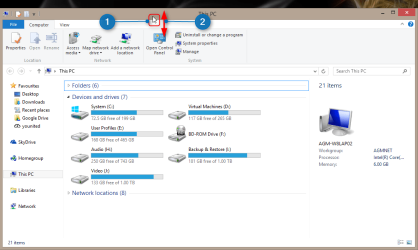
Your system specs tell nothing else than that you have a desktop PC. This normally means you are using an external display (as opposite to laptop's internal display), so this is most probably an issue in display's own adjustment settings. To confirm this, please see the screenshot below and do this:
Press and hold on the title bar of any window you have opened maximized (buttons hidden beyond the right edge)
Drag the window down a bit to restore it (last non full-screen windowed mode), then drag it again to the top of the display to maximize it
If the same happens and buttons disappear beyonf the right edge, the display's own adjustment settings are wrong. It might also be due missing or faulty driver (video card on PC or monitor). If however the windows settles now normally as it should, filling the screen and buttons visible, we have to think something else.
Kari
My Computer
Computer type
Laptop
Computer Manufacturer/Model Number
HP ENVY 17-1150eg
OS
Windows 10 Pro x64 EN-GB
CPU
1.6 GHz Intel Core i7-720QM Processor
Memory
6 GB
Graphics Card(s)
ATI Mobility Radeon HD 5850 Graphics
Sound Card
Beats sound system with integrated subwoofer
Monitor(s) Displays
17" laptop display, 22" LED and 32" Full HD TV through HDMI
Screen Resolution
1600*900 (1), 1920*1080 (2&3)
Hard Drives
Internal: 2 x 500 GB SATA Hard Disk Drive 7200 rpm
External: 2TB for backups, 3TB USB3 network drive for media
Cooling
As Envy runs a bit warm, I have it on a Cooler Master pad