Troubles playing video clips

motim

New member
Local time
9:52 AM
Messages
109
Hello,
When playing video clips (3 - 10 minutes) with Windows media player, it starts well, but after few seconds the picture starts to "hesitate" becomes in several places pixelated, come for few seconds normal and again starts playing slowly and again pixelated in some places.
There is also time delay with audio.
Started same clip with "MPC-HC" player, sometimes good and sometimes like above. The same clip in "BS-Player" plays good, but I do not like this player.
Since the clip plays well in BS-Player, I do not know what is with the other players, made same experiment with "SMplayer" (portable), after playing about a minute or so, starts to 'hesitate'.
The above happens with some other clips also, but mainly with large W x H clips.
When running the windows task manager while playing video, there is a process "audiodg.exe" eating some cpu and memory resources, but this is a reason for some other thread.
What shell I do to solve the playing problem, and can you recommend some 'normal' player, I searched the internet and what I found is too 'heavy'.
Thanks for answering.
Motim
 

My Computer

Computer type
PC/Desktop
Computer Manufacturer/Model Number
custom built
OS
Windows 7 Pro 32 bit
CPU
intel celeron 2.66GH 2.56GH
Memory
2.00 GB
Graphics Card(s)
Nvidia fx5500
Hard Drives
Western digital
Antivirus
AVG
Browser
firefox
mainly with large W x H clips.

This could be your problem. Your specs says Celeron 2.66 - this might not have the muscle to play HD clips.

Recreate the problem with task manager open and have a look at cpu usage (and RAM). If these are maxing out, then it's an underpowered system for this use.

You seem to have tried a lot of media players, except the one favored by a lot of people here - VLC. Might be worth a shot.

https://www.videolan.org/vlc/
 

My Computer

Computer type
PC/Desktop
Computer Manufacturer/Model Number
self build
OS
W10 Pro x64, W7 Pro x64 in VMware
CPU
i7 2600K @ 4.4GHz
Motherboard
MSI Z68A-GD80
Memory
8GB Mushkin @ 1600MHz
Graphics Card(s)
Nvidia GTX 750 Ti
Monitor(s) Displays
27" Benq + 27" LG
Screen Resolution
1080p
Hard Drives
500GB 850 Evo SSD + 3 * 2TB Seagate
PSU
EVGA 650 GS modular
Case
Antec 300
Cooling
Seidon 120V v2
Internet Speed
62/18 Mbps
Antivirus
Defender (W10) + MSE (W7)
Browser
Firefox
Problems playing video

Hello Wasnowas,
Thanks for answering.
If my Celeron 2.66 is too weak, then how come in BSplayer the same clips play well ?
I'll make a try with VLC player.
Thanks again.
Motim
 

My Computer

Computer type
PC/Desktop
Computer Manufacturer/Model Number
custom built
OS
Windows 7 Pro 32 bit
CPU
intel celeron 2.66GH 2.56GH
Memory
2.00 GB
Graphics Card(s)
Nvidia fx5500
Hard Drives
Western digital
Antivirus
AVG
Browser
firefox
Different players probably use different cpu %. Look in task manager and see the % resources used by each player for same clip.
 

My Computer

Computer type
PC/Desktop
Computer Manufacturer/Model Number
self build
OS
W10 Pro x64, W7 Pro x64 in VMware
CPU
i7 2600K @ 4.4GHz
Motherboard
MSI Z68A-GD80
Memory
8GB Mushkin @ 1600MHz
Graphics Card(s)
Nvidia GTX 750 Ti
Monitor(s) Displays
27" Benq + 27" LG
Screen Resolution
1080p
Hard Drives
500GB 850 Evo SSD + 3 * 2TB Seagate
PSU
EVGA 650 GS modular
Case
Antec 300
Cooling
Seidon 120V v2
Internet Speed
62/18 Mbps
Antivirus
Defender (W10) + MSE (W7)
Browser
Firefox
You could try PotPlayer. There's 64bit and 32bit versions available. Here's a link to the 32bit version.

English version: Download Potplayer 1.6.59347 32-Bit - FileHippo.com

Then you'll need the MadVR plugin:

madVR

Download MadVR and unzip it somewhere (you must keep the unzipped folder) - run Install.bat as an administrator; run madHcCtrl.exe to access your settings; and choose madVR as the video renderer in your media player (in PotPlayer, Video > Video Renderer> Madshi).

   Note
EDIT:

(in PotPlayer, Video > Video Renderer> Madshi)

You might need to repeat this step for each video file type. Play a video then choose renderer.


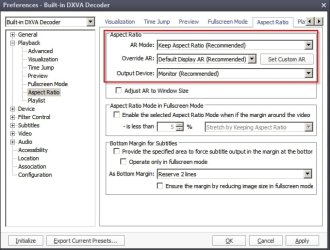
If (large) videos are not playing smoothly:

Set PotPlayer Preferences (F5) like this:

Preferences - Decoder.jpg

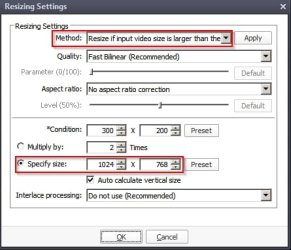
Additionally set it to resize only large videos.

Resize Settings.jpg

Try the following settings.

Resizing Specify Settings.jpg

NOTE: MadVR will also work with some of those other players that you've mentioned but I don't have any experience of using those.
 
Last edited:

My Computer

Computer type
Laptop
Computer Manufacturer/Model Number
ASUS
OS
Microsoft Windows 7 Home Premium 64-bit 7601 Multiprocessor Free Service Pack 1
CPU
AMD C-60 APU with Radeon(tm) HD Graphics
Motherboard
ASUSTeK COMPUTER INC. X501U
Memory
4.00 GB
Graphics Card(s)
AMD Radeon HD 6290 Graphics
Sound Card
(1) AMD High Definition Audio Device (2) Realtek High Defi
Screen Resolution
1366 x 768 x 32 bits (4294967296 colors) @ 60 Hz
Hard Drives
Hitachi HTS545050A7E380 SATA Disk Device
Antivirus
Comodo CIS & FW, SecureAplus App Whitelisting, Threatfire
Browser
Cyberfox 64bit, Opera 64bit, Airfox
Other Info
Spy-The-Spy, HitmanPro.Alert, Norton Connect Safe, MJRegWatcher, BitDefender TrafficLight, Voodoo Shield, Zemana AntiMalware
did you look into the situation of graphics card accelerated video decoding?
are you certain BSplayer wasn't the only software setup to use the graphics card to accelerate the process?
might want to look into how BSplayer was doing the decoding & see if you can get that option in another player.
 

My Computer

Computer type
PC/Desktop
Computer Manufacturer/Model Number
custom
OS
windows 7 home premium 64bit
CPU
core2quad q6600 @ stock speed
Motherboard
xfx 680i lt
Memory
4gb ddr2
Graphics Card(s)
gtx285
Sound Card
virtual audio cable/realtek hd
Hard Drives
ssd
PSU
seasonic 750w
Case
antec
Keyboard
ergonomic 4000
Mouse
logitech g5 (orange version)
Internet Speed
10mbit down / 2 mbit up
Other Info
www.facebook.com/bobby.rankin.7
Back
Top