Troubles with IPod/USB

Andyandhisboard

New member
Local time
11:57 PM
Messages
2
Hey guys,

I've been reading about people saying they have troubles when syncing, but can't find my problem anywhere. Ill start off by saying I usethe Nvidia nForce A8N32-SLI Deluxe motherboard, and CANNOT find drivers for 7 ultimate 64 bit. But Mouse USB, Keyboard USB, ethernet and everything works fine, so obviously it's not a huge deal.

When I plug in my Ipod Nano though, I comes up saying USB Device not recognized. Also itunes will not recognize it either, so I cant sync my ipod at all :(. Anyway, I've been trying to figure this out for weeks, and figured it might as well be time to post up a thread. BTW, the ipod still does charge when it is plugged in.

Thanks for any help!!!!

P.S. Please if you can help :D all I want to do is ad some new songs :D

Thanks again
 

My Computer

OS
Windows 7 ultimate 64 bit
Nvidia dont make motherboards do they?
I think it may be a ASUS motherboard
 

My Computer

Computer Manufacturer/Model Number
Blue Shards 1.0
OS
Windows 7 Ultimate 64bit
CPU
AMD Phenom II 555 Black Edition Quad Core OC'd to 4.0GHz
Motherboard
ASUS M4A88T-M
Memory
G Skill RipJaw 1333MHz 4GB
Graphics Card(s)
ATI raideon 4250 HD/XFX ATI Radeon 1GB HD4650
Sound Card
Realteck HD Audio
Monitor(s) Displays
2x 22" Widescreen HD Monitors
Hard Drives
500GB Sata 7500RPM
80GB IDE
PSU
850W OCUK Modular
Case
Antec Dark Fleet DF-30
Cooling
Titan Fenrir Pro (CPU)
Keyboard
Logitech Wireless
Mouse
Logitech Wireless
Internet Speed
24Meg
Other Info
Getting soon-
2TB 7200RPM HDD
+8GB RAM
30GB SSD
HD6950/70
Hey guys,

I've been reading about people saying they have troubles when syncing, but can't find my problem anywhere. Ill start off by saying I usethe Nvidia nForce A8N32-SLI Deluxe motherboard, and CANNOT find drivers for 7 ultimate 64 bit. But Mouse USB, Keyboard USB, ethernet and everything works fine, so obviously it's not a huge deal.

When I plug in my Ipod Nano though, I comes up saying USB Device not recognized. Also itunes will not recognize it either, so I cant sync my ipod at all :(. Anyway, I've been trying to figure this out for weeks, and figured it might as well be time to post up a thread. BTW, the ipod still does charge when it is plugged in.

Thanks for any help!!!!

P.S. Please if you can help :D all I want to do is ad some new songs :D

Thanks again
Welcome to the Windows 7 support forum.
As we understand your issue your mobile device will not sync due to missing USB driver.
The issue is due to an incomplete install/32 bit version of Itunes or an older chipset configuration of your MOBO.
To resolve your issue you must perform the following:
  1. Remove/Un-install all Apple Software including the following, quicktime+Bonjour+appleinstaller+Itunes+applemobile srvices
  2. re-boot your system
  3. Upload the latest Itunes for Windows 7 64 bit (V9.025)
  4. Install the Itunes installer as Administrator.
  5. Re-boot
  6. Open Itunes, set your sync preferences.
  7. Plug your Apple Mobile device into your USB port. You should hear 2 consecutive sounds indicating that the drivers have been loaded.
  8. Start your sync op.
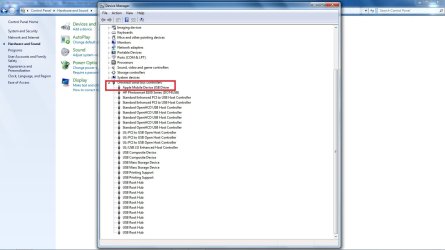
In device manager your apple mobile device should appear under USB devices like the image I posted for you.
 

Attachments

  • apple_driver.jpg
    apple_driver.jpg
    104 KB · Views: 86

My Computer

Computer Manufacturer/Model Number
Custom Build
OS
Windows 7 7600 1 X64
CPU
AMD PHENOM II X 550 PROCESSOR 3.1 ghz
Motherboard
ASUS M4A78-TE
Memory
Corsair 4 gig ddr 3
Graphics Card(s)
ati radeon 3300
Sound Card
ati hd
Monitor(s) Displays
syncmaster 2033sw
Screen Resolution
1600X900 60 hz refresh
Hard Drives
twin_seagates SATA's 1 TB & 500 Gig, hitachi_slimline 160 gig
PSU
antec_550 watt
Case
cooler master GLite
Cooling
stock_heat sink
Internet Speed
20mbs up/ 1.5mbs down
Other Info
favorite child "stewie"
favorite dog "brian"
Thanks, I will try this. I'm 100% sure I did indeed install the 64 but edition of itunes. Although when I installed it I just ran the .exe. Windows 7 is different from XP and I'm still learning. When I'm at the user logon screen, I can no longer push CTRL+ALT+DELETE and then log on as administrator to install it. Mind a quick explanation on how I would go about installing as administrator as opposed to my regular user?

Thanks much!
 

My Computer

OS
Windows 7 ultimate 64 bit
Back
Top