
troubleshooting

Herm61

New member
Member
VIP
Local time
8:35 AM
Messages
199
Location
virginia beach
Troubleshooting used to work but now it doesn’t. How can I fix the error message that says an error occurred while troubleshooting.
 

My Computer

Computer Manufacturer/Model Number
HP Pavilion p7xt series)
OS
Windows 7 Home Premium (x64) Service Pack 1
CPU
3.30 gigahertz Intel Core i3-2120
Motherboard
PEGATRON CORPORATION 2AC2 2.00
Memory
128 kilobyte primary memory cache
Graphics Card(s)
enbedded Intel(R) HD Graphics
Sound Card
Realtek High Definition Audio
Monitor(s) Displays
DELL E193FP [Monitor] (19.1"vis
Hard Drives
6052 Megabytes Usable Installed Memory
PSU
?
Case
desktop
Cooling
?
Check that your Intel Rapid Storage driver is up to date, then look in services to see if the Diagnostic Service Host is running.
 

My Computer

Computer type
Laptop
Computer Manufacturer/Model Number
HP 17-ak0xx, dv7 3173nr
OS
Win7 Home Premium x64 W10Pro&Home
CPU
A12 9720p 4+8 TurionII M520
Motherboard
HP 3839
Memory
6GB 8GB
Graphics Card(s)
R7
Monitor(s) Displays
24" sa550
Screen Resolution
1600x900 1920x1080
Mouse
Logitechx2
Internet Speed
120Mb/s down 12up
What troubleshooting are you talking about. Where do you see and what do you do to get there?
 

My Computer

Computer type
PC/Desktop
Computer Manufacturer/Model Number
Lenovo IdeaCenter 450
OS
Windows 10 Pro X64
CPU
Intel Quad Core i7-4770 @ 3.4Ghz
Memory
16.0GB PC3-12800 DDR3 SDRAM 1600 MHz
Graphics Card(s)
Intel Integrated HD Graphics
Sound Card
Realtek HD Audio
Monitor(s) Displays
HP 22" LCD
Screen Resolution
1680 x 1050
Hard Drives
250GB Samsung EVO SATA-3 SSD
2TB Seagate ST2000DM001 SATA-2
1.5TB Seagate ST3150041AS SATA
Keyboard
Dell USB
Mouse
Lenovo USB
Internet Speed
Cable via Road Runner 3MB Upload, 30MB Download
Antivirus
Windows Defender, MBAM Pro, MBAE
Browser
Seamonkey
Other Info
UEFI/GPT
PLDS DVD-RW DH16AERSH
The troubleshooting shown in the control panel.
 

My Computer

Computer Manufacturer/Model Number
HP Pavilion p7xt series)
OS
Windows 7 Home Premium (x64) Service Pack 1
CPU
3.30 gigahertz Intel Core i3-2120
Motherboard
PEGATRON CORPORATION 2AC2 2.00
Memory
128 kilobyte primary memory cache
Graphics Card(s)
enbedded Intel(R) HD Graphics
Sound Card
Realtek High Definition Audio
Monitor(s) Displays
DELL E193FP [Monitor] (19.1"vis
Hard Drives
6052 Megabytes Usable Installed Memory
PSU
?
Case
desktop
Cooling
?
Herm I think Ztruker means what exactly are you trying to troubleshoot as I have at least four "sections" in my Troubleshoot in Control Panel - Hardware, System and security etc etc
 

My Computer

Computer type
PC/Desktop
Computer Manufacturer/Model Number
Own build (new) Desk1 / Asus ROG Win 7 / Desk2 1st build
OS
Desk1 7 Home Prem / Desk2 10 Pro / Main lap Asus ROG 10 Pro 2 laptop Toshiba 7 Pro Asus P2520 7 & 10
CPU
Desk1 i5 3750K / Laptop i7 GTX 860M / Desk2 i5 2500
Motherboard
Desk1 Asus P877-V / Desk2 Gigabyte H67 UD3H / Laptop ?
Memory
Desk1 8GB (1866) / Desk2 16GB (1333) / Laptop 8Gb DDR3
Graphics Card(s)
Desk 1& 2NVidia GTX 650 & Laptops on board Intel
Sound Card
Desk 1 & 2 -XONAR DG Realtek High Def audio Laptop
Monitor(s) Displays
Desk 1 Benq HD 2450 / Desk2 Philips 24" / Laptop 17.5"
Screen Resolution
1920x1080 D1 & D2 & Laptop 1
Hard Drives
Desk1 Samsung 120GB 830 SSD
Asus ROG 256GB 850 Pro SSD
Desk2 Samsung 840 256 SSD
Toshiba 120GB EVO
PSU
Desk 1 Corsair HX 1050/ Laptop ? / Desk 2 Corsair HX 650
Case
Desk 1 Cooler HAF XM ? Toshiba laptop / Desk2 Coolermaster
Cooling
Fans on all Desk1 -2 Desk2 - all Coolermasters 5 Laptop ?
Keyboard
Desk 1 MS Sidewinder X6 Desk 2 MS Sidewinder X 4
Mouse
Desk 1&2 - Gigabyte MS 900 gamer - laptop - Logitec wireless
Internet Speed
ADSL2+
Other Info
One other Desktop (tester) and spare Toshba laptop both with SSD's
Running Kaspersky 2016 ISS on all machines config'd identically
Logitec audio stereo systems on each machine (x3)
Canon MG5250MFC
Router/modem TP-Link running WPA2SK
Urk! I didn't even realize there was a Troubleshooting selection in Control Panel. I guess my computer just never has any real problems :D

Is there more to the error message?
 

My Computer

Computer type
PC/Desktop
Computer Manufacturer/Model Number
Lenovo IdeaCenter 450
OS
Windows 10 Pro X64
CPU
Intel Quad Core i7-4770 @ 3.4Ghz
Memory
16.0GB PC3-12800 DDR3 SDRAM 1600 MHz
Graphics Card(s)
Intel Integrated HD Graphics
Sound Card
Realtek HD Audio
Monitor(s) Displays
HP 22" LCD
Screen Resolution
1680 x 1050
Hard Drives
250GB Samsung EVO SATA-3 SSD
2TB Seagate ST2000DM001 SATA-2
1.5TB Seagate ST3150041AS SATA
Keyboard
Dell USB
Mouse
Lenovo USB
Internet Speed
Cable via Road Runner 3MB Upload, 30MB Download
Antivirus
Windows Defender, MBAM Pro, MBAE
Browser
Seamonkey
Other Info
UEFI/GPT
PLDS DVD-RW DH16AERSH
Urk! I didn't even realize there was a Troubleshooting selection in Control Panel. I guess my computer just never has any real problems :D

Is there more to the error message?
No me neither Z - never had to use it I mean:) I suppose it is linked to that feature that pops up when a web page won't show or something similar eh?
 

My Computer

Computer type
PC/Desktop
Computer Manufacturer/Model Number
Own build (new) Desk1 / Asus ROG Win 7 / Desk2 1st build
OS
Desk1 7 Home Prem / Desk2 10 Pro / Main lap Asus ROG 10 Pro 2 laptop Toshiba 7 Pro Asus P2520 7 & 10
CPU
Desk1 i5 3750K / Laptop i7 GTX 860M / Desk2 i5 2500
Motherboard
Desk1 Asus P877-V / Desk2 Gigabyte H67 UD3H / Laptop ?
Memory
Desk1 8GB (1866) / Desk2 16GB (1333) / Laptop 8Gb DDR3
Graphics Card(s)
Desk 1& 2NVidia GTX 650 & Laptops on board Intel
Sound Card
Desk 1 & 2 -XONAR DG Realtek High Def audio Laptop
Monitor(s) Displays
Desk 1 Benq HD 2450 / Desk2 Philips 24" / Laptop 17.5"
Screen Resolution
1920x1080 D1 & D2 & Laptop 1
Hard Drives
Desk1 Samsung 120GB 830 SSD
Asus ROG 256GB 850 Pro SSD
Desk2 Samsung 840 256 SSD
Toshiba 120GB EVO
PSU
Desk 1 Corsair HX 1050/ Laptop ? / Desk 2 Corsair HX 650
Case
Desk 1 Cooler HAF XM ? Toshiba laptop / Desk2 Coolermaster
Cooling
Fans on all Desk1 -2 Desk2 - all Coolermasters 5 Laptop ?
Keyboard
Desk 1 MS Sidewinder X6 Desk 2 MS Sidewinder X 4
Mouse
Desk 1&2 - Gigabyte MS 900 gamer - laptop - Logitec wireless
Internet Speed
ADSL2+
Other Info
One other Desktop (tester) and spare Toshba laptop both with SSD's
Running Kaspersky 2016 ISS on all machines config'd identically
Logitec audio stereo systems on each machine (x3)
Canon MG5250MFC
Router/modem TP-Link running WPA2SK
troubleshooter

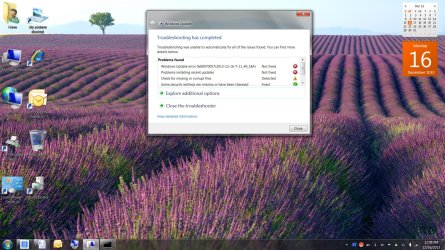
I tried the fixes recommend by DMHolt57 but still get the screen shot errors shown when I try to run the update fix it (my updates fail).

Fix the problem with Microsoft Windows Update that is not working


troubleshooter screenshot.jpg
 

My Computer

Computer Manufacturer/Model Number
HP Pavilion p7xt series)
OS
Windows 7 Home Premium (x64) Service Pack 1
CPU
3.30 gigahertz Intel Core i3-2120
Motherboard
PEGATRON CORPORATION 2AC2 2.00
Memory
128 kilobyte primary memory cache
Graphics Card(s)
enbedded Intel(R) HD Graphics
Sound Card
Realtek High Definition Audio
Monitor(s) Displays
DELL E193FP [Monitor] (19.1"vis
Hard Drives
6052 Megabytes Usable Installed Memory
PSU
?
Case
desktop
Cooling
?
First, make sure the date and time on your computer are correct. Causes problems with update if not.

Next, download the portable version of Windows Repair All-In-One. Use the bottom one (Direct Download).
Run it. Go through all the steps. When you finally get to Start Repairs, Click Unselect All then check just Repair Windows Updates.
Run it and see if that helps.
 

My Computer

Computer type
PC/Desktop
Computer Manufacturer/Model Number
Lenovo IdeaCenter 450
OS
Windows 10 Pro X64
CPU
Intel Quad Core i7-4770 @ 3.4Ghz
Memory
16.0GB PC3-12800 DDR3 SDRAM 1600 MHz
Graphics Card(s)
Intel Integrated HD Graphics
Sound Card
Realtek HD Audio
Monitor(s) Displays
HP 22" LCD
Screen Resolution
1680 x 1050
Hard Drives
250GB Samsung EVO SATA-3 SSD
2TB Seagate ST2000DM001 SATA-2
1.5TB Seagate ST3150041AS SATA
Keyboard
Dell USB
Mouse
Lenovo USB
Internet Speed
Cable via Road Runner 3MB Upload, 30MB Download
Antivirus
Windows Defender, MBAM Pro, MBAE
Browser
Seamonkey
Other Info
UEFI/GPT
PLDS DVD-RW DH16AERSH
Back
Top