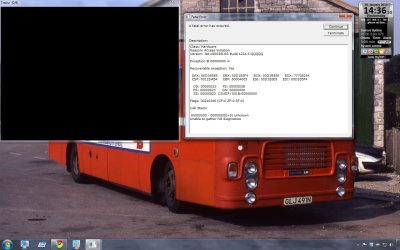
TRS2006 Error

PC WhizzKid

New member
Local time
7:50 AM
Messages
112
Hello guys,

Each time I try to load up TRS2006 I get this error message shown in the screenshot below. Please help me.
 

Attachments

  • TRS2006 Error.jpg
    TRS2006 Error.jpg
    120.4 KB · Views: 113

My Computer

Computer Manufacturer/Model Number
Advent
OS
banned for piracy
CPU
2.4Ghz Quad-Core P4
Motherboard
FOXCONN A6VMX
Memory
4GB
Graphics Card(s)
256MB X1200 On-board graphics
Sound Card
On-board
Monitor(s) Displays
19" TFT Mointer
Hard Drives
500GB WD Hard-drive.
Case
Mid-tower
Keyboard
Usb HP Keyboard
Hi there,

Did some googlin' and this is what I came up with:
You may also need to add to the trainzoptions.txt file in the /trs2006 folder the following line

-intro=disable
Here is the thread I used to get there. Feel free to retrace my steps to verify that's the right solution. Let us know if that fixes it for ya! Good luck :)

Cheers,

Walker
Windows Outreach Team
 

My Computer

Computer Manufacturer/Model Number
HP Pavilion dm3 (netbook) *** 27" iMac (Dual-Boot)
OS
Windows 7 Home Premium (64-bit) *** Windows XP SP3 (32-bit), OSX 10.6
CPU
AMD Athlon Neo X2 1.6GHz *** Intel Core i7 Quad Core 2.8GHz
Memory
4.00 GB *** 4.00 GB
Graphics Card(s)
ATI Radeon HD 3200, 384MB *** ATI Radeon HD 4850, 1GB
Sound Card
ATI High Definition Audio *** ATI High Definition Audio
Monitor(s) Displays
LG Flatron W2053TX
Screen Resolution
1600 x 900 (monitor), 1266 x 768 (laptop) *** 2560 x 1440
Hard Drives
300 GB SATA (internal), 500 GB HP SimpleSave (external) *** 1 TB SATA (internal), 160 GB LaCie (external)
Mouse
Logitech Cordless Optical Mouse for Notebooks
Internet Speed
Broadband
I tried this and when I loaded up TRS2006 no content. But I tried this with TRS2004 which had the same error it works perfectly now.

Do not worry about this, when I do my dual-boot thing with Windows XP and Windows 7 next month I will run them off XP with hopefully no problems. I think these games don't like any windows higher than XP. Because TRS2006 used to get corrupted quickly when I was running Vista.
 

My Computer

Computer Manufacturer/Model Number
Advent
OS
banned for piracy
CPU
2.4Ghz Quad-Core P4
Motherboard
FOXCONN A6VMX
Memory
4GB
Graphics Card(s)
256MB X1200 On-board graphics
Sound Card
On-board
Monitor(s) Displays
19" TFT Mointer
Hard Drives
500GB WD Hard-drive.
Case
Mid-tower
Keyboard
Usb HP Keyboard
Alright, well I'm glad you've got a solution worked out. Let us know if you need any help in the future!

Cheers,

Walker
Windows Outreach Team
 

My Computer

Computer Manufacturer/Model Number
HP Pavilion dm3 (netbook) *** 27" iMac (Dual-Boot)
OS
Windows 7 Home Premium (64-bit) *** Windows XP SP3 (32-bit), OSX 10.6
CPU
AMD Athlon Neo X2 1.6GHz *** Intel Core i7 Quad Core 2.8GHz
Memory
4.00 GB *** 4.00 GB
Graphics Card(s)
ATI Radeon HD 3200, 384MB *** ATI Radeon HD 4850, 1GB
Sound Card
ATI High Definition Audio *** ATI High Definition Audio
Monitor(s) Displays
LG Flatron W2053TX
Screen Resolution
1600 x 900 (monitor), 1266 x 768 (laptop) *** 2560 x 1440
Hard Drives
300 GB SATA (internal), 500 GB HP SimpleSave (external) *** 1 TB SATA (internal), 160 GB LaCie (external)
Mouse
Logitech Cordless Optical Mouse for Notebooks
Internet Speed
Broadband
U mnie jest wszystko w porządku,ale nie akceptuje zakładki technicznej i odrzuca dodatki.
Co robić?
 

My Computer

OS
Windows 7 Ultimate x64,
Hi Jacek, welcome to SevenForums. This is an English forum, so please make all posts translated into English. Try using Google Translate.

Thanks,

Walker
Windows Outreach Team
 

My Computer

Computer Manufacturer/Model Number
HP Pavilion dm3 (netbook) *** 27" iMac (Dual-Boot)
OS
Windows 7 Home Premium (64-bit) *** Windows XP SP3 (32-bit), OSX 10.6
CPU
AMD Athlon Neo X2 1.6GHz *** Intel Core i7 Quad Core 2.8GHz
Memory
4.00 GB *** 4.00 GB
Graphics Card(s)
ATI Radeon HD 3200, 384MB *** ATI Radeon HD 4850, 1GB
Sound Card
ATI High Definition Audio *** ATI High Definition Audio
Monitor(s) Displays
LG Flatron W2053TX
Screen Resolution
1600 x 900 (monitor), 1266 x 768 (laptop) *** 2560 x 1440
Hard Drives
300 GB SATA (internal), 500 GB HP SimpleSave (external) *** 1 TB SATA (internal), 160 GB LaCie (external)
Mouse
Logitech Cordless Optical Mouse for Notebooks
Internet Speed
Broadband
Hi there,

Did some googlin' and this is what I came up with:
You may also need to add to the trainzoptions.txt file in the /trs2006 folder the following line

-intro=disable
Here is the thread I used to get there. Feel free to retrace my steps to verify that's the right solution. Let us know if that fixes it for ya! Good luck :)

Cheers,

Walker
Windows Outreach Team


Walker,

Although our posts are years apart, your solution was what I needed. I purchased Trainz Classics 1st & 2nd editions a few years ago via Steam and needed to reinstall it on my current computer (Windows 7, 64-bit). The install went fine but each time I attempted to play the simulation, it kept crashing with a fatal error. I also installed Trainz TRS2006 from CD-ROM but it had the same fatal error crash. Trainz Cabon City via Steam, however, ran fine with no problems. I searched for nearly two weeks via Google and the publisher web site looking for a solution and trying every potential one that I found. It was not until this afternoon that I found your posting (another Google search) about disabling the intro. I did and the problem went away! Thanks!! :)
 

My Computer

Computer type
Laptop
Computer Manufacturer/Model Number
Hewlett Packard
OS
Windows 7 (64 bit) Home Premium
CPU
AMD Phenom II N830 Triple-Core
Memory
4 Gb
Graphics Card(s)
ATI Radeon HD 5650
Hard Drives
500 Gb
Antivirus
Symantec
Browser
IE 9
Back
Top