TrueCrypt volume won't dismount unless I do it Forcibly

oracle2b

New member
Local time
11:06 AM
Messages
5
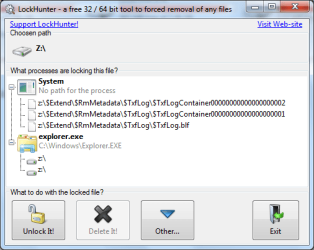
I installed the latest truecrypt on windows 7 rtm. I mounted a volume and when I wanted to dismount a dialog poped up and said that files within the volume were in use and whether or not I would like to forcefully dismount. I used 'unlocker' to see what could possibly be using files within the volume and the results showed that nothing was in use. I forcefully dismounted and I subsequently lost my work that was altered. I realized than unlocker was with incompatible with windows 7, after searching for a solution I found Lockhunter which is windows 7 compatible. This is what is showed me.http://www.sevenforums.com/attachment.php?attachmentid=30493&stc=1&d=1254772119. I want to know how can I disable these processes from access/locking onto files on this volume?
 

Attachments
  • locked volume.PNG
    locked volume.PNG
    17.9 KB · Views: 293

My Computer My Computer

Computer Manufacturer/Model Number
Sony VGN-NR110e
OS
windows 7
Memory
2GB
Hard Drives
100GB
Using utilities like "Unlocker" to actually "unlock" is inherently dangerous to your data.

The fact that an object is "locked" means that one or more processes/apps still expect to be able to work with that object in its present form. Those apps have registered their intentions towards the object with the OS, and in turn the OS prevents other apps from accessing the same object in an incompatible manner until the first app acknowledges that it's finished.

"Unlocker" and other similar utilities do not induce the original app to "hurry up and finish using the file". Instead, they merely delete the information record which allows the OS to keep track of that link, without regard to whether the original app is yet to save all data or anything of the sort. As you've unfortunately found out, that can lead to data corruption. Conceptually, it's not all that different to using Task Manager to terminate the first process because the second one wants access to the object.

In your example above, the active locks ("handles") are possibly caused by your anti-virus doing stuff (it can run as "system"), and an open Windows Explorer pane focused on the z: drive.
 

My Computer My Computer

Computer Manufacturer/Model Number
Multiple machines in various stages of decomposition.
OS
Win7x64
I've used unlocker to unlock apps like everything from being latched to a drive letter. without and lost of data. What i'm seeing now is that system processes are interfering with me dismounting my truecrypt volume safely. I need help fixing this so that I can mount and dismount a volume without and lost of data.
 

My Computer My Computer

Computer Manufacturer/Model Number
Sony VGN-NR110e
OS
windows 7
Memory
2GB
Hard Drives
100GB
I've used unlocker to unlock apps like everything from being latched to a drive letter. without and lost of data.

And most of the time, Russian Roulette is an uneventful game.

What i'm seeing now is that system processes are interfering with me dismounting my truecrypt volume safely. I need help fixing this so that I can mount and dismount a volume without and lost of data.

It's not that simple. Both the System and Explorer processes may be running non-default code which is specific to your machine. If their behaviour has changed recently on your machine, the most likely cause is some type of security or inspection utility which you installed just prior to when the problem began. Uninstalling your AV and testing without it would be a good start.
 

My Computer My Computer

Computer Manufacturer/Model Number
Multiple machines in various stages of decomposition.
OS
Win7x64
TrueCrypt is working fine for me just for mounting and unmounting an encrypted "file container".
 

My Computer My Computer

Computer Manufacturer/Model Number
HP DV8t quad
OS
Windows 7 Ultimate x64 (Retail)
CPU
i7-Q 720
Motherboard
Motherboard Chipset Intel Ibex Peak-M PM55, Intel Lynnfield
Memory
6 GB
Graphics Card(s)
nVidia GeForce GT 230M (1GB)
Sound Card
IDT High Definition Audio CODEC
Monitor(s) Displays
18.4 inch HP Infinity FHD (Samsung 184HT03-001)
Screen Resolution
1920 x 1080
Hard Drives
Hitachi 500GB 7200 rpm (x2)
Seagate FreeAgent 1.5 TB External USB (x2)
Thermaltake BlacX eSATA/USB 2.0 3.5/2.5 HD dock
Cooling
Zalman NC-2000 notebook cooling pad
Keyboard
laptop
Mouse
Logitech VX Revolution
Other Info
Backup Unit: Lenovo T61p
AFAIK, Unlocker doesn't actually unlock anything under Win 7. It does forcibly delete stubborn files though.
 

My Computer My Computer

Computer Manufacturer/Model Number
self built
OS
7600.20510 x86
CPU
P4 550 3.4 GHz HT running at 3.5 GHz
Motherboard
MSI PM8M3-V (MS-7211 v1.x) Micro-ATX mainboard
Memory
OCZ 2 GB(2x1GB) DDR400mHz running @ 414 mHz
Graphics Card(s)
HIS Radeon HD 3850 IceQ 3 Turbo HDMI Dual DL-DVI AGP
Sound Card
MOTU Traveler firewire studio interface 192 kHz 24 bit
Monitor(s) Displays
22" widescreen Acer X223W LCD, 17" Compaq P75 CRT
Screen Resolution
1680x1050 and 1280x1024
Hard Drives
SATA I x2 WD, 400 GB and 120 GB, SATA 2 WD Caviar Black 1 TB
PSU
350W generic
Case
Cybertronpc, it glows blue
Cooling
stock cpu fan, Ice-Q 3 gpu and system, many case fans
Keyboard
Logitch Classical Keyboard 200
Mouse
Logitech Mediaplay cordless
Internet Speed
1792/448 kbits/sec
Other Info
SATA II PCI fake RAID adapter, 1 GB Readyboost, original ATI Remote Wonder (even works with WMC perfectly), Logitech Rumblepad 2 game controller x2
AFAIK, Unlocker doesn't actually unlock anything under Win 7. It does forcibly delete stubborn files though.

Only because it relies on sinking a driver down into kernel-mode to do its dirty work, and the author hasn't gone through the process of getting his driver signed, so Unlocker no werky under x64. (The OP mentioned he'd gone over to another product.)

The specific utility doesn't matter though. It's the practice of forcibly closing open app handles which is potentially hazardous to data integrity, irrespective of which mechanism/utility is used to do it.

My aim is to inform, not to chastise or moralise :)
 

My Computer My Computer

Computer Manufacturer/Model Number
Multiple machines in various stages of decomposition.
OS
Win7x64
Ok I've uninstalled Avira antivirus and rebooted my laptop. I mount the truecrypt volume only to be met with the same prompt on whether i'd like to forcibly dismount the volume. The same exact processes stated in my original post are the culprits. When I connect my 2 other external usb drives I never have any difficulty ejecting/removing the device safely.
 

My Computer My Computer

Computer Manufacturer/Model Number
Sony VGN-NR110e
OS
windows 7
Memory
2GB
Hard Drives
100GB
Ok I've uninstalled Avira antivirus and rebooted my laptop. I mount the truecrypt volume only to be met with the same prompt on whether i'd like to forcibly dismount the volume. The same exact processes stated in my original post are the culprits. When I connect my 2 other external usb drives I never have any difficulty ejecting/removing the device safely.

Too bad. It was worth a shot.

Unfortunately, this is not an easy thing to troubleshoot. Your best bet might be to try to work out what's so special about the lone USB drive (out of 3?) that has a problem. Presumably there's something different either in content, or the way it's accessed. For example, maybe you're storing photos (exclusively) on that drive and Explorer is set to show thumbnails? Something along those lines anyway.
 

My Computer My Computer

Computer Manufacturer/Model Number
Multiple machines in various stages of decomposition.
OS
Win7x64
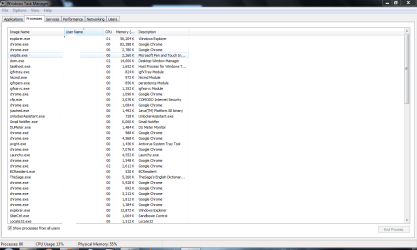
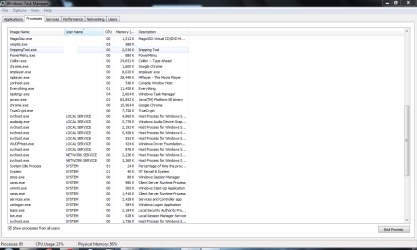
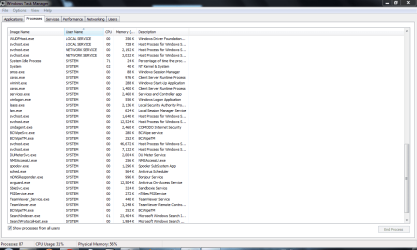
I uninstalled unlocker and the problem still exists. I posted screenshots of my running processes. If anyone could give me an idea as to what could be locking up the drive on truecrypt mounted volume, i'd really appreciate it.
 

Attachments

  • proc1.PNG
    proc1.PNG
    35.5 KB · Views: 59
  • proc2.PNG
    proc2.PNG
    35.8 KB · Views: 32
  • proc3.PNG
    proc3.PNG
    34.3 KB · Views: 31

My Computer My Computer

Computer Manufacturer/Model Number
Sony VGN-NR110e
OS
windows 7
Memory
2GB
Hard Drives
100GB
I was having the same problem with dismounting a TrueCrypt volume until I enabled the Default Mount Options setting 'Mount volumes as removable media' [in TrueCrypt Preferences].

From the TrueCrypt FAQ:

What will change when I enable the option 'Mount volumes as removable media'? You can enable this option, for example, to prevent Windows from automatically creating the 'Recycled' and/or the 'System Volume Information' folders on TrueCrypt volumes (in Windows, these folders are used by the Recycle Bin and System Restore facilities). However, there are some disadvantages. For example, when you enable this option under Windows Vista or earlier, the 'Computer' (or 'My Computer') list will not show free space on the volume (note that this is a Windows limitation, not a bug in TrueCrypt).
 

My Computer My Computer

OS
Windows 7
Back
Top