Solved Trust a WD Green 500gb HD which Data Lifeguard says it repaired?

gregrocker

New member
Guru
Local time
2:32 PM
Messages
50,634
I've run full bootable Data Lifeguard scan 3 times on a WD Green WD5000AADS 500gb I don't trust here. It recently kept rebooting to the BIOS splash screen which was corrected by a single Startup Repair, but I'm not sure I trust it even for the Dual Boot backup machine for our household.

Each time the Quick Scan says no errors reported (SMART, I believe). Then Full scan runs for two hours and says "Drive Repaired - Error Status 223," which their Help defines as:

Capture.PNG

How can it be "defect free" if it keeps finding and repairing? Am I to keep running it until it repairs everything else? Is DL itself defective or unreliable?

I realize that we advise others here every day not to trust a drive even if it will repair by its maker's diagnostics. But then what is the point of the diagnostics repair function? I think I would continue to rely on it if it stopped finding ANY errors to repair, and then passed a full Disk Check. How about you?
 
I suspect the "errors found, but have been repaired successfully" is a reference to re-allocated sectors.

All drives have a finite number of spares that are swapped in for bad sectors

If and when more sectors go bad, you may be into the "errors found and have not been repaired" category, IF you have used up all of the spares.

I think it's a bit of a misnomer to call that "repair" or "defect free". The bad sectors are still bad, they are just on the DL, to use a baseball term. Permanently on the DL. Or the physically unable to perform list (PUP), if you like the NFL.

I wouldn't agonize. Accept it as a fact, have backups, know what you will do the day it won't spin at all. They can fail suddenly---I had a 1.5 WD Green just give up suddenly 3 weeks ago. It had just been sitting in a closet unused and wouldn't spin when next connected.

Keep an eye on re-allocated sectors. They often rise rather quickly when things start to go bad.
 

My Computer My Computer

At a glance

Windows 7 Home Premium SP1, 64-bitIntel Skylake i5-6600K, not overclocked8 GB HyperX DDR4-2666 (2 x 4 GB)none; graphics are integrated on CPU
Computer type
PC/Desktop
Computer Manufacturer/Model Number
Ignatz Special; 4 speed manual gearbox; factory air conditioning; one of one
OS
Windows 7 Home Premium SP1, 64-bit
CPU
Intel Skylake i5-6600K, not overclocked
Motherboard
AsRock Z170M Extreme 4, micro ATX
Memory
8 GB HyperX DDR4-2666 (2 x 4 GB)
Graphics Card(s)
none; graphics are integrated on CPU
Sound Card
onboard: Realtek ALC1150; external: USB Behringer UF0-202
Monitor(s) Displays
Dell S2340M 23 inch IPS
Screen Resolution
1600 x 900
Hard Drives
System: Crucial MX100 series SSD, 128 GB;
Data: Samsung Spinpoint 103SJ, 1 TB;
Backup: WD Caviar Green WD30EZRX-00D8PB0, 3 TB
PSU
Rosewill SilentNight 500 watt fanless, semi-modular
Case
Antec Solo II
Cooling
Noctua NH-U12S; Noctua F12 intake, Noctua S12A exhaust
Keyboard
Microsoft 200 6JH-00001 USB
Mouse
Dell or Microsoft optical wired; USB
Antivirus
Microsoft Security Essentials and Malwarebytes Premium
Browser
Pale Moon
Other Info
All fans PWM; speeds at idle: CPU circa 500 rpm; intake circa 600 rpm; exhaust circa 600 rpm; CPU temps 27 idle and 47 C load in a warm room (27 C/81 F) when running Intel Extreme Tuning Utility stress test.
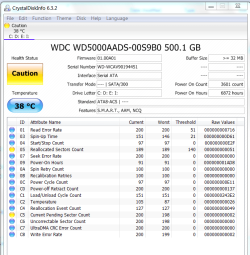
Strange that Quick Test which tests SMART didn't reported Unallocated Sectors. I'll install and run Crystal Disk Info when it finishes the latest test.

What's really irritating and OT is that I had two other 500gb backup HD's before Windows 10 TP v.9879 ruined them by flipping a switch to Power On In Sleep that bricked a bunch of HD's causing a furor on MS Community. build 9879 bricking drives - Microsoft Community
Build 9879 hard drive disaster - Microsoft Community

I have tried every fix I can find to fix them as some others were able to do. More here: I lost 2 Hard Disks after updated from Build 9860 to 9879 - Page 5 - Windows 10 Forums

This drive had 9879 on it but shows none of those symptoms which only happened to my Hitachi's.
 
Hi Greg,

I would get the SMART attribute count, particularly ## 5 and 196-199. GSmart, HDScan, defraggler, etc will do that. Then run chkdsk /r on the drive. Then compare the attribute count again. If you get more bad sectors at this point, the drive is rapidly failing.

BW,
Paul
 

My Computer My Computer

At a glance

Linux Lite 3.2 x64; Windows 7, 8.1Core2Duo 2.46GB ddr2nVidia
Computer type
PC/Desktop
Computer Manufacturer/Model Number
dell precision t3400 tower
OS
Linux Lite 3.2 x64; Windows 7, 8.1
CPU
Core2Duo 2.4
Memory
6GB ddr2
Graphics Card(s)
nVidia
Hard Drives
120gb SSD, 1TB HD, 2TB HD; sata II
Internet Speed
12/2
Browser
Vivaldi, Slimjet (Chromium) x64
...I wouldn't agonize. Accept it as a fact, have backups, know what you will do the day it won't spin at all. They can fail suddenly...

Exactly. I don't trust any HDD or SSD any further than I can throw them (and, at my age, that's not very far). Frequent, multiple backups are the only way to reasonably ensure the safety of your data.
 

My Computer My Computer

At a glance

Win 7 Ultimate 64 bitIntel i7-3930KKingston HyperX Genesis 32GB Kit (8x4GB Modul...MSI R7850 Twin Frozr 2GD5/OC Radeon HD 7850 2...
Computer type
PC/Desktop
Computer Manufacturer/Model Number
Custom Build
OS
Win 7 Ultimate 64 bit
CPU
Intel i7-3930K
Motherboard
ASUS P9X79 WS
Memory
Kingston HyperX Genesis 32GB Kit (8x4GB Modules) 1600MHz DDR
Graphics Card(s)
MSI R7850 Twin Frozr 2GD5/OC Radeon HD 7850 2GB 256-bit GDDR
Sound Card
Asus Xonar Essence STX
Monitor(s) Displays
3x Asus VG248QE 24", Vizio 32" TV
Screen Resolution
1920 x 1080, ?
Hard Drives
Samsung 128GB 840 Pro SSD (1),
Samsung 4TB 850 EVO SSDs (4)
Samsung 4TB 850 EVO SSDs (16) external backup drives used in 2.5" hot swap bays in the computer.
PSU
Corsair HX750w
Case
Antec Two Hundred v2 (modified)
Cooling
Cooler Master GeminII S524 120mm (fan replaced with a 140mm)
Keyboard
Logitech G510s
Mouse
Logitech M525 (two in use)
Internet Speed
=< 32Mbps down, 8Mbps up
Antivirus
AVAST!, MBAM, SAS, Spybot S&D (all but MBAM free) Glary Util
Browser
IE11
Other Info
LSI 9211-8i HBA card (8 SATA III ports), 2.5" & 3.5" Hot Swap Bays, HooToo HT-CR001 PCI-E to USB 3.0 Internal Hub + 6 Slot Card Reader, and LG Model CH12LS28 BD-ROM Optical Drive. Also, ScanSnap S1500 ADF duplexing scanner, Canon 9000F flat bed scanner, Corsair SP2500 2.1 speakers, Samsung CLP 415nw laser color printer, Cyberpower PP2200SW UPS
And on the third pass with WD Data Lifeguard CD, the Quick Test which had been showing Clean is also giving a defective error which must mean that it is deteriorating as we speak.

Capture.PNG

Then the long test passes, so go figure.

I don't think I trust the drive any longer to provide a Dual Boot backup PC for my roommates' aging PC's. Until I can get one of my spare 500gb Hitachi HD's killed by Windows 10 v.9879 to repair I am left with an 80gb I'll merge both of their installs into one Win7 with two accounts.

Come to think of it: I don't know how to merge two separate installs into one with two accounts? Nothing about export/import of a User account comes to mind. Any suggestions?

Thanks!
 
Last edited:
If the HDD is still under warranty, you should get it replaced by WD. I had to do that with a 2TB Green late last year. It was a pretty painless process. I opted to have them cross ship the replacement drive, allowing me time to make sure the replacement drive was good before returning the old one. I had to provide them with a credit card number but the hold on the card was lifted very shortly after I returned the old drive.

I prefer the blacks for HDDs in my computer, especially since my computer runs 24/7. I use my Greens for backup drives.
 

My Computer My Computer

At a glance

Win 7 Ultimate 64 bitIntel i7-3930KKingston HyperX Genesis 32GB Kit (8x4GB Modul...MSI R7850 Twin Frozr 2GD5/OC Radeon HD 7850 2...
Computer type
PC/Desktop
Computer Manufacturer/Model Number
Custom Build
OS
Win 7 Ultimate 64 bit
CPU
Intel i7-3930K
Motherboard
ASUS P9X79 WS
Memory
Kingston HyperX Genesis 32GB Kit (8x4GB Modules) 1600MHz DDR
Graphics Card(s)
MSI R7850 Twin Frozr 2GD5/OC Radeon HD 7850 2GB 256-bit GDDR
Sound Card
Asus Xonar Essence STX
Monitor(s) Displays
3x Asus VG248QE 24", Vizio 32" TV
Screen Resolution
1920 x 1080, ?
Hard Drives
Samsung 128GB 840 Pro SSD (1),
Samsung 4TB 850 EVO SSDs (4)
Samsung 4TB 850 EVO SSDs (16) external backup drives used in 2.5" hot swap bays in the computer.
PSU
Corsair HX750w
Case
Antec Two Hundred v2 (modified)
Cooling
Cooler Master GeminII S524 120mm (fan replaced with a 140mm)
Keyboard
Logitech G510s
Mouse
Logitech M525 (two in use)
Internet Speed
=< 32Mbps down, 8Mbps up
Antivirus
AVAST!, MBAM, SAS, Spybot S&D (all but MBAM free) Glary Util
Browser
IE11
Other Info
LSI 9211-8i HBA card (8 SATA III ports), 2.5" & 3.5" Hot Swap Bays, HooToo HT-CR001 PCI-E to USB 3.0 Internal Hub + 6 Slot Card Reader, and LG Model CH12LS28 BD-ROM Optical Drive. Also, ScanSnap S1500 ADF duplexing scanner, Canon 9000F flat bed scanner, Corsair SP2500 2.1 speakers, Samsung CLP 415nw laser color printer, Cyberpower PP2200SW UPS
It's pretty old, at least 5-7 years I'd guess.

I'm now trying to revive 2 Hitachi's that Win 10 v.9879 killed by tripping PUIS switch as described in
build 9879 bricking drives!!!! - Microsoft Community
and Build 9879 hard drive disaster (read this) - Microsoft Community

My help thread is at I lost 2 Hard Disks after updated from Build 9860 to 9879 - Page 7 - Windows 10 Forums
so anyone who can help me try the remaining fixes I've not yet tried which require Linux fluency (I don't have) are greatly appreciated!
 
One other thing on the drive which is the subject of this thread. I just ran a final Disk Check on all 3 partitions and each was clear. Does this combined with the SMART data give it any chance after the mixed results of tests recounted here?
 

Attachments

  • Capture.PNG
    Capture.PNG
    39.5 KB · Views: 3
81 bad sectors is not a good drive, at least not for an OS or for storing important data. But the other question is how fast is it failing. One can get a glimpse of that sometimes by looking at the attributes both before and after a chkdsk /r.
 

My Computer My Computer

At a glance

Linux Lite 3.2 x64; Windows 7, 8.1Core2Duo 2.46GB ddr2nVidia
Computer type
PC/Desktop
Computer Manufacturer/Model Number
dell precision t3400 tower
OS
Linux Lite 3.2 x64; Windows 7, 8.1
CPU
Core2Duo 2.4
Memory
6GB ddr2
Graphics Card(s)
nVidia
Hard Drives
120gb SSD, 1TB HD, 2TB HD; sata II
Internet Speed
12/2
Browser
Vivaldi, Slimjet (Chromium) x64
So based on your feedback I wanted to run another Disk Check on all 3 partitions from Win7 disk this time to afterward check the SMART sector count, but it's choking on the File Data in the Storage partition where all large ISO's for installers and image files are stored - hasn't budged from 6410 of 48000 files for hours. Do you think this has anything to do with the file size, or just sector failure?

There's no problem since these are also backed up on external and in Storage partitions on all other PC's in the house.

I plan to check SMART sector count after this completes, if it does.
 
Last edited:
Hi Greg,

I would say it depends on what stage of chkdsk (though I'm not sure you're using chkdsk...) it's hanging on. I've been told that once the file system part of chkdsk is done, the two final stages are data-agnostic. But I'm not sure that's entirely true, because I've found that deleting all partitions first, then creating a single blank partition of the entire disk enables chkdsk to complete in a fraction of the time.

BW,
Paul
 

My Computer My Computer

At a glance

Linux Lite 3.2 x64; Windows 7, 8.1Core2Duo 2.46GB ddr2nVidia
Computer type
PC/Desktop
Computer Manufacturer/Model Number
dell precision t3400 tower
OS
Linux Lite 3.2 x64; Windows 7, 8.1
CPU
Core2Duo 2.4
Memory
6GB ddr2
Graphics Card(s)
nVidia
Hard Drives
120gb SSD, 1TB HD, 2TB HD; sata II
Internet Speed
12/2
Browser
Vivaldi, Slimjet (Chromium) x64
It's pretty old, at least 5-7 years I'd guess...

Five years old is a pretty ripe old age for any HDD, let alone a Green that only has a two year warranty. I would retire it and replace it with a new one rather than waste time fooling with it. A 500GB WD Green is only $55 and a 500GB WD Black (my personal preference for an internal drive) is only $69 at Newegg.
 

My Computer My Computer

At a glance

Win 7 Ultimate 64 bitIntel i7-3930KKingston HyperX Genesis 32GB Kit (8x4GB Modul...MSI R7850 Twin Frozr 2GD5/OC Radeon HD 7850 2...
Computer type
PC/Desktop
Computer Manufacturer/Model Number
Custom Build
OS
Win 7 Ultimate 64 bit
CPU
Intel i7-3930K
Motherboard
ASUS P9X79 WS
Memory
Kingston HyperX Genesis 32GB Kit (8x4GB Modules) 1600MHz DDR
Graphics Card(s)
MSI R7850 Twin Frozr 2GD5/OC Radeon HD 7850 2GB 256-bit GDDR
Sound Card
Asus Xonar Essence STX
Monitor(s) Displays
3x Asus VG248QE 24", Vizio 32" TV
Screen Resolution
1920 x 1080, ?
Hard Drives
Samsung 128GB 840 Pro SSD (1),
Samsung 4TB 850 EVO SSDs (4)
Samsung 4TB 850 EVO SSDs (16) external backup drives used in 2.5" hot swap bays in the computer.
PSU
Corsair HX750w
Case
Antec Two Hundred v2 (modified)
Cooling
Cooler Master GeminII S524 120mm (fan replaced with a 140mm)
Keyboard
Logitech G510s
Mouse
Logitech M525 (two in use)
Internet Speed
=< 32Mbps down, 8Mbps up
Antivirus
AVAST!, MBAM, SAS, Spybot S&D (all but MBAM free) Glary Util
Browser
IE11
Other Info
LSI 9211-8i HBA card (8 SATA III ports), 2.5" & 3.5" Hot Swap Bays, HooToo HT-CR001 PCI-E to USB 3.0 Internal Hub + 6 Slot Card Reader, and LG Model CH12LS28 BD-ROM Optical Drive. Also, ScanSnap S1500 ADF duplexing scanner, Canon 9000F flat bed scanner, Corsair SP2500 2.1 speakers, Samsung CLP 415nw laser color printer, Cyberpower PP2200SW UPS
WD 1 TB Blue drives are usually available at 55 and are regularly on sale every 2 or 3 months at 45. I picked one up for 45 from Amazon within the last week. They are 7200 rpm. As far as I know, they differ from blacks mostly in the warranty length and in that they are limited to 1 TB maximum size.

At $45 for a 1 TB drive, hard drives are pretty much a disposable, like a USB flash drive. Hard to justify staying with any drive you are concerned about considering the low price for a replacement.
 

My Computer My Computer

At a glance

Windows 7 Home Premium SP1, 64-bitIntel Skylake i5-6600K, not overclocked8 GB HyperX DDR4-2666 (2 x 4 GB)none; graphics are integrated on CPU
Computer type
PC/Desktop
Computer Manufacturer/Model Number
Ignatz Special; 4 speed manual gearbox; factory air conditioning; one of one
OS
Windows 7 Home Premium SP1, 64-bit
CPU
Intel Skylake i5-6600K, not overclocked
Motherboard
AsRock Z170M Extreme 4, micro ATX
Memory
8 GB HyperX DDR4-2666 (2 x 4 GB)
Graphics Card(s)
none; graphics are integrated on CPU
Sound Card
onboard: Realtek ALC1150; external: USB Behringer UF0-202
Monitor(s) Displays
Dell S2340M 23 inch IPS
Screen Resolution
1600 x 900
Hard Drives
System: Crucial MX100 series SSD, 128 GB;
Data: Samsung Spinpoint 103SJ, 1 TB;
Backup: WD Caviar Green WD30EZRX-00D8PB0, 3 TB
PSU
Rosewill SilentNight 500 watt fanless, semi-modular
Case
Antec Solo II
Cooling
Noctua NH-U12S; Noctua F12 intake, Noctua S12A exhaust
Keyboard
Microsoft 200 6JH-00001 USB
Mouse
Dell or Microsoft optical wired; USB
Antivirus
Microsoft Security Essentials and Malwarebytes Premium
Browser
Pale Moon
Other Info
All fans PWM; speeds at idle: CPU circa 500 rpm; intake circa 600 rpm; exhaust circa 600 rpm; CPU temps 27 idle and 47 C load in a warm room (27 C/81 F) when running Intel Extreme Tuning Utility stress test.
WD 1 TB Blue drives are usually available at 55 and are regularly on sale every 2 or 3 months at 45. I picked one up for 45 from Amazon within the last week. They are 7200 rpm. As far as I know, they differ from blacks mostly in the warranty length and in that they are limited to 1 TB maximum size.

At $45 for a 1 TB drive, hard drives are pretty much a disposable, like a USB flash drive. Hard to justify staying with any drive you are concerned about considering the low price for a replacement.

Good point about the Blues. A 500GB Blue is $50 at Newegg; for only five shekels more, you can get double the capacity. If the Blues weren't capped out at only 1 TB, I would use them for my backups instead of the Greens.
 

My Computer My Computer

At a glance

Win 7 Ultimate 64 bitIntel i7-3930KKingston HyperX Genesis 32GB Kit (8x4GB Modul...MSI R7850 Twin Frozr 2GD5/OC Radeon HD 7850 2...
Computer type
PC/Desktop
Computer Manufacturer/Model Number
Custom Build
OS
Win 7 Ultimate 64 bit
CPU
Intel i7-3930K
Motherboard
ASUS P9X79 WS
Memory
Kingston HyperX Genesis 32GB Kit (8x4GB Modules) 1600MHz DDR
Graphics Card(s)
MSI R7850 Twin Frozr 2GD5/OC Radeon HD 7850 2GB 256-bit GDDR
Sound Card
Asus Xonar Essence STX
Monitor(s) Displays
3x Asus VG248QE 24", Vizio 32" TV
Screen Resolution
1920 x 1080, ?
Hard Drives
Samsung 128GB 840 Pro SSD (1),
Samsung 4TB 850 EVO SSDs (4)
Samsung 4TB 850 EVO SSDs (16) external backup drives used in 2.5" hot swap bays in the computer.
PSU
Corsair HX750w
Case
Antec Two Hundred v2 (modified)
Cooling
Cooler Master GeminII S524 120mm (fan replaced with a 140mm)
Keyboard
Logitech G510s
Mouse
Logitech M525 (two in use)
Internet Speed
=< 32Mbps down, 8Mbps up
Antivirus
AVAST!, MBAM, SAS, Spybot S&D (all but MBAM free) Glary Util
Browser
IE11
Other Info
LSI 9211-8i HBA card (8 SATA III ports), 2.5" & 3.5" Hot Swap Bays, HooToo HT-CR001 PCI-E to USB 3.0 Internal Hub + 6 Slot Card Reader, and LG Model CH12LS28 BD-ROM Optical Drive. Also, ScanSnap S1500 ADF duplexing scanner, Canon 9000F flat bed scanner, Corsair SP2500 2.1 speakers, Samsung CLP 415nw laser color printer, Cyberpower PP2200SW UPS
Hi Greg,

I would say it depends on what stage of chkdsk (though I'm not sure you're using chkdsk...) it's hanging on. I've been told that once the file system part of chkdsk is done, the two final stages are data-agnostic. But I'm not sure that's entirely true, because I've found that deleting all partitions first, then creating a single blank partition of the entire disk enables chkdsk to complete in a fraction of the time.

BW,
Paul

This is what I was thinking of doing next, just to experiment. What do you think about wiping the drive with zeroes, then creating one large partition to full format, running Disk Check, Data Lifeguard long test and comparing SMART sector count again?

Does this provide any chance to reclaim the drive? Does it offer the possibility of comparing sector count to previous to see if the situation has improved? Or is it in your estimation wasted time?

I finally gave up on the chkdsk /r /f /x on the Storage partition after it remained stalled overnight. I am trying to rerun chkdsk /r on it now to see if it will report the problem without stalling out during a fix.
 
Last edited:
In my experience, it's usually not necessary to wipe the drive unless there are other problems beside sectors, including deep malware. The wipe forces a sector-by-sector inventory, but chkdsk /r does that as well. But deleting the partitions somehow does chkdsk a lot of good. I have had drives that failed the long test, and after doing the above they came out good. But 81 bad sectors is high. At that point the OS is liable to start breaking up, hanging, etc.

I can't explain that wacky inversion of test results you got, BTW. I would chalk it up to the short test being idiomatic, and the long test not flagging the drive as history quite yet.
 

My Computer My Computer

At a glance

Linux Lite 3.2 x64; Windows 7, 8.1Core2Duo 2.46GB ddr2nVidia
Computer type
PC/Desktop
Computer Manufacturer/Model Number
dell precision t3400 tower
OS
Linux Lite 3.2 x64; Windows 7, 8.1
CPU
Core2Duo 2.4
Memory
6GB ddr2
Graphics Card(s)
nVidia
Hard Drives
120gb SSD, 1TB HD, 2TB HD; sata II
Internet Speed
12/2
Browser
Vivaldi, Slimjet (Chromium) x64
So the chkdsk d: /r found no errors, after hanging all night with the /f switch added. Confounding. I'm obsessive enough I'm running chkdsk d: /f /r again.

If it will complete all three partitions then I'll compare the SMART again after full Disk Checks on all partitions. What am I looking for exactly in the Crystal Disk info?

Thanks for clarifying the Secure Wipe has no real usefulness here. I was not clear on that even though we know it is overkill for installation problems since only the partition table and boot code need clearing.

Per your suggestions I think I'll delete all partitions, do a full format and then test and chkdsk the drive again, just for comparison purposes. I understand 80+ bad sectors is fatal but want to make sure that isn't a false positive if that's possible.
 
LOL. These things are indeed crazy. With SMART attributes, #5 and ##196-199 (in hex, C4-C7) are usually the most important.
 

My Computer My Computer

At a glance

Linux Lite 3.2 x64; Windows 7, 8.1Core2Duo 2.46GB ddr2nVidia
Computer type
PC/Desktop
Computer Manufacturer/Model Number
dell precision t3400 tower
OS
Linux Lite 3.2 x64; Windows 7, 8.1
CPU
Core2Duo 2.4
Memory
6GB ddr2
Graphics Card(s)
nVidia
Hard Drives
120gb SSD, 1TB HD, 2TB HD; sata II
Internet Speed
12/2
Browser
Vivaldi, Slimjet (Chromium) x64
I have one simple rule when it comes to hard drives.
If in doubt throw it out.

Any data worth saving is worth a proper working hard drive.
Doing test after test just is more wear and tear on the old hard drive.
 

My Computer My Computer

At a glance

Windows 10 Pro. 64/ version 1709 Windows 7 Pr...Intel i7-6800K @ 4.3Corsair Platinum 16 gig @2400EVGA GTX 1070 OC
Computer type
PC/Desktop
Computer Manufacturer/Model Number
Home made Desktop
OS
Windows 10 Pro. 64/ version 1709 Windows 7 Pro/64
CPU
Intel i7-6800K @ 4.3
Motherboard
ASUS X-99 Deluxe II
Memory
Corsair Platinum 16 gig @2400
Graphics Card(s)
EVGA GTX 1070 OC
Monitor(s) Displays
Asus 27" LED LCD/VE278Q
Screen Resolution
1920-1080 or 1280-720 HDMI
Hard Drives
INTEL SSD 730-240 Gb Sata 3.0/
PSU
EVGA Platium 1200W
Case
Phanteks Luxe Tempered Glass 8 fans/ one radiator
Cooling
XSPC/ Water Cooled CPU
Keyboard
Das 4 Professional
Mouse
Logitech M705/MX Anywhere 2-S
Internet Speed
100 mbits
Antivirus
Microsoft Security Essentials/ Malwarebytes Premium 3.0/ SAS
Browser
I.E. 11 default/Firefox/ ISP Time Warner Cable/Spectrum
Other Info
LG BluRay Burner/
Sound system-KLipsch-THX/
Icy Dock ssd Hot Swap bays.
Back
Top