Solved Trust a WD Green 500gb HD which Data Lifeguard says it repaired?

I understand, Jack. That is persuasion I offer almost every day to those we help here.

What I am doing now is experimenting to try to find if there is any purpose to the repair function which is offered on each maker's HD Diagnostic.

I have backups of every machine on every other machine, external hard drive, and to the cloud. And this is a secondary backup machine to begin with, at the end of an especially good quality 10 year old eMachine when they were still about collecting quality parts. Plus there is another backup machine for each of my roommates besides the dual-boot secondary.

So it's the perfect drive and machine to experiment whether there is any value whatsoever to manufacturer's repair utility or if it is essentially useless for our purposes except perhaps to repair drive enough to retrieve data.
 
Okay my 3 brain cells are slow. I understand what you are trying to do now.
 

My Computer My Computer

At a glance

Windows 10 Pro. 64/ version 1709 Windows 7 Pr...Intel i7-6800K @ 4.3Corsair Platinum 16 gig @2400EVGA GTX 1070 OC
Computer type
PC/Desktop
Computer Manufacturer/Model Number
Home made Desktop
OS
Windows 10 Pro. 64/ version 1709 Windows 7 Pro/64
CPU
Intel i7-6800K @ 4.3
Motherboard
ASUS X-99 Deluxe II
Memory
Corsair Platinum 16 gig @2400
Graphics Card(s)
EVGA GTX 1070 OC
Monitor(s) Displays
Asus 27" LED LCD/VE278Q
Screen Resolution
1920-1080 or 1280-720 HDMI
Hard Drives
INTEL SSD 730-240 Gb Sata 3.0/
PSU
EVGA Platium 1200W
Case
Phanteks Luxe Tempered Glass 8 fans/ one radiator
Cooling
XSPC/ Water Cooled CPU
Keyboard
Das 4 Professional
Mouse
Logitech M705/MX Anywhere 2-S
Internet Speed
100 mbits
Antivirus
Microsoft Security Essentials/ Malwarebytes Premium 3.0/ SAS
Browser
I.E. 11 default/Firefox/ ISP Time Warner Cable/Spectrum
Other Info
LG BluRay Burner/
Sound system-KLipsch-THX/
Icy Dock ssd Hot Swap bays.
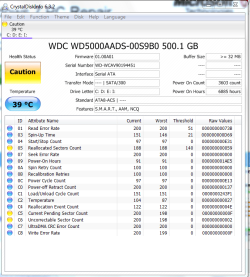
OK, after the last Disk Check which found two bad sectors to add to the file and says it repaired the file system on one of the OS partitions, this is the SMART.

Capture.PNG

Compared to last SMART from before Disk Check and latest diags:

356043d1428895104t-trust-wd-green-500gb-hd-data-lifeguard-says-repaired-capture.png
 
The drive has deteriorated. You picked up 8 more bad sectors, 2 uncorrectables and 13 pendings. The error rate is up.
 

My Computer My Computer

At a glance

Linux Lite 3.2 x64; Windows 7, 8.1Core2Duo 2.46GB ddr2nVidia
Computer type
PC/Desktop
Computer Manufacturer/Model Number
dell precision t3400 tower
OS
Linux Lite 3.2 x64; Windows 7, 8.1
CPU
Core2Duo 2.4
Memory
6GB ddr2
Graphics Card(s)
nVidia
Hard Drives
120gb SSD, 1TB HD, 2TB HD; sata II
Internet Speed
12/2
Browser
Vivaldi, Slimjet (Chromium) x64
Thanks, Paul. You're a champ at this.

And just in time Peter over at Ten Forums has helped walk me through Linux commands for hdparm to flip the PUIS switch which bricked many hard drives in build 9876 including two of my Hitachis. So I have the one I didn't throw out before realizing there's a fix back now, ready to replace this one before I leave next month for the summer.

I have some time to play with it some more. Any point in seeing how the sector count is affected by wipe, repartition, another Disk Check and diagnostics? I would not trust the drive but it might keep me from throwing it out.

I have mixed feelings about throwing it out: First, it runs great in both OS's, but when my roommate's used it while his was on the blink when I was out of town recently, it went into a reboot loop I had to fix with Startup Repair. I wonder if that's a bad sector?
 
It depends on whether chkdsk /r was run just before your first Crystal Disk analysis. If it was, then all the change you now see is recent. If not, the new change could be an accumulation over a time period. If unsure, retesting, or using the drive for a while then retesting, is the only way to really know.

It's highly likely that the boot fail was due to a sector gone bad. Hanging and that kind of breakdown are what happens. And there must be a law written somewhere that drives that begin to break down are fundamentally great drives.
 

My Computer My Computer

At a glance

Linux Lite 3.2 x64; Windows 7, 8.1Core2Duo 2.46GB ddr2nVidia
Computer type
PC/Desktop
Computer Manufacturer/Model Number
dell precision t3400 tower
OS
Linux Lite 3.2 x64; Windows 7, 8.1
CPU
Core2Duo 2.4
Memory
6GB ddr2
Graphics Card(s)
nVidia
Hard Drives
120gb SSD, 1TB HD, 2TB HD; sata II
Internet Speed
12/2
Browser
Vivaldi, Slimjet (Chromium) x64
Back
Top