Trying to add 2 wireless routers

MCleveland

New member
Member
VIP
Local time
8:09 PM
Messages
82
Location
Garden City, MI
I'm trying to add a second wireless router to my network to improve wireless in my house. My first router (D-Link DIR-655) is on the other side of my house with my modem and PC. I have an Ethernet cable that runs from the wireless router to a socket on the other side of the house. I followed this guide: How To Extend Your Wi-Fi Network With Simple Access Points - How-To Geek and I lose my internet connection on the PC right next to the first router. Also, I cannot tell if the 2nd router is sending a connection because when I connect to the 2nd router (D-Link DI-524) my iPhone shows the IP address of the first router. Is there anyone who can help me?
 

My Computer My Computer

Computer type
PC/Desktop
Computer Manufacturer/Model Number
Custom Build
OS
Windows 7 Home Premium x64
CPU
Intel Core i7 2600K @3.40GHz
Motherboard
Asus Sabertooth z77 (LGA1155)
Memory
7.95 GB Dual-Channel DDR3 @ 686MHz (8-8-8-24)
Graphics Card(s)
2048MB NVIDIA GeForce GTX 770 (EVGA)
Monitor(s) Displays
W2361 (1920x1080@59Hz), W2361 (1920x1080@59Hz)
Screen Resolution
1920x1080, 1920x1080
Hard Drives
238GB OCZ-VERTEX4 ATA Device, 977GB Western Digital WDC WD1002FAEX-00Y9A0 ATA Device (SATA), 313GB Western Digital WDC WD3200AAKS-00B3A0 ATA Device (SATA)
PSU
OCZ ZX Series 850W Fully-Modular 80PLUS Gold
Case
Corsair Obsidian 650D
Cooling
Stock
Keyboard
Logitech G15
Mouse
Logitech MX Revolution
Antivirus
Microsoft Security Essentials
I'm trying to add a second wireless router to my network to improve wireless in my house. My first router (D-Link DIR-655) is on the other side of my house with my modem and PC. I have an Ethernet cable that runs from the wireless router to a socket on the other side of the house. I followed this guide: How To Extend Your Wi-Fi Network With Simple Access Points - How-To Geek and I lose my internet connection on the PC right next to the first router. Also, I cannot tell if the 2nd router is sending a connection because when I connect to the 2nd router (D-Link DI-524) my iPhone shows the IP address of the first router. Is there anyone who can help me?

I have the same router DIR-655 and I'm running a D-link DAP-1522 wireless access point.

Using a dedicated access point like the DAP-1522 makes the settings and adjustments much easier because there is a simple switch on the side for A/P or bridge mode.

You will need to plug the second routers WAN port into one of the LAN ports on the main router or into a standard switch.

You will want the first router to handle DHCP IP assignments, the second router only works as a secondary access point with it's own SSID and password.

Ideally the first router is the DHCP server and is the only one that can hand out IP's to other machines on the LAN.

You will also want to set both routers up to use different channels for wireless broadcast so they don't interfere with each other.

You will need to access the second routers set up page and disable DHCP, you may need to change other settings depending on many factors. The link below can help you figure that out.

http://www.techsupportforum.com/3001-connecting-additional-routers/
 
Last edited:

My Computer My Computer

Computer type
PC/Desktop
Computer Manufacturer/Model Number
Home built
OS
Windows 7 Ult, Windows 8.1 Pro,
CPU
Q9650-4.275GHz, E8600 4.5GHz, E6750-3.8GHz
Motherboard
Evga 780i FTW
Memory
G.Skill PC2 9600 1200Mhz 5 5 5 15 2T
Graphics Card(s)
GTX480
Sound Card
Asus Xonar D2
Monitor(s) Displays
HannsG
Screen Resolution
1680X1050
Hard Drives
GSkill Phoenix Pro 120GB SSD
PSU
ThermalTake Toughpower 1000Watt modular
Case
ThermalTake XaserV
Cooling
Xigmatek S1283
Keyboard
Logitech G15
Mouse
Logitech G9
Internet Speed
T1
Well I had the same problem but I then found out about the wireless receiver.
It just picks up the network you set it to.
And has 1 cable out but you put that into te router and boom. Works with any boxes. I can post a few photos if you wish?
 

My Computer My Computer

Computer type
PC/Desktop
Computer Manufacturer/Model Number
Custom
OS
Windows 7 Ultimate 32 bit OEM
CPU
i5 quad
Memory
4gb
Graphics Card(s)
550ti
Hard Drives
128gb SSD, 1x 1tb Hybrid, 3 x 4tb HHD
I use 2 routers as well.
Main router has dhcp enabled, second one has dhcp disabled. 192.168.0.1 is the main, 192.168.0.2 is the second one.
Routers are connected together using the LAN ports, the ones labeled 1234, doesn't matter which ones you use.
Ssid and passwords are set the same so that devices will auto connect to the stronger/closest router.
 

My Computer My Computer

Computer Manufacturer/Model Number
HAL-9000
OS
Windows 7 Ultimate 64bit
CPU
Intel i7 3770K
Motherboard
Asus Sabertooth Z77
Memory
16GB DDR3 1333 Corsair XMS3
Graphics Card(s)
XFX HD6950 2GB EyeFinity
Sound Card
Logitech G35 & Sennheiser PC135 & VIA HD
Monitor(s) Displays
23" HP 2310e, 23" Samsung B2230, 21.5" Viewsonic
Screen Resolution
5760x1080
Hard Drives
16TB of Storage
128GB & 256GB Crucial M4 SSD's, 2X 1TB WD Black, 3x 2TB WD, 3x 2TB Samsung F4, 1.5TB Seagate, WD 500GB,
PSU
Antec True Power New 650watt
Case
Cooler Master HAF-932
Cooling
Corsair H60 Hydro Cooler, 3x 230mm Fans, 2x120mm Fan
Keyboard
Logitech G15 and G13
Mouse
Logitech G700 Gaming Mouse
Internet Speed
50/10 Mbit
Other Info
Speakers : Alesis M1 Active Mk2 Studio Monitors , APC RS 1200 UPS, HP 4500DN Color Laser, HP P1006 mono Laser, Kodak 8500 Dye-Sub, Epson 1280 inkjet, Epson Worforce 610 MFC
I'm trying to add a second wireless router to my network to improve wireless in my house. My first router (D-Link DIR-655) is on the other side of my house with my modem and PC. I have an Ethernet cable that runs from the wireless router to a socket on the other side of the house. I followed this guide: How To Extend Your Wi-Fi Network With Simple Access Points - How-To Geek and I lose my internet connection on the PC right next to the first router. Also, I cannot tell if the 2nd router is sending a connection because when I connect to the 2nd router (D-Link DI-524) my iPhone shows the IP address of the first router. Is there anyone who can help me?

I have the same router DIR-655 and I'm running a D-link DAP-1522 wireless access point.

Using a dedicated access point like the DAP-1522 makes the settings and adjustments much easier because there is a simple switch on the side for A/P or bridge mode.

You will need to plug the second routers WAN port into one of the LAN ports on the main router or into a standard switch.

You will want the first router to handle DHCP IP assignments, the second router only works as a secondary access point with it's own SSID and password.

Ideally the first router is the DHCP server and is the only one that can hand out IP's to other machines on the LAN.

You will also want to set both routers up to use different channels for wireless broadcast so they don't interfere with each other.

You will need to access the second routers set up page and disable DHCP, you may need to change other settings depending on many factors. The link below can help you figure that out.

How to Connect Two Routers on a Home Network

I like the idea of the DAP-1522. I'm currently using an Ethernet Switch (http://www.amazon.com/NETGEAR-ProSafe-Gigabit-Ethernet-Desktop/dp/B0000BVYT3/ref=sr_1_1?ie=UTF8&qid=1346807732&sr=8-1&keywords=netgear+switch) upstairs for my wired devices, would I be able to switch that out for my ethernet switch and get the same functionality but with wireless?

I use 2 routers as well.
Main router has dhcp enabled, second one has dhcp disabled. 192.168.0.1 is the main, 192.168.0.2 is the second one.
Routers are connected together using the LAN ports, the ones labeled 1234, doesn't matter which ones you use.
Ssid and passwords are set the same so that devices will auto connect to the stronger/closest router.

Even with both of them connected, does your devices always show they're connected to 192.168.0.1 even if 192.168.0.2 is closer?
 

My Computer My Computer

Computer type
PC/Desktop
Computer Manufacturer/Model Number
Custom Build
OS
Windows 7 Home Premium x64
CPU
Intel Core i7 2600K @3.40GHz
Motherboard
Asus Sabertooth z77 (LGA1155)
Memory
7.95 GB Dual-Channel DDR3 @ 686MHz (8-8-8-24)
Graphics Card(s)
2048MB NVIDIA GeForce GTX 770 (EVGA)
Monitor(s) Displays
W2361 (1920x1080@59Hz), W2361 (1920x1080@59Hz)
Screen Resolution
1920x1080, 1920x1080
Hard Drives
238GB OCZ-VERTEX4 ATA Device, 977GB Western Digital WDC WD1002FAEX-00Y9A0 ATA Device (SATA), 313GB Western Digital WDC WD3200AAKS-00B3A0 ATA Device (SATA)
PSU
OCZ ZX Series 850W Fully-Modular 80PLUS Gold
Case
Corsair Obsidian 650D
Cooling
Stock
Keyboard
Logitech G15
Mouse
Logitech MX Revolution
Antivirus
Microsoft Security Essentials
Even with both of them connected, does your devices always show they're connected to 192.168.0.1 even if 192.168.0.2 is closer?

It shows 192.168.0.1 when I am connected through 192.168.0.2.
0.1 is the router that is handing out the IP's and is the default gateway.
I know when I am connected to the second router downstairs, when it is off, I only get 1-2 bars on my ipad in the garage, and I get full bars when it is on.
 

My Computer My Computer

Computer Manufacturer/Model Number
HAL-9000
OS
Windows 7 Ultimate 64bit
CPU
Intel i7 3770K
Motherboard
Asus Sabertooth Z77
Memory
16GB DDR3 1333 Corsair XMS3
Graphics Card(s)
XFX HD6950 2GB EyeFinity
Sound Card
Logitech G35 & Sennheiser PC135 & VIA HD
Monitor(s) Displays
23" HP 2310e, 23" Samsung B2230, 21.5" Viewsonic
Screen Resolution
5760x1080
Hard Drives
16TB of Storage
128GB & 256GB Crucial M4 SSD's, 2X 1TB WD Black, 3x 2TB WD, 3x 2TB Samsung F4, 1.5TB Seagate, WD 500GB,
PSU
Antec True Power New 650watt
Case
Cooler Master HAF-932
Cooling
Corsair H60 Hydro Cooler, 3x 230mm Fans, 2x120mm Fan
Keyboard
Logitech G15 and G13
Mouse
Logitech G700 Gaming Mouse
Internet Speed
50/10 Mbit
Other Info
Speakers : Alesis M1 Active Mk2 Studio Monitors , APC RS 1200 UPS, HP 4500DN Color Laser, HP P1006 mono Laser, Kodak 8500 Dye-Sub, Epson 1280 inkjet, Epson Worforce 610 MFC
Even with both of them connected, does your devices always show they're connected to 192.168.0.1 even if 192.168.0.2 is closer?

It shows 192.168.0.1 when I am connected through 192.168.0.2.
0.1 is the router that is handing out the IP's and is the default gateway.
I know when I am connected to the second router downstairs, when it is off, I only get 1-2 bars on my ipad in the garage, and I get full bars when it is on.

Thank you! That makes me feel better knowing that it's working. Although, I still don't understand why my PC downstairs doesn't get internet while I have it plugged in.
 

My Computer My Computer

Computer type
PC/Desktop
Computer Manufacturer/Model Number
Custom Build
OS
Windows 7 Home Premium x64
CPU
Intel Core i7 2600K @3.40GHz
Motherboard
Asus Sabertooth z77 (LGA1155)
Memory
7.95 GB Dual-Channel DDR3 @ 686MHz (8-8-8-24)
Graphics Card(s)
2048MB NVIDIA GeForce GTX 770 (EVGA)
Monitor(s) Displays
W2361 (1920x1080@59Hz), W2361 (1920x1080@59Hz)
Screen Resolution
1920x1080, 1920x1080
Hard Drives
238GB OCZ-VERTEX4 ATA Device, 977GB Western Digital WDC WD1002FAEX-00Y9A0 ATA Device (SATA), 313GB Western Digital WDC WD3200AAKS-00B3A0 ATA Device (SATA)
PSU
OCZ ZX Series 850W Fully-Modular 80PLUS Gold
Case
Corsair Obsidian 650D
Cooling
Stock
Keyboard
Logitech G15
Mouse
Logitech MX Revolution
Antivirus
Microsoft Security Essentials
I'm trying to add a second wireless router to my network to improve wireless in my house. My first router (D-Link DIR-655) is on the other side of my house with my modem and PC. I have an Ethernet cable that runs from the wireless router to a socket on the other side of the house. I followed this guide: How To Extend Your Wi-Fi Network With Simple Access Points - How-To Geek and I lose my internet connection on the PC right next to the first router. Also, I cannot tell if the 2nd router is sending a connection because when I connect to the 2nd router (D-Link DI-524) my iPhone shows the IP address of the first router. Is there anyone who can help me?

I have the same router DIR-655 and I'm running a D-link DAP-1522 wireless access point.

Using a dedicated access point like the DAP-1522 makes the settings and adjustments much easier because there is a simple switch on the side for A/P or bridge mode.

You will need to plug the second routers WAN port into one of the LAN ports on the main router or into a standard switch.

You will want the first router to handle DHCP IP assignments, the second router only works as a secondary access point with it's own SSID and password.

Ideally the first router is the DHCP server and is the only one that can hand out IP's to other machines on the LAN.

You will also want to set both routers up to use different channels for wireless broadcast so they don't interfere with each other.

You will need to access the second routers set up page and disable DHCP, you may need to change other settings depending on many factors. The link below can help you figure that out.

How to Connect Two Routers on a Home Network

I like the idea of the DAP-1522. I'm currently using an Ethernet Switch (Amazon.com: NETGEAR GS105 ProSafe 5-Port Gigabit Ethernet Desktop Switch - 10/100/1000 Mbps: Electronics) upstairs for my wired devices, would I be able to switch that out for my ethernet switch and get the same functionality but with wireless?

Even with both of them connected, does your devices always show they're connected to 192.168.0.1 even if 192.168.0.2 is closer?

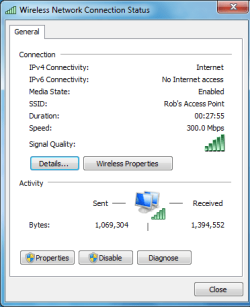
Using a dedicated access point is the way to go here IMO. I get the full wireless N speeds of 300Mbps from my access point. Using dual routers sometimes works well and some routers even have an access point mode to make the set up more simple. The only real problem with using two routers is that sometimes those routers work well together, other times not so well depending on many factors.

The DAP-1522 does have it's own default gateway but the main router handles DHCP. Both the main router and A/P have their own SSID's and passwords and run on different channels to prevent overlap. But you can set them up to use the same SSID's if you want.

And yes, you can just replace the wired switch with this access point and have both a wireless access point and also a wired switch with 4 more ports that you can plug into. No special set up is required, just hit the A/P-Bridge switch and plug stuff in.
 

My Computer My Computer

Computer type
PC/Desktop
Computer Manufacturer/Model Number
Home built
OS
Windows 7 Ult, Windows 8.1 Pro,
CPU
Q9650-4.275GHz, E8600 4.5GHz, E6750-3.8GHz
Motherboard
Evga 780i FTW
Memory
G.Skill PC2 9600 1200Mhz 5 5 5 15 2T
Graphics Card(s)
GTX480
Sound Card
Asus Xonar D2
Monitor(s) Displays
HannsG
Screen Resolution
1680X1050
Hard Drives
GSkill Phoenix Pro 120GB SSD
PSU
ThermalTake Toughpower 1000Watt modular
Case
ThermalTake XaserV
Cooling
Xigmatek S1283
Keyboard
Logitech G15
Mouse
Logitech G9
Internet Speed
T1
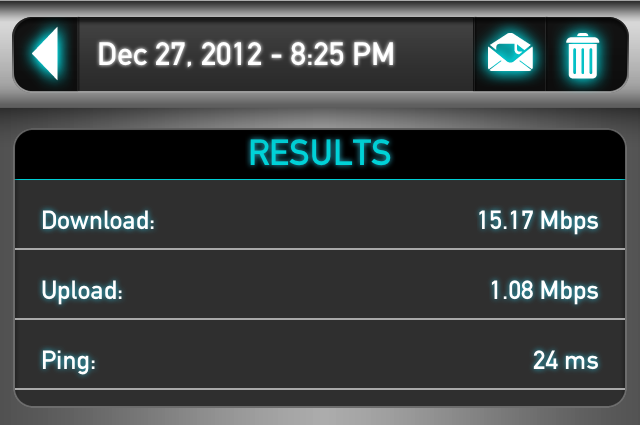
So I know this thread is pretty old, but I finally picked up the DAP-1522 and wanted to post my results. My wireless speeds on my iPhone went from this:
Jsh2x.png
to this:
Tld93.png
. Needless to say, I'm super excited. Thanks everyone for your help and advice. :D
 

My Computer My Computer

Computer type
PC/Desktop
Computer Manufacturer/Model Number
Custom Build
OS
Windows 7 Home Premium x64
CPU
Intel Core i7 2600K @3.40GHz
Motherboard
Asus Sabertooth z77 (LGA1155)
Memory
7.95 GB Dual-Channel DDR3 @ 686MHz (8-8-8-24)
Graphics Card(s)
2048MB NVIDIA GeForce GTX 770 (EVGA)
Monitor(s) Displays
W2361 (1920x1080@59Hz), W2361 (1920x1080@59Hz)
Screen Resolution
1920x1080, 1920x1080
Hard Drives
238GB OCZ-VERTEX4 ATA Device, 977GB Western Digital WDC WD1002FAEX-00Y9A0 ATA Device (SATA), 313GB Western Digital WDC WD3200AAKS-00B3A0 ATA Device (SATA)
PSU
OCZ ZX Series 850W Fully-Modular 80PLUS Gold
Case
Corsair Obsidian 650D
Cooling
Stock
Keyboard
Logitech G15
Mouse
Logitech MX Revolution
Antivirus
Microsoft Security Essentials
I use 2 routers as well.
Main router has dhcp enabled, second one has dhcp disabled. 192.168.0.1 is the main, 192.168.0.2 is the second one.
Routers are connected together using the LAN ports, the ones labeled 1234, doesn't matter which ones you use.
Ssid and passwords are set the same so that devices will auto connect to the stronger/closest router.


There you go....you have to disable DCHP on the second router for it to work correctly.
 

My Computer My Computer

Computer Manufacturer/Model Number
Custom built
OS
Windows 7 Ultimate 64 bit
CPU
AMD Phenom II X4 965 Black Edition
Motherboard
Gigabyte GA-MA790X-DS4
Memory
GSkill 4 X 2 GB PC 8500
Graphics Card(s)
XFX Radeon HD 6790 D
Sound Card
On board RealTek HD
Monitor(s) Displays
Dual monitors:Samsung SyncMaster S20B300
Screen Resolution
1600 X 900
Hard Drives
Seagate Barracuda 1TB (primary)
Seagate Barracuda 2 X 320 GB
PSU
Ultra X4 750 watt fully modular
Case
Thermaltake Overseer RX 1 full tower
Cooling
Core-Contact 92 mm CPU Cooler
Keyboard
Logitech G510
Mouse
Razor DeathAdder
Internet Speed
50/5 Mbps UL/DL
Other Info
Optical: Super Muliti DVD burner w/lightscribe, Hauppauge WinTV HVR-1800
So I know this thread is pretty old, but I finally picked up the DAP-1522 and wanted to post my results. My wireless speeds on my iPhone went from this:
Jsh2x.png
to this:
Tld93.png
. Needless to say, I'm super excited. Thanks everyone for your help and advice. :D

This looks much better to me using the DAP-1522 of course, no big surprise there. :)
It's nice to see someone using my advice for hardware purchases with good results.

If your phone and other clients use the 802.11n standard but not 802.11g or below you can switch to the 802.11n Only mode and get much faster connection speeds. If you want even better speeds you can also channel bond by using the 20Mhz-40Mhz setting, but you need good signal strength and clean channels for channel bonding to work as it should.
 

My Computer My Computer

Computer type
PC/Desktop
Computer Manufacturer/Model Number
Home built
OS
Windows 7 Ult, Windows 8.1 Pro,
CPU
Q9650-4.275GHz, E8600 4.5GHz, E6750-3.8GHz
Motherboard
Evga 780i FTW
Memory
G.Skill PC2 9600 1200Mhz 5 5 5 15 2T
Graphics Card(s)
GTX480
Sound Card
Asus Xonar D2
Monitor(s) Displays
HannsG
Screen Resolution
1680X1050
Hard Drives
GSkill Phoenix Pro 120GB SSD
PSU
ThermalTake Toughpower 1000Watt modular
Case
ThermalTake XaserV
Cooling
Xigmatek S1283
Keyboard
Logitech G15
Mouse
Logitech G9
Internet Speed
T1
This looks much better to me using the DAP-1522 of course, no big surprise there. :)
It's nice to see someone using my advice for hardware purchases with good results.

If your phone and other clients use the 802.11n standard but not 802.11g or below you can switch to the 802.11n Only mode and get much faster connection speeds. If you want even better speeds you can also channel bond by using the 20Mhz-40Mhz setting, but you need good signal strength and clean channels for channel bonding to work as it should.

Yes, it was very good advice. Thanks again. :)

I did this and my speed dropped to about 4Mbps so I changed it back but it's still sitting at 4Mbps. I don't know why it would drop all of a sudden.
 

My Computer My Computer

Computer type
PC/Desktop
Computer Manufacturer/Model Number
Custom Build
OS
Windows 7 Home Premium x64
CPU
Intel Core i7 2600K @3.40GHz
Motherboard
Asus Sabertooth z77 (LGA1155)
Memory
7.95 GB Dual-Channel DDR3 @ 686MHz (8-8-8-24)
Graphics Card(s)
2048MB NVIDIA GeForce GTX 770 (EVGA)
Monitor(s) Displays
W2361 (1920x1080@59Hz), W2361 (1920x1080@59Hz)
Screen Resolution
1920x1080, 1920x1080
Hard Drives
238GB OCZ-VERTEX4 ATA Device, 977GB Western Digital WDC WD1002FAEX-00Y9A0 ATA Device (SATA), 313GB Western Digital WDC WD3200AAKS-00B3A0 ATA Device (SATA)
PSU
OCZ ZX Series 850W Fully-Modular 80PLUS Gold
Case
Corsair Obsidian 650D
Cooling
Stock
Keyboard
Logitech G15
Mouse
Logitech MX Revolution
Antivirus
Microsoft Security Essentials
This looks much better to me using the DAP-1522 of course, no big surprise there. :)
It's nice to see someone using my advice for hardware purchases with good results.

If your phone and other clients use the 802.11n standard but not 802.11g or below you can switch to the 802.11n Only mode and get much faster connection speeds. If you want even better speeds you can also channel bond by using the 20Mhz-40Mhz setting, but you need good signal strength and clean channels for channel bonding to work as it should.

Yes, it was very good advice. Thanks again. :)

I did this and my speed dropped to about 4Mbps so I changed it back but it's still sitting at 4Mbps. I don't know why it would drop all of a sudden.

It can drop because of the channel overlap from your neighbors when they change channels or the auto channel changers can cause them to move right into your wireless channel range, this is a common problem when using the 2.4 ghz band.

It really pays to scan the wireless connections in your area and find a channel that isn't being used by anyone.

If you have enough free channels you can enable channel bonding for even better speeds but you need a high signal strength for that to work. If you can post the results I can tell you which channels might work best for you.

Xirrus WiFi Inspector is useful for finding the best channels.
Wi-Fi Inspector | Xirrus
 

My Computer My Computer

Computer type
PC/Desktop
Computer Manufacturer/Model Number
Home built
OS
Windows 7 Ult, Windows 8.1 Pro,
CPU
Q9650-4.275GHz, E8600 4.5GHz, E6750-3.8GHz
Motherboard
Evga 780i FTW
Memory
G.Skill PC2 9600 1200Mhz 5 5 5 15 2T
Graphics Card(s)
GTX480
Sound Card
Asus Xonar D2
Monitor(s) Displays
HannsG
Screen Resolution
1680X1050
Hard Drives
GSkill Phoenix Pro 120GB SSD
PSU
ThermalTake Toughpower 1000Watt modular
Case
ThermalTake XaserV
Cooling
Xigmatek S1283
Keyboard
Logitech G15
Mouse
Logitech G9
Internet Speed
T1
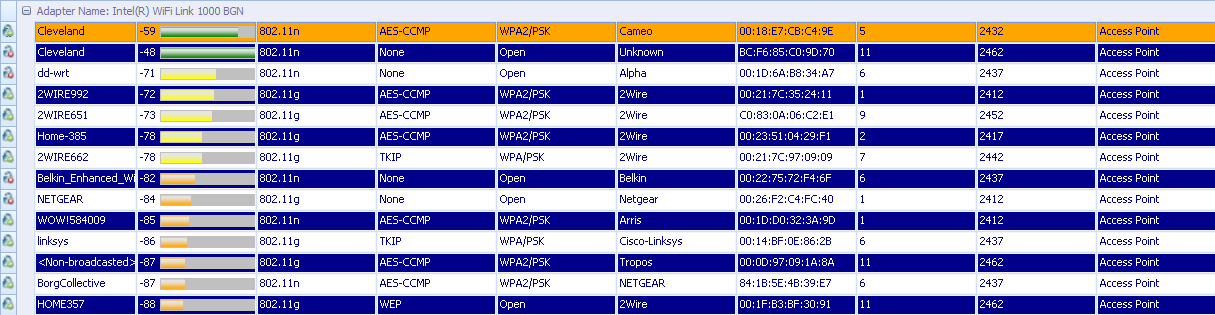
28QeQ.png


Is this the info you need? My DIR-655 is the "Cleveland" at the top of the list and my DAP-1522 is the one below it.
 

My Computer My Computer

Computer type
PC/Desktop
Computer Manufacturer/Model Number
Custom Build
OS
Windows 7 Home Premium x64
CPU
Intel Core i7 2600K @3.40GHz
Motherboard
Asus Sabertooth z77 (LGA1155)
Memory
7.95 GB Dual-Channel DDR3 @ 686MHz (8-8-8-24)
Graphics Card(s)
2048MB NVIDIA GeForce GTX 770 (EVGA)
Monitor(s) Displays
W2361 (1920x1080@59Hz), W2361 (1920x1080@59Hz)
Screen Resolution
1920x1080, 1920x1080
Hard Drives
238GB OCZ-VERTEX4 ATA Device, 977GB Western Digital WDC WD1002FAEX-00Y9A0 ATA Device (SATA), 313GB Western Digital WDC WD3200AAKS-00B3A0 ATA Device (SATA)
PSU
OCZ ZX Series 850W Fully-Modular 80PLUS Gold
Case
Corsair Obsidian 650D
Cooling
Stock
Keyboard
Logitech G15
Mouse
Logitech MX Revolution
Antivirus
Microsoft Security Essentials
I'm wondering why you didn't secure the DAP-1522?

And yes as I suspected, the reason your wireless speeds seem to fluctuate is because you have so many neighbor's using the 2.4ghz frequency. You can access it by typing dlinkap into your browsers URL or you can find out which IP it was assigned by your other router, 192.168.0.50 is default I believe.

You definitely need to set up the DAP-1522 to use WPA2 security with AES encryption. If you want the fastest speeds some tuning is required. You need to set it to the 802.11n Only setting if you want the best possible speeds. This setting only works for N client connections but it's by far the fastest setting.

You could also turn on channel bonding which is the 20-40Mhz setting on the routers set up page. This setting can double your bandwidth but it works best with clear channels that aren't being used by your neighbors, channel 11 with channel bonding turned on would be worth trying.

It also helps if you experiment and try changing to different channels which your neighbor's aren't using, this can take some trial and error, checking the wireless speed between settings to see if you found the best channels.

In fact if you had a 5ghz wireless adaptor you could just change the DAP-1522 to that frequency and have all that bandwidth to yourself because hardly anyone is using the 5ghz frequency.
 
Last edited:

My Computer My Computer

Computer type
PC/Desktop
Computer Manufacturer/Model Number
Home built
OS
Windows 7 Ult, Windows 8.1 Pro,
CPU
Q9650-4.275GHz, E8600 4.5GHz, E6750-3.8GHz
Motherboard
Evga 780i FTW
Memory
G.Skill PC2 9600 1200Mhz 5 5 5 15 2T
Graphics Card(s)
GTX480
Sound Card
Asus Xonar D2
Monitor(s) Displays
HannsG
Screen Resolution
1680X1050
Hard Drives
GSkill Phoenix Pro 120GB SSD
PSU
ThermalTake Toughpower 1000Watt modular
Case
ThermalTake XaserV
Cooling
Xigmatek S1283
Keyboard
Logitech G15
Mouse
Logitech G9
Internet Speed
T1
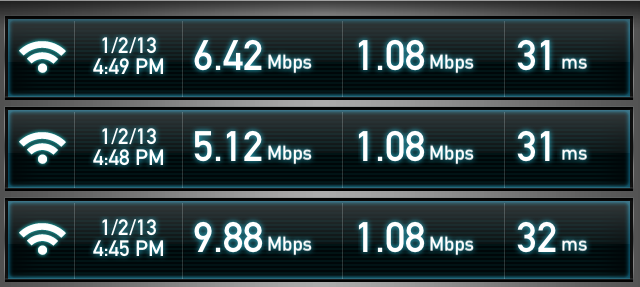
I realize I forgot to yesterday when my dad mentioned it, hah. I have it set with WPA2 and AES now.

I also now changed it to 802.11n Only and 20-40Mhz. I changed the wireless channel to 3 since it wasn't being used by anyone around me. After I let it sit for a bit to make sure all settings were saved, I ran 3 speed tests from my iPhone to compare results again. With the new settings I got:
pyF2r.png


Definitely better than before, but I still can't figure out why I can't get that 15Mbps speed again.
 

My Computer My Computer

Computer type
PC/Desktop
Computer Manufacturer/Model Number
Custom Build
OS
Windows 7 Home Premium x64
CPU
Intel Core i7 2600K @3.40GHz
Motherboard
Asus Sabertooth z77 (LGA1155)
Memory
7.95 GB Dual-Channel DDR3 @ 686MHz (8-8-8-24)
Graphics Card(s)
2048MB NVIDIA GeForce GTX 770 (EVGA)
Monitor(s) Displays
W2361 (1920x1080@59Hz), W2361 (1920x1080@59Hz)
Screen Resolution
1920x1080, 1920x1080
Hard Drives
238GB OCZ-VERTEX4 ATA Device, 977GB Western Digital WDC WD1002FAEX-00Y9A0 ATA Device (SATA), 313GB Western Digital WDC WD3200AAKS-00B3A0 ATA Device (SATA)
PSU
OCZ ZX Series 850W Fully-Modular 80PLUS Gold
Case
Corsair Obsidian 650D
Cooling
Stock
Keyboard
Logitech G15
Mouse
Logitech MX Revolution
Antivirus
Microsoft Security Essentials
The channel settings are different than you think.

Single channels span 2 channels in either direction, this is in order to gain bandwidth. So finding a single clear channel isn't really good enough, you need to find an area where the channels don't overlap.

When using channel bonding you are using 2 channels plus 2 other channels either up or down from where you have it set so simply picking one channel that isn't in use doesn't mean it's the best one to use.

The reason the speed fluctuates is because your neighbors are hogging most of the bandwidth and what they are doing at the time also figures into the equation. Because of this, the potential for the wireless speed which is based on available bandwidth is always changing.

You are getting a free lesson on how to optimize a wireless connection and trust me, not many people know how to do this. ;)

InSSider WiFi scanner is better for showing the channel overlap.
inSSIDer – Discover The Wi-Fi Around You | MetaGeek

When you get it all working right and with enough available channels you might see this.
 

Attachments

  • 300Mbps my Network speed.PNG
    300Mbps my Network speed.PNG
    12.5 KB · Views: 3

My Computer My Computer

Computer type
PC/Desktop
Computer Manufacturer/Model Number
Home built
OS
Windows 7 Ult, Windows 8.1 Pro,
CPU
Q9650-4.275GHz, E8600 4.5GHz, E6750-3.8GHz
Motherboard
Evga 780i FTW
Memory
G.Skill PC2 9600 1200Mhz 5 5 5 15 2T
Graphics Card(s)
GTX480
Sound Card
Asus Xonar D2
Monitor(s) Displays
HannsG
Screen Resolution
1680X1050
Hard Drives
GSkill Phoenix Pro 120GB SSD
PSU
ThermalTake Toughpower 1000Watt modular
Case
ThermalTake XaserV
Cooling
Xigmatek S1283
Keyboard
Logitech G15
Mouse
Logitech G9
Internet Speed
T1
Believe me, I appreciate the help. ;)

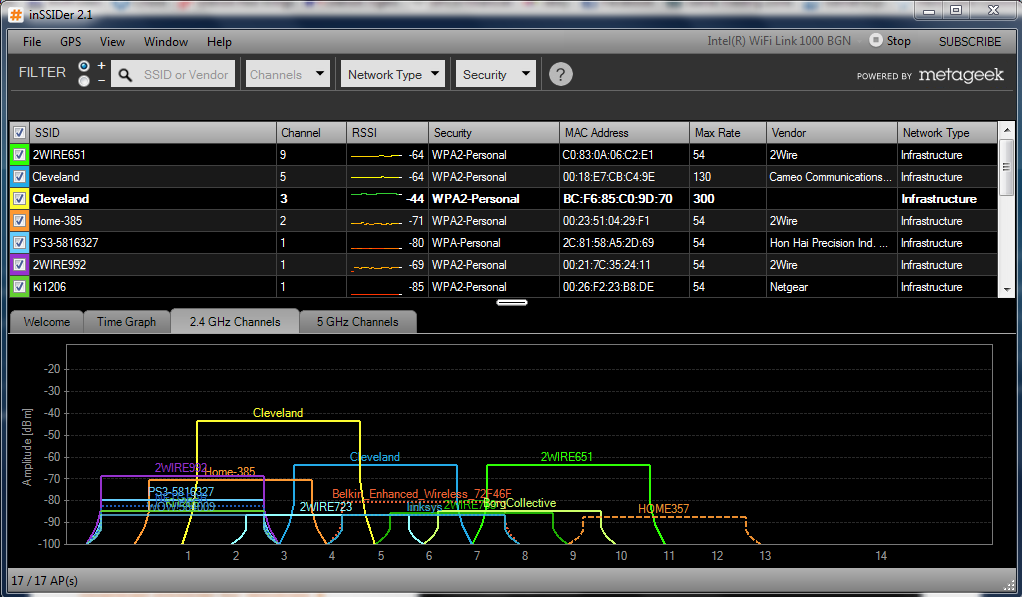
So from the looks of it, I want the Yellow Cleveland to be away from all the other networks in order to get the best speeds?
pB9os.png
 

My Computer My Computer

Computer type
PC/Desktop
Computer Manufacturer/Model Number
Custom Build
OS
Windows 7 Home Premium x64
CPU
Intel Core i7 2600K @3.40GHz
Motherboard
Asus Sabertooth z77 (LGA1155)
Memory
7.95 GB Dual-Channel DDR3 @ 686MHz (8-8-8-24)
Graphics Card(s)
2048MB NVIDIA GeForce GTX 770 (EVGA)
Monitor(s) Displays
W2361 (1920x1080@59Hz), W2361 (1920x1080@59Hz)
Screen Resolution
1920x1080, 1920x1080
Hard Drives
238GB OCZ-VERTEX4 ATA Device, 977GB Western Digital WDC WD1002FAEX-00Y9A0 ATA Device (SATA), 313GB Western Digital WDC WD3200AAKS-00B3A0 ATA Device (SATA)
PSU
OCZ ZX Series 850W Fully-Modular 80PLUS Gold
Case
Corsair Obsidian 650D
Cooling
Stock
Keyboard
Logitech G15
Mouse
Logitech MX Revolution
Antivirus
Microsoft Security Essentials
Believe me, I appreciate the help. ;)

So from the looks of it, I want the Yellow Cleveland to be away from all the other networks in order to get the best speeds?
pB9os.png

This is correct but as you can see this is impossible in an area so crowded with 2.4ghz users.

I must say how ever, it appears as if you achieved the 300mbps maximum speed capable with this router so you really can't do better than this considering how crowded your area is.

If you purchased the D-Link DWA-160 dual band USB NIC you would probably see some slight improvement because you would then be using the 5ghz band which has many more channels and isn't being used by anyone.

The price on these 5ghz NIC's has come down to only 20 bucks "Amazon" because of the new 802.11ac wireless hardware which is out now.

This is all just to just show you the options of your DAP-1522 dual band A/P-Router-bridge.

With 300Mbps you are now on easy street. I can stream multiple HD movies to 4 different wireless machines on my network at the same time, even if it's the same movie and there are no skips are freeze up's at all.
 

My Computer My Computer

Computer type
PC/Desktop
Computer Manufacturer/Model Number
Home built
OS
Windows 7 Ult, Windows 8.1 Pro,
CPU
Q9650-4.275GHz, E8600 4.5GHz, E6750-3.8GHz
Motherboard
Evga 780i FTW
Memory
G.Skill PC2 9600 1200Mhz 5 5 5 15 2T
Graphics Card(s)
GTX480
Sound Card
Asus Xonar D2
Monitor(s) Displays
HannsG
Screen Resolution
1680X1050
Hard Drives
GSkill Phoenix Pro 120GB SSD
PSU
ThermalTake Toughpower 1000Watt modular
Case
ThermalTake XaserV
Cooling
Xigmatek S1283
Keyboard
Logitech G15
Mouse
Logitech G9
Internet Speed
T1
My speeds have been up lately back to the 15Mbps mark. I don't know what changed, but I hope it stays this way. I appreciate all the help. Thanks again! :)
 

My Computer My Computer

Computer type
PC/Desktop
Computer Manufacturer/Model Number
Custom Build
OS
Windows 7 Home Premium x64
CPU
Intel Core i7 2600K @3.40GHz
Motherboard
Asus Sabertooth z77 (LGA1155)
Memory
7.95 GB Dual-Channel DDR3 @ 686MHz (8-8-8-24)
Graphics Card(s)
2048MB NVIDIA GeForce GTX 770 (EVGA)
Monitor(s) Displays
W2361 (1920x1080@59Hz), W2361 (1920x1080@59Hz)
Screen Resolution
1920x1080, 1920x1080
Hard Drives
238GB OCZ-VERTEX4 ATA Device, 977GB Western Digital WDC WD1002FAEX-00Y9A0 ATA Device (SATA), 313GB Western Digital WDC WD3200AAKS-00B3A0 ATA Device (SATA)
PSU
OCZ ZX Series 850W Fully-Modular 80PLUS Gold
Case
Corsair Obsidian 650D
Cooling
Stock
Keyboard
Logitech G15
Mouse
Logitech MX Revolution
Antivirus
Microsoft Security Essentials
Back
Top