Trying to clean restore windows 7 with DVD+R

hamzahas2

New member
Local time
11:52 PM
Messages
5
I have an Acer aspire 5336 laptop and the other day i was trying to do some modifications to my android device and while i was doing it my laptop completely froze so i turned it off with the power button and turned it back on and it takes about 30 minutes to get on the boot screen which is not normal and after it finally loaded i could only move the mouse and i couldn't even go into the settings. i tried to restore it with going into backup and restore but it wont finish loading. I want to factory restore my computer with a disc but i don't have the windows disc because it didn't come with the laptop. So i want to make a windows 7 Home premium disc but i don't want to lose my serial number and have a screen popup which says this is not a genuine copy. So what do i do guys?
 

My Computer My Computer

At a glance

Windows 7 Home Premium 64bit
OS
Windows 7 Home Premium 64bit

My Computer My Computer

At a glance

Windows 10 Pro x64Intel Core i7 6700KGSkill TridentZ RGB 16GB 3600 16-16-16-36EVGA GTX 980 Ti SC x2
Computer type
PC/Desktop
Computer Manufacturer/Model Number
Skylake Special #666
OS
Windows 10 Pro x64
CPU
Intel Core i7 6700K
Motherboard
Asus Sabertooth Z170 Mark 1
Memory
GSkill TridentZ RGB 16GB 3600 16-16-16-36
Graphics Card(s)
EVGA GTX 980 Ti SC x2
Sound Card
Realtek High Definition
Monitor(s) Displays
AOC G2460PG
Screen Resolution
1920 x 1080 144Hz
Hard Drives
Samsung 860 Pro 256GB, Seagate Barracuda 4TB x2
PSU
EVGA 1000 P2, EVGA White Custom Braided Cables
Case
Corsair Vengeance C70 Gunmetal Black
Cooling
Corsair H100i v2, Corsair ML120 x2, Thermal Grizzly Kryonaut
Keyboard
Logitech G910 Orion Spectrum
Mouse
Logitech G700s
Internet Speed
Verizon Fios Quantum Gateway 75/75
Antivirus
Windows Defender, Malwarebytes Free 3.8.3
Browser
Chrome
Other Info
Corsair SP120 x4, LG Blu-ray Drive, Durabrand HT-395 100 Watt Dolby Digital Amp, Corsair H2100 Wireless 7.1 Headset
That sticker is faded and I don't want to risk losing my license. Will this way keep my genuine copy?
 

My Computer My Computer

At a glance

Windows 7 Home Premium 64bit
OS
Windows 7 Home Premium 64bit
If you can`t read your key, then you are going to have to try and do a factory restore. If windows came preinstalled (OEM) then you can`t use the key you find in windows to do a clean install. It will not activate windows. Only the key on the sticker will activate a clean install of the same version you have installed now.

Goin to bed :sleepy: I`m beat
 

My Computer My Computer

At a glance

Windows 10 Pro x64Intel Core i7 6700KGSkill TridentZ RGB 16GB 3600 16-16-16-36EVGA GTX 980 Ti SC x2
Computer type
PC/Desktop
Computer Manufacturer/Model Number
Skylake Special #666
OS
Windows 10 Pro x64
CPU
Intel Core i7 6700K
Motherboard
Asus Sabertooth Z170 Mark 1
Memory
GSkill TridentZ RGB 16GB 3600 16-16-16-36
Graphics Card(s)
EVGA GTX 980 Ti SC x2
Sound Card
Realtek High Definition
Monitor(s) Displays
AOC G2460PG
Screen Resolution
1920 x 1080 144Hz
Hard Drives
Samsung 860 Pro 256GB, Seagate Barracuda 4TB x2
PSU
EVGA 1000 P2, EVGA White Custom Braided Cables
Case
Corsair Vengeance C70 Gunmetal Black
Cooling
Corsair H100i v2, Corsair ML120 x2, Thermal Grizzly Kryonaut
Keyboard
Logitech G910 Orion Spectrum
Mouse
Logitech G700s
Internet Speed
Verizon Fios Quantum Gateway 75/75
Antivirus
Windows Defender, Malwarebytes Free 3.8.3
Browser
Chrome
Other Info
Corsair SP120 x4, LG Blu-ray Drive, Durabrand HT-395 100 Watt Dolby Digital Amp, Corsair H2100 Wireless 7.1 Headset
Have you run Startup Repair to see what it reports? I'd run it a few times. In addition there are Troubleshooting Steps for Windows 7 here to test the hardware from boot which you may yet need need.

The tutorial AddRAM provided will give you a perfect reinstall for as long as you stick with the tools and methods in it.
 
hamzahas2 said:
I want to factory restore my computer with a disc but i don't have the windows disc because it didn't come with the laptop.

   Information
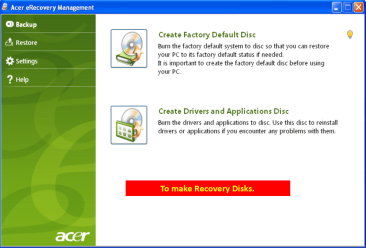
We always assume you have made your Recovery Disks using the OEM manufacturer's Recovery Media Creator app the first day you had your new PC.
& made the Startup Repair CD.
startup repair disc-create


Did you make the OEM manufacturer's Recovery Disks?

Manual how to use Acer eRecovery Management here:
ftp://ftp.support.acer-euro.com/notebook/empowering_technology/NB%20ET2%20user's%20guide/Acer%20eRecovery%20Management%20English.pdf

Acer001-11.PNG

You can Order Acer recovery disks from here:
https://secure.tx.acer.com/RCDB/Main.aspx?brand=acer
 

My Computer My Computer

At a glance

ME/XP/Vista/Win7
OS
ME/XP/Vista/Win7
No I did not make any kind of recovery discs and whenever i try to run start up repair or anything it would take about 30 minutes to load and get on the windows 7 wallpaper nothing will happen afterwards and i end up turning of the computer. what i would like is to maybe torrent a ISO file of windows 7 home premium the part I'm confused is i want to keep my key but I'm not sure
 
Last edited:

My Computer My Computer

At a glance

Windows 7 Home Premium 64bit
OS
Windows 7 Home Premium 64bit
I just gave you a list of Troubleshooting steps which provides in Step 5 the ISO and tool to burn a Win7 installation DVD for your licensed version, to use for repair or if necessary reinstall. Did you even bother reading it?

If you're at all interested in getting and keeping a perfect Clean Reinstall - Factory OEM Windows 7
follow the steps in the blue link which also provides the installer. For as long as you use only the tools and methods given you'll have a perfect install.
 
The problem is my computer is like a brick after i boot it up so i cant use any of those options. im sorry if it came off as ignorant.
 

My Computer My Computer

At a glance

Windows 7 Home Premium 64bit
OS
Windows 7 Home Premium 64bit
Thank you very much im going to start working on this and ill update you. Thanks
 

My Computer My Computer

At a glance

Windows 7 Home Premium 64bit
OS
Windows 7 Home Premium 64bit
Back
Top