Trying to dual boot 2 windows 7s

nimonster

New member
Local time
8:03 PM
Messages
19
I recently got an alienware x51r2 with windows 7 64 bit, and I want to add another OS (also win764bit). I created a new partition from windows and when I boot from the dvd in UEFI mode, not legacy, to install it on the new partition, it says that the partitions are not in recommended order and it asks if i want to still proceed. Should i proceed? will it make problems?
 

My Computer My Computer

Computer type
PC/Desktop
OS
Windows 7 32 and 64 bit
Would you post a shot of disk management form the working windows install.
 

My Computer My Computer

Computer type
PC/Desktop
Computer Manufacturer/Model Number
Skylake Special #666
OS
Windows 10 Pro x64
CPU
Intel Core i7 6700K
Motherboard
Asus Sabertooth Z170 Mark 1
Memory
GSkill TridentZ RGB 16GB 3600 16-16-16-36
Graphics Card(s)
EVGA GTX 980 Ti SC x2
Sound Card
Realtek High Definition
Monitor(s) Displays
AOC G2460PG
Screen Resolution
1920 x 1080 144Hz
Hard Drives
Samsung 860 Pro 256GB, Seagate Barracuda 4TB x2
PSU
EVGA 1000 P2, EVGA White Custom Braided Cables
Case
Corsair Vengeance C70 Gunmetal Black
Cooling
Corsair H100i v2, Corsair ML120 x2, Thermal Grizzly Kryonaut
Keyboard
Logitech G910 Orion Spectrum
Mouse
Logitech G700s
Internet Speed
Verizon Fios Quantum Gateway 75/75
Antivirus
Windows Defender, Malwarebytes Free 3.8.3
Browser
Chrome
Other Info
Corsair SP120 x4, LG Blu-ray Drive, Durabrand HT-395 100 Watt Dolby Digital Amp, Corsair H2100 Wireless 7.1 Headset
You do know that you have to have two licenses for two Win 7's, even on the same PC. Do you qualify there?
 

My Computer My Computer

Computer type
PC/Desktop
Computer Manufacturer/Model Number
Custom Build
OS
Windows 7 Home Premium 32-Bit - Build 7600 SP1
CPU
Intel Core i3-2120 3.30Ghz
Motherboard
Asus P8Z68-V LX Intel Z68 Socket H2 ATX
Memory
Kingston 4 GB DDR3 1333 mhz
Graphics Card(s)
AMD Radeon HD6670
Sound Card
Sound Blaster Audigy SE 24-Bit
Monitor(s) Displays
Asus VE228
Screen Resolution
1440 X 900
Hard Drives
OCZ Vertex 3 120 GB Sata 3 SSD ==
Kingston SH103/S3 120 G Hyper X 120 GB SSD ==
Western Digital 500 GB Caviar Green 7200 RPM ==
PSU
Corsair CX600M == 600 Watt
Case
NZXT Apollo - Silver with Clear Side Panel
Cooling
Three 120 mm Fans
Keyboard
Microsoft Natural 4000
Mouse
Microsoft Custom Optical 3000
Internet Speed
AT&T Fiber Optic Wireless Network
Antivirus
Microsoft Security Essentials
Browser
Chrome
Other Info
120 mm Blue LED Fan -- Three Blue LED Lazer Light Sticks
Attached is the screenshot of the partitions. I bought a windows 7 DVD from Costco so I think the license is fine. I haven't installed it on any other PC and also win7 came with one win7 installation
 

My Computer My Computer

Computer type
PC/Desktop
OS
Windows 7 32 and 64 bit
Here is the screenshot
 

Attachments

  • image.jpg
    image.jpg
    258.2 KB · Views: 4

My Computer My Computer

Computer type
PC/Desktop
OS
Windows 7 32 and 64 bit
I always get that warning message when Dual Booting to test Win7 on a Win8 PC. It was explained to me that it has to do with the Recovery partition's position on the disk and has no bearing on the new install. It has never caused me any problems.

The recommended layout is here and shows that when an OEM partition exists on the drive, the REcovery partition should be in the last position. However many OEM's do not place it there so the error is generated because of their configuration and not yours. As I said earlier, it is negligible.
 
Attached is the screenshot of the partitions. I bought a windows 7 DVD from Costco so I think the license is fine. I haven't installed it on any other PC and also win7 came with one win7 installation

Yes, you are OK license wise. You purchased one with the PC and also one at Costco.
 

My Computer My Computer

Computer type
PC/Desktop
Computer Manufacturer/Model Number
Custom Build
OS
Windows 7 Home Premium 32-Bit - Build 7600 SP1
CPU
Intel Core i3-2120 3.30Ghz
Motherboard
Asus P8Z68-V LX Intel Z68 Socket H2 ATX
Memory
Kingston 4 GB DDR3 1333 mhz
Graphics Card(s)
AMD Radeon HD6670
Sound Card
Sound Blaster Audigy SE 24-Bit
Monitor(s) Displays
Asus VE228
Screen Resolution
1440 X 900
Hard Drives
OCZ Vertex 3 120 GB Sata 3 SSD ==
Kingston SH103/S3 120 G Hyper X 120 GB SSD ==
Western Digital 500 GB Caviar Green 7200 RPM ==
PSU
Corsair CX600M == 600 Watt
Case
NZXT Apollo - Silver with Clear Side Panel
Cooling
Three 120 mm Fans
Keyboard
Microsoft Natural 4000
Mouse
Microsoft Custom Optical 3000
Internet Speed
AT&T Fiber Optic Wireless Network
Antivirus
Microsoft Security Essentials
Browser
Chrome
Other Info
120 mm Blue LED Fan -- Three Blue LED Lazer Light Sticks
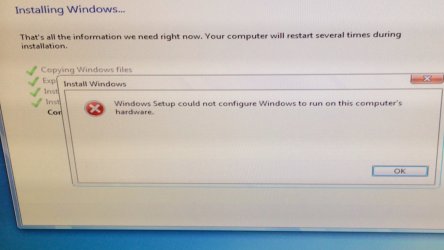
Error?
 

Attachments

  • image.jpg
    image.jpg
    176.9 KB · Views: 1

My Computer My Computer

Computer type
PC/Desktop
OS
Windows 7 32 and 64 bit
Reboot and enter BIOS setup to check SATA controller setting. That error can be caused by the controller being set to RAID. If set to RAID you may need to provide the RAID drivers.

Next check the UEFI settings in BIOS, including Legacy BIOS and CSM. You may need to set it to a Compatibility Mode to install.

Is there a newer BIOS update?

Is this an Advanced Format HD (AF logo?) which may require a BIOS update?

Are there performance issues with the extant Win7 which might point to HD issues, or a bad SATA cable?

Are you using the new DVD, or a flash installer which may need to be removed before reboot, with HD set as first to boot in BIOS setup?

If using flash or burned installer, try another official ISO for your licensed version burned to DVD or flash stick using tool in Steps 1 and 2 of Clean Reinstall - Factory OEM Windows 7
 
Back
Top