Trying to get my camera installed

SFwriter

New member
Local time
2:45 AM
Messages
11
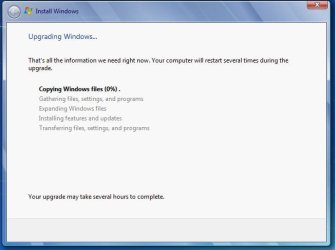
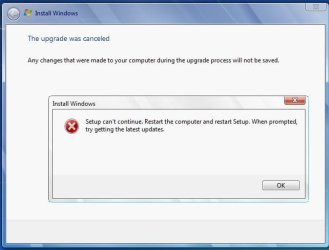
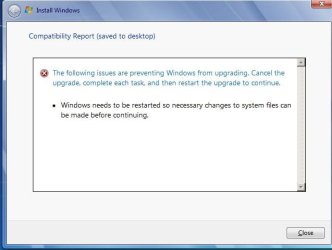
I think I've tried everything you've suggested to Repair my WIN7 install (to get my camera installed). It's supposed to be driverless and does install in 5 seconds flat on my friend 's near-identical system, and HIS working camera won't function on my system. The four attached images show what I'm getting (even after the SFC /SCANNOW in an elevated CMD box). Image 1: I start the upgrade (repair WIN7) and it tells me to restart the computer :huh:. Image 2: after copying the temp files, it copies the regular Windows files to 100%. Image 3: it stalls at 0% during "gathering". Image 4: it tells me that setup cannot continue, and that I should reboot, restart setup and check for upgrades (done it literally a dozen times or more now). When it was working on my friend's computer, it had two driver files "something-THUNK.dll" and an .ax file. Both are missing off of both computers but I bet they would re-appear if I plugged into his computer again... There isn't any software IN the camera. It's just a little CMOS number that is supposed to be UVC, and IS in my friend's computer. I've unplugged everything but the keyboard and mouse, uninstalled or disabled half a dozen things (SuperAntiSPyware, Spybot S&D, AVAST, KXdriver (to run my SB Live 5.0) and anything that I could imagine was interfering. Any clues or hints? I'm slowly going insane here...
 

Attachments
  • 1.JPG
    1.JPG
    32.5 KB · Views: 7
  • 2.JPG
    2.JPG
    30.6 KB · Views: 6
  • 3.JPG
    3.JPG
    31.4 KB · Views: 6
  • 4.JPG
    4.JPG
    33.1 KB · Views: 7

My Computer

Computer Manufacturer/Model Number
Self-built
OS
WIN7
CPU
AMD 9750 Quad
Motherboard
M4A78 PRO
Memory
2 Gb CL5 1 Gb CL4 (yeah, I know...)
Graphics Card(s)
ATI 4850
Sound Card
SB Live 5.1 and on-board
Monitor(s) Displays
NEC MultiSync 1940WCXM
Screen Resolution
1440x900
Hard Drives
80 GB "C" for isolation purposes
500 GB partitioned D-H
PSU
435w Heavy Duty
Case
Blue! :-)
Cooling
Air -- tried water; didn't like it
Keyboard
Logitech Itouch
Mouse
MS Intellimouse 5 button programmable
Internet Speed
16/1
Hello SFwriter,

Does the camera have a memory card in it? If so, you should be able to just plug it into a memory card reader instead to upload the images into the computer.

Hope this helps,
Shawn
 

My Computer

Computer type
PC/Desktop
Computer Manufacturer/Model Number
Self built custom
OS
64-bit Windows 11 Pro for Workstations
CPU
Intel i7-8700K OC'd to 5 GHz
Motherboard
ASUS ROG Maximus XI Formula Z390
Memory
64 GB (4x16GB) G.SKILL TridentZ RGB DDR4 3600 MHz
Graphics Card(s)
ASUS ROG-STRIX-GTX1080TI-O11G-GAMING
Sound Card
Integrated
Monitor(s) Displays
2 x Samsung Odyssey G7 27"
Screen Resolution
2560x1440
Hard Drives
1TB Samsung 990 PRO M.2,
4TB Samsung 990 PRO PRO M.2,
TerraMaster F8 SSD Plus NAS
PSU
Seasonic Prime Titanium 850W
Case
Thermaltake Core P3
Cooling
Corsair Hydro H115i
Keyboard
Logitech wireless K800
Mouse
Logitech MX Master 4
Internet Speed
2 Gb/s Download and 100 Mb/s Upload
Antivirus
Malwarebyte Anti-Malware Premium
Browser
Google Chrome
Other Info
Logitech Z625 speaker system,
Logitech BRIO 4K Pro webcam,
HP Color LaserJet Pro MFP M477fdn,
APC SMART-UPS RT 1000 XL - SURT1000XLI,
Galaxy S23 Plus phone
Hi there
what's the camera -- and a lot of them will need to be SWITCHED ON when connected to the computer as well.

Normally typical cameras are just "Bog standard" USB devices.

Cheers
jimbo
 

My Computer

Computer type
PC/Desktop
Computer Manufacturer/Model Number
Custom built, several laptops HP/ASUS
OS
Linux CENTOS 7 / various Windows OS'es and servers
CPU
Intel i7 Intel i5
Memory
8GB, 16GB
Graphics Card(s)
On Motherboard
Sound Card
Realtek HD audio
Monitor(s) Displays
Apple Cinema display, Samsung LCD
Screen Resolution
1920 X 1080
Hard Drives
4 X 1TB SATA
Mouse
Toshiba wireless laser
Internet Speed
> 20MB up
Sadly, I'm afraid it's not a simple solution like turning it on. It's not a digital photo camera, but a webcam (MSG923 MYSHOW 16 M/p 640x480 30fps), so no memory card. The other is a Microsoft Lifecam. Both need additional software to do "fancy" things but are plug'n'play for basic functions. Both are BOG-standard (I like that -- toilet standard -- hilarious) USB devices.

I think it's safe to forget the camera issue altogether, hence my placing it in the other forum. If I could just get past the point where W7 Setup says it "cannot continue with the install" (over and over again), and get it to "allow" me to repair my installation of W7, I think the camera issue would amend itself. It's surely just a case of missing DLLs, OCX, AX, et cetera, which a repair-install would likely sort out. If only I could get it to do the install instead of failing and telling me to restart after getting updates which I've already done innumerable times.
 

Attachments

  • Camera.JPG
    Camera.JPG
    22 KB · Views: 111

My Computer

Computer Manufacturer/Model Number
Self-built
OS
WIN7
CPU
AMD 9750 Quad
Motherboard
M4A78 PRO
Memory
2 Gb CL5 1 Gb CL4 (yeah, I know...)
Graphics Card(s)
ATI 4850
Sound Card
SB Live 5.1 and on-board
Monitor(s) Displays
NEC MultiSync 1940WCXM
Screen Resolution
1440x900
Hard Drives
80 GB "C" for isolation purposes
500 GB partitioned D-H
PSU
435w Heavy Duty
Case
Blue! :-)
Cooling
Air -- tried water; didn't like it
Keyboard
Logitech Itouch
Mouse
MS Intellimouse 5 button programmable
Internet Speed
16/1
Back
Top