CatB
New member
- Local time
- 1:35 AM
- Messages
- 3
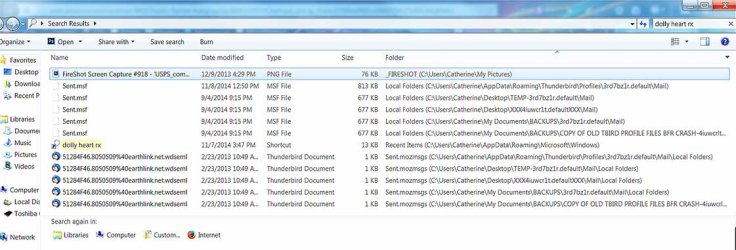
Greetings - I've wasted countless hours during the past 6 weeks changing numerous search & index options and solutions for weeks with zero success. With the former hard drive, a Vista with upgrade to Win7, I had to make 'some forgotten-Grrrrr' modification to the Indexing Options which then brought up all TB emails, subject lines and contents, normal readable text.
This time I've tried so many, many things, don't know if it would help to outline them (very lengthy), but I could do so.
In a nutshell, the default indexing options which were supposed to work do not pull up the emails like it did before the crash. Those options were listed:
Imapmail
Mail
News
Start Menu
Users-excluding appdata appdata (for myself and default users).
(Clicked on Modify and confirmed that indeed those specific mail folders under my TB roaming profile were checked to be indexed.) Did not work! Because I had checked the text file type 'msf', those coded emails came up, which were useless, so I unchecked that file type.
I read a previous post here from years ago where Kerry had written to include AppData for the long outdated TB3. So now I'm rebuilding that selection again**. (At least a dozen rebuilds tried in vain with either wider or more targeted selections).
**Update to above paragraph: Selecting the Indexing Options in the list as Start Menu & Users\Catherine\AppData\ with each and every single check box ticked yielded zero emails. (msf file type which I had manually added is unchecked). There were 35,000 more indexed items this time than with the default mail selections and no msf file types.
Does anyone have experience with this please?
Thank you in advance from Catherine.
This time I've tried so many, many things, don't know if it would help to outline them (very lengthy), but I could do so.
In a nutshell, the default indexing options which were supposed to work do not pull up the emails like it did before the crash. Those options were listed:
Imapmail
News
Start Menu
Users-excluding appdata appdata (for myself and default users).
(Clicked on Modify and confirmed that indeed those specific mail folders under my TB roaming profile were checked to be indexed.) Did not work! Because I had checked the text file type 'msf', those coded emails came up, which were useless, so I unchecked that file type.
I read a previous post here from years ago where Kerry had written to include AppData for the long outdated TB3. So now I'm rebuilding that selection again**. (At least a dozen rebuilds tried in vain with either wider or more targeted selections).
**Update to above paragraph: Selecting the Indexing Options in the list as Start Menu & Users\Catherine\AppData\ with each and every single check box ticked yielded zero emails. (msf file type which I had manually added is unchecked). There were 35,000 more indexed items this time than with the default mail selections and no msf file types.
Does anyone have experience with this please?
Thank you in advance from Catherine.
Last edited:
My Computer
At a glance
Win 7 Home Premium 64bitIntel Core 2 Duo CPU4.00 GBNVIDIA GeForce G 105M
- Computer type
- Laptop
- Computer Manufacturer/Model Number
- HP Pavilion dv3t-2000 T6400
- OS
- Win 7 Home Premium 64bit
- CPU
- Intel Core 2 Duo CPU
- Memory
- 4.00 GB
- Graphics Card(s)
- NVIDIA GeForce G 105M
- Hard Drives
- Toshiba 500GB 2.5" Notebook Internal HD
- Antivirus
- MS Security Essentials
- Browser
- Firefox 33 (kept updated)