Trying to "git" to 64 bit!

cdsailor

New member
Local time
8:41 AM
Messages
7
For years I've used a Palm Tungsten e to maintain my calendar, contacts and more for my business. I even have an excell app that can compute a job bid on site.

This old trusty Palm is the only thing stopping me from moving to 64 bit on my upcoming next machine.

I need a new device! Probubly a smartphone. I do not need web access, and I don't want my information stored in the cloud, it's too sensitive.

The perfect device would have an easiy to use desk top, that can sync with the device, and be able to import my data from my Palm Tungsten e.

Any ideas? Or should I just buy a copy of Windows 7 Home Premium and load the 32 bit version on my new computer?

Im most grateful for your time and help

CD
 
Last edited:

My Computer

OS
vista
How about an iPod Touch?
 

My Computer

Computer Manufacturer/Model Number
Danpass 642
OS
Win 7 64 Pro
CPU
E4400
Motherboard
P5N-E SLI
Memory
2GB - G.Skill DDR2 800 F2-6400CL5D-2GBNQ
Graphics Card(s)
Sapphire 100172L Radeon X1550 256mb
Sound Card
built-in
Monitor(s) Displays
Viewsonic 19"
Screen Resolution
1440x900
PSU
Ultra ULT-VX600
Case
Antec Three Hundred
Cooling
Stock Antec 120 and 140 fans on low plus two 120s for intake
You could always make the switch, and then run XP or another OS in a VM with USB access to your device.
 

My Computer

OS
Windows 7 Ultimate x64 SP1
CPU
Intel Core i7-2600
Motherboard
Gigabyte GA-P67A-UD3P-B3
Memory
12 GB Patriot Extreme DDR3-1333
Graphics Card(s)
Nvidia GTX 470
Monitor(s) Displays
Dell UltraSharp 2209WA
Hard Drives
OCZ Agility3 240 GB, WD5001AALS, WD7501AALS
PSU
OCZ ModStream 700W
Case
CoolerMaster HAF 912 Advanced
Cooling
CoolerMaster Hyper 212 Plus
Touch and VM

Thanks danpass, I'll start looking at Ipod touch apps but I thought it was more for games and music.

Thanks DeaconFrost, your suggestion could be the immediate answer. W7 Professional includes XP mode, I just have to find out if the XP mode is of the 32bit or 64bit flavor.

Since most inexpensive computers at the local stores have W7 home premium installed I would be required to install an upgrade. I've been warned to stay away from upgrades and always do a clean install. A clean install would have me thinking about installing a clean W7 32bit again anyway.

Thank you both for your help,
CD
 

My Computer

OS
vista
I just have to find out if the XP mode is of the 32bit or 64bit flavor.

32 bit even when the VM is run on 64 bit Windows 7.
 

My Computer

Computer type
PC/Desktop
Computer Manufacturer/Model Number
Me
OS
Win 7 Ultimate x64
CPU
FX-8350 @ 4.6 GHz so far
Motherboard
Asus M5A97 EVO
Memory
ADATA XPG V1 Series Black 8GB DDR3 1600
Graphics Card(s)
Sapphire R9 270x Dual-X
Sound Card
Xonar DGX w/ Corsair Vengence 1300
Monitor(s) Displays
Acer S232HL Abid
Screen Resolution
1920x1080
Hard Drives
120 GB OCZ Vertex 3
500 GB Seagate 7200.12
PSU
Antec Earthwatts 650W Green
Case
Antec Three Hundred
Cooling
Cooler Master 212 EVO
Keyboard
Logitech G510
Mouse
Logitech G500s
Internet Speed
35000/3000
Hello cdsailor, welcome to Seven Forums!


If you purchase full retail Windows 7 you will get both 32-bit and 64-bit, you can install and activate one instance at a time, if you start with 32-bit and feel you can go to 64-bit at a later time, you'll always have the option.

If you have no pressing reason to use a 64-bit OS make your life easy and start with 32-bit.
A clean install is the best way to go.


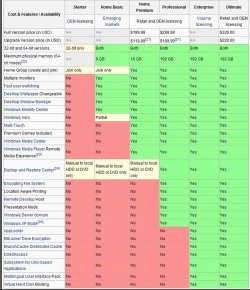
You'd better have a look at the SKU chart below.

click this image to enlarge
Capture11.JPG
 

My Computer

Computer Manufacturer/Model Number
* BFK Customs *
OS
W 7 64-bit Ultimate
CPU
Intel Q9550 Yorkfield
Motherboard
ASUS P5Q Pro
Memory
8GB Dominator 8500C5D
Graphics Card(s)
ATI : XFX 5870
Sound Card
Realtek HD Audio 7-1
Monitor(s) Displays
1x 47" LCD HDMI & 3x 26" LCD HDMI
Screen Resolution
1920x1080P & 1920x1200
Hard Drives
1x 80GB Intel X25-M G2 SSD : 1x 500GB & 1x 640GB WD Caviar Black(s)
PSU
Corsair 620HX
Case
Cooler Master RC-690
Cooling
Tuniq Tower 120, 2x 140mm and 3x 120mm case fans
Keyboard
Microsoft 500
Mouse
Razer Diamondback 3G
Internet Speed
14 Mb/s
Other Info
1x Koutech 3Gb/s SATA HDD Hot Swap Rack
Thanks Bare Foot Kid

Your suggestion is most likely my best hope.

It will cost though.

I'll buy a new computer, then a full retail version of Windows 7 Professional, and while I'm at it I might as well buy a second hard drive to put everything on so if there is a warrenty problem with the computer, I can return the computer with the original, untouched, hard drive.

I was hoping I could avoid the cost of W7 professional and put the money toward a different hand held device (PDA or Smart phone) that would work with W7 home, which is sold pre installed in most computers.

Thanks for your reply and your time.

CD
 

My Computer

OS
vista
Hello CD.


Just look around for a PC with Pro or Ultimate 32-bit pre-installed, they're around; speaking of another HDD, a wise old Indian once told me, never store anything on C: you can't afford to lose.

;)
 

My Computer

Computer Manufacturer/Model Number
* BFK Customs *
OS
W 7 64-bit Ultimate
CPU
Intel Q9550 Yorkfield
Motherboard
ASUS P5Q Pro
Memory
8GB Dominator 8500C5D
Graphics Card(s)
ATI : XFX 5870
Sound Card
Realtek HD Audio 7-1
Monitor(s) Displays
1x 47" LCD HDMI & 3x 26" LCD HDMI
Screen Resolution
1920x1080P & 1920x1200
Hard Drives
1x 80GB Intel X25-M G2 SSD : 1x 500GB & 1x 640GB WD Caviar Black(s)
PSU
Corsair 620HX
Case
Cooler Master RC-690
Cooling
Tuniq Tower 120, 2x 140mm and 3x 120mm case fans
Keyboard
Microsoft 500
Mouse
Razer Diamondback 3G
Internet Speed
14 Mb/s
Other Info
1x Koutech 3Gb/s SATA HDD Hot Swap Rack
We had the exact same problem!

We had a Palm Tungsten T5 that we loved BUT the syncing was a very big pain in the arse. It was also a big pain to use with Vista and the new version of Palm Desktop.

Anyhoo, after almost throwing the unit through the window, my and my wife bought 2 Ipod Touch 8Gig.

Now, the 'Pain in the arse part': I spent almost a week trying to sync for the last time, the Palm Tungsten T5 to my windows XP machine. After downloading various utilities to extract the data and inject it into an Outlook Calendar, it finally worked, but only once. I almost passed out when it worked! I finally had an Outlook Data file with all my data.

Now, the 'Easy part': We injected the outlook data file into an Outlook 2007 calendar. Then, I installed ITunes 64 Bits on my Windows 7 64 Bits and my wife installed ITunes 32 Bits on her Vista 32 bits machine.

Then we both synced our Ipod Touch with her Outlook 2007. Everything worked the first time! It was incredible.

Anyhoo, I sync my Ipod with her machine, just for the Calendar and I sync it again on my machine for the songs, applications and movies. It's a real joy.

Let me know if you need more info.
 

My Computer

OS
Windows 7 Ultimate 64 Bits
Wow lebrocoli that sounds promising,

except maybe for the cost of an iTouch. (around $200 i think)

If I understand correctly, once your palm calander and contacts were moved to outlook you can now sync with outlook on your PC.

I'm not sure if I have outlook, I think my current PC has outlook express but I'll check. It's running XP home Premium and Im not sure if that came with outlook.

Of course this thread is about me moving everything to a new 64bit W7 machine which will have Outlook. I wonder if the transfer from old Palm to new machine with outlook is a dooms day shot!:confused:

So now how do you sync? iTouch doesn't have a USB cable does it? Bluetooth maybe?

Thanks for your reply

CD
 

My Computer

OS
vista
Wise old indian (Bare Foot Kid)

A wise old indian once told me that if you don't have your data in three places you don't have your data at all!:)
 

My Computer

OS
vista

My Computer

Computer Manufacturer/Model Number
* BFK Customs *
OS
W 7 64-bit Ultimate
CPU
Intel Q9550 Yorkfield
Motherboard
ASUS P5Q Pro
Memory
8GB Dominator 8500C5D
Graphics Card(s)
ATI : XFX 5870
Sound Card
Realtek HD Audio 7-1
Monitor(s) Displays
1x 47" LCD HDMI & 3x 26" LCD HDMI
Screen Resolution
1920x1080P & 1920x1200
Hard Drives
1x 80GB Intel X25-M G2 SSD : 1x 500GB & 1x 640GB WD Caviar Black(s)
PSU
Corsair 620HX
Case
Cooler Master RC-690
Cooling
Tuniq Tower 120, 2x 140mm and 3x 120mm case fans
Keyboard
Microsoft 500
Mouse
Razer Diamondback 3G
Internet Speed
14 Mb/s
Other Info
1x Koutech 3Gb/s SATA HDD Hot Swap Rack
What I mean is that we sync our Ipod Touch Calendar to the Outlook Calendar. All the syncing stuff is done through the ITunes Software. You start ITunes, you connect your Ipod, the Ipod appear within ITunes, you click on its icon and then you press on the sync button. That is it.

In fact, you are not obliged to sync with Outlook, you can sync your Ipod calendar to a MobileMe Calendar, which is a calendar on the web.
 

My Computer

OS
Windows 7 Ultimate 64 Bits
A wise old indian once told me that if you don't have your data in three places you don't have your data at all!:)


just got a 1.5TB segate external. it's taking 11hrs to COPY all my external/internal drives to it.

movie files === .avi, .flv, .mp4, .mov ---- 537GB
music files === .MP3, wave, wma, midi ---- 213GB
software === ---- 266GB
office files === .txt, .xls, .doc, .pps, .access, .pst, ---- 10GB
HDD images === ---- 110GB
pictures === .jpeg, .tiff, .bmp, .art ---- 1GB

1137GB so far ( 11.5 yrs of crap )
 

My Computer

Computer Manufacturer/Model Number
Gateway/NV7923u & NV79C52u Laptops
OS
windows 7 professional & ultimate 64bit laptops
CPU
2.27 boost to 2.53 & 2.53 boost to 2.80
Motherboard
Mobile Intel® HM55 Express Chipset ???
Memory
4GB
Graphics Card(s)
Intel® Graphics Media Accelerator HD
Sound Card
realtek High-definition audio support
Monitor(s) Displays
17.3 " HD 1600 x 900
Hard Drives
hatachi Travelstar 5400 500GB & west digital 500GB
Internet Speed
35MB fios
A wise old indian once told me that if you don't have your data in three places you don't have your data at all!:)


just got a 1.5TB segate external. it's taking 11hrs to COPY all my external/internal drives to it.

movie files === .avi, .flv, .mp4, .mov ---- 537GB
music files === .MP3, wave, wma, midi ---- 213GB
software === ---- 266GB
office files === .txt, .xls, .doc, .pps, .access, .pst, ---- 10GB
HDD images === ---- 110GB
pictures === .jpeg, .tiff, .bmp, .art ---- 1GB

1137GB so far ( 11.5 yrs of crap )
I recommend trying a free program by MS called Sync Toy 2.1 for these kinds of massive copy operations. It makes it easy to semi automate the process and it seems to do it a bit faster than just using regular copy commands, even to a USB drive.

(Btw, I have a couple of those 1.5 TB Seagates, and just got a 2 TB WD @ Costco for $129. I ripped the drive out of the enclosure (a nice 2 TB WD Caviar Green inside) and put it in an estata hard drive dock and now it's real fast!).
 

My Computer

Computer Manufacturer/Model Number
HP DV8t quad
OS
Windows 7 Ultimate x64 (Retail)
CPU
i7-Q 720
Motherboard
Motherboard Chipset Intel Ibex Peak-M PM55, Intel Lynnfield
Memory
6 GB
Graphics Card(s)
nVidia GeForce GT 230M (1GB)
Sound Card
IDT High Definition Audio CODEC
Monitor(s) Displays
18.4 inch HP Infinity FHD (Samsung 184HT03-001)
Screen Resolution
1920 x 1080
Hard Drives
Hitachi 500GB 7200 rpm (x2)
Seagate FreeAgent 1.5 TB External USB (x2)
Thermaltake BlacX eSATA/USB 2.0 3.5/2.5 HD dock
Cooling
Zalman NC-2000 notebook cooling pad
Keyboard
laptop
Mouse
Logitech VX Revolution
Other Info
Backup Unit: Lenovo T61p
I like things that fit, I'll avoid 64 bit!

In a world of digital dark offices and FAQ's I really have a lot of respect for those of you who figure these things out. I've got patients but not tons of it!

If I trusted Goggle apps, I think that would be easiest but I don't trust Goggle with my business stuff.

So for now I'm staying put. Everything works and if it ain't broke don't fix it.

If it does break, a 32 bit OS and a new computer is only about 3 to 4 days away. It will cost me more money not to use the pre-installed 64 bit OS but I will know how to make everything work and that is worth money, time, and confidence.

Thanks to all who responded, I wish you all well.
CD
 

My Computer

OS
vista
Hello again CD, glad we could help.


Feel free anytime to pop in to say hello and bring us up to date on how things are going.
 

My Computer

Computer Manufacturer/Model Number
* BFK Customs *
OS
W 7 64-bit Ultimate
CPU
Intel Q9550 Yorkfield
Motherboard
ASUS P5Q Pro
Memory
8GB Dominator 8500C5D
Graphics Card(s)
ATI : XFX 5870
Sound Card
Realtek HD Audio 7-1
Monitor(s) Displays
1x 47" LCD HDMI & 3x 26" LCD HDMI
Screen Resolution
1920x1080P & 1920x1200
Hard Drives
1x 80GB Intel X25-M G2 SSD : 1x 500GB & 1x 640GB WD Caviar Black(s)
PSU
Corsair 620HX
Case
Cooler Master RC-690
Cooling
Tuniq Tower 120, 2x 140mm and 3x 120mm case fans
Keyboard
Microsoft 500
Mouse
Razer Diamondback 3G
Internet Speed
14 Mb/s
Other Info
1x Koutech 3Gb/s SATA HDD Hot Swap Rack
If I understood your original post correctly, I would like to recommend the system I'm using.

I have always been a Nokia fan boy, currently using N900. I have bluetooth always on, paired with my computer (64-bit Seven). Using Nokia's Ovi Suite or PC Suite my contacts, calendar, notes, tasks and messages are always in sync, also with Outlook. Also photos and videos taken since last sync are always automatically transferred to computer.

IMO, PC Suite is better if you don't use your smartphone as a mediaplayer, Ovi Suite if you also want your music and other media to stay in sync.

Since 1st of this month I'm retired, but until that I also used Mobi Systems Office Suite, to be able to make and calculate offers on spot.

In my opinion, Nokia's smartphones together with Seven, 32 or 64-bit, is a powerful combination to anyone needing a mobile solution for work. Not to mention the free GPS system and Ovi Maps application.

Kari
 

My Computer

Computer type
Laptop
Computer Manufacturer/Model Number
HP ENVY 17-1150eg
OS
Windows 10 Pro x64 EN-GB
CPU
1.6 GHz Intel Core i7-720QM Processor
Memory
6 GB
Graphics Card(s)
ATI Mobility Radeon HD 5850 Graphics
Sound Card
Beats sound system with integrated subwoofer
Monitor(s) Displays
17" laptop display, 22" LED and 32" Full HD TV through HDMI
Screen Resolution
1600*900 (1), 1920*1080 (2&3)
Hard Drives
Internal: 2 x 500 GB SATA Hard Disk Drive 7200 rpm
External: 2TB for backups, 3TB USB3 network drive for media
Cooling
As Envy runs a bit warm, I have it on a Cooler Master pad
Keyboard
Logitech diNovo Media Desktop Laser (bluetooth)
Mouse
Logitech Performance Mouse MX
Internet Speed
50/10 Mbps VDSL
Antivirus
Windows Defender 4.3.9431.0
Browser
Maxthon 3.5.2., IE11
My HTC HD2 running Win Mo 6.5 syncs perfectly with Office 2010. Even my One Note Notebooks are now accessible anywhere.
 

My Computer

Computer Manufacturer/Model Number
tw33k
OS
Windows 7 Ultimate (x64) SP1
CPU
Intel 3770k 4.6GHz
Motherboard
ASUS Maximus V Formula
Memory
8GB (2x 4GB) Crucial Ballistix
Graphics Card(s)
Sapphire 7950 (1060/1600)
Sound Card
On Board Realtek HD Audio
Monitor(s) Displays
27" Acer B273HU (via HDMI)
Screen Resolution
2048 x 1152
Hard Drives
Crucial M4 128GB
2TB WD Black
1TB Samsung F3 SATA
1TB WD Elite External
2TB WD USB 3.0
PSU
Corsair AX750 Gold
Case
Corsair Obsidian 800DW
Cooling
Corsair H100 (2x AP-121/2x UK-3000 push/pull)
Keyboard
Microsoft Wireless 5000
Mouse
Microsoft Wireless 5000
Internet Speed
5mb/s
Other Info
Logitech z-2300 2.1 speakers
Lamptron FC-5 v2
You could always make the switch, and then run XP or another OS in a VM with USB access to your device.


We could do that? I have an old device, can I use VPC's integration to detect my device and install drivers in that VM even if W7 does not recognize this dinosaur device at all? :cry: :cry: :cry:
 

My Computer

Computer Manufacturer/Model Number
Asus G73SW-XN2
OS
Windows 2000 5.0 Build 2195
CPU
Intel Core i7-2630QM@2GHz(2.9GHz Turbo Boost) [Sandy Bridge]
Motherboard
Asus G73SW (Intel HM65 Chipset)
Memory
Kingston DDR3 1333 16GB (4GBx4)
Graphics Card(s)
nVidia GTX 460m 1.5GB
Sound Card
EAX Advanced HD 5.0, THX TruStudio
Monitor(s) Displays
17.3 in. primary & 23 in. secondary
Screen Resolution
1920x1080
Hard Drives
Seagate Momentus XT (SATA II) 500 GB @ 7200 RPM
Hitachi (SATA II) 500GB @ 7200 RPM

Non Raid because ASUS was crappy to choose an HM65 Chipset
Keyboard
Built-in 102-Key Backlit Keyboard
Other Info
It's a Laptop.
Back
Top