Trying to install Windows 7 over Ubuntu

BrahManty

New member
Local time
1:18 PM
Messages
4
Let me start off by saying that I am not very experienced with installing operating systems or knowing how they work.

I just received a new Netbook today, and Asus Eee PC. I ordered it in a deal where it only came with the Asus ExpressGate OS on it, and my windows 7 dvd was at a friends house, so I figured I'd give Ubuntu a try before I got Windows on it. So far, my Ubuntu experience has gone well, but I put the Windows 7 files on a flash drive (following this guide) and tried to boot from the USB drive, and nothing happened. Startup took a while longer than normal and the USB drive flashed like it was trying to start up the windows installer, but then it just gave up and started Ubuntu like normal.

Does anyone know what might possibly be going on? Any help is greatly appreciated, and if you need any more information, just ask and I'll reply very soon.
 

My Computer

OS
Windows 7
Haven't tried actually installing Win7 over Ubuntu (have it installed along side Ubuntu), so I could be wrong here ... but my guess is that since your drive is already formatted with Ext3 or Ext4 filesystem partitions, the Win7 installer can see nowhere to install the OS on the drive.

You might have to remove the Ubuntu partition(s) first so that the Win7 installer will see the unallocated space, and if you had an optical drive you could boot from, I could recommend any of a number of free partitioning tools you could download, burn, and boot from -- but since you don't have that, I don't know what to recommend at this point.

Perhaps someone more versed in loading SW to USB and booting from that can be of some help.
 

My Computer

Computer type
PC/Desktop
Computer Manufacturer/Model Number
Custom
OS
Win7 Pro 32-bit, Win8 Pro 32-bit
CPU
AMD Phenom II X6 1090T
Motherboard
Gigabyte
Memory
4GB ddr3 1300
Graphics Card(s)
AMD HD 4290 onboard
Sound Card
Builtin Realtek HD Audio
Monitor(s) Displays
Samsung 24" widescreen, LG 23" widescreen
Screen Resolution
1920x1200/1920x1080
Hard Drives
Kingston 256GB SSD
Keyboard
Logitech Illuminated Keyboard
Mouse
Logitech M705 wireless mouse
Antivirus
Norton Av 2013
Browser
IE v10
Let me start off by saying that I am not very experienced with installing operating systems or knowing how they work.

I just received a new Netbook today, and Asus Eee PC. I ordered it in a deal where it only came with the Asus ExpressGate OS on it, and my windows 7 dvd was at a friends house, so I figured I'd give Ubuntu a try before I got Windows on it. So far, my Ubuntu experience has gone well, but I put the Windows 7 files on a flash drive (following this guide) and tried to boot from the USB drive, and nothing happened. Startup took a while longer than normal and the USB drive flashed like it was trying to start up the windows installer, but then it just gave up and started Ubuntu like normal.

Does anyone know what might possibly be going on? Any help is greatly appreciated, and if you need any more information, just ask and I'll reply very soon.

Have you set your boot order to allow removable drives to be booted from first, then the HDD (Done through bios)

Also, when you start up the laptop, during the BIOS post screen (the black screen with all the white writting) hold down F8 until a screen with options comes up, in that list should be your HDD and the USB stick, choose the USB and you should be good to go

Try that and post back with results

Lucky
 

My Computer

Computer Manufacturer/Model Number
The HAFmeister (Custom)
OS
Windows 7 Ultimate x64 RTM + SP1
CPU
Intel Core i7 950 3.06GHZ (OC'd to 3.99Ghz)
Motherboard
Asus Rampage III Extreme x58 SATA 6GB & USB 3.0
Memory
6GB OCZ Reaper HPC Edition PC3-16000 (set 1606Mhz 8-8-8-26)
Graphics Card(s)
EVGA Nvidia Geforce GTX 570
Sound Card
Creative SB X-Fi Titanium Fatal1ty Professional Series
Monitor(s) Displays
Samsung SM2433BW 24" Widescreen Monitor
Screen Resolution
1920x1200
Hard Drives
Western Digital Caviar Black 500GB 32Mb Buffer SATA II
Western Digital Caviar Black 750GB 32Mb Buffer SATA II
Western Digital Caviar Blue 500GB 16Mb Buffer SATA II
Western Digital My Book Essential Edition 750GB USB
Samsung Spinpoint 2TB SATA II
PSU
Thermaltake Toughpower 1200w (Modular)
Case
CoolerMaster HAF-932
Cooling
Zalman Reserator XT and ZM-WB5 Plus - GPU uses Stock coolers
Keyboard
Logitech G510
Mouse
Logitech G9 Gaming Mouse
Internet Speed
3MB Profile - 350-400kbs (Real-Speed)
Other Info
IcyBox Hot-Swap Bay,
Logitech G27 Steering Wheel,
Xbox 360 Wirless Elite Controller with Microsoft Reciever and
Play & Charge Kit,
Belkin USB Wireless Adaptor,
GAME Generic Controller (Playstation Looky-Likey),
Epson SX125 All-in-One.

My Computer

Computer Manufacturer/Model Number
Dell XPS
OS
Windows 7 Pro 64bit
CPU
Intel Core 2 Quad Q6600
Motherboard
Dell Inc 0PP150 (Socket 775)
Memory
4GB
Graphics Card(s)
1024MB GeForce GTS 250 (PNY)
Monitor(s) Displays
Dell 22in
Screen Resolution
1680x1050
Hard Drives
313GB Seagate ST332062 0AS SCSI Disk Device (SCSI)
733GB Western Digital WDC WD75 00AACS-00D6B SCSI Disk Device (SCSI)
Keyboard
Logitech G11
Mouse
Logitech G5
Internet Speed
3Mb/s
Other Info
And Acer Aspire One
Try this:

http://www.sevenforums.com/tutorials/2432-usb-windows-7-installation-key-drive-create.html?ltr=U

All Linux code must be deleted.
http://www.sevenforums.com/tutorials/52129-disk-clean-clean-all-diskpart-command.html
http://www.sevenforums.com/tutorials/2668-partition-volume-delete.html?ltr=P
http://www.sevenforums.com/tutorials/2674-partition-volume-create-new.html?ltr=P

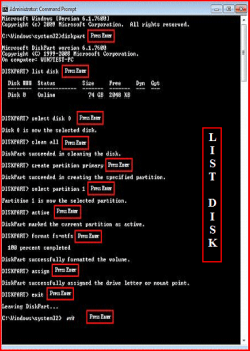
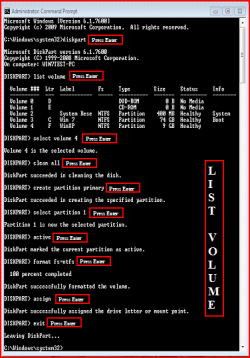
Try a full clean & full format.
1) Boot DVD.
2) Press Shift+F10 (for command prompt)

Type in command line
DISKPART
LIST DISK
SELECT DISK # (win HD)
CLEAN ALL
CREATE PARTITION PRIMARY
SELECT PARTITION 1
ACTIVE
FORMAT=NTFS
ASSIGN
EXIT
EXIT

List Disk.PNG
List Volume.PNG
 

My Computer

OS
ME/XP/Vista/Win7
Its a lot easier to install windows first. At one point I had xp and 5 different versions of linux installed, and never had a problem. Just set up a vm in ubuntu if your cpu will support it.
 

My Computer

OS
fedora 12
What Mark Phelps said was definitely right. My entire drive is partitioned to the ext4 file system, so that must be why. And I have handy partitioning tools in Ubuntu that I can't use because the hard drive I need to partition is the one Ubuntu is using...

This is a pretty frustrating situation, wish I had thought this out before I just jumped in and installed Ubuntu.

@LuckyStar, Yes, I have been booting from USB.

Also, I wish I could do Theog's fix, but I've already made the USB drive into a windows installer, and it won't even start up because of the file system on my hard drive, so I can't try to use Command Prompt.

Thank you all for the replies, but I guess I'm in a much worse situation than I originally anticipated, so any more help would be appreciated.
 

My Computer

OS
Windows 7
Well, then could someone explain to me why the USB drive booted up the Windows 7 installer just fine on my sister's laptop, but refuses to start it on mine? It's not BIOS settings, because I was able to get the Ubuntu flash drive working just fine and haven't changed anything since then. And I've already explained that I can't use the DVD because it's a netbook. No DVD drive.
 

My Computer

OS
Windows 7
No, I used two different flash drives for each operating system.
 

My Computer

OS
Windows 7
i just install vista over linux, the parititon shows up, i just had to delete it, and then when it showed up as unallocated space, i hit next and it starts installing??

my method was with a dvd of vista maybe thats why, but it wasnt difficult at all, and it installs the bootloader right over grub so no errors or anything when booting.
 

My Computers

System One System Two

  • Computer type
    PC/Desktop
    Computer Manufacturer/Model Number
    PowerSpec G164
    OS
    WIN10
    CPU
    AMD Ryzen 5 3600 6-Core Processor 3.59 GHz
    Memory
    16.0 GB
    Internet Speed
    VERY FAST>>>!!!
  • Antivirus
    ESET Security Premium
Back
Top