Solved Trying to install Windows xp on partition of Lenovo Thinkpad Edge 15

nailimexam

New member
Local time
7:08 PM
Messages
8
Hi,

I would like to install windows XP on the 44GB partition I made, and have a dual boot system.
But I am having trouble installing Windows XP (pro w/ SP3 and net framework 3.0, and my sata driver slipstreamed)

At first, I just got a blue screen after the disk attempted loading files. Then, I slipstreamed the SATA driver for XP for the EDGE 15 onto the XP installation Disk (There were three .inf files in the driver folder, I only slipstreamed the first one, and copied the driver folder into the image folder, following this guide: http://www.sevenforums.com/tutorials/72185-sata-drivers-slipstream-into-windows-xp-cd.html).

This seemed to get me past the problem. I was able to format the 44GB partition the disk began installing. Then the computer restarted to finish the installation.
However, during the XP installation, I got a hang up at 33mins. After repeated tries, I get this hang up every time.

I tried disabling as many unnecessary devices in the Bios as I could, but I still get the same hang up.

I tried to find the problem by opening the command prompt and typing setupapi.log (in D:\Windows (the 44GB partition)
However, the last entry in the log was "completed successfully". (The guide I followed using "setupapi.log" was for the 34 min hang up. Since mine is 33min maybe its a completely different problem).

Should I try to slipstream all the drivers onto XP installation disk? (there appear to be over 100 drivers on the Lenovo support page for the thinkpad edge 15)

Any other suggestions?

Thanks.
 
Last edited by a moderator:

My Computer My Computer

At a glance

windows 7intel core i34gbintegrated
Computer Manufacturer/Model Number
Lenovo Thinkpad Edge 15 0301
OS
windows 7
CPU
intel core i3
Memory
4gb
Graphics Card(s)
integrated
Hard Drives
500gb 7500rpm
You really only want the text file for the SATA controller driver, in order to overcome the bluescreen to display the HD partitions for install. Adding other drivers can actually create complications that cause install to fail while installing these drivers, which can be done from the desktop after install anyway.

Have you tried installing your XP programs in Win7 Compatibility Mode,
or virtualizing XP from within Win7 using XP Mode in Ultimate/Pro or freeware like Virtual Box, VMWare, or Virtual Player? These are easier than wrestling with an XPired OS.
 
Thank you,

I tried xp compatibility mode in win7, and I tried the virtual "xp mode" os. Both actually made the program run worse (its a very simple real time 2D space hockey game)

The only driver I currently have slipstreamed is the SATA controller driver (the first .inf file listed in the driver folder)

And it gets me past the original problem spot every time. I am able to select the partition, format it, then Xp starts installing, then it restarts comp then I get to a screen that says 39 minutes remaining.

Then it proceeds to "Install Devices" with a little green bar. The green bar gets filled up then disappears, and it seems all devices were installed.

Then it sits at 33 minutes remaining and nothing happens.
 

My Computer My Computer

At a glance

windows 7intel core i34gbintegrated
Computer Manufacturer/Model Number
Lenovo Thinkpad Edge 15 0301
OS
windows 7
CPU
intel core i3
Memory
4gb
Graphics Card(s)
integrated
Hard Drives
500gb 7500rpm
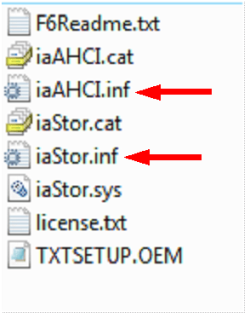
If you downloaded 80sa08ww.exe this not the F6 driver.

First check for all the Win XP drivers for your hardware on the manufacturer's web site.
If your Win XP CD, does not support your Sata Controller, you will need to load drivers to uses at F6.
Load Sata Controller drivers with a floppy disk is the best way.
http://www.sevenforums.com/tutorials/66010-sata-drivers-load-windows-xp-setup-dual-boot.html
OR
http://www.sevenforums.com/tutorials/72185-sata-drivers-slipstream-into-windows-xp-cd.html

Your Lenovo has a Intel Sata Controller.
You can download your F6 Sata Controller drivers from here:
For 32bit
F6 Intel Sata Controller


Add all drivers & all Sata controllers.

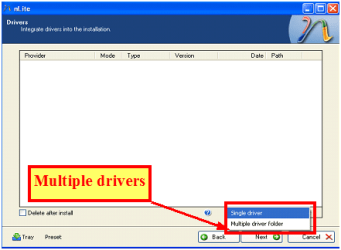
Capture3-1.PNG Capture222.PNG
 

My Computer My Computer

At a glance

ME/XP/Vista/Win7
OS
ME/XP/Vista/Win7
Thank you, that was a part of the setup I was unsure about.

So I should choose the multiple driver tab in nlite instead of single, then load those two inf files you showed?

(note I am a bit confused that 80sa08ww.exe is not the right file. There is a readme download that comes with it that describes loading the contents onto a floppy for F6 installation, and I see the exact same folder files as the picture you show, but I will try with the link you gave me.)

Unfortunately I do not have an external usb floppy drive : (, so I'll try the slipstream again.


What do you mean by "Add all drivers & all SATA controllers"

not just the two you have arrows on?

Thanks
 

My Computer My Computer

At a glance

windows 7intel core i34gbintegrated
Computer Manufacturer/Model Number
Lenovo Thinkpad Edge 15 0301
OS
windows 7
CPU
intel core i3
Memory
4gb
Graphics Card(s)
integrated
Hard Drives
500gb 7500rpm
I only had a quick look of the download of 80sa08ww.exe, looked wrong, but maybe right on the floppy.

When you get to the inf file, will list about 20 Sata Controllers in each one.

Add the right one or all.
 

My Computer My Computer

At a glance

ME/XP/Vista/Win7
OS
ME/XP/Vista/Win7
When I click insert and "multiple driver folder" in nlite, it only allows me to select the folder the files are in not the specific files. Is this ok?

also, when I get to the "Driver Integration Options Window, it no longer appears to have my correct driver listed (I think mine is "Intel(R) 5 Series 4 Port SATA AHCI Controller" which is listed under IDE ATA/ATAPI controllers in the device manager)

Should I go with this and select all drivers even though mine appears to not be listed? or should I select each of the two .inf files individually?

Also, The Intel download from the link you gave me appears identical to the one I downloaded from Lenovo, except the one from Lenovo has an extra folder called "PREPARE" which has a third .inf file named "IMSM_PRE.inf". Is this file important as well?


Thanks
 

My Computer My Computer

At a glance

windows 7intel core i34gbintegrated
Computer Manufacturer/Model Number
Lenovo Thinkpad Edge 15 0301
OS
windows 7
CPU
intel core i3
Memory
4gb
Graphics Card(s)
integrated
Hard Drives
500gb 7500rpm
Use the add all.
 

My Computer My Computer

At a glance

ME/XP/Vista/Win7
OS
ME/XP/Vista/Win7
Even though it doesn't have "Intel(R) 5 Series 4 Port SATA AHCI Controller" listed?


also, what about the IMSM_PRE.inf file that is included in the Lenovo download.

Sry for all the questions, but I wnat to make sure I get ti right this time, thank you for your help
 

My Computer My Computer

At a glance

windows 7intel core i34gbintegrated
Computer Manufacturer/Model Number
Lenovo Thinkpad Edge 15 0301
OS
windows 7
CPU
intel core i3
Memory
4gb
Graphics Card(s)
integrated
Hard Drives
500gb 7500rpm
I would need to redownload Lenovo file & make floppy.

But floppy is the best way.
 

My Computer My Computer

At a glance

ME/XP/Vista/Win7
OS
ME/XP/Vista/Win7
Ok, I was finally able to install XP, not sure what happened but I tried it again and it worked.

I proceeded to the next step of this guide

Dual Boot Installation with Windows 7 and XP

and installed EasyBCD on the XP operating system.

I followed the directions in the guide and rebooted.

Upon reboot, the select OS screen flashed on the screen then windows 7 started.

It was only there for a moment, but I could see both windows 7 and Windows XP options. However, it flashed too quick for me to be able to select. (On my second attempt I repeatedly pressed the down arrow at start up to try to select the XP OS but the screen just flashed by and started Windows 7)
 

My Computer My Computer

At a glance

windows 7intel core i34gbintegrated
Computer Manufacturer/Model Number
Lenovo Thinkpad Edge 15 0301
OS
windows 7
CPU
intel core i3
Memory
4gb
Graphics Card(s)
integrated
Hard Drives
500gb 7500rpm
In EasyBCD you change the boot screen time.
 

My Computer My Computer

At a glance

ME/XP/Vista/Win7
OS
ME/XP/Vista/Win7
Thank you! easiest fix yet!

I tried to get back into XP but couldn't (f8 didn't work) so I changed the EasyBCD settings on Windows 7, worked perfectly. I restarted and selected XP and it booted. (I even opened EasyBCD in XP and the setting had been changed to match the ones I entered while in windows 7, NICE!)


Thanks for your help Theog!
 

My Computer My Computer

At a glance

windows 7intel core i34gbintegrated
Computer Manufacturer/Model Number
Lenovo Thinkpad Edge 15 0301
OS
windows 7
CPU
intel core i3
Memory
4gb
Graphics Card(s)
integrated
Hard Drives
500gb 7500rpm
I thought I would add this in case someone else has the same issue as me.


The first time I tried to install XP, it hanged at 33 minutes after the green bar for installing devices disappeared. The screen showing when it hanged was the screen for selecting languages. The first time the installation hung, I tried to click the "next" button on the languages window and it didnt do anything. I assumed that meant it was just an advertisement for XP's multi-lingual abilities.

On subsequent install attempts I did not press the next button on this window (bec I thought it was an ad)

So today I tired an install, and out of frustration clicked what I thought was a fake "next" button and presto! finished the installation w/o a hitch.

Hahaha, I guess its better to feel a fool with a working computer than not without.
 

My Computer My Computer

At a glance

windows 7intel core i34gbintegrated
Computer Manufacturer/Model Number
Lenovo Thinkpad Edge 15 0301
OS
windows 7
CPU
intel core i3
Memory
4gb
Graphics Card(s)
integrated
Hard Drives
500gb 7500rpm
Back
Top