Trying to make USB boot drive, having issues

Dmanrocks22

New member
Local time
4:12 AM
Messages
17
Location
NC
I'm using YUMA to create a multiboot drive out of my 16gb Patriot XT flash drive. I'm using the Windows 7 SP1 x64 image provided by digital river and a Backtrack 5 Gnome x64 image. This isn't my problem though.

When I boot my computer without the USB drive in any port, it pops up in the boot menu. When I plug in any USB flash drive, though, and then go into the boot options, it's gone. Essentially the only time it will give me the option to boot from a flash drive is if there is no flash drive in the port. It doesn't matter whether the drive contains a bootable image or not.

Boot order is as follows:

HDD
USB
CD/DVD
etc.
etc.

Legacy USB support is disabled since enabled causes booting with the drive in at all to lockup during POST.

Any ideas on what could be causing this?
 

My Computer My Computer

Computer Manufacturer/Model Number
Dell (laptop)
OS
Windows 7 Home Premium x64
CPU
Intel P8600 2.4Ghz
Motherboard
Dell
Memory
4gb DDR2 1333
Graphics Card(s)
Mobility Radeon 4570 512mb
Sound Card
IDT Integrated Audio
Monitor(s) Displays
15.6" 768p
Hard Drives
250Gb 7200rpm
PSU
Power brick
Case
Laptop
Cooling
Air
If you disable Legacy USB Support, you will not be able to boot from the USB device. So enable it. There are no two ways about it.

Redo your YUMI from scratch again. Choose to format the pendrive to FAT32 during the process.. This time include only the Win7 install ISO. ( You can add anything else later.)

Make sure that the ISO file name contains no spaces.

Once you create it, use the onetime boot menu to boot from the pendrive.

Are you able to get the YUMI Boot menu and choose Win7 install?

Read through the Known issues YUMI - Multiboot USB Creator (Windows) | USB Pen Drive Linux and take corrective action as indicated therein in case you encounter problems mentioned therein. 1. You should make the ISO contiguous 2. During the Windows install process, you should plug out the pendrive, before the first Windows start.

For creating only the Windows 7 installation pendrive, I would recommend that you use Universal USB installer Universal USB Installer – Easy as 1 2 3 | USB Pen Drive Linux which is much simpler and devoid of any issues.

You may experiment with YUMI at your leisure later.
 

My Computer My Computer

OS
Windows 7 Home Premium 32 bit
Thank you, I'll try this.

I also get an error message during installation of the image:

gjVu.jpeg


Is this a problem? And if it is, how do I fix it?
 

My Computer My Computer

Computer Manufacturer/Model Number
Dell (laptop)
OS
Windows 7 Home Premium x64
CPU
Intel P8600 2.4Ghz
Motherboard
Dell
Memory
4gb DDR2 1333
Graphics Card(s)
Mobility Radeon 4570 512mb
Sound Card
IDT Integrated Audio
Monitor(s) Displays
15.6" 768p
Hard Drives
250Gb 7200rpm
PSU
Power brick
Case
Laptop
Cooling
Air
Installing the image? Where? Why?:confused:

I am afraid you are adopting a wrong procedure in creating the bootable pendrive.

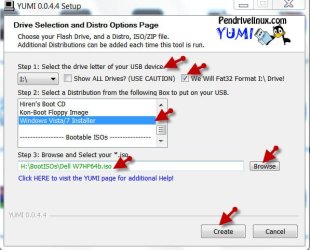
In step one select your pendrive and tick format to FAT32.

In step 2 select Windows Vista/7 Installer.

In step 3 browse to the location of the Windows 7 ISO and select it.

Click on Create.

Your bootable pendrive to install Windows 7 will be ready in a few seconds.

yumi.jpg

( If the downloaded ISO is corrupt, you will experience problems. If it is not a genuine ISO you will experience problems. Use only genuine software.)
 

My Computer My Computer

OS
Windows 7 Home Premium 32 bit
I think you misunderstand: That's what I did - when I go through all of that process YUMA automatically opens up a 7zip window and starts extracting the ISO files to the disk.

Could the issue (with the error) be that YUMA doesn't recognize the pre-patched copy of windows?

I tried booting the USB from another computer - as with my laptop it automatically locks up during post once I press the boot options key.

I tried formatting it and then trying again from scratch, no difference.

Tried installing only Backtrack, no difference

:huh:
 

My Computer My Computer

Computer Manufacturer/Model Number
Dell (laptop)
OS
Windows 7 Home Premium x64
CPU
Intel P8600 2.4Ghz
Motherboard
Dell
Memory
4gb DDR2 1333
Graphics Card(s)
Mobility Radeon 4570 512mb
Sound Card
IDT Integrated Audio
Monitor(s) Displays
15.6" 768p
Hard Drives
250Gb 7200rpm
PSU
Power brick
Case
Laptop
Cooling
Air
Confirm your ISO or download another, write to stick using Universal USB Installer
with Win7 in dropdown.

Boot using one-time BIOS Boot Menu key under USB, Removable or HD's. Keep HD set first to boot in BIOS.
 
Hi,

I've used YUMI several times with Windows and Linux distros and have never seen this problem.

As suggested by Greg, try a different USB stick to rule that out.

Regards,
Golden
 

My Computer My Computer

Computer type
PC/Desktop
Computer Manufacturer/Model Number
Golden Mk. I.4
OS
Windows 10 Pro x64 ; Xubuntu x64
CPU
Intel i7 860 @ 2.80 GHz O/C'ed to 4.0GHz
Motherboard
Gigabyte P55A-UD3R Rev.1. Award BIOS F13
Memory
16GB Corsair Vengance DDR3 @ 661 MHz Dual Channel (9-9-9-24)
Graphics Card(s)
EVGA NVidia GTX 560 1024MB
Sound Card
Realtek Integrated
Monitor(s) Displays
Dual Samsung SyncMaster 2494HS
Screen Resolution
1920*1080 and 1920*1080
Hard Drives
1*Samsung 840 EVO 120GB SSD;
1*OCZ Vertex 2 60GB SSD;
2*Samsung F3 SpinPoint 1TB in RAID0;
1*Samsung F1 SpinPoint 1TB;
2*Western Digital 1TB External USB 3.0
1*Western Digital 500GB External USB 3.0
1*Seagate 500GB External USB 2.0
PSU
Thermaltake ToughPower QFan 750W
Case
Thermaltake Element S VK60001W2Z
Cooling
Corsair H60 Water Cooling, 2*230mm and 2*80mm case fans
Keyboard
Logitech G110
Mouse
Logitech MX518
Hi,

I've used YUMI several times with Windows and Linux distros and have never seen this problem.

As suggested by Greg, try a different USB stick to rule that out.

Regards,
Golden

Problem is that I only have 1 USB drive large enough.

However, I'm going to try Universal USB Installer rather than YUMI and see if that works.
 

My Computer My Computer

Computer Manufacturer/Model Number
Dell (laptop)
OS
Windows 7 Home Premium x64
CPU
Intel P8600 2.4Ghz
Motherboard
Dell
Memory
4gb DDR2 1333
Graphics Card(s)
Mobility Radeon 4570 512mb
Sound Card
IDT Integrated Audio
Monitor(s) Displays
15.6" 768p
Hard Drives
250Gb 7200rpm
PSU
Power brick
Case
Laptop
Cooling
Air
I think you misunderstand: That's what I did - when I go through all of that process YUMA automatically opens up a 7zip window and starts extracting the ISO files to the disk.

Could the issue (with the error) be that YUMA doesn't recognize the pre-patched copy of windows?

I tried booting the USB from another computer - as with my laptop it automatically locks up during post once I press the boot options key.

I tried formatting it and then trying again from scratch, no difference.

Tried installing only Backtrack, no difference

:huh:

OK, I have not used YUMI for Windows 7 installation, so I missed out on the 7zip part.:)

But I had an inkling that you may not be using a genuine original ISO and that is why I added a last sentence to my previous post "( If the downloaded ISO is corrupt, you will experience problems. If it is not a genuine ISO you will experience problems. Use only genuine software.)"

And it turns out , you are using a patched ISO. You will have no problems if only you use a genuine official ISO as vouched for by Golden above.

With a patched ISO, I am not sure whether you will be successful even with the Universal Installer. On your own now.
 

My Computer My Computer

OS
Windows 7 Home Premium 32 bit
I think you misunderstand: That's what I did - when I go through all of that process YUMA automatically opens up a 7zip window and starts extracting the ISO files to the disk.

Could the issue (with the error) be that YUMA doesn't recognize the pre-patched copy of windows?

I tried booting the USB from another computer - as with my laptop it automatically locks up during post once I press the boot options key.

I tried formatting it and then trying again from scratch, no difference.

Tried installing only Backtrack, no difference

:huh:

OK, I have not used YUMI for Windows 7 installation, so I missed out on the 7zip part.:)

But I had an inkling that you may not be using a genuine original ISO and that is why I added a last sentence to my previous post "( If the downloaded ISO is corrupt, you will experience problems. If it is not a genuine ISO you will experience problems. Use only genuine software.)"

And it turns out , you are using a patched ISO. You will have no problems if only you use a genuine official ISO.

With a patched ISO, I am not sure whether you will be successful even with the Universal Installer. On your own now.

The ISO is official and being distributed by Microsoft's official partner for digital distribution - Digital River. It is not a cracked or non-genuine copy of windows. It is an official, genuine copy produced by Microsoft and distributed officially on the Digital River website.

Download Windows 7 Integrated With SP1 ISO – Official Direct Download Links

However, considering it happens even solely with Backtrack I don't think that was the root of my issue. It appears to be a BIOS bug, at this point, although one reproduced on 2 separate computers with 2 separate BIOS'.
 

My Computer My Computer

Computer Manufacturer/Model Number
Dell (laptop)
OS
Windows 7 Home Premium x64
CPU
Intel P8600 2.4Ghz
Motherboard
Dell
Memory
4gb DDR2 1333
Graphics Card(s)
Mobility Radeon 4570 512mb
Sound Card
IDT Integrated Audio
Monitor(s) Displays
15.6" 768p
Hard Drives
250Gb 7200rpm
PSU
Power brick
Case
Laptop
Cooling
Air
It appears to be a BIOS bug, at this point, although one reproduced on 2 separate computers with 2 separate BIOS'.

Hi,

Thats very unlikely, but not impossible.The easiest route is to try a cheap 4GB USB thumb drive.

Regards,
Golden
 

My Computer My Computer

Computer type
PC/Desktop
Computer Manufacturer/Model Number
Golden Mk. I.4
OS
Windows 10 Pro x64 ; Xubuntu x64
CPU
Intel i7 860 @ 2.80 GHz O/C'ed to 4.0GHz
Motherboard
Gigabyte P55A-UD3R Rev.1. Award BIOS F13
Memory
16GB Corsair Vengance DDR3 @ 661 MHz Dual Channel (9-9-9-24)
Graphics Card(s)
EVGA NVidia GTX 560 1024MB
Sound Card
Realtek Integrated
Monitor(s) Displays
Dual Samsung SyncMaster 2494HS
Screen Resolution
1920*1080 and 1920*1080
Hard Drives
1*Samsung 840 EVO 120GB SSD;
1*OCZ Vertex 2 60GB SSD;
2*Samsung F3 SpinPoint 1TB in RAID0;
1*Samsung F1 SpinPoint 1TB;
2*Western Digital 1TB External USB 3.0
1*Western Digital 500GB External USB 3.0
1*Seagate 500GB External USB 2.0
PSU
Thermaltake ToughPower QFan 750W
Case
Thermaltake Element S VK60001W2Z
Cooling
Corsair H60 Water Cooling, 2*230mm and 2*80mm case fans
Keyboard
Logitech G110
Mouse
Logitech MX518
Well, I am not trying to be harsh but from a purist's point of view, when you patch the official ISO , it is no longer a genuine official ISO.:)

Why not try with the unpatched , unmodified official ISO, instead of blamng the BIOS?
 

My Computer My Computer

OS
Windows 7 Home Premium 32 bit
Well, I am not trying to be harsh but from a purist's point of view, when you patch the official ISO , it is no longer a genuine official ISO.:)

Why not try with the unpatched , unmodified official ISO, instead of blamng the BIOS?

It's not RTM, but technically speaking it's still "official."

Well, primarily because even formatting the drive and only installing the linux ISO still caused the BIOS to hang, and the BIOS hangs even if I don't go into the boot menu - the drive only has to be plugged in.
 

My Computer My Computer

Computer Manufacturer/Model Number
Dell (laptop)
OS
Windows 7 Home Premium x64
CPU
Intel P8600 2.4Ghz
Motherboard
Dell
Memory
4gb DDR2 1333
Graphics Card(s)
Mobility Radeon 4570 512mb
Sound Card
IDT Integrated Audio
Monitor(s) Displays
15.6" 768p
Hard Drives
250Gb 7200rpm
PSU
Power brick
Case
Laptop
Cooling
Air
Back
Top