Trying to modify an icon on Windows Media Player 12

raiderfan

New member
Local time
3:07 AM
Messages
22
Hello,

If you make a music cd of various artists when you play it in Windows Media Player 12 the player projects a (I assume) a default icon of a music note in the left corner of the library window.

Is that possible to change that icon to another icon.

Thanks

raiderfan
 

Attachments

  • WMP default icon.jpg
    WMP default icon.jpg
    3.2 KB · Views: 16

My Computers My Computers

  • At a glance

    Windows 7 Home Premium64 bitAMD Phenom X4 965 3400 mhz 4 core4 GB ddr2 800 mhzATI Radeon 4520
    Computer Manufacturer/Model Number
    Wydan Technologies
    OS
    Windows 7 Home Premium64 bit
    CPU
    AMD Phenom X4 965 3400 mhz 4 core
    Motherboard
    asus M4A88T-M
    Memory
    4 GB ddr2 800 mhz
    Graphics Card(s)
    ATI Radeon 4520
    Sound Card
    On Board
    Monitor(s) Displays
    LG 2040W
    Hard Drives
    500GB Western Digital SATA
    PSU
    Amd Phenom X4 965 3400 MHZ 4 core
    Case
    Logsys Cs305
    Cooling
    AMD Standard
    Keyboard
    Microsoft USB Office Keyboard
    Mouse
    Microsoft USB Mouse
  • At a glance

    Windows 7 64 bitAMD A10-7700K Radeon R7, 10 computer cores 4C...8 gigabytesOn motherboard
    Computer type
    PC/Desktop
    System Manufacturer/Model Number
    Ironside Computers
    OS
    Windows 7 64 bit
    CPU
    AMD A10-7700K Radeon R7, 10 computer cores 4C+6G, 34+
    Motherboard
    ASRock FM2A78 Pro3+
    Memory
    8 gigabytes
    Graphics Card(s)
    On motherboard
    Sound Card
    on motherboard
    Monitor(s) Displays
    LG W2040
    Screen Resolution
    1280 x 1024
    Hard Drives
    Toshiba DT01ACA100 SATA Disc Device
    PSU
    UNK
    Case
    thorex
    Cooling
    UNK
    Keyboard
    Microsoft Office Keyboard
    Mouse
    Microdoft Comfort Mouse 4500
    Internet Speed
    8.32 MBPS upload 12.75 download
    Browser
    Firefox
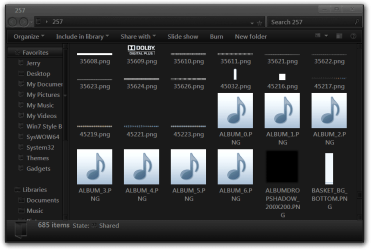
It looks like that is a .png in the 257 folder in wmploc.dll I see many of them.

Jerry
257.png
 

My Computer My Computer

At a glance

Win 7 Pro x64 / Win 10 ProIntel(R) Core(TM) i7-3630QM CPU @ 2.40GHz12 GB(1) Intel(R) HD Graphics 4000 (2) NVIDIA GeFo...
Computer type
Laptop
Computer Manufacturer/Model Number
Sager NP9170
OS
Win 7 Pro x64 / Win 10 Pro
CPU
Intel(R) Core(TM) i7-3630QM CPU @ 2.40GHz
Motherboard
CLEVO P170EM
Memory
12 GB
Graphics Card(s)
(1) Intel(R) HD Graphics 4000 (2) NVIDIA GeForce GTX 675M
Sound Card
(1) Realtek High Definition Audio (2) Intel(R) Display Aud
Monitor(s) Displays
17.3
Screen Resolution
1920x1080
Hard Drives
(1) Samsung 860 EVO 500GB(OS) (1) Samsung 860 EVO 500GB(Data)
Keyboard
Backlite
Antivirus
MSE, Malwarebytes Pro
Browser
Firefox
Other Info
DESKTOP: Custom-built.
OS: Win 10 Pro x64.
CASE: Rosewill R5.
CPU: Intel I5 4670K CPU @ 3.40GHz.
CPU COOLER: Cool Master Hyper 212 EVO.
MOTHERBOARD: Asus Z87-A.
MEMORY: Kingston HyperX 2x4 GB.
GPU: Nvidia Geforce 650 TI.
PSU: Corsair TX750.
DRIVES: (1) Samsung 840 120 GB SSD (2) Western Digital blue 500 GB 7200 RPM.
Bongo,

Thanks,

I was only able to open that file with resource hacker. It does contain many "notes". How do I change the default note to one from that .dll file.

However, I actually would like to add an icon of my own choice. Is that even possible?

Do you know of any software or instructions that would allow me to do so?


Thanks

raiderfan
 

My Computers My Computers

  • At a glance

    Windows 7 Home Premium64 bitAMD Phenom X4 965 3400 mhz 4 core4 GB ddr2 800 mhzATI Radeon 4520
    Computer Manufacturer/Model Number
    Wydan Technologies
    OS
    Windows 7 Home Premium64 bit
    CPU
    AMD Phenom X4 965 3400 mhz 4 core
    Motherboard
    asus M4A88T-M
    Memory
    4 GB ddr2 800 mhz
    Graphics Card(s)
    ATI Radeon 4520
    Sound Card
    On Board
    Monitor(s) Displays
    LG 2040W
    Hard Drives
    500GB Western Digital SATA
    PSU
    Amd Phenom X4 965 3400 MHZ 4 core
    Case
    Logsys Cs305
    Cooling
    AMD Standard
    Keyboard
    Microsoft USB Office Keyboard
    Mouse
    Microsoft USB Mouse
  • At a glance

    Windows 7 64 bitAMD A10-7700K Radeon R7, 10 computer cores 4C...8 gigabytesOn motherboard
    Computer type
    PC/Desktop
    System Manufacturer/Model Number
    Ironside Computers
    OS
    Windows 7 64 bit
    CPU
    AMD A10-7700K Radeon R7, 10 computer cores 4C+6G, 34+
    Motherboard
    ASRock FM2A78 Pro3+
    Memory
    8 gigabytes
    Graphics Card(s)
    On motherboard
    Sound Card
    on motherboard
    Monitor(s) Displays
    LG W2040
    Screen Resolution
    1280 x 1024
    Hard Drives
    Toshiba DT01ACA100 SATA Disc Device
    PSU
    UNK
    Case
    thorex
    Cooling
    UNK
    Keyboard
    Microsoft Office Keyboard
    Mouse
    Microdoft Comfort Mouse 4500
    Internet Speed
    8.32 MBPS upload 12.75 download
    Browser
    Firefox
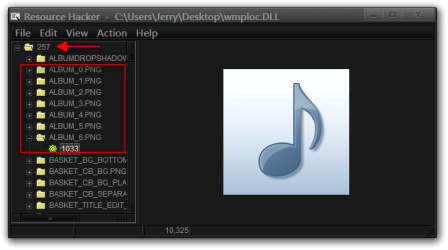
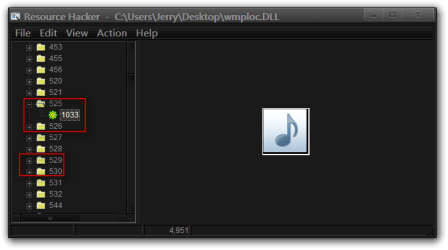
You should be able to use this tutorial http://www.sevenforums.com/tutorials/73191-icons-change-using-resource-hacker.html it will give you the general idea on how to use resource hacker just remember to edit wmploc.dll and it looks like you are using a 64 bit system so it will be in both C:\Windows\System32 and C:\Windows\SysWOW64 and also you will be editing the images in the 257 folder I have highlighted the ones(there are 11 of them) that will need editing by expanding them and clicking on the 1033. Take note that these are .png not .ico so you do not have to build them like an icon is built.
Resource Hacker  -  CUsersJerryDesktopwmploc.DLL.png

Resource Hacker  -  CUsersJerryDesktopwmploc.DLL2.png


To properly change a system file you need to take ownership give yourself permission and rename the old file and then copy in the new one look at Post #6 of this thread will tell you how to do it http://www.sevenforums.com/customization/179502-basic-networking-information.html#post1525656

Jerry
 

My Computer My Computer

At a glance

Win 7 Pro x64 / Win 10 ProIntel(R) Core(TM) i7-3630QM CPU @ 2.40GHz12 GB(1) Intel(R) HD Graphics 4000 (2) NVIDIA GeFo...
Computer type
Laptop
Computer Manufacturer/Model Number
Sager NP9170
OS
Win 7 Pro x64 / Win 10 Pro
CPU
Intel(R) Core(TM) i7-3630QM CPU @ 2.40GHz
Motherboard
CLEVO P170EM
Memory
12 GB
Graphics Card(s)
(1) Intel(R) HD Graphics 4000 (2) NVIDIA GeForce GTX 675M
Sound Card
(1) Realtek High Definition Audio (2) Intel(R) Display Aud
Monitor(s) Displays
17.3
Screen Resolution
1920x1080
Hard Drives
(1) Samsung 860 EVO 500GB(OS) (1) Samsung 860 EVO 500GB(Data)
Keyboard
Backlite
Antivirus
MSE, Malwarebytes Pro
Browser
Firefox
Other Info
DESKTOP: Custom-built.
OS: Win 10 Pro x64.
CASE: Rosewill R5.
CPU: Intel I5 4670K CPU @ 3.40GHz.
CPU COOLER: Cool Master Hyper 212 EVO.
MOTHERBOARD: Asus Z87-A.
MEMORY: Kingston HyperX 2x4 GB.
GPU: Nvidia Geforce 650 TI.
PSU: Corsair TX750.
DRIVES: (1) Samsung 840 120 GB SSD (2) Western Digital blue 500 GB 7200 RPM.
Back
Top