Trying to remove WMP Picture Library

jjavaman

New member
Local time
5:50 PM
Messages
4
Hi,

I've been searching everywhere in this forum and all others but haven't been able to find my particular problem. My video and music libraries work great with no problems.

My picture library shows pretty much every image from every corner of my hard drive bogging down the player pretty badly.

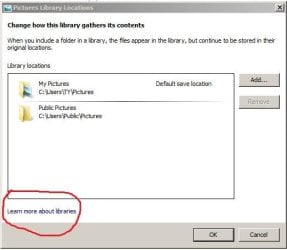
I have never used WMP for viewing pictures so, deciding to remove them, I went to organize > manage libraries > pictures and removed the only two that were there: "My Pictures" and "Public pictures".

They appeared to go away but the pictures remained in the library.

As an experiment, when I added "my pictures" back in as a library folder, it worked fine and I now had duplicates of that folder. I was able to right click individual pictures and delete them (only the second set that I just re-added). When I removed the "my pictures" folder again, I now still have duplicates of those pictures and when I right click and chose delete it does nothing.

The problem seems to be that when you remove a folder from the library, the files remain literally "stuck" in the library. Is this normal? How can these files be removed?

Thanks

Darren
 

My Computer My Computer

OS
Windows 7 Ultimate 32bit
Hi,

I have never used WMP for viewing pictures so, deciding to remove them, I went to organize > manage libraries > pictures and removed the only two that were there: "My Pictures" and "Public pictures".

They appeared to go away but the pictures remained in the library.

Darren


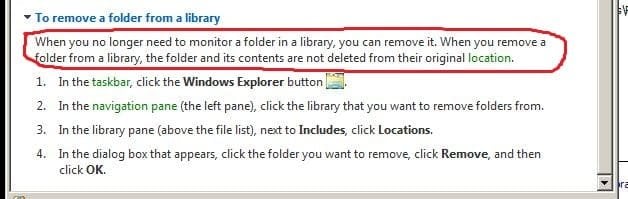
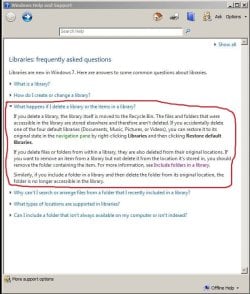
see the attached screenshots--read the 'learn more about' section
 

Attachments

  • Capture3.JPG
    Capture3.JPG
    28.7 KB · Views: 7
  • Capture.JPG
    Capture.JPG
    29.6 KB · Views: 14
  • Capture2.JPG
    Capture2.JPG
    72.1 KB · Views: 10

My Computer My Computer

Computer Manufacturer/Model Number
SALEON model 2.2b
OS
win7 ultimate 32bit
CPU
core2 Extreme QX6850-OCd to 3.15 GHz
Motherboard
ASUS P5G41-M LE
Memory
4 GB
Graphics Card(s)
NVidia 8600 GT
Monitor(s) Displays
23" acer
Hard Drives
one SATA 250GB partitioned equally in half
one SATA 160GB-internal storage
PSU
500W Thermaltake
Case
mini tower
   Tip
select options in wmp and select the library tab, uncheck the box for "delete files from the computer when deleted from the library"


you need to remove them from the library in wmp, to do so from in wmp you click organize/ manage libraries/pictures
then click remove for each location in the window that shows. this will stop wmp monitoring your pictures library in explorer
then you need to clear the pictures that are already showing in the wmp library.
on the left navigation pane in wmp select pictures, this will then show a path at the top of wmp, it will show library
click library at the top and then in the wmp primary views window that shows several icons select the pictures icon then again it will show more icons, all pictures ,tags etc, select "folder"
when all your images finish loading you can select them all and right click and delete.


   Warning
a prompt window will ask you if you wish to delete from the library only or from the library and computer,
BE SURE TO SELECT "DELETE FROM LIBRARY ONLY"
 

My Computer My Computer

Computer Manufacturer/Model Number
Hewlett packard/p6512uk
OS
Microsoft Windows 7 Home Premium 64-bit 7600
CPU
IIx4 amd athelon 635 processor
Motherboard
FOXCONN 2AA9
Memory
2x2gb
Graphics Card(s)
ati radeon HD 5450
Sound Card
(1) Realtek High Definition Audio (2) AMD High Definition
Monitor(s) Displays
samsung lcd tv 32"
Screen Resolution
1360x 768
Hard Drives
(1) WDC WD10 01FAES-60Z2A0 SATA Disk Device (2) Maxtor OneTouch USB Device (3) ST310003 33AS USB Device (4) WD My Book 1111 USB Device
PSU
?
Cooling
air!
Keyboard
wireless hp
Mouse
wireless Hp,optical
Internet Speed
1.10mb/s
Antivirus
MSE
Browser
Firefox
Thanks for the replies, guys.

Tman, unfortunately, that's one of the questions and responses I've been finding everywhere I've been looking and my reason for posting here. I'm not trying to delete the files entirely from my hard drive. I just want to remove them from my WMP library which I also know "how" to do it just that it's not working the way the program is supposed to.

I guess really my question more clearly would be. has anyone else encountered this glitch with the software and if you got it fixed, how did you do it?

Boohbah, you've pretty much nailed it with what I'm trying to do. I have removed the folders through the manage libraries tab (effectively, stopped WMP from monitoring those folders). That function works.

My problem arises when I get to the second part of right clicking and deleting them from the library, clicking delete does nothing. Normally the picture icon should dissapear I don't get an error message or anything, the icons just won't delete.

I've tried stopping WMP in Task Manager/Services then going to Appdata/Local/Microsoft/Media Player/ and deleted the Currentdatabase_372 file, restarted WMP, let the database rebuild itself but that didn't work. I'm trying to avoid having to uninstall WMP. Any other suggestions?

Thanks again for the quick replies.

Darren
 

My Computer My Computer

OS
Windows 7 Ultimate 32bit
When trying to delete, I've also tried "open file location", changed the name of the folder it's drawing from. Going back to libraries, There's a generic icon and error when I try to open the file (because the path is gone due to renaming the folder) but it still won't delete.

The thing that stumps me is that none of these files are showing up in libraries in the explorer window, just in WMP.

...That, coupled with the fact that Libraries was never told to monitor all these other folders to begin with.
 

My Computer My Computer

OS
Windows 7 Ultimate 32bit

My Computer My Computer

Computer Manufacturer/Model Number
Hewlett packard/p6512uk
OS
Microsoft Windows 7 Home Premium 64-bit 7600
CPU
IIx4 amd athelon 635 processor
Motherboard
FOXCONN 2AA9
Memory
2x2gb
Graphics Card(s)
ati radeon HD 5450
Sound Card
(1) Realtek High Definition Audio (2) AMD High Definition
Monitor(s) Displays
samsung lcd tv 32"
Screen Resolution
1360x 768
Hard Drives
(1) WDC WD10 01FAES-60Z2A0 SATA Disk Device (2) Maxtor OneTouch USB Device (3) ST310003 33AS USB Device (4) WD My Book 1111 USB Device
PSU
?
Cooling
air!
Keyboard
wireless hp
Mouse
wireless Hp,optical
Internet Speed
1.10mb/s
Antivirus
MSE
Browser
Firefox
That did it. I was close before. I just didn't delete ALL of the files in the WMP appdata folder before only the Current database_372 file. I re-added the My pictures and public pictures folders to the pictures library and it loaded pictures out of only those folders. Yay!

I still cant figure out why WMP would have loaded everything else in there to begin with but if it happens again I know how to fix it. :)

Many thanks, Boohbah!

Darren
 

My Computer My Computer

OS
Windows 7 Ultimate 32bit
your welcome.
you may find wmp loads quicker now and is more responsive,
 

My Computer My Computer

Computer Manufacturer/Model Number
Hewlett packard/p6512uk
OS
Microsoft Windows 7 Home Premium 64-bit 7600
CPU
IIx4 amd athelon 635 processor
Motherboard
FOXCONN 2AA9
Memory
2x2gb
Graphics Card(s)
ati radeon HD 5450
Sound Card
(1) Realtek High Definition Audio (2) AMD High Definition
Monitor(s) Displays
samsung lcd tv 32"
Screen Resolution
1360x 768
Hard Drives
(1) WDC WD10 01FAES-60Z2A0 SATA Disk Device (2) Maxtor OneTouch USB Device (3) ST310003 33AS USB Device (4) WD My Book 1111 USB Device
PSU
?
Cooling
air!
Keyboard
wireless hp
Mouse
wireless Hp,optical
Internet Speed
1.10mb/s
Antivirus
MSE
Browser
Firefox
Back
Top