Trying to share PC to blu-ray, can see folders, but no files

LifeOfRiley2

New member
Local time
2:36 AM
Messages
1
I'm trying to set up DLNA sharing from my PC to my Sony BD S390 blu-ray. I have a Netgear WNDR4000 router, and both the PC and blu-ray are hard-wired to it.

When I try to access the music files through the blu-ray player, it sees the shared library I created, and the folder names in my music library are visible (artist, album, etc.), but when I click through those, no files come up.

I've tried setting everything I can to allow sharing, and even turned the firewall off, but nothing has worked. One thing I have noticed is that when I right click on a folder or file and go to "Share With," after I change the setting from "Nobody" to "homegroup," it doesn't do anything. If I go back and click again to the same file, it will come up as sharing with "Nobody."

Any suggestions? Thanks in advance.
 

My Computer My Computer

At a glance

Windows 7 64 Bit
Computer type
PC/Desktop
Computer Manufacturer/Model Number
Dell
OS
Windows 7 64 Bit
You need to load software on your computer to share the directories you want your blueray device to see. I have the same setup on my computer at home so that I can download movies and music and play them on my Samsung blueray player.

Go to this website, Serviio media server, and download the FREE program. You then tell the program what folders you want all of your devices to see. It is very simple. Good Luck!
 

My Computer My Computer

At a glance

Win7 64bit, Win7 32bit, Win Server 2008/2003
Computer type
PC/Desktop
Computer Manufacturer/Model Number
HP, DELL
OS
Win7 64bit, Win7 32bit, Win Server 2008/2003
I'm trying to set up DLNA sharing from my PC to my Sony BD S390 blu-ray. I have a Netgear WNDR4000 router, and both the PC and blu-ray are hard-wired to it.

When I try to access the music files through the blu-ray player, it sees the shared library I created, and the folder names in my music library are visible (artist, album, etc.), but when I click through those, no files come up.

I've tried setting everything I can to allow sharing, and even turned the firewall off, but nothing has worked. One thing I have noticed is that when I right click on a folder or file and go to "Share With," after I change the setting from "Nobody" to "homegroup," it doesn't do anything. If I go back and click again to the same file, it will come up as sharing with "Nobody."

Any suggestions? Thanks in advance.

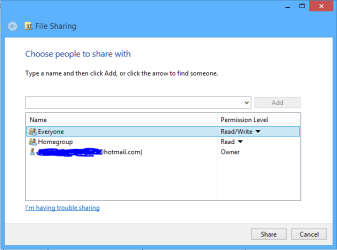
In order to share folders from a Homegroup machine with other machines or players not included in the Homegroup you will need to use the "Everyone" share in the Homegroup style share settings, picture of this setting below. You need to right click the folder, choose "Share With" then "Specific People" then click on the drop down list and add "Everyone" read/write access as desired.
 

Attachments

  • share with Everyone.PNG
    share with Everyone.PNG
    6.7 KB · Views: 0

My Computer My Computer

At a glance

Windows 7 Ult, Windows 8.1 Pro,Q9650-4.275GHz, E8600 4.5GHz, E6750-3.8GHzG.Skill PC2 9600 1200Mhz 5 5 5 15 2TGTX480
Computer type
PC/Desktop
Computer Manufacturer/Model Number
Home built
OS
Windows 7 Ult, Windows 8.1 Pro,
CPU
Q9650-4.275GHz, E8600 4.5GHz, E6750-3.8GHz
Motherboard
Evga 780i FTW
Memory
G.Skill PC2 9600 1200Mhz 5 5 5 15 2T
Graphics Card(s)
GTX480
Sound Card
Asus Xonar D2
Monitor(s) Displays
HannsG
Screen Resolution
1680X1050
Hard Drives
GSkill Phoenix Pro 120GB SSD
PSU
ThermalTake Toughpower 1000Watt modular
Case
ThermalTake XaserV
Cooling
Xigmatek S1283
Keyboard
Logitech G15
Mouse
Logitech G9
Internet Speed
T1
Back
Top