Trying to shrink partition

linda092

New member
Local time
1:52 AM
Messages
12
Hello,
I have a new computer with a HD of 916 GB (approx). I am coming from XP, and have used Paragon's partitioner for years. I like to use programs included with an os if possible, and have read good things about Win7's capability with partition management.

Yes, I hit the wall of not being able to shrink past about halfway, due to unmovable files. I've been reading a lot, and found this thread. It tells me to turn off System Restore and virtual memory. Well, I tried turning off System Restore: that was not enough: I still can't shrink appropriately.

My next step according to that thread is to turn off virtual memory. With XP, I usually did not allow Windows to manage virtual memory, but specified it myself. I'm a little scared about turning it off altogether. Is that safe to do? I have barely anything installed, mainly just the OS. If I should not turn it off, then what size should I use? My OS is Win7 64 bit, and my ram is 8gb.

One of the reasons I need to be careful with what I do is I wasn't able to create bootable restore disks. But that will be in another post, once I get this going :-)
 

My Computer

Computer Manufacturer/Model Number
Dell XPS Studio
OS
Windows 7 64
CPU
i5-750
Memory
8 gb
Graphics Card(s)
Radeon 4800 or so
Sound Card
old

My Computer

Computer Manufacturer/Model Number
Custom
OS
Windows 7 Professional x64
CPU
Intel i7 2600K OC'd @ 4620 MHz
Motherboard
Asus P8Z68-V Pro
Memory
16GB GSkill Sniper 2133 Mhz (4x4GB)
Graphics Card(s)
EVGA GeForce GTX 480 SuperClocked+
Sound Card
Realtek High Definition Audio
Monitor(s) Displays
2x Acer S273HLbmii 27"
Screen Resolution
2 x 1920x1080
Hard Drives
64GB Crucial M4 SSD

Storage: Hitachi 1TB 5400RPM, Samsung 1.5TB 5400RPM
PSU
Corsair HW Series 750w (modular)
Case
Cooler Master HAF 932 Advanced Blue Edition
Cooling
CM Hyper 212+ CPU cooler, 3x 230mm + 1x 140mm case fans
Keyboard
Logitech MK320 (wireless)
Mouse
Logitech MK320 (wireless)
Internet Speed
30 Mb/s : 2 Mb/s
Wow, that was a fast reply! Thanks Jonathan for the welcome and the reply. That makes sense to shut off Hibernate... I'll try this tomorrow when I have the Memorial Weekend to tinker.
 

My Computer

Computer Manufacturer/Model Number
Dell XPS Studio
OS
Windows 7 64
CPU
i5-750
Memory
8 gb
Graphics Card(s)
Radeon 4800 or so
Sound Card
old
Okay, keep us posted. :)

You can also use the free Partition Wizard to shrink it. In fact, you may consider doing that now, instead of monkeying around with Disk Management.
 

My Computer

Computer Manufacturer/Model Number
Custom
OS
Windows 7 Professional x64
CPU
Intel i7 2600K OC'd @ 4620 MHz
Motherboard
Asus P8Z68-V Pro
Memory
16GB GSkill Sniper 2133 Mhz (4x4GB)
Graphics Card(s)
EVGA GeForce GTX 480 SuperClocked+
Sound Card
Realtek High Definition Audio
Monitor(s) Displays
2x Acer S273HLbmii 27"
Screen Resolution
2 x 1920x1080
Hard Drives
64GB Crucial M4 SSD

Storage: Hitachi 1TB 5400RPM, Samsung 1.5TB 5400RPM
PSU
Corsair HW Series 750w (modular)
Case
Cooler Master HAF 932 Advanced Blue Edition
Cooling
CM Hyper 212+ CPU cooler, 3x 230mm + 1x 140mm case fans
Keyboard
Logitech MK320 (wireless)
Mouse
Logitech MK320 (wireless)
Internet Speed
30 Mb/s : 2 Mb/s
Use Perfect DIsk 10 trial's Offline Defragger to move System FIles blocking shrinkage.

It is likely free Partition Wizard bootable CD will shrink it now anyway, but as with all partition managers besides DIsk Mgmt, you need to back up your files because there is a risk of failure in Resizing operations.

However in hundreds of resizing operations we have helped with here, there hasn't been a failure yet with PW which is by far the best manager for Win7.
 
Ok, here is where I am. I turned off Hibernate (but I'm on a desktop so I'm not sure that did anything), turned off System Restore, and am using no page file. I rebooted to make sure my changes held, and they did.
I got both programs recommended here. Perfect Disk defrag is a nice program, and it defragged everything except 2 blocks labelled as Metafiles.
I then used Partition Wizard as a bootable CD, thinking that would be best, and it said my drive was too fragmented to do as I wanted.
So I booted into Win7 again (checked again to see the unmoved files according to Perfectdisk, they are still sitting there in the middle of the Drive Map. Tried to run PW again, and it said it had to run on boot, so I let it. Same message: I need to defrag.

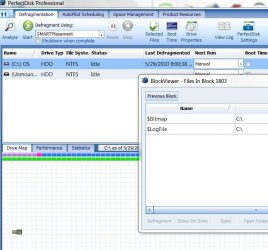
Apparently those 2 blocks are hanging me up. When I look at what files they are, its a list of a bunch of them. Most have the $ in front of the name.

Any suggestions?
 
Last edited:

My Computer

Computer Manufacturer/Model Number
Dell XPS Studio
OS
Windows 7 64
CPU
i5-750
Memory
8 gb
Graphics Card(s)
Radeon 4800 or so
Sound Card
old
Have you tried Paragon?

The new free version doesn't have lots of functions - but it works very well.

The snag is, the free Paragon doesn't come with a boot disc.

If you have 10 mins to spare, I suggest you do this:

1. Install Free Partition Manager Express - Leading partitioning software ...

2. Copy the entire contents of the Win7 32BIT install disc ( or 32BIT Recovery disc ) to your HD.

3. D/l this , Parpecreators.zip - Windows Live
( as always , rt click it >properties>unblock>apply>ok ). Unzip it and run the self extractor.

4. Rt click and RUN AS ADMIN on the 7 pecreator.cmd. In 2 mins you will have a pe3 boot disc.
 
Last edited:

My Computers

System One System Two

  • Computer type
    PC/Desktop
    OS
    7 X64
    CPU
    i5 8400
    Motherboard
    gigabyte b365m ds3h
    Memory
    2x8gb 3200mhz
    Hard Drives
    various
    PSU
    pure power 11 400w cm
    Case
    Coolermaster
    Cooling
    cryorig m9i
  • Computer type
    PC/Desktop
    OS
    7x64
    CPU
    g5400
    Motherboard
    ga b365m ds3h
    Memory
    8gb ddr4 2400
    PSU
    xfx pro 450w
Ok, here is where I am. I turned off Hibernate (but I'm on a desktop so I'm not sure that did anything), turned off System Restore, and am using no page file. I rebooted to make sure my changes held, and they did.
I got both programs recommended here. Perfect Disk defrag is a nice program, and it defragged everything except 2 blocks labelled as Metafiles.
I then used Partition Wizard as a bootable CD, thinking that would be best, and it said my drive was too fragmented to do as I wanted.
So I booted into Win7 again (checked again to see the unmoved files according to Perfectdisk, they are still sitting there in the middle of the Drive Map. Tried to run PW again, and it said it had to run on boot, so I let it. Same message: I need to defrag.

Apparently those 2 blocks are hanging me up. When I look at what files they are, its a list of a bunch of them. Most have the $ in front of the name.

Any suggestions?

Linda,
Strange since PerfectDisk is a good defragger.

My favorite defragger is Contig Contig


Run until is show 0 files defragged. Probably the third run.
use following command lines:
c:
cd \
contig -c -q c:\


If after this Partition Wizard still says you need to defrag, then I've another trick up the sleeve.


My Computer

Computer Manufacturer/Model Number
Toshiba Satellite S875D-S7239 laptop
OS
MS Windows 7 Ultimate SP1 64-bit
CPU
AMD A10-4600M
Motherboard
AMD Pumori (Socket FT1)
Memory
6.00 GB Dual-Channel DDR3 @ 798MHz (11-11-12-28)
Graphics Card(s)
AMD Radeon HD 7660G
Sound Card
High Definition Audio Device
Monitor(s) Displays
Generic PnP Monitor (1600x900@60Hz)
Screen Resolution
1600x900@60Hz
Hard Drives
SSD 119GB Corsair CSSD-V128GB2 ATA Device
Keyboard
Standard PS/2 Keyboard
Mouse
HP Wireless Optical Mobile Mouse Model FHA-3410
Internet Speed
What the local pub, local coffee shop offers.
Other Info
Optical Drive:MATSHITA BD-CMB UJ160B ATA Device


Also have an Asus ha1002xp netbook with Win 7 Ultimate installed.
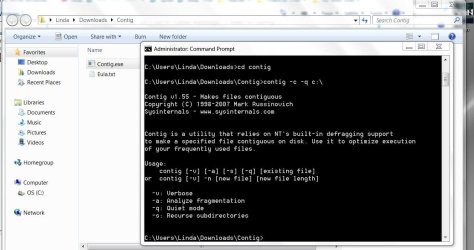
I just tried the contig advice (I have used Paragon many times in the past, but since I have already installed PW I don't really want to be trying tons of new software unless necessary)

It didn't seem to do anything. Here is my snippet:
 

Attachments

  • contig.JPG
    contig.JPG
    91 KB · Views: 36

My Computer

Computer Manufacturer/Model Number
Dell XPS Studio
OS
Windows 7 64
CPU
i5-750
Memory
8 gb
Graphics Card(s)
Radeon 4800 or so
Sound Card
old
Oh, and here is a pic of the two blocks that won't defrag...
 

Attachments

  • defrag1.JPG
    defrag1.JPG
    184.6 KB · Views: 26
  • defrag2.JPG
    defrag2.JPG
    77.7 KB · Views: 30

My Computer

Computer Manufacturer/Model Number
Dell XPS Studio
OS
Windows 7 64
CPU
i5-750
Memory
8 gb
Graphics Card(s)
Radeon 4800 or so
Sound Card
old
A couple of things:
1) I made a mistake and listed a -c option. Should have been -s.
2) please enter the other commands listed. In other words, there are 3 commands:
C:
cd \
c:\users\linda\download\contig\contig -s -q c:\

I also have shown the path you are using. On my system contig is in the system32 folder which is why I didn't need a full path statement.
 

My Computer

Computer Manufacturer/Model Number
Toshiba Satellite S875D-S7239 laptop
OS
MS Windows 7 Ultimate SP1 64-bit
CPU
AMD A10-4600M
Motherboard
AMD Pumori (Socket FT1)
Memory
6.00 GB Dual-Channel DDR3 @ 798MHz (11-11-12-28)
Graphics Card(s)
AMD Radeon HD 7660G
Sound Card
High Definition Audio Device
Monitor(s) Displays
Generic PnP Monitor (1600x900@60Hz)
Screen Resolution
1600x900@60Hz
Hard Drives
SSD 119GB Corsair CSSD-V128GB2 ATA Device
Keyboard
Standard PS/2 Keyboard
Mouse
HP Wireless Optical Mobile Mouse Model FHA-3410
Internet Speed
What the local pub, local coffee shop offers.
Other Info
Optical Drive:MATSHITA BD-CMB UJ160B ATA Device


Also have an Asus ha1002xp netbook with Win 7 Ultimate installed.
You will find Rejzor's gui is a lot easier when using contig :

View attachment RejzorContigGui.zip

I just tried the contig advice (I have used Paragon many times in the past, but since I have already installed PW I don't really want to be trying tons of new software unless necessary)

You can lead a horse to water....
 

My Computers

System One System Two

  • Computer type
    PC/Desktop
    OS
    7 X64
    CPU
    i5 8400
    Motherboard
    gigabyte b365m ds3h
    Memory
    2x8gb 3200mhz
    Hard Drives
    various
    PSU
    pure power 11 400w cm
    Case
    Coolermaster
    Cooling
    cryorig m9i
  • Computer type
    PC/Desktop
    OS
    7x64
    CPU
    g5400
    Motherboard
    ga b365m ds3h
    Memory
    8gb ddr4 2400
    PSU
    xfx pro 450w
siw
I found that PowerDefragmenter did not work well with Win7.
Perhaps he has fixed that.
Later today, I'll give it a second chance.
 

My Computer

Computer Manufacturer/Model Number
Toshiba Satellite S875D-S7239 laptop
OS
MS Windows 7 Ultimate SP1 64-bit
CPU
AMD A10-4600M
Motherboard
AMD Pumori (Socket FT1)
Memory
6.00 GB Dual-Channel DDR3 @ 798MHz (11-11-12-28)
Graphics Card(s)
AMD Radeon HD 7660G
Sound Card
High Definition Audio Device
Monitor(s) Displays
Generic PnP Monitor (1600x900@60Hz)
Screen Resolution
1600x900@60Hz
Hard Drives
SSD 119GB Corsair CSSD-V128GB2 ATA Device
Keyboard
Standard PS/2 Keyboard
Mouse
HP Wireless Optical Mobile Mouse Model FHA-3410
Internet Speed
What the local pub, local coffee shop offers.
Other Info
Optical Drive:MATSHITA BD-CMB UJ160B ATA Device


Also have an Asus ha1002xp netbook with Win 7 Ultimate installed.
I just used it - worked ok. V3 , I think - may be newer than the one you tried.

Karl, could you check those skydrive links - are you able to d/l them ? ( you don't have to complete the d/l - just see if it lets you )
 

My Computers

System One System Two

  • Computer type
    PC/Desktop
    OS
    7 X64
    CPU
    i5 8400
    Motherboard
    gigabyte b365m ds3h
    Memory
    2x8gb 3200mhz
    Hard Drives
    various
    PSU
    pure power 11 400w cm
    Case
    Coolermaster
    Cooling
    cryorig m9i
  • Computer type
    PC/Desktop
    OS
    7x64
    CPU
    g5400
    Motherboard
    ga b365m ds3h
    Memory
    8gb ddr4 2400
    PSU
    xfx pro 450w
siw,
Excellent. I just downloaded it again and will try again.
Will get back with results.
Karl
 

My Computer

Computer Manufacturer/Model Number
Toshiba Satellite S875D-S7239 laptop
OS
MS Windows 7 Ultimate SP1 64-bit
CPU
AMD A10-4600M
Motherboard
AMD Pumori (Socket FT1)
Memory
6.00 GB Dual-Channel DDR3 @ 798MHz (11-11-12-28)
Graphics Card(s)
AMD Radeon HD 7660G
Sound Card
High Definition Audio Device
Monitor(s) Displays
Generic PnP Monitor (1600x900@60Hz)
Screen Resolution
1600x900@60Hz
Hard Drives
SSD 119GB Corsair CSSD-V128GB2 ATA Device
Keyboard
Standard PS/2 Keyboard
Mouse
HP Wireless Optical Mobile Mouse Model FHA-3410
Internet Speed
What the local pub, local coffee shop offers.
Other Info
Optical Drive:MATSHITA BD-CMB UJ160B ATA Device


Also have an Asus ha1002xp netbook with Win 7 Ultimate installed.
You will find Rejzor's gui is a lot easier when using contig :

View attachment 75610

I just tried the contig advice (I have used Paragon many times in the past, but since I have already installed PW I don't really want to be trying tons of new software unless necessary)

You can lead a horse to water....

Are you calling me a horse, siw2? :D

Anyway, the contig did not work. Those 2 blocks I have pictured are still there. I'm using PerfectDisk to defrag, and PartitionWizard to partition. PW just does not want to move those files. And the Win7 app won't do it either.

So let's see what up that sleeve...
 

My Computer

Computer Manufacturer/Model Number
Dell XPS Studio
OS
Windows 7 64
CPU
i5-750
Memory
8 gb
Graphics Card(s)
Radeon 4800 or so
Sound Card
old
Oh, and here is a pic of the two blocks that won't defrag...

Linda, did you do the PD10 offline defrag?

Rightclick on HD and choose "System" as I recall.

I'm using PD Professional 11 Trial. I'm not sure what you mean by offline defrag. Oh, unless you mean Boot Time? No, I didn't do that, I'll go try it now...

...Back again, no good. It got me down to one block, but I tried PW and got the same result. Maybe it's time to get rid of PD11 and try Defraggler?
 
Last edited:

My Computer

Computer Manufacturer/Model Number
Dell XPS Studio
OS
Windows 7 64
CPU
i5-750
Memory
8 gb
Graphics Card(s)
Radeon 4800 or so
Sound Card
old
Problem solved. I did it in steps. I used Win7 Shrink Volume to shrink as much as it would let me. Then i used PD11 offline to defrag what it would. Then i booted back into Win7, and used PD to analyze and see if those end files were gone. If they were, then I immediately went back to Win7 Shrink disk to shrink what I could.

Repeat repeat repeat. I had to do it about 4 times to get my partition down to 70GB. I plan on creating a Data partition and an Apps partition, maybe a few Linux partitions, so hopefully Win7 will have enough room with 70GB.

Thanks for the help guys, maybe this process can tell you what was hanging me up?
 

My Computer

Computer Manufacturer/Model Number
Dell XPS Studio
OS
Windows 7 64
CPU
i5-750
Memory
8 gb
Graphics Card(s)
Radeon 4800 or so
Sound Card
old
Thanks for the help guys, maybe this process can tell you what was hanging me up?
The MFT (master file table) was hanging you up. That is usually always sitting in about the middle of the partition. But with PW you should have been able to move it. Here is some more info.
 

My Computer

Computer Manufacturer/Model Number
HP, Dell, Gateway, Toshiba - 4 laptops and 2 desktops
OS
Vista, Windows7, Mint Mate, Zorin, Windows 8
CPU
from 1.6GHz Duo to i7
Monitor(s) Displays
2x HP w2207
Hard Drives
5x HDD, 7x SSD, 12x Externals
Keyboard
with trackball - no mices
Mouse
Trackball mice
Internet Speed
DSL 6000
Back
Top