Solved Trying to understand my Boot Options - USB listed twice - which one?

steveeyes

New member
Local time
1:33 PM
Messages
19
I have a gigabyte z97 series mother board. By pressing f12 I can choose my boot options instead of going into setup.

To boot from a USB I have to have a USB in a USB port. So I put my USB in a port, reboot, press F12 to get my boot options.

The options look like this:

PO: Samsung SSD 850 EVO
P2: ATAPI iHAS124E
P1: WDS WD10003FZEX
UEFI: UFD 3.0 Silicon-Power 32G1100
UFD: 3.0 Silicon-Power 32G1100

Pretty sure the last two listings is for my USB port.

But why does it list it twice when I only have one USB in my port?

Which one would I choose for booting off of a USB flash drive?

Thanks

p.s. not sure if it makes a difference but I will be booting from a USB stick with windows 10 installed.
Also when I go into my setup it says I have a "Gigabyte UEFI Dual Bios" if that helps.
 

My Computer My Computer

At a glance

windows 732GB
Computer type
PC/Desktop
Computer Manufacturer/Model Number
cpu solutions
OS
windows 7
Memory
32GB
Monitor(s) Displays
ASUS
Hard Drives
1TB HDD
380 SDD
Cooling
Liquid
Keyboard
Logitech
Mouse
Logitech
Internet Speed
Cable
Antivirus
Norton
Browser
Firefox
Depends if you want to boot in efi mode or bios mode.

If you installed windows in efi mode, then choose that option and vice versa
 

My Computers My Computers

  • At a glance

    7 X64i5 84002x8gb 3200mhz
    Computer type
    PC/Desktop
    OS
    7 X64
    CPU
    i5 8400
    Motherboard
    gigabyte b365m ds3h
    Memory
    2x8gb 3200mhz
    Hard Drives
    various
    PSU
    pure power 11 400w cm
    Case
    Coolermaster
    Cooling
    cryorig m9i
  • At a glance

    7x64g54008gb ddr4 2400
    Computer type
    PC/Desktop
    OS
    7x64
    CPU
    g5400
    Motherboard
    ga b365m ds3h
    Memory
    8gb ddr4 2400
    PSU
    xfx pro 450w
Hmmm, I guess I'm still confused. This will be a new installation of windows 10 on a new ssd drive. I guess I'll ask my questions again. Please note that I'm a real novice so these terms I'm just now learning about.

1. In my post above I list what my boot options were. Why does it list it twice when I only have one USB plugged into my usb port? My gut says it has something to do with BIOS mode v.s. EFI mode as posted above. I don't understand the difference to know which is best.

Is there a way to find out how my current mode of booting in windows 7 is?

2. From the two USB options in my boot options (pressing f12) above, is one choose better than the other? When I load my boot options by pressing F12 it says at the top of my options Gigabyte UEFI Dual Bios

Again sorry but this is so foreign to me that it seems like a completely new language. I tried googling for an answer but had no luck.
 

My Computer My Computer

At a glance

windows 732GB
Computer type
PC/Desktop
Computer Manufacturer/Model Number
cpu solutions
OS
windows 7
Memory
32GB
Monitor(s) Displays
ASUS
Hard Drives
1TB HDD
380 SDD
Cooling
Liquid
Keyboard
Logitech
Mouse
Logitech
Internet Speed
Cable
Antivirus
Norton
Browser
Firefox
If windows is installed on a disk with mbr partition style - it is bios.

If windows is installed on a disk with gpt partition style - it is efi. Windows can only boot under efi from a gpt disk.

(As always, there are geek workarounds to many of these things - but you probably don't want to muck around with that stuff.)

If you boot the windows installation media under efi, it will tell you it can't install to mbr disk. If the disk is not initialized, it will automatically initialize it to efi and create the necessary partitions during installation.

If you are booting up recovery\repair media you need to use the correct mode or the windows system recovery tools will not function properly.

This is why you have a choice of modes to boot from usb.

There are two bios modes - the original has been around a long time and is simply called bios - a more recent thing is called efi or uefi.

There are two disk partitioning styles - mbr and gpt.

it is confusing because both modes support both partition styles. For example, it is possible to have windows installed in bios mode on an mbr disk and at the same time have a data disk which is partitioned gpt style ( which is required to access all availabe space on disks larger than 2tb). There is a 2tb limit on the size of disk that mbr partition style can address.
 
Last edited:

My Computers My Computers

  • At a glance

    7 X64i5 84002x8gb 3200mhz
    Computer type
    PC/Desktop
    OS
    7 X64
    CPU
    i5 8400
    Motherboard
    gigabyte b365m ds3h
    Memory
    2x8gb 3200mhz
    Hard Drives
    various
    PSU
    pure power 11 400w cm
    Case
    Coolermaster
    Cooling
    cryorig m9i
  • At a glance

    7x64g54008gb ddr4 2400
    Computer type
    PC/Desktop
    OS
    7x64
    CPU
    g5400
    Motherboard
    ga b365m ds3h
    Memory
    8gb ddr4 2400
    PSU
    xfx pro 450w
If you are about to install win10 you will have to decide which mode you want. Obviously your mobo bios can do either. Most mobos since about 2010 can.

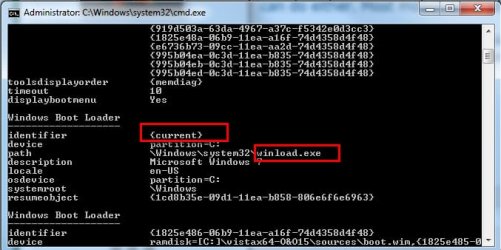
If you are unsure you can just look at the disk you are booted into , or you can run bcdedit at command prompt. If the loader is listed as winload.exe that is bios. If it is listed as winload.efi, that is efi.

bcdedit-winload.jpg
 

My Computers My Computers

  • At a glance

    7 X64i5 84002x8gb 3200mhz
    Computer type
    PC/Desktop
    OS
    7 X64
    CPU
    i5 8400
    Motherboard
    gigabyte b365m ds3h
    Memory
    2x8gb 3200mhz
    Hard Drives
    various
    PSU
    pure power 11 400w cm
    Case
    Coolermaster
    Cooling
    cryorig m9i
  • At a glance

    7x64g54008gb ddr4 2400
    Computer type
    PC/Desktop
    OS
    7x64
    CPU
    g5400
    Motherboard
    ga b365m ds3h
    Memory
    8gb ddr4 2400
    PSU
    xfx pro 450w
You could have win7 installed in bios mode on one disk, and win10 installed in efi mode on a different disk.
But that could be a bit awkward when it comes to selecting which disk to boot into.


There is probably a "both" setting as default in your bios configuration. Press something at startup - probably F2 for gigabyte and you can have a look round your bios settings and check.


You haven't listed the mobo in your specs.


Windows Setup: Installing using the MBR or GPT partition style | Microsoft Docs

Boot to UEFI Mode or Legacy BIOS mode | Microsoft Docs
 
Last edited:

My Computers My Computers

  • At a glance

    7 X64i5 84002x8gb 3200mhz
    Computer type
    PC/Desktop
    OS
    7 X64
    CPU
    i5 8400
    Motherboard
    gigabyte b365m ds3h
    Memory
    2x8gb 3200mhz
    Hard Drives
    various
    PSU
    pure power 11 400w cm
    Case
    Coolermaster
    Cooling
    cryorig m9i
  • At a glance

    7x64g54008gb ddr4 2400
    Computer type
    PC/Desktop
    OS
    7x64
    CPU
    g5400
    Motherboard
    ga b365m ds3h
    Memory
    8gb ddr4 2400
    PSU
    xfx pro 450w
mobo.jpg


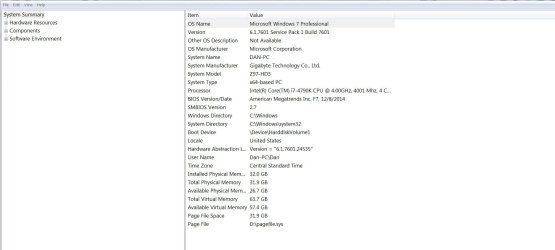
Wow..thank you...great info. Not sure if the attached is my mobo specs or not. Thanks again.
 

My Computer My Computer

At a glance

windows 732GB
Computer type
PC/Desktop
Computer Manufacturer/Model Number
cpu solutions
OS
windows 7
Memory
32GB
Monitor(s) Displays
ASUS
Hard Drives
1TB HDD
380 SDD
Cooling
Liquid
Keyboard
Logitech
Mouse
Logitech
Internet Speed
Cable
Antivirus
Norton
Browser
Firefox
I have a gigabyte z97 series mother board. By pressing f12 I can choose my boot options instead of going into setup.

To boot from a USB I have to have a USB in a USB port. So I put my USB in a port, reboot, press F12 to get my boot options.

The options look like this:

PO: Samsung SSD 850 EVO
P2: ATAPI iHAS124E
P1: WDS WD10003FZEX
UEFI: UFD 3.0 Silicon-Power 32G1100
UFD: 3.0 Silicon-Power 32G1100

Pretty sure the last two listings is for my USB port.

But why does it list it twice when I only have one USB in my port?

Which one would I choose for booting off of a USB flash drive?

Thanks

p.s. not sure if it makes a difference but I will be booting from a USB stick with windows 10 installed.
Also when I go into my setup it says I have a "Gigabyte UEFI Dual Bios" if that helps.

As I understood, the USB drive is a Win 10 installation disk.
As SIW2 already explained, you can boot this installation disk into 2 ways: Legacy or UEFI

Installation
Both modes install same Win 10 but in different modes:
- If you boot as Legacy it will install Win 10 as Legacy - MBR (the disk will be MBR style)
- If you boot as UEFI it will install Win 10 as UEFI - GPT (the disk will be GPT style)

Win 10 (or Win 7) will work the same way on a Legacy or UEFI. I use UEFI - GPT as it is more up to date.

Maintenance
To repair an installation you must boot in the same mode you have installed.
- If you installed Win 10 in Legacy - MBR you must boot the Win 10 installation disk as Legacy.
- If you installed Win 10 in UEFI- GPT you must boot the Win 10 installation disk as UEFI.

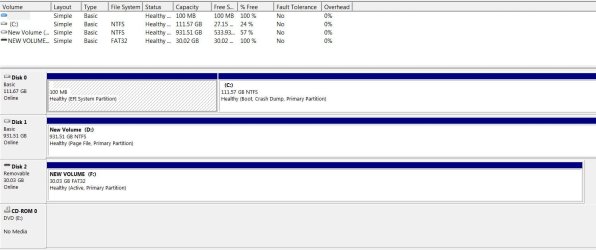
Can you please post an image of Disk Manager (C:\Windows\System32\diskmgmt.msc) to see what you have?
Do you plan to install Win 10 in the same disk you have Win 7 (dual boot)?

PS.: Gigabyte UEFI Dual Bios means that you have the MoBo firmware in two memory chips. It's a Gigabyte characteristic. If one gets corrupted it will use the other. Nothing to do with installation mode.
 

My Computers My Computers

  • At a glance

    Windows 7 HP 64i5 6600K - 800MHz to 4200MHz4+4G GSkill DDR4 3000IG - Intel 530
    Computer type
    PC/Desktop
    Computer Manufacturer/Model Number
    custom build
    OS
    Windows 7 HP 64
    CPU
    i5 6600K - 800MHz to 4200MHz
    Motherboard
    GA-Z170-HD3P
    Memory
    4+4G GSkill DDR4 3000
    Graphics Card(s)
    IG - Intel 530
    Monitor(s) Displays
    Samsung 226BW
    Screen Resolution
    1680x1050
    Hard Drives
    (1) -1 SM951 – 128GB M.2 AHCI PCIe SSD drive for Windows 7 and Lubuntu
    (2) -1 WD SATA 3 - 1T for Data
    (3) -1 WD SATA 3 - 1T for backup
    PSU
    Thermaltake 450W TR2 gold
    Keyboard
    Old and good Chicony mechanical keyboard
    Mouse
    Logitech mX performance - 9 buttons (had to disable some)
    Internet Speed
    500Mb/s
    Browser
    Firefox 64
    Other Info
    TinyWall firewall
  • At a glance

    Windows 7 Proi7-4500U 800MHz to 3.0GHz(4+4)G DDR3 1600IG intel 4400 + NVIDIA GeForce GT 745M
    Computer type
    Laptop
    System Manufacturer/Model Number
    Asus Q550LF
    OS
    Windows 7 Pro
    CPU
    i7-4500U 800MHz to 3.0GHz
    Motherboard
    Asus Q550LF
    Memory
    (4+4)G DDR3 1600
    Graphics Card(s)
    IG intel 4400 + NVIDIA GeForce GT 745M
    Sound Card
    Realtek
    Monitor(s) Displays
    LG Display LP156WF4-SPH1
    Screen Resolution
    1920 x 1080
    Hard Drives
    BX500 120G SSD for Windows and programs +
    1T HDD for data
    Internet Speed
    500 Mb/s
    Browser
    Firefox
    Other Info
    TinyWall firewall
DiskMgt.jpg


Thanks for the info. Appreciate it. Crossing my fingers the attachment is what you are looking for.

Based on the feedback from you all, it seems I can go either way: UEFI or Legacy.

When I Press F12 for my boot options I get the following:

The options look like this:

PO: Samsung SSD 850 EVO
P2: ATAPI iHAS124E
P1: WDS WD10003FZEX
UEFI: UFD 3.0 Silicon-Power 32G1100
UFD: 3.0 Silicon-Power 32G1100

The bottom 2 is for my USB so if I understand you all, I can use either one when I install my windows 10.


Thanks
 

My Computer My Computer

At a glance

windows 732GB
Computer type
PC/Desktop
Computer Manufacturer/Model Number
cpu solutions
OS
windows 7
Memory
32GB
Monitor(s) Displays
ASUS
Hard Drives
1TB HDD
380 SDD
Cooling
Liquid
Keyboard
Logitech
Mouse
Logitech
Internet Speed
Cable
Antivirus
Norton
Browser
Firefox
Your Win 7 disk is UEFI - GPT.
Your D: disk is MBR (but you can convert to GPT)
Do you plan to install Win 10 in the same disk you have Win 7 (dual boot)?
Is \Users on the D: drive?
 

My Computers My Computers

  • At a glance

    Windows 7 HP 64i5 6600K - 800MHz to 4200MHz4+4G GSkill DDR4 3000IG - Intel 530
    Computer type
    PC/Desktop
    Computer Manufacturer/Model Number
    custom build
    OS
    Windows 7 HP 64
    CPU
    i5 6600K - 800MHz to 4200MHz
    Motherboard
    GA-Z170-HD3P
    Memory
    4+4G GSkill DDR4 3000
    Graphics Card(s)
    IG - Intel 530
    Monitor(s) Displays
    Samsung 226BW
    Screen Resolution
    1680x1050
    Hard Drives
    (1) -1 SM951 – 128GB M.2 AHCI PCIe SSD drive for Windows 7 and Lubuntu
    (2) -1 WD SATA 3 - 1T for Data
    (3) -1 WD SATA 3 - 1T for backup
    PSU
    Thermaltake 450W TR2 gold
    Keyboard
    Old and good Chicony mechanical keyboard
    Mouse
    Logitech mX performance - 9 buttons (had to disable some)
    Internet Speed
    500Mb/s
    Browser
    Firefox 64
    Other Info
    TinyWall firewall
  • At a glance

    Windows 7 Proi7-4500U 800MHz to 3.0GHz(4+4)G DDR3 1600IG intel 4400 + NVIDIA GeForce GT 745M
    Computer type
    Laptop
    System Manufacturer/Model Number
    Asus Q550LF
    OS
    Windows 7 Pro
    CPU
    i7-4500U 800MHz to 3.0GHz
    Motherboard
    Asus Q550LF
    Memory
    (4+4)G DDR3 1600
    Graphics Card(s)
    IG intel 4400 + NVIDIA GeForce GT 745M
    Sound Card
    Realtek
    Monitor(s) Displays
    LG Display LP156WF4-SPH1
    Screen Resolution
    1920 x 1080
    Hard Drives
    BX500 120G SSD for Windows and programs +
    1T HDD for data
    Internet Speed
    500 Mb/s
    Browser
    Firefox
    Other Info
    TinyWall firewall
I plan on replacing the current SSD drive (drive C) with a 2TB SSD. So what I will be doing is a clean install on to a new SSD.

My biggest concern is that I properly install Windows 10 on to my new 2TB SSD which will become drive C.

So when I install windows 10 to my 2TB SSD, I will choose UEFI: UFD 3.0 Silicon-Power 32G1100 from my boot options when I press F12? Is this right?

When I press F12 my boot options look like this:

PO: Samsung SSD 850 EVO
P2: ATAPI iHAS124E
P1: WDS WD10003FZEX
UEFI: UFD 3.0 Silicon-Power 32G1100
UFD: 3.0 Silicon-Power 32G1100
 

My Computer My Computer

At a glance

windows 732GB
Computer type
PC/Desktop
Computer Manufacturer/Model Number
cpu solutions
OS
windows 7
Memory
32GB
Monitor(s) Displays
ASUS
Hard Drives
1TB HDD
380 SDD
Cooling
Liquid
Keyboard
Logitech
Mouse
Logitech
Internet Speed
Cable
Antivirus
Norton
Browser
Firefox
I plan on replacing the current SSD drive (drive C) with a 2TB SSD. So what I will be doing is a clean install on to a new SSD.

My biggest concern is that I properly install Windows 10 on to my new 2TB SSD which will become drive C.

So when I install windows 10 to my 2TB SSD, I will choose UEFI: UFD 3.0 Silicon-Power 32G1100 from my boot options when I press F12? Is this right?

Yes, it's right.

Important
Make sure you disconnect the other two disks from the MoBo (SATA or Power cables) or you may end with the boot loader on one disk and the OS on the new 2TB SSD.
 
Last edited:

My Computers My Computers

  • At a glance

    Windows 7 HP 64i5 6600K - 800MHz to 4200MHz4+4G GSkill DDR4 3000IG - Intel 530
    Computer type
    PC/Desktop
    Computer Manufacturer/Model Number
    custom build
    OS
    Windows 7 HP 64
    CPU
    i5 6600K - 800MHz to 4200MHz
    Motherboard
    GA-Z170-HD3P
    Memory
    4+4G GSkill DDR4 3000
    Graphics Card(s)
    IG - Intel 530
    Monitor(s) Displays
    Samsung 226BW
    Screen Resolution
    1680x1050
    Hard Drives
    (1) -1 SM951 – 128GB M.2 AHCI PCIe SSD drive for Windows 7 and Lubuntu
    (2) -1 WD SATA 3 - 1T for Data
    (3) -1 WD SATA 3 - 1T for backup
    PSU
    Thermaltake 450W TR2 gold
    Keyboard
    Old and good Chicony mechanical keyboard
    Mouse
    Logitech mX performance - 9 buttons (had to disable some)
    Internet Speed
    500Mb/s
    Browser
    Firefox 64
    Other Info
    TinyWall firewall
  • At a glance

    Windows 7 Proi7-4500U 800MHz to 3.0GHz(4+4)G DDR3 1600IG intel 4400 + NVIDIA GeForce GT 745M
    Computer type
    Laptop
    System Manufacturer/Model Number
    Asus Q550LF
    OS
    Windows 7 Pro
    CPU
    i7-4500U 800MHz to 3.0GHz
    Motherboard
    Asus Q550LF
    Memory
    (4+4)G DDR3 1600
    Graphics Card(s)
    IG intel 4400 + NVIDIA GeForce GT 745M
    Sound Card
    Realtek
    Monitor(s) Displays
    LG Display LP156WF4-SPH1
    Screen Resolution
    1920 x 1080
    Hard Drives
    BX500 120G SSD for Windows and programs +
    1T HDD for data
    Internet Speed
    500 Mb/s
    Browser
    Firefox
    Other Info
    TinyWall firewall
Thanks for all your help.....
 

My Computer My Computer

At a glance

windows 732GB
Computer type
PC/Desktop
Computer Manufacturer/Model Number
cpu solutions
OS
windows 7
Memory
32GB
Monitor(s) Displays
ASUS
Hard Drives
1TB HDD
380 SDD
Cooling
Liquid
Keyboard
Logitech
Mouse
Logitech
Internet Speed
Cable
Antivirus
Norton
Browser
Firefox
Please mark this thread as Solved.
 

My Computers My Computers

  • At a glance

    Windows 7 HP 64i5 6600K - 800MHz to 4200MHz4+4G GSkill DDR4 3000IG - Intel 530
    Computer type
    PC/Desktop
    Computer Manufacturer/Model Number
    custom build
    OS
    Windows 7 HP 64
    CPU
    i5 6600K - 800MHz to 4200MHz
    Motherboard
    GA-Z170-HD3P
    Memory
    4+4G GSkill DDR4 3000
    Graphics Card(s)
    IG - Intel 530
    Monitor(s) Displays
    Samsung 226BW
    Screen Resolution
    1680x1050
    Hard Drives
    (1) -1 SM951 – 128GB M.2 AHCI PCIe SSD drive for Windows 7 and Lubuntu
    (2) -1 WD SATA 3 - 1T for Data
    (3) -1 WD SATA 3 - 1T for backup
    PSU
    Thermaltake 450W TR2 gold
    Keyboard
    Old and good Chicony mechanical keyboard
    Mouse
    Logitech mX performance - 9 buttons (had to disable some)
    Internet Speed
    500Mb/s
    Browser
    Firefox 64
    Other Info
    TinyWall firewall
  • At a glance

    Windows 7 Proi7-4500U 800MHz to 3.0GHz(4+4)G DDR3 1600IG intel 4400 + NVIDIA GeForce GT 745M
    Computer type
    Laptop
    System Manufacturer/Model Number
    Asus Q550LF
    OS
    Windows 7 Pro
    CPU
    i7-4500U 800MHz to 3.0GHz
    Motherboard
    Asus Q550LF
    Memory
    (4+4)G DDR3 1600
    Graphics Card(s)
    IG intel 4400 + NVIDIA GeForce GT 745M
    Sound Card
    Realtek
    Monitor(s) Displays
    LG Display LP156WF4-SPH1
    Screen Resolution
    1920 x 1080
    Hard Drives
    BX500 120G SSD for Windows and programs +
    1T HDD for data
    Internet Speed
    500 Mb/s
    Browser
    Firefox
    Other Info
    TinyWall firewall
Back
Top