Trying to upgrade to window 7 from vista.

parkwood

New member
Local time
6:09 AM
Messages
22
Can anybody help me please.
Received my window7 disk from Dell and the upgrade assistant disk is telling me that I need to get and download the Windows7 compatible version of the Dell wireless wlam card utility before it will continue and being a bit thick could do with some help.
parks.
 

My Computer My Computer

At a glance

gdbvf ds
OS
gdbvf ds
Here is the link to the Dell support site. You can download either via your service tag number or by your PC model number. There may or may not be Windows 7 drivers listed - not all models have Windows 7 drivers (ot at least not yet). Welcome to Dell Support

If you would have listed your system specs, or at least posted your model number I could have checked for you.
 

My Computer My Computer

At a glance

Windows 10 64 bitIntel i7 6700K16GB Corsair DominatorIntel CPU Graphics
Computer type
PC/Desktop
Computer Manufacturer/Model Number
My Own Build
OS
Windows 10 64 bit
CPU
Intel i7 6700K
Motherboard
ASUS ROG Maximus VIII Hero
Memory
16GB Corsair Dominator
Graphics Card(s)
Intel CPU Graphics
Sound Card
RealTek
Monitor(s) Displays
27" Dell S2719dgf
Screen Resolution
2560X1440
Hard Drives
1 TB Samsung 850 EVO SSD for Win 10 Pro
500GB Samsung 850 EVO SSD for Win 10 Insider
2 TB drive for backup
PSU
EVGA Supernova 750G2
Case
BeQuiet Silent Base 600
Cooling
Deepcool Captain 120EX
Keyboard
Microsoft Wireless 2000
Mouse
Microsoft wireless
Internet Speed
100 MB/sec (Cable)
Antivirus
Microsoft Defender and Malwarebytes
Browser
Edge/Firefox
Other Info
Cakewalk (Sonar) by BandLab and Studio One 4.1 Pro recording studio software. MOTU 896Mk3 Hybrid recording interface, Frontier Tranzport wireless control unit, Behringer X-Touch Control Surface.
Five USB connected optical drives for CD Audio production using Nero BurningROM
Thank you I will get back to you.
Parks.:D
 

My Computer My Computer

At a glance

gdbvf ds
OS
gdbvf ds
Here is the link to the Dell support site. You can download either via your service tag number or by your PC model number. There may or may not be Windows 7 drivers listed - not all models have Windows 7 drivers (ot at least not yet). Welcome to Dell Support

If you would have listed your system specs, or at least posted your model number I could have checked for you.

Morn Fireberd,
I have tried to find but no luck,so here is my model number Studio Slim 540s service tag 6hcp22s.
Regards Parks.
 

My Computer My Computer

At a glance

gdbvf ds
OS
gdbvf ds
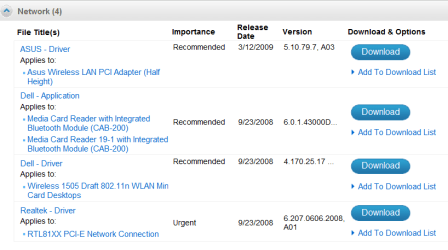
You Windows 7 32 bit wireless LAN driver is there in the list that comes up from your service tag:

Drivers & Downloads

Capture.PNG

Suggest you put this on a stick or CD. Plug your PC into ethernet during installation and select "Keep connected to internet during installation" so you get the latest installer updates, which may even include a newer driver.

MS funded the partnership (WHQL) with all manufacturers to develop drivers for WIndows 7 so they have the drivers first in installer and Windows Updates. Get any missing ones from that product Downloads page.
 
You Windows 7 32 bit wireless LAN driver is there in the list that comes up from your service tag:

Drivers & Downloads

View attachment 40169

Suggest you put this on a stick or CD. Plug your PC into ethernet during installation and select "Keep connected to internet during installation" so you get the latest installer updates, which may even include a newer driver.

MS funded the partnership (WHQL) with all manufacturers to develop drivers for WIndows 7 so they have the drivers first in installer and Windows Updates. Get any missing ones from that product Downloads page.[/QUOTE

Yes we are all up and go installing Windows7 after I post this.
Many Thanks Parks.
 

My Computer My Computer

At a glance

gdbvf ds
OS
gdbvf ds
Back
Top