
Tuner Setup - setup loops at accepting Channel Changer

byronkw

New member
Local time
4:47 PM
Messages
8
have installed new Haupaugge HVR 2250 turner card and have to set up TV Tuner and confirm remote functions
after some driver conflicts i got the card and remote working to control Shaw Digital Box via IR blaster and can see live TV
when i'm on the "Test Channel Changing" page - I can see and confirm that the channels are changing in the video display box
WMC setup.PNG
as soon as i 'check the box' another box pops up and says "Enter Channel - Enter a channel number"
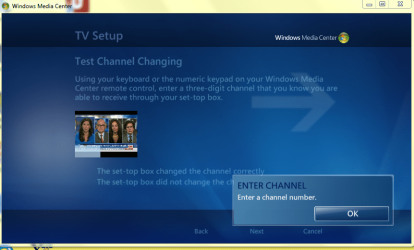
WMC setup OK.PNG
again, i can enter channels and they change in the video display box
but when i choose "OK" i just go back to the 2 unchecked choices
the Back and Cancel buttons are active, but the Next button is not
whichever box i check, the box pops up and says "Enter Channel - Enter a channel number"
stuck in that loop with Next never becoming active, and the box always 'unchecks' after i choose "OK"
multipe reboots, same thing... no choice but to Cancel and lose all settings
what am i missing - is this a bug in WMC?
 

My Computer My Computer

Computer type
PC/Desktop
Computer Manufacturer/Model Number
Dell
OS
Windows 7 Pro 64 bit
CPU
Intel Core 2 Quad CPU Q9550
Motherboard
Dell
Memory
6 GB
Graphics Card(s)
none
Hard Drives
1.5 TB
500 GB
multiple USB
ReadyNAS NV+ v2
Antivirus
Norton
Browser
Chrome
Hmmm that seems odd did you try erasing all the drivers and starting over ?

Or even change the slot that the card is in ?

I suggest scratching all drivers and folder and starting over if it is doing this and unchecking the box see if you can get it to work without the IR receiver for some reason it picks your box up but decides to disable it from the menu is it a direct line or is the receiver hooked up to you machine ?

If it is a direct line off a splitter you don't need to include the receiver in the mix that is probably what is going on but I can't see how you have the wiring set up
 

My Computer My Computer

Computer type
PC/Desktop
Computer Manufacturer/Model Number
CoreI7-6700K MrFingerIII Special Builds
OS
Windows 10 Home Premium 64bit sp1
CPU
Intel I7-6700K @ 4.6 Ghz 1.344 volts everyday OC
Motherboard
Asrock Fatality K6 Z170 Socket 1151
Memory
32GB G-Skill TridentZ 3200mhz 16-18-18-38 DDR4
Graphics Card(s)
Sli Gigabyte Windforce GTX 980 G1
Sound Card
AC97 Creative Rage Tactic 3D Headphones Bluetooth
Monitor(s) Displays
27" Asus ROG Swift PG278Q G-Sync 48" Vizio Smart HD TV
Screen Resolution
2560x1440p 27"- 48" Currently Gaming at 2560x1440p Res 2K
Hard Drives
250GB Samsung Evo840SSD Seagate baracuda 500 GB WD Mybook 500Gb 1TB Seagate Barracuda
PSU
HX1050w Corsair Silver 80plus certified crosfire/sli
Case
Enthod Pro Full Tower
Cooling
Corsair H110i GT 280 mm High Performance WaterBlock
Keyboard
Logitech wireless keyboard
Mouse
Logitech wireless mouse
Internet Speed
Cox Cable 100+ mb
Antivirus
WebRoot Spysweeper with Antivirus
Browser
IE-10, Chrome, Opera
Other Info
My Other Rig is a AMD FX8320E @4.6Ghz 16GB Ballistic Sport Ram
Mobo Asrock Fatality 990FX 120GB OCZ SSD 1TB Seagate Barracuda Corsair H75 Cooling PSU Corsair CX750
GPU GTX Gigabyte 970G1
thanks for the thoughts
because i need to use the IR blaster from the Hauppauge board to control the Set-Top box, i don't have the option of set-up without the remote - the board requires me to run an app to enable the IR and that puts the remote in charge of the rest of the process in WMC
i've done multiple driver and folder deletions (including a tool Hauppauge provide to scrub all traces) in order to get to successful driver installation and be able to run WMC's TV signal to this point... only to get stuck in this WMC loop where it won't accept my confirmation that everything IS working.
it would seem to be a WMC issue (?) not the Hauppauge board and IR - because they are both working
i can't find a way to 'update' WMC - is it possible that i need to do that, or is it possible to reinstall it?
 

My Computer My Computer

Computer type
PC/Desktop
Computer Manufacturer/Model Number
Dell
OS
Windows 7 Pro 64 bit
CPU
Intel Core 2 Quad CPU Q9550
Motherboard
Dell
Memory
6 GB
Graphics Card(s)
none
Hard Drives
1.5 TB
500 GB
multiple USB
ReadyNAS NV+ v2
Antivirus
Norton
Browser
Chrome
thanks for the thoughts
because i need to use the IR blaster from the Hauppauge board to control the Set-Top box, i don't have the option of set-up without the remote - the board requires me to run an app to enable the IR and that puts the remote in charge of the rest of the process in WMC
i've done multiple driver and folder deletions (including a tool Hauppauge provide to scrub all traces) in order to get to successful driver installation and be able to run WMC's TV signal to this point... only to get stuck in this WMC loop where it won't accept my confirmation that everything IS working.
it would seem to be a WMC issue (?) not the Hauppauge board and IR - because they are both working
i can't find a way to 'update' WMC - is it possible that i need to do that, or is it possible to reinstall it?


Ok maybe you should try to set it up and then after use WMC that is what I did when I first installed my tuner ,I think you have solved your own issue by accident

Try the Host program and install then after you get it set up then go through WMC and it might take I didn't think of that because I had set up the Host program before doing what you are trying to do
 

My Computer My Computer

Computer type
PC/Desktop
Computer Manufacturer/Model Number
CoreI7-6700K MrFingerIII Special Builds
OS
Windows 10 Home Premium 64bit sp1
CPU
Intel I7-6700K @ 4.6 Ghz 1.344 volts everyday OC
Motherboard
Asrock Fatality K6 Z170 Socket 1151
Memory
32GB G-Skill TridentZ 3200mhz 16-18-18-38 DDR4
Graphics Card(s)
Sli Gigabyte Windforce GTX 980 G1
Sound Card
AC97 Creative Rage Tactic 3D Headphones Bluetooth
Monitor(s) Displays
27" Asus ROG Swift PG278Q G-Sync 48" Vizio Smart HD TV
Screen Resolution
2560x1440p 27"- 48" Currently Gaming at 2560x1440p Res 2K
Hard Drives
250GB Samsung Evo840SSD Seagate baracuda 500 GB WD Mybook 500Gb 1TB Seagate Barracuda
PSU
HX1050w Corsair Silver 80plus certified crosfire/sli
Case
Enthod Pro Full Tower
Cooling
Corsair H110i GT 280 mm High Performance WaterBlock
Keyboard
Logitech wireless keyboard
Mouse
Logitech wireless mouse
Internet Speed
Cox Cable 100+ mb
Antivirus
WebRoot Spysweeper with Antivirus
Browser
IE-10, Chrome, Opera
Other Info
My Other Rig is a AMD FX8320E @4.6Ghz 16GB Ballistic Sport Ram
Mobo Asrock Fatality 990FX 120GB OCZ SSD 1TB Seagate Barracuda Corsair H75 Cooling PSU Corsair CX750
GPU GTX Gigabyte 970G1
because i have to abort the setup (Next is greyed out, only Back and Cancel to choose from) i can't use WMC with the tuner card - it hasn't finished setup and deletes everything i have entered to that point.

i'm not sure what you mean by the Host program?
 

My Computer My Computer

Computer type
PC/Desktop
Computer Manufacturer/Model Number
Dell
OS
Windows 7 Pro 64 bit
CPU
Intel Core 2 Quad CPU Q9550
Motherboard
Dell
Memory
6 GB
Graphics Card(s)
none
Hard Drives
1.5 TB
500 GB
multiple USB
ReadyNAS NV+ v2
Antivirus
Norton
Browser
Chrome
The program that the tuner originally came with that is the host program if you are running it through there could be a conflict between the two you could just try to install the driver and check for updates and if there is that might resolve the issue
 

My Computer My Computer

Computer type
PC/Desktop
Computer Manufacturer/Model Number
CoreI7-6700K MrFingerIII Special Builds
OS
Windows 10 Home Premium 64bit sp1
CPU
Intel I7-6700K @ 4.6 Ghz 1.344 volts everyday OC
Motherboard
Asrock Fatality K6 Z170 Socket 1151
Memory
32GB G-Skill TridentZ 3200mhz 16-18-18-38 DDR4
Graphics Card(s)
Sli Gigabyte Windforce GTX 980 G1
Sound Card
AC97 Creative Rage Tactic 3D Headphones Bluetooth
Monitor(s) Displays
27" Asus ROG Swift PG278Q G-Sync 48" Vizio Smart HD TV
Screen Resolution
2560x1440p 27"- 48" Currently Gaming at 2560x1440p Res 2K
Hard Drives
250GB Samsung Evo840SSD Seagate baracuda 500 GB WD Mybook 500Gb 1TB Seagate Barracuda
PSU
HX1050w Corsair Silver 80plus certified crosfire/sli
Case
Enthod Pro Full Tower
Cooling
Corsair H110i GT 280 mm High Performance WaterBlock
Keyboard
Logitech wireless keyboard
Mouse
Logitech wireless mouse
Internet Speed
Cox Cable 100+ mb
Antivirus
WebRoot Spysweeper with Antivirus
Browser
IE-10, Chrome, Opera
Other Info
My Other Rig is a AMD FX8320E @4.6Ghz 16GB Ballistic Sport Ram
Mobo Asrock Fatality 990FX 120GB OCZ SSD 1TB Seagate Barracuda Corsair H75 Cooling PSU Corsair CX750
GPU GTX Gigabyte 970G1
Hauppauge have a "WinTV" program which i did not install
their WMC specific driver Pkg is updated and the TV signal is received from the cable set-top box by the card - i can see the picture and use the remote to change channels
where i'm stuck is that WMC won't allow me to confirm that everything is working and choose "Next" in the setup
is my WMC version a problem - is there a newer build?
 

My Computer My Computer

Computer type
PC/Desktop
Computer Manufacturer/Model Number
Dell
OS
Windows 7 Pro 64 bit
CPU
Intel Core 2 Quad CPU Q9550
Motherboard
Dell
Memory
6 GB
Graphics Card(s)
none
Hard Drives
1.5 TB
500 GB
multiple USB
ReadyNAS NV+ v2
Antivirus
Norton
Browser
Chrome
Hauppauge have a "WinTV" program which i did not install
their WMC specific driver Pkg is updated and the TV signal is received from the cable set-top box by the card - i can see the picture and use the remote to change channels
where i'm stuck is that WMC won't allow me to confirm that everything is working and choose "Next" in the setup
is my WMC version a problem - is there a newer build?


There is not a newer build but it updates pretty frequently sorry I wasn't here to answer you yesterday kind of busy but you understand

Anyway it updates every few days from what I have seen the next step if it doesn't let you set the channels it might be a conflict going on with WMC you can contact M$ for support it might be something super simple we are overlooking

I think this is the Answer here this guy had your same issue and here is what he did to solve it http://answers.microsoft.com/en-us/...-channel/72a22b9b-098e-4be1-bd51-e0a0dfdc7c3a
 

My Computer My Computer

Computer type
PC/Desktop
Computer Manufacturer/Model Number
CoreI7-6700K MrFingerIII Special Builds
OS
Windows 10 Home Premium 64bit sp1
CPU
Intel I7-6700K @ 4.6 Ghz 1.344 volts everyday OC
Motherboard
Asrock Fatality K6 Z170 Socket 1151
Memory
32GB G-Skill TridentZ 3200mhz 16-18-18-38 DDR4
Graphics Card(s)
Sli Gigabyte Windforce GTX 980 G1
Sound Card
AC97 Creative Rage Tactic 3D Headphones Bluetooth
Monitor(s) Displays
27" Asus ROG Swift PG278Q G-Sync 48" Vizio Smart HD TV
Screen Resolution
2560x1440p 27"- 48" Currently Gaming at 2560x1440p Res 2K
Hard Drives
250GB Samsung Evo840SSD Seagate baracuda 500 GB WD Mybook 500Gb 1TB Seagate Barracuda
PSU
HX1050w Corsair Silver 80plus certified crosfire/sli
Case
Enthod Pro Full Tower
Cooling
Corsair H110i GT 280 mm High Performance WaterBlock
Keyboard
Logitech wireless keyboard
Mouse
Logitech wireless mouse
Internet Speed
Cox Cable 100+ mb
Antivirus
WebRoot Spysweeper with Antivirus
Browser
IE-10, Chrome, Opera
Other Info
My Other Rig is a AMD FX8320E @4.6Ghz 16GB Ballistic Sport Ram
Mobo Asrock Fatality 990FX 120GB OCZ SSD 1TB Seagate Barracuda Corsair H75 Cooling PSU Corsair CX750
GPU GTX Gigabyte 970G1
thanks again for the reply
his situation sounds exactly the same, and i do have the white translucent box in the lower left corner of the display, but it doesn't show a number... just slightly obscures the picture behind
i've tried choosing multiple different set-top boxes but no different result
(although WMC doesn't list the Motorola box model that i have, all Motorola seem to work)
i've downloaded a WMC Cumulative Update (Download Cumulative Update for Media Center for Windows 7 (KB977863) from Official Microsoft Download Center) in the 64 bit version for Win 7 (Windows6.1-KB977863-x64.msu) but when i run it i get a message saying "This update does not apply to your computer"
 

My Computer My Computer

Computer type
PC/Desktop
Computer Manufacturer/Model Number
Dell
OS
Windows 7 Pro 64 bit
CPU
Intel Core 2 Quad CPU Q9550
Motherboard
Dell
Memory
6 GB
Graphics Card(s)
none
Hard Drives
1.5 TB
500 GB
multiple USB
ReadyNAS NV+ v2
Antivirus
Norton
Browser
Chrome
i misread the answer at http://answers.microsoft.com/en-us/w...1-e0a0dfdc7c3a

"the white box in the lower left corner of the display is requiring that you enter a channel number on your keyboard"

this is is the solution
- even though you are setting up a remote, and confirming channel changes with a remote -
WMC is actually asking you to enter a channel number with your keyboard
(although it does not give you any clue that is what you need to do)
enter any number on your keyboard
it appears in the white box in the corner of the video display preview window
click on the OK button
and PRESTO! the Next button becomes active and you can complete the setup

Thanks so much for pointing me to that ... I sure hope MS catches on to how obscure the instructions are during setup
 

My Computer My Computer

Computer type
PC/Desktop
Computer Manufacturer/Model Number
Dell
OS
Windows 7 Pro 64 bit
CPU
Intel Core 2 Quad CPU Q9550
Motherboard
Dell
Memory
6 GB
Graphics Card(s)
none
Hard Drives
1.5 TB
500 GB
multiple USB
ReadyNAS NV+ v2
Antivirus
Norton
Browser
Chrome
i misread the answer at http://answers.microsoft.com/en-us/w...1-e0a0dfdc7c3a

"the white box in the lower left corner of the display is requiring that you enter a channel number on your keyboard"

this is is the solution
- even though you are setting up a remote, and confirming channel changes with a remote -
WMC is actually asking you to enter a channel number with your keyboard
(although it does not give you any clue that is what you need to do)
enter any number on your keyboard
it appears in the white box in the corner of the video display preview window
click on the OK button
and PRESTO! the Next button becomes active and you can complete the setup

Thanks so much for pointing me to that ... I sure hope MS catches on to how obscure the instructions are during setup
I actually thought I mentioned changing channels with the number pad instead of control but none the less you got it resolved and glad it does what you need it to do :cool:
 

My Computer My Computer

Computer type
PC/Desktop
Computer Manufacturer/Model Number
CoreI7-6700K MrFingerIII Special Builds
OS
Windows 10 Home Premium 64bit sp1
CPU
Intel I7-6700K @ 4.6 Ghz 1.344 volts everyday OC
Motherboard
Asrock Fatality K6 Z170 Socket 1151
Memory
32GB G-Skill TridentZ 3200mhz 16-18-18-38 DDR4
Graphics Card(s)
Sli Gigabyte Windforce GTX 980 G1
Sound Card
AC97 Creative Rage Tactic 3D Headphones Bluetooth
Monitor(s) Displays
27" Asus ROG Swift PG278Q G-Sync 48" Vizio Smart HD TV
Screen Resolution
2560x1440p 27"- 48" Currently Gaming at 2560x1440p Res 2K
Hard Drives
250GB Samsung Evo840SSD Seagate baracuda 500 GB WD Mybook 500Gb 1TB Seagate Barracuda
PSU
HX1050w Corsair Silver 80plus certified crosfire/sli
Case
Enthod Pro Full Tower
Cooling
Corsair H110i GT 280 mm High Performance WaterBlock
Keyboard
Logitech wireless keyboard
Mouse
Logitech wireless mouse
Internet Speed
Cox Cable 100+ mb
Antivirus
WebRoot Spysweeper with Antivirus
Browser
IE-10, Chrome, Opera
Other Info
My Other Rig is a AMD FX8320E @4.6Ghz 16GB Ballistic Sport Ram
Mobo Asrock Fatality 990FX 120GB OCZ SSD 1TB Seagate Barracuda Corsair H75 Cooling PSU Corsair CX750
GPU GTX Gigabyte 970G1
sorry if i missed your instruction to use the keypad earlier - it sure isn't clear that's what is to be done
alas - was able to get the card set up and remote setup ... but WMC isn't using the card and it's IR blaster to change channels for Scheduled Recordings - it only changes it i use the remote to select a channel
that's not really the topic of this thread, but any advice - or reference to a good source of info - on this issue would be appreciated
 

My Computer My Computer

Computer type
PC/Desktop
Computer Manufacturer/Model Number
Dell
OS
Windows 7 Pro 64 bit
CPU
Intel Core 2 Quad CPU Q9550
Motherboard
Dell
Memory
6 GB
Graphics Card(s)
none
Hard Drives
1.5 TB
500 GB
multiple USB
ReadyNAS NV+ v2
Antivirus
Norton
Browser
Chrome

My Computer My Computer

Computer type
PC/Desktop
Computer Manufacturer/Model Number
CoreI7-6700K MrFingerIII Special Builds
OS
Windows 10 Home Premium 64bit sp1
CPU
Intel I7-6700K @ 4.6 Ghz 1.344 volts everyday OC
Motherboard
Asrock Fatality K6 Z170 Socket 1151
Memory
32GB G-Skill TridentZ 3200mhz 16-18-18-38 DDR4
Graphics Card(s)
Sli Gigabyte Windforce GTX 980 G1
Sound Card
AC97 Creative Rage Tactic 3D Headphones Bluetooth
Monitor(s) Displays
27" Asus ROG Swift PG278Q G-Sync 48" Vizio Smart HD TV
Screen Resolution
2560x1440p 27"- 48" Currently Gaming at 2560x1440p Res 2K
Hard Drives
250GB Samsung Evo840SSD Seagate baracuda 500 GB WD Mybook 500Gb 1TB Seagate Barracuda
PSU
HX1050w Corsair Silver 80plus certified crosfire/sli
Case
Enthod Pro Full Tower
Cooling
Corsair H110i GT 280 mm High Performance WaterBlock
Keyboard
Logitech wireless keyboard
Mouse
Logitech wireless mouse
Internet Speed
Cox Cable 100+ mb
Antivirus
WebRoot Spysweeper with Antivirus
Browser
IE-10, Chrome, Opera
Other Info
My Other Rig is a AMD FX8320E @4.6Ghz 16GB Ballistic Sport Ram
Mobo Asrock Fatality 990FX 120GB OCZ SSD 1TB Seagate Barracuda Corsair H75 Cooling PSU Corsair CX750
GPU GTX Gigabyte 970G1
Back
Top