Tuning SNR only increases "Max" rate but NOT current rate

dannyk90

New member
Member
VIP
Local time
11:31 PM
Messages
111
Location
England
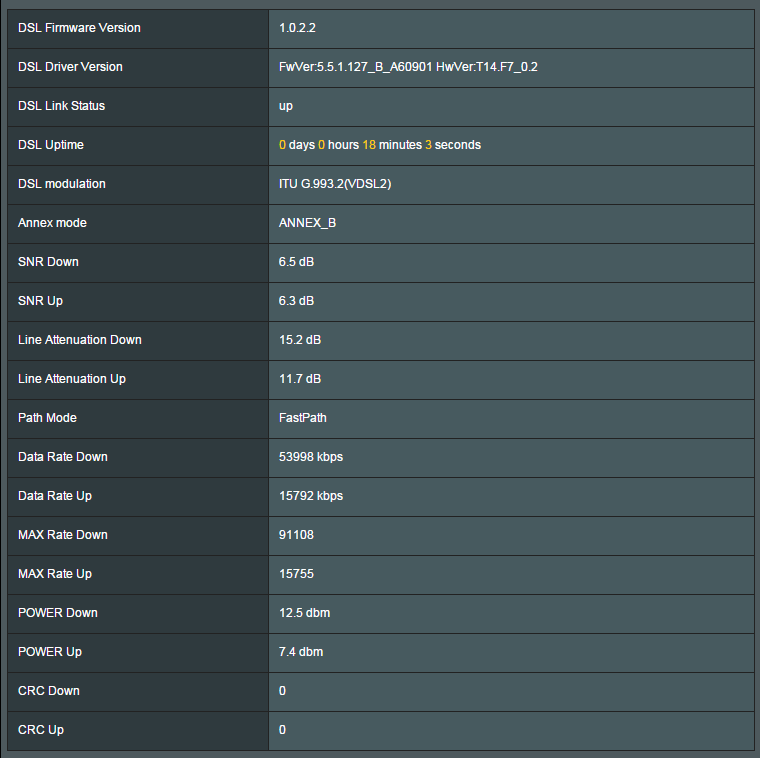
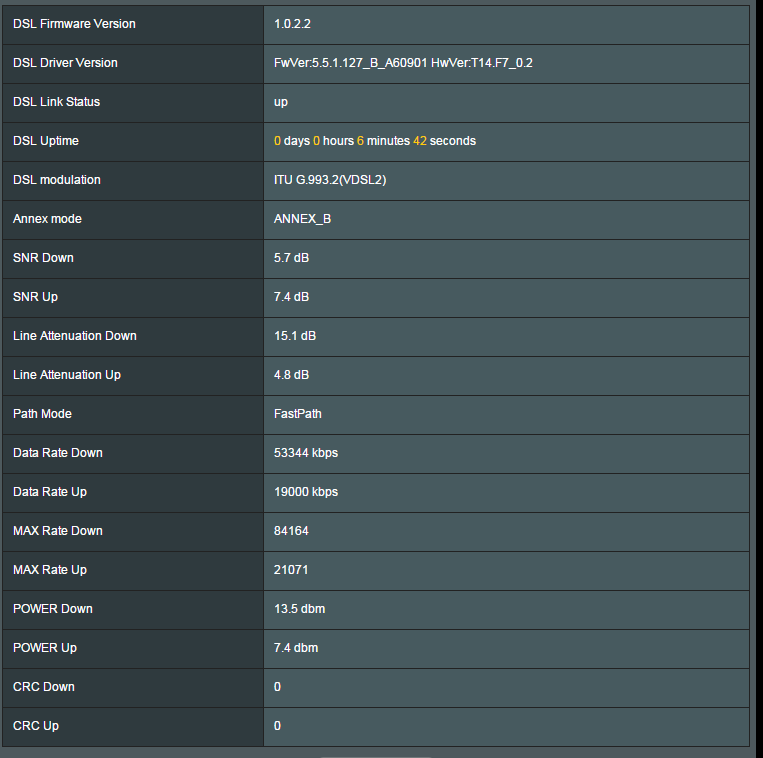
I have been trying some different settings and my current download will stay the same but the max rate would increase which I never get, I increased the max rate from 84 to 90 mbit/s but my current just always stays at 54mbit/s in return my current upload speed does lower from 19 to 15mbit/s.

Default Router Settings
OSpLEZD.png


Custom SNR Settings
8s3RDp3.png


My router is next to the where the line comes in to the house with a short cable. The cable is a standard cheap one, so I tried a shielded twisted (rj11) cable (same length) and it actually made my speeds lower!

So I went back to the cheap flat cable.

My isp isnt capping me because their estimates were 70mbit/s and Im on their best service.


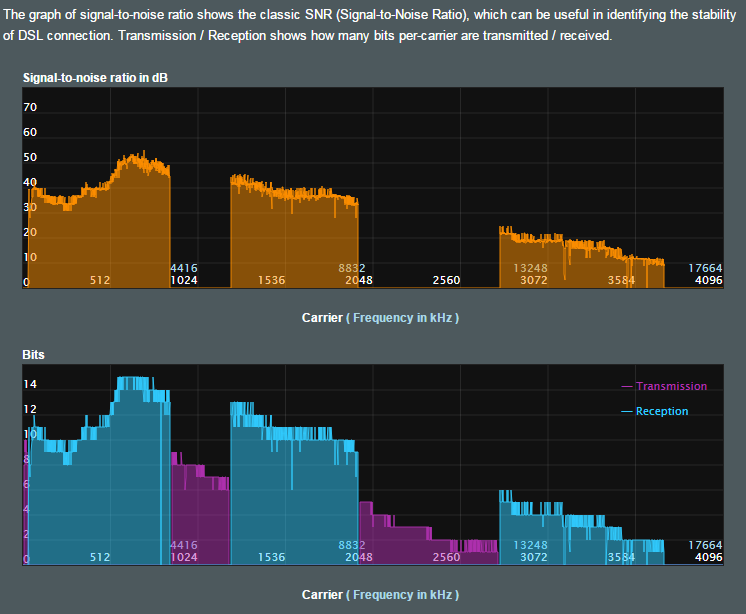
Dont know if this helps? (with custom settings)
qI5ZAOI.png


Ping

From looking at my old speedtest results, I had 16 ping with my old ADSL connection.
Now with my new Fibre connection I get pings of 25 or 27.

Shouldn't fibre get a faster ping ?
 
Last edited:

My Computer My Computer

At a glance

Windows 10 ProIntel i7-5820k 3.30ghz4x 4gb Crucial 2133mhz DDR4Gtx 780
Computer type
PC/Desktop
Computer Manufacturer/Model Number
self built
OS
Windows 10 Pro
CPU
Intel i7-5820k 3.30ghz
Motherboard
Asus Rampage Extreme V ROG
Memory
4x 4gb Crucial 2133mhz DDR4
Graphics Card(s)
Gtx 780
Sound Card
-
Monitor(s) Displays
Acer XB270H (144hz, G-Sync, 27")
Screen Resolution
1920x1080
Hard Drives
3x SSDs 256gb Samsung 850 Pro
PSU
Corsair AX850 Gold 80+ 850w
Case
NZXT Phantom full tower
Cooling
Noctua NH-U14S + 7 case fans
Keyboard
Logitech Illuminated Keyboard
Mouse
Razer Deathadder 3500
Internet Speed
60mbit down, 15mbit up
Antivirus
Microsoft Security Essentials
Browser
Chrome
so I tried a shielded twisted (rj11) cable (same length) and it actually made my speeds lower!

rj11 is a phone jack, not a twisted pair cable (shielded or not).

You are not going to be able to increase your speed, since that's controlled by your ISP or dependent on equipment on their side of the demarcation point. On your end you have everything needed to get higher speed, i.e. an Ethernet cable and NIC that obviously both support at least 100Mbps.

You may be able to get max speed once at 3:00am on a full moon during a leap year :)
 

My Computer My Computer

At a glance

Windows 7 Pro
Computer type
PC/Desktop
OS
Windows 7 Pro
lol I was thinking that would be the case :/

it's a shame, stuck on 53mbit/s when I could be getting 90.
 

My Computer My Computer

At a glance

Windows 10 ProIntel i7-5820k 3.30ghz4x 4gb Crucial 2133mhz DDR4Gtx 780
Computer type
PC/Desktop
Computer Manufacturer/Model Number
self built
OS
Windows 10 Pro
CPU
Intel i7-5820k 3.30ghz
Motherboard
Asus Rampage Extreme V ROG
Memory
4x 4gb Crucial 2133mhz DDR4
Graphics Card(s)
Gtx 780
Sound Card
-
Monitor(s) Displays
Acer XB270H (144hz, G-Sync, 27")
Screen Resolution
1920x1080
Hard Drives
3x SSDs 256gb Samsung 850 Pro
PSU
Corsair AX850 Gold 80+ 850w
Case
NZXT Phantom full tower
Cooling
Noctua NH-U14S + 7 case fans
Keyboard
Logitech Illuminated Keyboard
Mouse
Razer Deathadder 3500
Internet Speed
60mbit down, 15mbit up
Antivirus
Microsoft Security Essentials
Browser
Chrome
but why did the ping double when I went from ADSL to VDSL ? Getting a faster connection should have halved my ping right ?

my router is saying now I'm only receiving 45 mbit/s down, the Path Mode has changed from "fast" to "interleaved".

What is Path Mode ?
 
Last edited:

My Computer My Computer

At a glance

Windows 10 ProIntel i7-5820k 3.30ghz4x 4gb Crucial 2133mhz DDR4Gtx 780
Computer type
PC/Desktop
Computer Manufacturer/Model Number
self built
OS
Windows 10 Pro
CPU
Intel i7-5820k 3.30ghz
Motherboard
Asus Rampage Extreme V ROG
Memory
4x 4gb Crucial 2133mhz DDR4
Graphics Card(s)
Gtx 780
Sound Card
-
Monitor(s) Displays
Acer XB270H (144hz, G-Sync, 27")
Screen Resolution
1920x1080
Hard Drives
3x SSDs 256gb Samsung 850 Pro
PSU
Corsair AX850 Gold 80+ 850w
Case
NZXT Phantom full tower
Cooling
Noctua NH-U14S + 7 case fans
Keyboard
Logitech Illuminated Keyboard
Mouse
Razer Deathadder 3500
Internet Speed
60mbit down, 15mbit up
Antivirus
Microsoft Security Essentials
Browser
Chrome
The speed of the connection is not correlated to your latency. There are countless factors that would affect your "ping" - distance to nearest ISP central office, equipment used, network congestion, bad network management, etc.

If I were you - I would reset the modem, just to make sure I didn't change something I was not supposed to, and leave it be :D I know we all want faster internet, but 99% of the time it's all up to the ISP.
 

My Computer My Computer

At a glance

Windows 7 Pro
Computer type
PC/Desktop
OS
Windows 7 Pro
The first question I ask myself.
Self are you getting the speeds that you are paying for. Various internet speed test can be found online. If you are getting what you are paying for your done testing.
If not I check my equipment and settings. I found out a long time ago that the lines in my home was causing my problem. I update the in house phone lines and it solved that problem.
If they are okay I call the I.S.P.

If you are trying to find out why their are small fluctuation in internet speed you will spend the rest of your life looking.
 

My Computer My Computer

At a glance

Windows 10 Pro. 64/ version 1709 Windows 7 Pr...Intel i7-6800K @ 4.3Corsair Platinum 16 gig @2400EVGA GTX 1070 OC
Computer type
PC/Desktop
Computer Manufacturer/Model Number
Home made Desktop
OS
Windows 10 Pro. 64/ version 1709 Windows 7 Pro/64
CPU
Intel i7-6800K @ 4.3
Motherboard
ASUS X-99 Deluxe II
Memory
Corsair Platinum 16 gig @2400
Graphics Card(s)
EVGA GTX 1070 OC
Monitor(s) Displays
Asus 27" LED LCD/VE278Q
Screen Resolution
1920-1080 or 1280-720 HDMI
Hard Drives
INTEL SSD 730-240 Gb Sata 3.0/
PSU
EVGA Platium 1200W
Case
Phanteks Luxe Tempered Glass 8 fans/ one radiator
Cooling
XSPC/ Water Cooled CPU
Keyboard
Das 4 Professional
Mouse
Logitech M705/MX Anywhere 2-S
Internet Speed
100 mbits
Antivirus
Microsoft Security Essentials/ Malwarebytes Premium 3.0/ SAS
Browser
I.E. 11 default/Firefox/ ISP Time Warner Cable/Spectrum
Other Info
LG BluRay Burner/
Sound system-KLipsch-THX/
Icy Dock ssd Hot Swap bays.
Is the path mode controlled by the ISP ?

@doctore
A strange thing is... when an Open Reach engineer (official internet company, not isp) came and looked around and also looked in the cabinet outside, the connection went to 65mbit/s down and I was getting pings of 16 ms !

Now im on 41mbit/s ping of 28 ms.

@Layback Bear
So I wouldnt call 20 mbit/s a small fluctuation.

The advertised speed was 70mbit/s down.


I'll reset the router on a weekday when no ones using the internet lol. Im sure it wont change anything, all I did was make it accept a faster speed which was shown in the images above.
 

My Computer My Computer

At a glance

Windows 10 ProIntel i7-5820k 3.30ghz4x 4gb Crucial 2133mhz DDR4Gtx 780
Computer type
PC/Desktop
Computer Manufacturer/Model Number
self built
OS
Windows 10 Pro
CPU
Intel i7-5820k 3.30ghz
Motherboard
Asus Rampage Extreme V ROG
Memory
4x 4gb Crucial 2133mhz DDR4
Graphics Card(s)
Gtx 780
Sound Card
-
Monitor(s) Displays
Acer XB270H (144hz, G-Sync, 27")
Screen Resolution
1920x1080
Hard Drives
3x SSDs 256gb Samsung 850 Pro
PSU
Corsair AX850 Gold 80+ 850w
Case
NZXT Phantom full tower
Cooling
Noctua NH-U14S + 7 case fans
Keyboard
Logitech Illuminated Keyboard
Mouse
Razer Deathadder 3500
Internet Speed
60mbit down, 15mbit up
Antivirus
Microsoft Security Essentials
Browser
Chrome
Reset router to factory default, speeds still the same coming in from outside.

Still interleaved path mode.

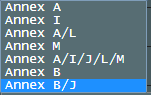
What would be a good annex mode ?
8xMA31l.png
 
Last edited:

My Computer My Computer

At a glance

Windows 10 ProIntel i7-5820k 3.30ghz4x 4gb Crucial 2133mhz DDR4Gtx 780
Computer type
PC/Desktop
Computer Manufacturer/Model Number
self built
OS
Windows 10 Pro
CPU
Intel i7-5820k 3.30ghz
Motherboard
Asus Rampage Extreme V ROG
Memory
4x 4gb Crucial 2133mhz DDR4
Graphics Card(s)
Gtx 780
Sound Card
-
Monitor(s) Displays
Acer XB270H (144hz, G-Sync, 27")
Screen Resolution
1920x1080
Hard Drives
3x SSDs 256gb Samsung 850 Pro
PSU
Corsair AX850 Gold 80+ 850w
Case
NZXT Phantom full tower
Cooling
Noctua NH-U14S + 7 case fans
Keyboard
Logitech Illuminated Keyboard
Mouse
Razer Deathadder 3500
Internet Speed
60mbit down, 15mbit up
Antivirus
Microsoft Security Essentials
Browser
Chrome
turns out the way they have things set up... for every time the router is turned off and on, the DLN will cap my speed because it thinks it is making my line "more stable" lol.

Theyre going to send an engineer to reset it.
 

My Computer My Computer

At a glance

Windows 10 ProIntel i7-5820k 3.30ghz4x 4gb Crucial 2133mhz DDR4Gtx 780
Computer type
PC/Desktop
Computer Manufacturer/Model Number
self built
OS
Windows 10 Pro
CPU
Intel i7-5820k 3.30ghz
Motherboard
Asus Rampage Extreme V ROG
Memory
4x 4gb Crucial 2133mhz DDR4
Graphics Card(s)
Gtx 780
Sound Card
-
Monitor(s) Displays
Acer XB270H (144hz, G-Sync, 27")
Screen Resolution
1920x1080
Hard Drives
3x SSDs 256gb Samsung 850 Pro
PSU
Corsair AX850 Gold 80+ 850w
Case
NZXT Phantom full tower
Cooling
Noctua NH-U14S + 7 case fans
Keyboard
Logitech Illuminated Keyboard
Mouse
Razer Deathadder 3500
Internet Speed
60mbit down, 15mbit up
Antivirus
Microsoft Security Essentials
Browser
Chrome
Back
Top