Tunnel Enabled -- Now What?

pgordon

New member
Local time
2:43 PM
Messages
39
I've been trying to access my office computer from my home computer, without success, and now I'm questioning my big picture understanding of the problem. Using Windows 7 Professional, Shrew, and a Linksys VPN Router (RV042), I can enable a tunnel, but I can't get a remote desktop connection. Am I missing a step? What happens after "tunnel enabled"? :confused:
 

My Computer

Computer Manufacturer/Model Number
Hewlett-Packard Compaq Presario/CQ5218F
OS
Windows 7
CPU
AMD Athlon(tm) II x2 215
Memory
3.00 GB (2.75 GB usable)
Other Info
64-bit Operating System
I use a program called TeamViewer. There is a free version you can dowload.
 

Attachments

  • TeamViewer.JPG
    TeamViewer.JPG
    27.5 KB · Views: 12

My Computer

Computer type
PC/Desktop
Computer Manufacturer/Model Number
Built them myself, Science Experiments !
OS
Win7 Enterprise, Win7 x86 (Ult 7600), Win7 x64 Ult 7600, TechNet RTM on AMD x64 (2.8Ghz)
CPU
AMD fx8350 4ghz, AMD-32 2400mhz, AMD-64 3200mhz, AMDx64 2.8G
Motherboard
SIS 755, ECS-K8M890M-M (Ult 7600), GigaByte & others
Memory
2gb, 4gb on the Ult 7600, 4gb on Technet RTM, 32gb on FX8350
Graphics Card(s)
Draw my own Graphics, several nVidia cards
Sound Card
on motherboard
Monitor(s) Displays
19" flat scr, 28" I-Inc widescr,22" Emprex Widescr, 23" Acer
Screen Resolution
1280 x 1024, 1440 x 900, 1920 x 1080
Hard Drives
6 pata Ide HD's & 2 Sata HD's
added 80gb external on Ult 7600 computer,
numerous extra 1tb, 2TB, 3Tb SATA HD's
A collection of ext HD Docks w/ HDs
PSU
430w, 550w, 600w, 700, 800, etc
Case
All Generic Full Towers
Cooling
Open Air & a few fans, some w/ colored LEDs
Keyboard
Compaq & Dell recycled from GoodWill
Mouse
Made in China Optical Wired Mouse
Internet Speed
Fast Cable InterNet
Antivirus
AVG Free on 24 different Desktops, NO Problems!
Browser
IE 8 is preferred, but use FireFox sometimes
Other Info
Linksys Routers, switches, & Hubs
Too Many USB Flash Drives to count, Biggest is 64GB !
Eight computers in my home network.
Sixteen computers at my business network.
Linked via TeamViewer !
Lots of old used spare computer parts everywhere!
I spent some time looking at the Team Viewer software, and I have reservations. I'm not exactly in the business of top secret information, but I bought my own VPN router to avoid running confidential information through what appears to be a public website. I understand that the info is on the Internet, but I thought the VPN router avoided the middle man. Also, I don't understand the economics of free Team Viewer software. Are they going to be asking me to make donations after I become habitually dependent on them?
 

My Computer

Computer Manufacturer/Model Number
Hewlett-Packard Compaq Presario/CQ5218F
OS
Windows 7
CPU
AMD Athlon(tm) II x2 215
Memory
3.00 GB (2.75 GB usable)
Other Info
64-bit Operating System

My Computer

Computer type
PC/Desktop
Computer Manufacturer/Model Number
Home built
OS
Windows 7 Ult, Windows 8.1 Pro,
CPU
Q9650-4.275GHz, E8600 4.5GHz, E6750-3.8GHz
Motherboard
Evga 780i FTW
Memory
G.Skill PC2 9600 1200Mhz 5 5 5 15 2T
Graphics Card(s)
GTX480
Sound Card
Asus Xonar D2
Monitor(s) Displays
HannsG
Screen Resolution
1680X1050
Hard Drives
GSkill Phoenix Pro 120GB SSD
PSU
ThermalTake Toughpower 1000Watt modular
Case
ThermalTake XaserV
Cooling
Xigmatek S1283
Keyboard
Logitech G15
Mouse
Logitech G9
Internet Speed
T1
I worked through the tutorial without success. In the fine print, it states that the directions assume "that you're not part of a domain." My office has a static IP address. I've followed all of the directions on the tutorial and still I get nothing after "tunnel enabled." Thoughts?
 

My Computer

Computer Manufacturer/Model Number
Hewlett-Packard Compaq Presario/CQ5218F
OS
Windows 7
CPU
AMD Athlon(tm) II x2 215
Memory
3.00 GB (2.75 GB usable)
Other Info
64-bit Operating System
Hi there
to access an Office computer you'll probably have to go through an Office VPN - this ensures that you will get connected and authorized to your office's network and then it will forward you to your individual machine.

All you need on your home machine is the CLIENT version of your work's VPN software.

Most work computers will be connected to a work LAN via their own private servers -- I doubt if you'll have a "Stand alone machine" connected to the public Internet.

If your work doesn't have a VPN then it can be done but you will need to have the work Router / Server set up to pass you through directly to your machine and also the ports must be opened. -- Usually a much more difficult proposition to organize.

Check first about "Remote Logon" from your admins -- there's usually some software in place for Remote logon when people are on call out / support etc etc.

Cheers
jimbo
 

My Computer

Computer type
PC/Desktop
Computer Manufacturer/Model Number
Custom built, several laptops HP/ASUS
OS
Linux CENTOS 7 / various Windows OS'es and servers
CPU
Intel i7 Intel i5
Memory
8GB, 16GB
Graphics Card(s)
On Motherboard
Sound Card
Realtek HD audio
Monitor(s) Displays
Apple Cinema display, Samsung LCD
Screen Resolution
1920 X 1080
Hard Drives
4 X 1TB SATA
Mouse
Toshiba wireless laser
Internet Speed
> 20MB up
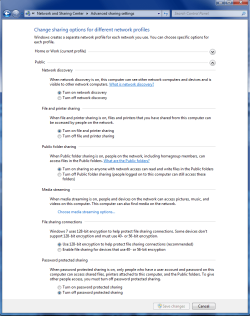
Somebody just reported in today about this problem. The fix seemed to be enabling all sharing settings in the "Public" file sharing settings list. This didn't make much sense to me because he was using Homegroup to share with. He was talking about these settings in the picture below. You might need to reboot after changing the settings on both machines. Make sure they are all set like this. :)

I can't say if this will work for you or not but it worked for him.
You can read about it here> http://www.sevenforums.com/network-sharing/48190-remote-assistance-linksys-router.html
 

Attachments

  • public sharing enabled all.PNG
    public sharing enabled all.PNG
    39.7 KB · Views: 44
Last edited:

My Computer

Computer type
PC/Desktop
Computer Manufacturer/Model Number
Home built
OS
Windows 7 Ult, Windows 8.1 Pro,
CPU
Q9650-4.275GHz, E8600 4.5GHz, E6750-3.8GHz
Motherboard
Evga 780i FTW
Memory
G.Skill PC2 9600 1200Mhz 5 5 5 15 2T
Graphics Card(s)
GTX480
Sound Card
Asus Xonar D2
Monitor(s) Displays
HannsG
Screen Resolution
1680X1050
Hard Drives
GSkill Phoenix Pro 120GB SSD
PSU
ThermalTake Toughpower 1000Watt modular
Case
ThermalTake XaserV
Cooling
Xigmatek S1283
Keyboard
Logitech G15
Mouse
Logitech G9
Internet Speed
T1
No luck. The office is using a workgroup, not one computer dedicated as a server. On the VPN router at the office, I opened a port dedicated to my particular computer at the office, and set the computer and the computer's firewall accordingly (including chev65's settings mentioned above and including a change to the registry to make sure the computer is listening to the correct port). I can get a tunnel enabled from the client to the router, but when I try to establish a remote desktop connection, I'm still getting the electronic equivalent to a blank stare in response. It feels like I'm missing something obvious. Any other ideas (other than throwing the computers out the window (so to speak))?
 

My Computer

Computer Manufacturer/Model Number
Hewlett-Packard Compaq Presario/CQ5218F
OS
Windows 7
CPU
AMD Athlon(tm) II x2 215
Memory
3.00 GB (2.75 GB usable)
Other Info
64-bit Operating System
As you can tell from my last post it only takes one setting to ruin the entire deal. How could I possibly know which setting is out of place when I can't even see the computer. It's pretty frustating trying to fix machines when I can't even see them. :confused:
 

My Computer

Computer type
PC/Desktop
Computer Manufacturer/Model Number
Home built
OS
Windows 7 Ult, Windows 8.1 Pro,
CPU
Q9650-4.275GHz, E8600 4.5GHz, E6750-3.8GHz
Motherboard
Evga 780i FTW
Memory
G.Skill PC2 9600 1200Mhz 5 5 5 15 2T
Graphics Card(s)
GTX480
Sound Card
Asus Xonar D2
Monitor(s) Displays
HannsG
Screen Resolution
1680X1050
Hard Drives
GSkill Phoenix Pro 120GB SSD
PSU
ThermalTake Toughpower 1000Watt modular
Case
ThermalTake XaserV
Cooling
Xigmatek S1283
Keyboard
Logitech G15
Mouse
Logitech G9
Internet Speed
T1
You've been very helpful, despite the limitations of forums. However, I have what might be one last question. I've been trying to get it done with a particular topology as follows:

HomeComputer >> CableModem >> Internet >> DSLModem(bridged) >> VPNRouter(RV042) >> Switch >> OfficeComputers(x5)

I have each of the five office computers set to listen to a different port. Thus, when I type in my IP address for a remote desktop connections to may particular office computer, I add the port (e.g., 12.34.56.789:12345). Can it be done, or do I need to dedicate one of the five office computers to being a network server with WinServer2008?
 

My Computer

Computer Manufacturer/Model Number
Hewlett-Packard Compaq Presario/CQ5218F
OS
Windows 7
CPU
AMD Athlon(tm) II x2 215
Memory
3.00 GB (2.75 GB usable)
Other Info
64-bit Operating System
To me it should be like this. Cable modem> router-switch>networked computers, simple as that. I have no idea why you would run a cable modem with a bridged DSL modem. And why would you have a Home Computer in front of the cable modem?

No doubt that is part of the problem.

I honestly have no idea why that set up is being used or if it can work.
 

My Computer

Computer type
PC/Desktop
Computer Manufacturer/Model Number
Home built
OS
Windows 7 Ult, Windows 8.1 Pro,
CPU
Q9650-4.275GHz, E8600 4.5GHz, E6750-3.8GHz
Motherboard
Evga 780i FTW
Memory
G.Skill PC2 9600 1200Mhz 5 5 5 15 2T
Graphics Card(s)
GTX480
Sound Card
Asus Xonar D2
Monitor(s) Displays
HannsG
Screen Resolution
1680X1050
Hard Drives
GSkill Phoenix Pro 120GB SSD
PSU
ThermalTake Toughpower 1000Watt modular
Case
ThermalTake XaserV
Cooling
Xigmatek S1283
Keyboard
Logitech G15
Mouse
Logitech G9
Internet Speed
T1
It looks like my message is confusing. What I am calling the cable modem is the device sitting next to my home computer, which enables me to access the internet from home. I guess the real topology that matters is at the office. The internet comes into the office through a DSL modem and then goes to a VPN router before going to a switch. In other words:

Internent >> DSLModem(bridged) >> VPNRouter(RV042) >> Switch >> OfficeComputers(x5)

Should it work?
 

My Computer

Computer Manufacturer/Model Number
Hewlett-Packard Compaq Presario/CQ5218F
OS
Windows 7
CPU
AMD Athlon(tm) II x2 215
Memory
3.00 GB (2.75 GB usable)
Other Info
64-bit Operating System
Back
Top