
Turn off autofocus on integrated camera

StupidUser

New member
Member
VIP
Local time
10:53 AM
Messages
109
Hi. Where can I change the property settings for an integrated camera? Specifically, where can I change the autofocus property?

I recently started using the camera built into my notebook (I don't have any other cameras). Sometimes the camera zooms in and out automatically. I'm told I can fix this by turning off autofocus. However, I can't find such a setting.

I opened Control Panel - View scanners and cameras. But that just gives me an empty window (see attachment). If I click "Scan Profiles", I get an error "No scanners were detected....". The Refresh button does nothing and the Add Device button is for adding a not-integrated device.

If I go to Control Panel - Devices and Printers, there is nothing camera related there. I don't know where else to look. Thanks for your help.


(Not sure if this is the right subforum. Sorry if it isn't.)
 

Attachments
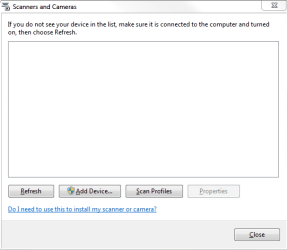
  • Capture.PNG
    Capture.PNG
    6.7 KB · Views: 7

My Computer

Computer type
PC/Desktop
Computer Manufacturer/Model Number
Lenovo/2757CTO Thinkpad W700
OS
Microsoft Windows 7 Professional 64-bit 7601 Multiprocessor Free Service Pack 1
CPU
AMD A6-5350M APU with Radeon(tm) HD Graphics
Motherboard
LENOVO 20B20011US
Memory
16.00 GB
Graphics Card(s)
AMD Radeon HD 8450G
Sound Card
(1) AMD High Definition Audio Device (2) Conexant 20671 Sm
Monitor(s) Displays
??
Screen Resolution
1366 x 768 x 32 bits (4294967296 colors) @ 60 Hz
Hard Drives
HGST HTS 545032A7E380 SATA Disk Device
Mouse
Microsoft Optical Wheel Mouse
Other Info
BIOS: Ver 1.00PARTTBLX
The webcam settings should be available through a systray icon.
A right-click or double-click on that icon should lead you to video
settings where you would find an option to disable autofocus.

Typically, such settings would also be available thru the Start >
Programs menu.
 

My Computer

Computer Manufacturer/Model Number
built by me
OS
Windows 7 Pro 64bit
CPU
i7 970 (stock 3.2Ghz for now)
Motherboard
ASUS P6X58D-E
Memory
G-Skills Ripjaws 12Gb (3X4 GB) 1600 (XMP)
Graphics Card(s)
EVGA GeForce GTX 460SE
Sound Card
HT Omega Claro Plus +
Monitor(s) Displays
I-Inc iH-282HPB 28"
Screen Resolution
1920x1200
Hard Drives
2x Crucial C300 - 64GB (Raid0)
WD Caviar Black 1TB
WD Caviar Black 1TB
External Drives:
WD Caviar Black 1TB
Seagate Barracuda 1TB
Seagate Barracuda 500Gb
PSU
Corsair HX750 Modular
Case
CoolerMaster HAF-X 942
Cooling
Noctua NH-D14
Keyboard
Logitech Illuminated USB Keyboard (Unidriver)
Mouse
Logitech LX8 Cordless Laser
Internet Speed
3mbps
Other Info
Asus DRW 24B1ST
Cyberpower CPS1500AVR
Corsair SP2500 Gaming Audio / Klipsch ProMedia Ultra 5.1 w/Klipsch RB-61 Fronts
3x CoolerMaster MegaFlow 200 Case Fans (snazzy blue!)
There is no camera icon in my system tray (I even checked the "customize" link).
 

My Computer

Computer type
PC/Desktop
Computer Manufacturer/Model Number
Lenovo/2757CTO Thinkpad W700
OS
Microsoft Windows 7 Professional 64-bit 7601 Multiprocessor Free Service Pack 1
CPU
AMD A6-5350M APU with Radeon(tm) HD Graphics
Motherboard
LENOVO 20B20011US
Memory
16.00 GB
Graphics Card(s)
AMD Radeon HD 8450G
Sound Card
(1) AMD High Definition Audio Device (2) Conexant 20671 Sm
Monitor(s) Displays
??
Screen Resolution
1366 x 768 x 32 bits (4294967296 colors) @ 60 Hz
Hard Drives
HGST HTS 545032A7E380 SATA Disk Device
Mouse
Microsoft Optical Wheel Mouse
Other Info
BIOS: Ver 1.00PARTTBLX
What software are you using to interact with the camera?
 

My Computer

OS
Windows 7 Ultimate x64 SP1
CPU
Intel Core i7-2600
Motherboard
Gigabyte GA-P67A-UD3P-B3
Memory
12 GB Patriot Extreme DDR3-1333
Graphics Card(s)
Nvidia GTX 470
Monitor(s) Displays
Dell UltraSharp 2209WA
Hard Drives
OCZ Agility3 240 GB, WD5001AALS, WD7501AALS
PSU
OCZ ModStream 700W
Case
CoolerMaster HAF 912 Advanced
Cooling
CoolerMaster Hyper 212 Plus
The application giving me a problem is some web-based Adobe product for meetings with several people (it's for training at a new job). I also use the camera with Skype and TeamViewer.
 

My Computer

Computer type
PC/Desktop
Computer Manufacturer/Model Number
Lenovo/2757CTO Thinkpad W700
OS
Microsoft Windows 7 Professional 64-bit 7601 Multiprocessor Free Service Pack 1
CPU
AMD A6-5350M APU with Radeon(tm) HD Graphics
Motherboard
LENOVO 20B20011US
Memory
16.00 GB
Graphics Card(s)
AMD Radeon HD 8450G
Sound Card
(1) AMD High Definition Audio Device (2) Conexant 20671 Sm
Monitor(s) Displays
??
Screen Resolution
1366 x 768 x 32 bits (4294967296 colors) @ 60 Hz
Hard Drives
HGST HTS 545032A7E380 SATA Disk Device
Mouse
Microsoft Optical Wheel Mouse
Other Info
BIOS: Ver 1.00PARTTBLX
Back
Top