Turn off taskbar "popups" (not thumbnails)

Oddish

New member
Local time
3:30 AM
Messages
11
I'm not talking about thumbnail previews since I've got Aero turned off. I'm talking about the annoying little box that pops up when I hover over an application in the taskbar. It's just a litte box with the icon and title of the window and since I don't group applications on my taskbar, it's unnecessary and annoying. Any ideas on how to turn these off?
 

My Computer

OS
Windows 7
CPU
Intel Core 2 Duo E7400
Motherboard
Gigabyte EP45-DS3L
Memory
2x1GB Crucial DDR2 PC6400 CL6
Graphics Card(s)
Asus Radeon HD 4350
Sound Card
Integrated
Monitor(s) Displays
Dell U2410
Screen Resolution
1920x1200
Hard Drives
Samsung HD322HJ
WDC WD2500KS
Anyone? Does anyone know what the feature is called so maybe I can google it?
 

My Computer

OS
Windows 7
CPU
Intel Core 2 Duo E7400
Motherboard
Gigabyte EP45-DS3L
Memory
2x1GB Crucial DDR2 PC6400 CL6
Graphics Card(s)
Asus Radeon HD 4350
Sound Card
Integrated
Monitor(s) Displays
Dell U2410
Screen Resolution
1920x1200
Hard Drives
Samsung HD322HJ
WDC WD2500KS
I'm not talking about thumbnail previews since I've got Aero turned off. I'm talking about the annoying little box that pops up when I hover over an application in the taskbar. It's just a litte box with the icon and title of the window and since I don't group applications on my taskbar, it's unnecessary and annoying. Any ideas on how to turn these off?

Do you mean like this?

Ken
 
Last edited:

My Computer

Computer Manufacturer/Model Number
HP Pavillion dv-7 1005 Tx
OS
Win 8 Release candidate 8400
CPU
[email protected]
Memory
4 gigs
Graphics Card(s)
Nvidia 9600M
Sound Card
HD built-in
Monitor(s) Displays
17" Wxga
Screen Resolution
1440x900
Cooling
none
Internet Speed
45Mb down 5Mb up
See if this works for what you're trying to do:

go to the tools menu, select Internet Options, and then select the Settings button in the Tabs section of the first tab, uncheck the option that says “Show previews for individual tabs in the taskbar” and restart IE.
 

My Computer

Computer type
PC/Desktop
Computer Manufacturer/Model Number
Bruce ... somewhere in his 40's
OS
Windows 7 Ultimate 32bit SP1
CPU
Intel(R) Core(TM)2 Quad CPU @ 2.40GHz, 2400 MHz
Motherboard
INTEL/D975XBX2
Memory
4 GB
Graphics Card(s)
ATI Radeon HD 2600 Pro
Monitor(s) Displays
Samsung SyncMaster 914v
Screen Resolution
1280 x 1024
Hard Drives
2/500GB each ... ST3500630AS ATA Device.
One is not connected
PSU
Rocketfish 700 W
Case
G.Skill Gigabyte Chassis
Keyboard
Standard PS/2 Keyboard
Mouse
Microsoft PS/2 Mouse
Internet Speed
DSL
Antivirus
Avira Internet Security
Browser
IE 11
Other Info
ATI HDMI Audio
This behavior is system wide, not just IE specific, IIRC.
 

My Computers

System One System Two

  • Computer type
    PC/Desktop
    Computer Manufacturer/Model Number
    The Beast Model A (homebrew)
    OS
    Windows 11 21H2 Current build
    CPU
    AMD Ryzen 9 3950X
    Motherboard
    MSI MEG X570 GODLIKE
    Memory
    4 * 32 GB - Corsair Vengeance 3600 MHz
    Graphics Card(s)
    EVGA GeForce RTX 3080 Ti XC3 ULTRA GAMING (12G-P5-3955-KR)
    Sound Card
    Realtek® ALC1220 Codec
    Monitor(s) Displays
    2x Eve Spectrum ES07D03 4K Gaming Monitor (Matte) | Eve Spec
    Screen Resolution
    3x 3840 x 2160
    Hard Drives
    3x Samsung 980 Pro NVMe PCIe 4 M.2 2 TB SSD (MZ-V8P2T0B/AM) } 3x Sabrent Rocket NVMe 4.0 1 TB SSD
    PSU
    PC Power & Cooling’s Silencer Series 1050 Watt, 80 Plus Plat
    Case
    Fractal Design Define 7 XL Dark ATX Full Tower Case
    Cooling
    SteelSeries Apex Pro Wired Gaming Keyboard
    Keyboard
    SteelSeries Apex Pro
    Mouse
    Logitech MX Master 3S | MX Master 3 for business
    Internet Speed
    AT&T LightSpeed Gigabit Duplex Ftth
    Antivirus
    Windows Defender + MB 3
    Browser
    Nightly (default) + Firefox (stable),Chrome, Edge
  • Computer type
    PC/Desktop
    System Manufacturer/Model Number
    Dell Latitude E5470
    OS
    ChromeOS Flex Dev Channel (current)
    CPU
    Intel(R) Core(TM) i5-6300U CPU @ 2.40GHz, 2501 Mhz, 2 Core(s), 4 Logical Processor(s)
    Motherboard
    Dell
    Memory
    16 GB
    Graphics Card(s)
    Intel(R) HD Graphics 520
    Sound Card
    Intel(R) HD Graphics 520 + RealTek Audio
    Monitor(s) Displays
    Dell laptop display 15"
    Screen Resolution
    1920 * 1080
    Hard Drives
    Toshiba 128GB M.2 22300 drive
    INTEL Cherryville 520 Series SSDSC2CW180A 180 GB SATA III SSD
    PSU
    Dell
    Case
    Dell
    Cooling
    Dell
    Keyboard
    Dell
    Mouse
    Logitech MX Master 3S (shared w. Sys 1) | Dell TouchPad
    Internet Speed
    AT&T LightSpeed Gigabit Duplex Ftth
Yup - just checked by switching to basic, and it shows in for Control Panel, Firefox, AveStyler, xplorer^2....every thing that I have opened.
 

My Computers

System One System Two

  • Computer type
    PC/Desktop
    Computer Manufacturer/Model Number
    The Beast Model A (homebrew)
    OS
    Windows 11 21H2 Current build
    CPU
    AMD Ryzen 9 3950X
    Motherboard
    MSI MEG X570 GODLIKE
    Memory
    4 * 32 GB - Corsair Vengeance 3600 MHz
    Graphics Card(s)
    EVGA GeForce RTX 3080 Ti XC3 ULTRA GAMING (12G-P5-3955-KR)
    Sound Card
    Realtek® ALC1220 Codec
    Monitor(s) Displays
    2x Eve Spectrum ES07D03 4K Gaming Monitor (Matte) | Eve Spec
    Screen Resolution
    3x 3840 x 2160
    Hard Drives
    3x Samsung 980 Pro NVMe PCIe 4 M.2 2 TB SSD (MZ-V8P2T0B/AM) } 3x Sabrent Rocket NVMe 4.0 1 TB SSD
    PSU
    PC Power & Cooling’s Silencer Series 1050 Watt, 80 Plus Plat
    Case
    Fractal Design Define 7 XL Dark ATX Full Tower Case
    Cooling
    SteelSeries Apex Pro Wired Gaming Keyboard
    Keyboard
    SteelSeries Apex Pro
    Mouse
    Logitech MX Master 3S | MX Master 3 for business
    Internet Speed
    AT&T LightSpeed Gigabit Duplex Ftth
    Antivirus
    Windows Defender + MB 3
    Browser
    Nightly (default) + Firefox (stable),Chrome, Edge
  • Computer type
    PC/Desktop
    System Manufacturer/Model Number
    Dell Latitude E5470
    OS
    ChromeOS Flex Dev Channel (current)
    CPU
    Intel(R) Core(TM) i5-6300U CPU @ 2.40GHz, 2501 Mhz, 2 Core(s), 4 Logical Processor(s)
    Motherboard
    Dell
    Memory
    16 GB
    Graphics Card(s)
    Intel(R) HD Graphics 520
    Sound Card
    Intel(R) HD Graphics 520 + RealTek Audio
    Monitor(s) Displays
    Dell laptop display 15"
    Screen Resolution
    1920 * 1080
    Hard Drives
    Toshiba 128GB M.2 22300 drive
    INTEL Cherryville 520 Series SSDSC2CW180A 180 GB SATA III SSD
    PSU
    Dell
    Case
    Dell
    Cooling
    Dell
    Keyboard
    Dell
    Mouse
    Logitech MX Master 3S (shared w. Sys 1) | Dell TouchPad
    Internet Speed
    AT&T LightSpeed Gigabit Duplex Ftth
Thanks for the responses. This is what I'm talking about (see attached file).
 

Attachments

  • w7_previews.png
    w7_previews.png
    9.9 KB · Views: 310

My Computer

OS
Windows 7
CPU
Intel Core 2 Duo E7400
Motherboard
Gigabyte EP45-DS3L
Memory
2x1GB Crucial DDR2 PC6400 CL6
Graphics Card(s)
Asus Radeon HD 4350
Sound Card
Integrated
Monitor(s) Displays
Dell U2410
Screen Resolution
1920x1200
Hard Drives
Samsung HD322HJ
WDC WD2500KS
I'd like to eliminate these popups as well but have been researching to no avail so far
 

My Computer

Computer type
PC/Desktop
Computer Manufacturer/Model Number
diy
OS
Win7 pro x64
CPU
stock i7 7700k
Motherboard
Gigabyte Z270N-WIFI mini-ITX
Memory
Corsair Vengeance LPX 16GB (2x8GB) DDR4 @ 3200MHz
Graphics Card(s)
integrated Intel HD 630
Sound Card
onboard Realtek ALC1220
Monitor(s) Displays
two vertically mounted samsung 55" 4k un55mu8000
Screen Resolution
1920x1280
Hard Drives
256GB Samsung EVO 960 M.2 pci-e NVMe SSD
PSU
SilverStone Nightjar ST45NF 450Watt Fanless
Case
No case. Motherboard is mounted directly onto power supply
Cooling
Evercool low profile 815EP with Panaflow 12L fan at 7v
Keyboard
Ortek MCK-86 mini
Mouse
Belkin 5-button USB
Internet Speed
spectrum 400mbps
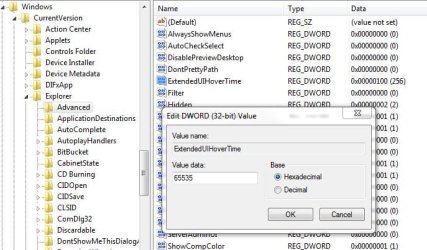
Change the following key

HKCU\Software\Microsoft\Windows\CurrentVersion\Explorer\Advanced\
ExtendedUIHoverTime to a really big time like 65536 and the pop-up will be gone
 
Last edited:

My Computer

Computer Manufacturer/Model Number
HP DV9033CL
OS
Windows 7 Professional 32 Bit
Memory
2 GB
Graphics Card(s)
nVidia GeForce Go 7600
Sound Card
Conexant HD Audio Board
Screen Resolution
1440x900
Internet Speed
aDSL 1.5Mbps / 256 Kbps
Change the following key

HKCU\Software\Microsoft\Windows\Explorer\Advanced\
ExtendedUIHoverTime to a really big time like 65536 and the pop-up will be gone

Thanks. I like the idea but I do not have that path or dword in my registry. I'm on win7 ultimate, 7600.16385
 

My Computer

Computer type
PC/Desktop
Computer Manufacturer/Model Number
diy
OS
Win7 pro x64
CPU
stock i7 7700k
Motherboard
Gigabyte Z270N-WIFI mini-ITX
Memory
Corsair Vengeance LPX 16GB (2x8GB) DDR4 @ 3200MHz
Graphics Card(s)
integrated Intel HD 630
Sound Card
onboard Realtek ALC1220
Monitor(s) Displays
two vertically mounted samsung 55" 4k un55mu8000
Screen Resolution
1920x1280
Hard Drives
256GB Samsung EVO 960 M.2 pci-e NVMe SSD
PSU
SilverStone Nightjar ST45NF 450Watt Fanless
Case
No case. Motherboard is mounted directly onto power supply
Cooling
Evercool low profile 815EP with Panaflow 12L fan at 7v
Keyboard
Ortek MCK-86 mini
Mouse
Belkin 5-button USB
Internet Speed
spectrum 400mbps
Ya same I''m not finding any HKCU folder??

any suggestions?

Thanks
Kukag
 

My Computer

Computer Manufacturer/Model Number
Custom
OS
Windows 7
CPU
AMD Phenom II X4 940 3.0 Stock
Motherboard
Gigabyte GA-MA78GM-S2H
Memory
G.SKILL DDR2 800 PI Black 4GB+Corsair XMS2 Xtrm Gaming 2GB
Graphics Card(s)
ASUS EN8800GT TOP (Fact OC)
Monitor(s) Displays
Optiquest 20" Flatscreen
Screen Resolution
1680x1050
Hard Drives
Seagate 3.5' 7200RPM 750GB HDD
PSU
Antec NeoHE 550W
Cooling
Stock AMD Phenom HSF
Keyboard
Logitech G15
Internet Speed
Charter HighSpeed 10 Down / 5 Up
HKCU is a common abbreviation for HKEY_CURRENT_USER

Try just pasting ExtendedUIHoverTime into the finder (F3) it should bring you right to it
 

Attachments

  • extendedui.JPG
    extendedui.JPG
    61 KB · Views: 301

My Computer

Computer Manufacturer/Model Number
HP DV9033CL
OS
Windows 7 Professional 32 Bit
Memory
2 GB
Graphics Card(s)
nVidia GeForce Go 7600
Sound Card
Conexant HD Audio Board
Screen Resolution
1440x900
Internet Speed
aDSL 1.5Mbps / 256 Kbps
There's no "Explorer" under HKCU\Software\Microsoft\Windows\. I searched the whole registry and couldn't find "ExtendedUIHoverTime" anywhere. I'm running Windows 7 RTM.
 

My Computer

OS
Windows 7
CPU
Intel Core 2 Duo E7400
Motherboard
Gigabyte EP45-DS3L
Memory
2x1GB Crucial DDR2 PC6400 CL6
Graphics Card(s)
Asus Radeon HD 4350
Sound Card
Integrated
Monitor(s) Displays
Dell U2410
Screen Resolution
1920x1200
Hard Drives
Samsung HD322HJ
WDC WD2500KS
There's no "Explorer" under HKCU\Software\Microsoft\Windows\. I searched the whole registry and couldn't find "ExtendedUIHoverTime" anywhere. I'm running Windows 7 RTM.

same for me, using win7 ultimate
 

My Computer

Computer type
PC/Desktop
Computer Manufacturer/Model Number
diy
OS
Win7 pro x64
CPU
stock i7 7700k
Motherboard
Gigabyte Z270N-WIFI mini-ITX
Memory
Corsair Vengeance LPX 16GB (2x8GB) DDR4 @ 3200MHz
Graphics Card(s)
integrated Intel HD 630
Sound Card
onboard Realtek ALC1220
Monitor(s) Displays
two vertically mounted samsung 55" 4k un55mu8000
Screen Resolution
1920x1280
Hard Drives
256GB Samsung EVO 960 M.2 pci-e NVMe SSD
PSU
SilverStone Nightjar ST45NF 450Watt Fanless
Case
No case. Motherboard is mounted directly onto power supply
Cooling
Evercool low profile 815EP with Panaflow 12L fan at 7v
Keyboard
Ortek MCK-86 mini
Mouse
Belkin 5-button USB
Internet Speed
spectrum 400mbps
I'm not talking about thumbnail previews since I've got Aero turned off. I'm talking about the annoying little box that pops up when I hover over an application in the taskbar. It's just a litte box with the icon and title of the window and since I don't group applications on my taskbar, it's unnecessary and annoying. Any ideas on how to turn these off?

Do you mean like this?

Ken


I'll settle for removing this type of preview.
 

My Computer

OS
Windows 7
ra5c

you will get more response if you start your own thread. I just happened to be looking for something in this thread and noticed your post.

Just trying to help


ken
 

My Computer

Computer Manufacturer/Model Number
HP Pavillion dv-7 1005 Tx
OS
Win 8 Release candidate 8400
CPU
[email protected]
Memory
4 gigs
Graphics Card(s)
Nvidia 9600M
Sound Card
HD built-in
Monitor(s) Displays
17" Wxga
Screen Resolution
1440x900
Cooling
none
Internet Speed
45Mb down 5Mb up
There's no "Explorer" under HKCU\Software\Microsoft\Windows\. I searched the whole registry and couldn't find "ExtendedUIHoverTime" anywhere. I'm running Windows 7 RTM.

My bad it's HKCU\Software\Microsoft\Windows\CurrentVersion\Explorer\Advanced\

as my screenshot shows

but if you searched you should've found it, odd
 

My Computer

Computer Manufacturer/Model Number
HP DV9033CL
OS
Windows 7 Professional 32 Bit
Memory
2 GB
Graphics Card(s)
nVidia GeForce Go 7600
Sound Card
Conexant HD Audio Board
Screen Resolution
1440x900
Internet Speed
aDSL 1.5Mbps / 256 Kbps
Anyone? Does anyone know what the feature is called so maybe I can google it?


I believe it's called, "pop-up tool tips", or someting to that effect.
 

My Computer

OS
Windows 7
There's no "Explorer" under HKCU\Software\Microsoft\Windows\. I searched the whole registry and couldn't find "ExtendedUIHoverTime" anywhere. I'm running Windows 7 RTM.

My bad it's HKCU\Software\Microsoft\Windows\CurrentVersion\Explorer\Advanced\

as my screenshot shows

but if you searched you should've found it, odd

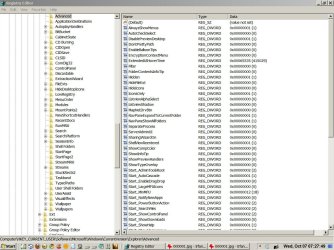
ExtendedUIHoverTime was not in my registry until I added it as noted above by creating a DWORD for it (see screenshot). Unfortunately it seems to have no effect on my system and the pop-ups are still there.
 

Attachments

  • 1.jpg
    1.jpg
    188 KB · Views: 210

My Computer

Computer type
PC/Desktop
Computer Manufacturer/Model Number
diy
OS
Win7 pro x64
CPU
stock i7 7700k
Motherboard
Gigabyte Z270N-WIFI mini-ITX
Memory
Corsair Vengeance LPX 16GB (2x8GB) DDR4 @ 3200MHz
Graphics Card(s)
integrated Intel HD 630
Sound Card
onboard Realtek ALC1220
Monitor(s) Displays
two vertically mounted samsung 55" 4k un55mu8000
Screen Resolution
1920x1280
Hard Drives
256GB Samsung EVO 960 M.2 pci-e NVMe SSD
PSU
SilverStone Nightjar ST45NF 450Watt Fanless
Case
No case. Motherboard is mounted directly onto power supply
Cooling
Evercool low profile 815EP with Panaflow 12L fan at 7v
Keyboard
Ortek MCK-86 mini
Mouse
Belkin 5-button USB
Internet Speed
spectrum 400mbps
Has anyone made any progress with this? Is it time to contact Microsoft for a solution?
 

My Computer

OS
Windows 7
CPU
Intel Core 2 Duo E7400
Motherboard
Gigabyte EP45-DS3L
Memory
2x1GB Crucial DDR2 PC6400 CL6
Graphics Card(s)
Asus Radeon HD 4350
Sound Card
Integrated
Monitor(s) Displays
Dell U2410
Screen Resolution
1920x1200
Hard Drives
Samsung HD322HJ
WDC WD2500KS
Back
Top