
Solved Turn off Win7/XP Dual Boot

babylon5fan

New member
Local time
5:17 PM
Messages
2
Hello,

I have a created a system using Windows 7 64-bit and Windows XP Professional. My C Drive is the Win 7 while the D Drive is the old Windows XP. I am ready to abandon Windows XP and go with Windows 7 only. My C drive is a SATA drive while my D Drive is an old PATA drive. I wish to disable Windows XP and format the D Drive.

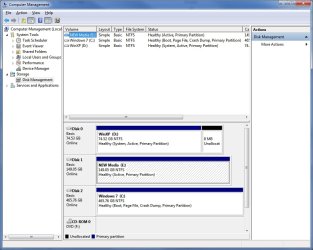
In Disk Management, My Windows 7 Disk is Disk 2/Drive C: with Boot, Page File, Crash Dump and Primary Partition.
My Windows XP Disk is listed as DISK 0/Drive D with System, Active and Primary Partition

Since the boot info is on the Windows 7, could I just take the D Drive out of the system without any problems?
Is there a way to tell the boot to ignore the D Drive as a drive with an operating system on it before I remove the D Drive?

Thanks,
Babylon5fan
 

Attachments
  • Disk_Info.jpg
    Disk_Info.jpg
    86.5 KB · Views: 68

My Computer

OS
Windows 7

My Computer

Computer Manufacturer/Model Number
Apple Macbook Pro (April 2009)
OS
W7 Ult. x64 | OS X
CPU
Intel Mobile Core 2 Duo 2.93Ghz [T9800 Penryn]
Motherboard
NVIDIA nForce 730i Rev. B1 [Mac-F2268EC8 (U2E1)]
Memory
4096MB Samsung DDR3 Dual Channel [PC3-8500F 1066Mhz]
Graphics Card(s)
NVIDIA GeForce 9600M GT 512MB [G96M Rev. C1]
Sound Card
SB X-Fi Surround 5.1 USB | Onboard Realtek (Disabled)
Monitor(s) Displays
Acer x223wbd 22" | Apple Anti-Glare 17" (Disabled)
Screen Resolution
{Current} 1440x900 {Acer} 1680x1050 {Apple} 1920x1200
Hard Drives
{Internal}
Seagate Momentus 320GB 2.5" 7200RPM [ST9320421AS]

{Externals}
LaCie 320GB USB 2.0 HDD [301284UR]
LaCie 750GB USB 2.0 FW400 eSATA HDD [301314U]
LaCie 1TB USB 2.0 HDD [301304UR]
PSU
Magsafe
Case
Aluminum/Unibody (MBP52)
Cooling
2 x 6000 RPM Fans
Keyboard
Logitech G-15v2 [PN 920-000379]
Mouse
Logitech G-9 [PN 910-000338]
Internet Speed
12Mbps/2.5Mbps w/ 24Mbps Speed Boost [Comcast]
Other Info
Logitech X-540 Speakers [PN 970223-0122]
Sennheiser PC-151 Headset
That will work - it's how I used to explain it to people on Vista forums in days gone by.

Pretty long winded - there is a much quicker, easier way.

D/l this View attachment sisparV5.zip ( as usual rt click it >properties>unblock>apply>ok , then rt click the .zip file and select Extract).

Rt click and RUN AS ADMINISTRATOR on sispar.cmd.

It only takes a few seconds. Then you can Reboot into 7 - go to Disk Management , delete/ format/whatever you want with the XP partition.
 

My Computers

System One System Two

  • Computer type
    PC/Desktop
    OS
    7 X64
    CPU
    i5 8400
    Motherboard
    gigabyte b365m ds3h
    Memory
    2x8gb 3200mhz
    Hard Drives
    various
    PSU
    pure power 11 400w cm
    Case
    Coolermaster
    Cooling
    cryorig m9i
  • Computer type
    PC/Desktop
    OS
    7x64
    CPU
    g5400
    Motherboard
    ga b365m ds3h
    Memory
    8gb ddr4 2400
    PSU
    xfx pro 450w
sisparV5.zip worked for me!!

It appears that you gave me the answer I needed. I am happily formatting that former system drive right now!! :)
 

My Computer

OS
Windows 7
Hi babylon5fan,

Thanks for letting us know.

Glad you got it sorted out out.

Have fun.
 

My Computers

System One System Two

  • Computer type
    PC/Desktop
    OS
    7 X64
    CPU
    i5 8400
    Motherboard
    gigabyte b365m ds3h
    Memory
    2x8gb 3200mhz
    Hard Drives
    various
    PSU
    pure power 11 400w cm
    Case
    Coolermaster
    Cooling
    cryorig m9i
  • Computer type
    PC/Desktop
    OS
    7x64
    CPU
    g5400
    Motherboard
    ga b365m ds3h
    Memory
    8gb ddr4 2400
    PSU
    xfx pro 450w
Report

Dear SIW2,

Just wanted to say THANK YOU!

A while ago I was also on dual-boot Windows XP & 7, and wanted to remove the XP.

I followed your advice ... and everything went smooth. When I restarted the system, the Windows Boot Manager menu was still there with the Windows 7 option only (selected).
To remove the Windows Boot Manager menu, I just needed to implement the following - open a Command Prompt window with Administrator privileges and type:

Code:
BCDEdit /delete {ntldr} /f

Now, my system boots straight into Windows 7.
 

My Computer

OS
Windows 7
CPU
AMD Athlon 64 X2 3800+ @ 2000MHz
Motherboard
ASUS A8N-SLi Premium
Memory
2GB Corsair DDR 400MHz
Graphics Card(s)
ASUS eXtreme Nvidia GeForce N6600GT 128MB DDR3
Monitor(s) Displays
23" Samsung P2370
Hard Drives
300GB Seagate Barracuda 7200.9 16MB SATA-II NCQ
PSU
CoolerMaster Real Power 550W
Case
CoolerMaster Centurion 532
Thanks for the update tfu.

Glad it's working well for you.
 

My Computers

System One System Two

  • Computer type
    PC/Desktop
    OS
    7 X64
    CPU
    i5 8400
    Motherboard
    gigabyte b365m ds3h
    Memory
    2x8gb 3200mhz
    Hard Drives
    various
    PSU
    pure power 11 400w cm
    Case
    Coolermaster
    Cooling
    cryorig m9i
  • Computer type
    PC/Desktop
    OS
    7x64
    CPU
    g5400
    Motherboard
    ga b365m ds3h
    Memory
    8gb ddr4 2400
    PSU
    xfx pro 450w
I get boot choice, but don't see any other OS partition

I installed Win7-64 over previous XP Pro 32 and specifically tried to delete old Dell recovery partition or any other wasted space in the setup. When I boot up I am presented with three options: to boot to old OS, check memory, or boot to Win 7, the default (in 30 seconds if no other choice). I have looked for any other partitions or logical drives, but only see the C:drive and a bit of unused space (55MB). Do I really have a dual boot option? I am running Ultimate and my BIOS allows VM. Is that how one enters an XP virtual mode, as if it were a dual boot? I still have Windows.old on the disk, but I can't believe that that has anything to do with this. (I intend to delete Windows.old folder--any reason not to? I have copy wanted files on NAS.) I haven't tried this boot to old OS option. Anyone?
 

My Computer

OS
Win 7-64 Ultimate
Welcome!

Go ahead and delete the Previous Versions entry. Type msconfig into the start menu, and remove the entry in the Boot tab.

To use the virtual XP machine, you need to use virtualization software. If you want to download it, see here: Download Windows XP Mode

As you can see, that entry doesn't have anything to do with XP Mode.

If you already have all your data backed up, there is no reason not to delete Windows.old. See this tutorial: http://www.sevenforums.com/tutorials/19151-windows-old-folder-delete.html
 

My Computer

Computer Manufacturer/Model Number
Custom
OS
Windows 7 Professional x64
CPU
Intel i7 2600K OC'd @ 4620 MHz
Motherboard
Asus P8Z68-V Pro
Memory
16GB GSkill Sniper 2133 Mhz (4x4GB)
Graphics Card(s)
EVGA GeForce GTX 480 SuperClocked+
Sound Card
Realtek High Definition Audio
Monitor(s) Displays
2x Acer S273HLbmii 27"
Screen Resolution
2 x 1920x1080
Hard Drives
64GB Crucial M4 SSD

Storage: Hitachi 1TB 5400RPM, Samsung 1.5TB 5400RPM
PSU
Corsair HW Series 750w (modular)
Case
Cooler Master HAF 932 Advanced Blue Edition
Cooling
CM Hyper 212+ CPU cooler, 3x 230mm + 1x 140mm case fans
Keyboard
Logitech MK320 (wireless)
Mouse
Logitech MK320 (wireless)
Internet Speed
30 Mb/s : 2 Mb/s
Thanks Jonathan. I can see that item, the only one, in the Boot tab in msconfig, but delete is greyed out and right clicking on the item does nothing. I am curious why this boot option was created. I assume that the boot to the other OS leads nowhere, but I am afraid to try it. The one line item in the msconfig boot tab says Windows 7 (C:/Windows) current OS; default OS. No mention of the memory check, which is the thrid option listed at boot and which I also haven't tried. Did I make this happen by selecting a boot option memory check at Win 7 installation--which I have forgotten, and got a false OS option to boot (sorry for the pun)? Weird.
 

My Computer

OS
Win 7-64 Ultimate
Try booting from the old entry. Nothing bad will happen, but I doubt you will get anywhere.

To remove the other entry, try using EasyBCD. If that doesn't work, we can remove it manually.
 

My Computer

Computer Manufacturer/Model Number
Custom
OS
Windows 7 Professional x64
CPU
Intel i7 2600K OC'd @ 4620 MHz
Motherboard
Asus P8Z68-V Pro
Memory
16GB GSkill Sniper 2133 Mhz (4x4GB)
Graphics Card(s)
EVGA GeForce GTX 480 SuperClocked+
Sound Card
Realtek High Definition Audio
Monitor(s) Displays
2x Acer S273HLbmii 27"
Screen Resolution
2 x 1920x1080
Hard Drives
64GB Crucial M4 SSD

Storage: Hitachi 1TB 5400RPM, Samsung 1.5TB 5400RPM
PSU
Corsair HW Series 750w (modular)
Case
Cooler Master HAF 932 Advanced Blue Edition
Cooling
CM Hyper 212+ CPU cooler, 3x 230mm + 1x 140mm case fans
Keyboard
Logitech MK320 (wireless)
Mouse
Logitech MK320 (wireless)
Internet Speed
30 Mb/s : 2 Mb/s
Booting to the previous version of Windows lead nowhere. It said: "Windows could not start because of a computer disk hardware configuration problem..." I hit Esc and it restarted. I then tried the Windows Memory Diagnostic Tool, which I presume checks the RAM. No RAM errors. Can't that tool be set to start upon next boot? I don't really need that on a boot menu. No idea how the false dual boot thing happened. So now I need to edit the boot record.
 

My Computer

OS
Win 7-64 Ultimate
I presume that EasyBCD also works for Win 7, else you wouldn't have recommended it. I'm reading the documentation now.
 

My Computer

OS
Win 7-64 Ultimate

My Computer

Computer Manufacturer/Model Number
Custom
OS
Windows 7 Professional x64
CPU
Intel i7 2600K OC'd @ 4620 MHz
Motherboard
Asus P8Z68-V Pro
Memory
16GB GSkill Sniper 2133 Mhz (4x4GB)
Graphics Card(s)
EVGA GeForce GTX 480 SuperClocked+
Sound Card
Realtek High Definition Audio
Monitor(s) Displays
2x Acer S273HLbmii 27"
Screen Resolution
2 x 1920x1080
Hard Drives
64GB Crucial M4 SSD

Storage: Hitachi 1TB 5400RPM, Samsung 1.5TB 5400RPM
PSU
Corsair HW Series 750w (modular)
Case
Cooler Master HAF 932 Advanced Blue Edition
Cooling
CM Hyper 212+ CPU cooler, 3x 230mm + 1x 140mm case fans
Keyboard
Logitech MK320 (wireless)
Mouse
Logitech MK320 (wireless)
Internet Speed
30 Mb/s : 2 Mb/s
Bingo! Thanks Jonathan, that was it. Wonder how that got checked--don't remember checking it. But that fixed my phantom dual boot issue. As an aside, does EasyBCD work on Win 7? I will also look at your references for the VM option, thanks.
 

My Computer

OS
Win 7-64 Ultimate
Oh yes, EasyBCD works very well with Windows 7, especially the latest beta version.

When you installed Windows 7, it automatically changed that setting. It wasn't your fault.
 

My Computer

Computer Manufacturer/Model Number
Custom
OS
Windows 7 Professional x64
CPU
Intel i7 2600K OC'd @ 4620 MHz
Motherboard
Asus P8Z68-V Pro
Memory
16GB GSkill Sniper 2133 Mhz (4x4GB)
Graphics Card(s)
EVGA GeForce GTX 480 SuperClocked+
Sound Card
Realtek High Definition Audio
Monitor(s) Displays
2x Acer S273HLbmii 27"
Screen Resolution
2 x 1920x1080
Hard Drives
64GB Crucial M4 SSD

Storage: Hitachi 1TB 5400RPM, Samsung 1.5TB 5400RPM
PSU
Corsair HW Series 750w (modular)
Case
Cooler Master HAF 932 Advanced Blue Edition
Cooling
CM Hyper 212+ CPU cooler, 3x 230mm + 1x 140mm case fans
Keyboard
Logitech MK320 (wireless)
Mouse
Logitech MK320 (wireless)
Internet Speed
30 Mb/s : 2 Mb/s
Back
Top