Turn on Google Statusbar

EchoX860

Super Senior Member
Pro User
VIP
Local time
7:06 AM
Messages
563
Is it possible to have the Statusbar that you normally see on the bottom of Browsers appear permanently in Chrome, that's one of my issues with using Chrome.
 

My Computer

Computer Manufacturer/Model Number
HP p6270z
OS
Windows 7 Home Premium x64
CPU
AMD Athlon II X4 620
Motherboard
Foxconn ALOE (CPU 1)
Memory
4.00GB Dual Channel DDR3 @ 666Mhz (9-9-9-24)
Graphics Card(s)
HD Radeon 4200 (Integrated)
Sound Card
Realtek High Definition Audio
Monitor(s) Displays
HP 2311 (1920x1080) @ 60Hz
Screen Resolution
1920x1080
Hard Drives
488GB Seagate ST3500418AS SCSI Disk Device (RAID)
Mine is on all of the time. When nothing is going on, it just says Done. Or are you referring to something else?:)
 

My Computer

OS
Windows 7 Home Premium
CPU
Intel(R) Pentium(R) 4 CPU 3.20GHz
Motherboard
Asus P5VD2-MX-XE
Memory
Physical Memory : 2048 MB (2 x 1024 DDR2-SDRAM )
Graphics Card(s)
Video Card : NVIDIA GeForce 7300 SE/7200 GS
Sound Card
ASUSTeK Computer ALC-660 6-channel CODEC
Monitor(s) Displays
Monitor Type : Acer X183H - 19 inches
Screen Resolution
1366 x 768
Hard Drives
ATA WDC WD1600JS-60NCB1
Keyboard
Logitech
Mouse
Logitech
Internet Speed
DSL 3000
What version are you using?

I mean like this. I want it all the way across the Browser Screen, not some stupid bubble.

Note: That's an Echofon (Twitter client) icon on Firefox.
 

Attachments

  • Capture.PNG
    Capture.PNG
    1.7 KB · Views: 75

My Computer

Computer Manufacturer/Model Number
HP p6270z
OS
Windows 7 Home Premium x64
CPU
AMD Athlon II X4 620
Motherboard
Foxconn ALOE (CPU 1)
Memory
4.00GB Dual Channel DDR3 @ 666Mhz (9-9-9-24)
Graphics Card(s)
HD Radeon 4200 (Integrated)
Sound Card
Realtek High Definition Audio
Monitor(s) Displays
HP 2311 (1920x1080) @ 60Hz
Screen Resolution
1920x1080
Hard Drives
488GB Seagate ST3500418AS SCSI Disk Device (RAID)
This would be nice. I'd rather have a permanent status bar rather than that annoying recurring download bar.
 

My Computer

Computer Manufacturer/Model Number
Self-built rig
OS
Win7 Pro x64
CPU
Koa i5-2550K
Memory
8 GB
Graphics Card(s)
Sapphire ATI 6870 1GB GDDR5
Sound Card
RealTek HD Audio / ATI HDMI Audio
Monitor(s) Displays
Samsung HDTV Monitor T23A350
Screen Resolution
1920 x 1080
Hard Drives
- SSD (C:)
- HDD (D:)
- BD-ROM (E:)
Keyboard
Logitech G110
Internet Speed
Unifi home (5mbps)
That's a HUGE reason I can't use the new IE or Chrome.
 

My Computer

Computer Manufacturer/Model Number
HP p6270z
OS
Windows 7 Home Premium x64
CPU
AMD Athlon II X4 620
Motherboard
Foxconn ALOE (CPU 1)
Memory
4.00GB Dual Channel DDR3 @ 666Mhz (9-9-9-24)
Graphics Card(s)
HD Radeon 4200 (Integrated)
Sound Card
Realtek High Definition Audio
Monitor(s) Displays
HP 2311 (1920x1080) @ 60Hz
Screen Resolution
1920x1080
Hard Drives
488GB Seagate ST3500418AS SCSI Disk Device (RAID)

That's a HUGE reason I can't use the new IE or Chrome.
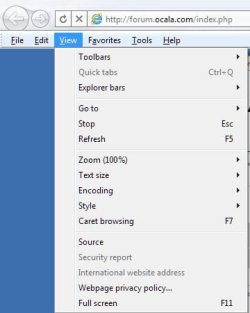
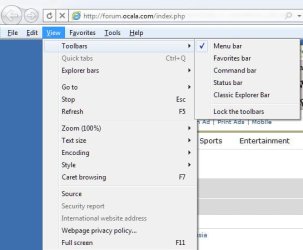
The new IE (IE 9 beta) status bar is very simple to reintroduce into your browsing experience.

Tap the "Alt" key to get the menu bar:
ScreenShot00069.jpg

Click on "View":
ScreenShot00070.jpg

Then "Toolbars" and select the "Status Bar":
ScreenShot00071.jpg

Done! :D

I don't know about Chrome as I very rarely use it. I'm a FF x64 kinda guy...
 

My Computer

Computer Manufacturer/Model Number
Toshiba L355D
OS
Windows 7 Ultimate x64 SP1
CPU
Core2 Duo
Motherboard
Intel
Memory
4 GB
Graphics Card(s)
GM965 on-board
Sound Card
RealTek on-board
Monitor(s) Displays
19"+17"(laptop)
Screen Resolution
1440x900 (x 2)
Hard Drives
500GB Ext. 200GB Internal
PSU
N/A
Case
N/A
Cooling
N/A
@EchoX860: IE does hide it but as mikedl showed you can force it out. Iirc you can do this on IE8 too. The only reason I use Chrome over IE is merely personal preference (like some websites appearing wonky in one browser but not the other, grr...).

Chrome on the other hand seems to take the "minimalist" approach too far and simply doesn't make the option available.
 

My Computer

Computer Manufacturer/Model Number
Self-built rig
OS
Win7 Pro x64
CPU
Koa i5-2550K
Memory
8 GB
Graphics Card(s)
Sapphire ATI 6870 1GB GDDR5
Sound Card
RealTek HD Audio / ATI HDMI Audio
Monitor(s) Displays
Samsung HDTV Monitor T23A350
Screen Resolution
1920 x 1080
Hard Drives
- SSD (C:)
- HDD (D:)
- BD-ROM (E:)
Keyboard
Logitech G110
Internet Speed
Unifi home (5mbps)
@EchoX860: IE does hide it but as mikedl showed you can force it out. Iirc you can do this on IE8 too. The only reason I use Chrome over IE is merely personal preference (like some websites appearing wonky in one browser but not the other, grr...).

Chrome on the other hand seems to take the "minimalist" approach too far and simply doesn't make the option available.

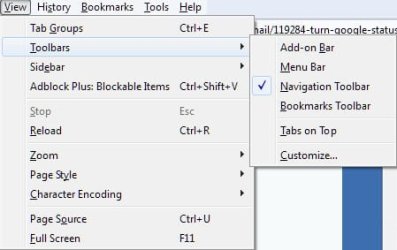
Neither does FF x64 without an add-on:
ScreenShot00072.jpg

Quite frankly, I prefer the extra screen space for web pages. Sure, in this day and age, most of us have large monitors but I'll still take all of the screen real estate I can get.

FF has put what was once in the status bar up in the address bar location and the hover links are presented neatly in the status bar as well:
ScreenShot00073.jpg
 

My Computer

Computer Manufacturer/Model Number
Toshiba L355D
OS
Windows 7 Ultimate x64 SP1
CPU
Core2 Duo
Motherboard
Intel
Memory
4 GB
Graphics Card(s)
GM965 on-board
Sound Card
RealTek on-board
Monitor(s) Displays
19"+17"(laptop)
Screen Resolution
1440x900 (x 2)
Hard Drives
500GB Ext. 200GB Internal
PSU
N/A
Case
N/A
Cooling
N/A
Back
Top