Turn on Windows Security Services

billberry12

New member
Member
VIP
Local time
9:10 PM
Messages
292
Every time I reboot, or start up from off, I get the above message from the action center red x on the taskbar. I am running MSE, but when I click the red x, it tells me MSE is off, please turn it on. How do I get this warning to stop, and make MSE come on at startup, and stop this annoying warning?
Thanks,
Bill
 

My Computer

Computer type
Laptop
Computer Manufacturer/Model Number
Dell Vostro 3750
OS
Windows 7 Professional
CPU
Core I5
Memory
8GB
Hard Drives
Seagate 600 240GB SSD
Antivirus
MSE
Browser
Chrome, IE, Firfox
Try Uninstalling MSE and reinstall it.
 

My Computer

Computer Manufacturer/Model Number
Self Built
OS
Win 7 Ultimate 32bit
CPU
C2D E6600 2.4Ghz
Motherboard
Intel D965WH
Memory
4G Kingston KHX5400D2
Graphics Card(s)
EVGA GTX 570 HD SC (012-P3-1573-KR)
Sound Card
On-Board
Monitor(s) Displays
Samsung 226BW
Screen Resolution
1680 x 1050
Hard Drives
2 x 250 Seagate Barracuda
2 x 500 Seagate Barracuda (Raid1)
PSU
Corsair TX750W
Case
In-Win C589
Cooling
Stock Intel Cooling
If it is actually off, let your computer sit at the login screen until hard drive activity starts to decrease. Looking at your specs I'd say 30-45 secs ought to do it.
 

My Computer

Computer type
Laptop
Computer Manufacturer/Model Number
Toshiba P775-S7100
OS
Windows 7 Professional SP1 64-bit
CPU
Intel Core i5-2450M @2.5 GHz
Memory
6 GB DDR3 1333MHz
Graphics Card(s)
Intel HD 3000
Monitor(s) Displays
Built-in 17.3" LED; 22" Insignia NS-L22Q-10A
Screen Resolution
1600x900; 1360x768
Hard Drives
750 GB Hitachi
1TB Seagate FreeAgent External
Internet Speed
Verizon DSL Speed(Down/Up): 3360 Kbps / 800 Kbps
Antivirus
MSE and MBAM Pro
Browser
IE10
I uninstalled MSE, rebooted, updated and ran Ccleaner, and Registry fixer from Cclenaer, updated and ran Malwarebytes, reinstalled, updated, and ran MSE and still have the red x.
 

My Computer

Computer type
Laptop
Computer Manufacturer/Model Number
Dell Vostro 3750
OS
Windows 7 Professional
CPU
Core I5
Memory
8GB
Hard Drives
Seagate 600 240GB SSD
Antivirus
MSE
Browser
Chrome, IE, Firfox
Did you do what I suggested. If I log in immediately I have the same problem, but when I wait 20-30 seconds before logging in, I don't have the problem.
 

My Computer

Computer type
Laptop
Computer Manufacturer/Model Number
Toshiba P775-S7100
OS
Windows 7 Professional SP1 64-bit
CPU
Intel Core i5-2450M @2.5 GHz
Memory
6 GB DDR3 1333MHz
Graphics Card(s)
Intel HD 3000
Monitor(s) Displays
Built-in 17.3" LED; 22" Insignia NS-L22Q-10A
Screen Resolution
1600x900; 1360x768
Hard Drives
750 GB Hitachi
1TB Seagate FreeAgent External
Internet Speed
Verizon DSL Speed(Down/Up): 3360 Kbps / 800 Kbps
Antivirus
MSE and MBAM Pro
Browser
IE10
Yes. Waited for 10 minutes. Still red x.
 

My Computer

Computer type
Laptop
Computer Manufacturer/Model Number
Dell Vostro 3750
OS
Windows 7 Professional
CPU
Core I5
Memory
8GB
Hard Drives
Seagate 600 240GB SSD
Antivirus
MSE
Browser
Chrome, IE, Firfox
I have the same problem as well, the red x down there except mine won't turn on, have you tried right clicking beside your volume icon and going into properties then customizing notification icons and then un-check the always show all icons and notifications on the taskbar then find action center and choose to hide it, its the only solution I found to keep the annoyance away.
 

My Computer

Computer type
PC/Desktop
Computer Manufacturer/Model Number
Custom
OS
Windows 7 x64 Professional
CPU
Intel i5-4690k
Motherboard
MSI Z97 Gaming 5
Memory
Corsair Vengeance Pro Series 16GB DDR3 1866mhz
Graphics Card(s)
R9 390 8GB
Monitor(s) Displays
24" Acer 3D monitor
Hard Drives
2TB Seagate HDD
120GB Adata SSD
PSU
750 watt
Case
Zalmann Z9
Cooling
Fan
Keyboard
Razer Deathstalker
Mouse
Anker Gaming Mouse
Internet Speed
20MB/S
Antivirus
AVG
Browser
Google Chrome
That worked. One less aggravation. Thanks. But..it made my desktop gadgets disappear. I added them back, and so far, no action icon nor red x. Again. Thanks, I hope disableing the action icon doesn't cause any problems. Anyone???
 

My Computer

Computer type
Laptop
Computer Manufacturer/Model Number
Dell Vostro 3750
OS
Windows 7 Professional
CPU
Core I5
Memory
8GB
Hard Drives
Seagate 600 240GB SSD
Antivirus
MSE
Browser
Chrome, IE, Firfox
Ohhhhh. the action center icon had it. Thats not unusual really. I'm sorry. I thought MSE had the X, and therefor was not running at login. I'm sorry for not understanding. You should be able to make it not display certain warnings, and then set it to show notifications only. That way you can see it when something is actually wrong. If you have trouble doing that. Let me know.
 

My Computer

Computer type
Laptop
Computer Manufacturer/Model Number
Toshiba P775-S7100
OS
Windows 7 Professional SP1 64-bit
CPU
Intel Core i5-2450M @2.5 GHz
Memory
6 GB DDR3 1333MHz
Graphics Card(s)
Intel HD 3000
Monitor(s) Displays
Built-in 17.3" LED; 22" Insignia NS-L22Q-10A
Screen Resolution
1600x900; 1360x768
Hard Drives
750 GB Hitachi
1TB Seagate FreeAgent External
Internet Speed
Verizon DSL Speed(Down/Up): 3360 Kbps / 800 Kbps
Antivirus
MSE and MBAM Pro
Browser
IE10
Ok,, .... when you click the red X for the action center,, what exactly does it do?
 

My Computer

Computer Manufacturer/Model Number
Self Built
OS
Win 7 Ultimate 32bit
CPU
C2D E6600 2.4Ghz
Motherboard
Intel D965WH
Memory
4G Kingston KHX5400D2
Graphics Card(s)
EVGA GTX 570 HD SC (012-P3-1573-KR)
Sound Card
On-Board
Monitor(s) Displays
Samsung 226BW
Screen Resolution
1680 x 1050
Hard Drives
2 x 250 Seagate Barracuda
2 x 500 Seagate Barracuda (Raid1)
PSU
Corsair TX750W
Case
In-Win C589
Cooling
Stock Intel Cooling
hi......
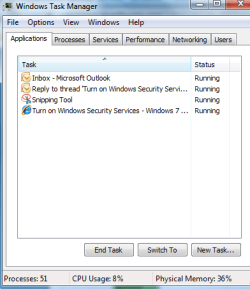
1.open task manager and check that these two processes are up and running MsMpEng.exe and Msseces.exe
2. in action center-virus protection it should say on ...what does it say in your case?
 

My Computer

OS
windows 7 ultimate 64 bit,Windows 7 ultimate 32 bit,Windows XP sp3 home
Her is what I get
 

Attachments

  • Capture.PNG
    Capture.PNG
    12.2 KB · Views: 3

My Computer

Computer type
Laptop
Computer Manufacturer/Model Number
Dell Vostro 3750
OS
Windows 7 Professional
CPU
Core I5
Memory
8GB
Hard Drives
Seagate 600 240GB SSD
Antivirus
MSE
Browser
Chrome, IE, Firfox
The two processes are running, and virus propection is on.
 

My Computer

Computer type
Laptop
Computer Manufacturer/Model Number
Dell Vostro 3750
OS
Windows 7 Professional
CPU
Core I5
Memory
8GB
Hard Drives
Seagate 600 240GB SSD
Antivirus
MSE
Browser
Chrome, IE, Firfox
those are applications, not processes. Use the next tab over, click show processes from all users. Set it to alphabetical order, scroll down to the M's and get a screenshot of that and post it. We will tell you if they are running or not.

EDIT: okay, never mind then.
 

My Computer

Computer type
Laptop
Computer Manufacturer/Model Number
Toshiba P775-S7100
OS
Windows 7 Professional SP1 64-bit
CPU
Intel Core i5-2450M @2.5 GHz
Memory
6 GB DDR3 1333MHz
Graphics Card(s)
Intel HD 3000
Monitor(s) Displays
Built-in 17.3" LED; 22" Insignia NS-L22Q-10A
Screen Resolution
1600x900; 1360x768
Hard Drives
750 GB Hitachi
1TB Seagate FreeAgent External
Internet Speed
Verizon DSL Speed(Down/Up): 3360 Kbps / 800 Kbps
Antivirus
MSE and MBAM Pro
Browser
IE10
Open the notification area customization page. Set the action center to notifications only. Then open action center. Click Change Action Center Settings. Turn off which ever one is causing the red x. I had to do this because it kept bugging me about my Windows Update settings.
 

My Computer

Computer type
Laptop
Computer Manufacturer/Model Number
Toshiba P775-S7100
OS
Windows 7 Professional SP1 64-bit
CPU
Intel Core i5-2450M @2.5 GHz
Memory
6 GB DDR3 1333MHz
Graphics Card(s)
Intel HD 3000
Monitor(s) Displays
Built-in 17.3" LED; 22" Insignia NS-L22Q-10A
Screen Resolution
1600x900; 1360x768
Hard Drives
750 GB Hitachi
1TB Seagate FreeAgent External
Internet Speed
Verizon DSL Speed(Down/Up): 3360 Kbps / 800 Kbps
Antivirus
MSE and MBAM Pro
Browser
IE10
Good link thathagat. Looks like both solutions there might help, assuming the latest updates for MSE aren't installed. If it works, its better than just turning off the warnings like I suggest.
 

My Computer

Computer type
Laptop
Computer Manufacturer/Model Number
Toshiba P775-S7100
OS
Windows 7 Professional SP1 64-bit
CPU
Intel Core i5-2450M @2.5 GHz
Memory
6 GB DDR3 1333MHz
Graphics Card(s)
Intel HD 3000
Monitor(s) Displays
Built-in 17.3" LED; 22" Insignia NS-L22Q-10A
Screen Resolution
1600x900; 1360x768
Hard Drives
750 GB Hitachi
1TB Seagate FreeAgent External
Internet Speed
Verizon DSL Speed(Down/Up): 3360 Kbps / 800 Kbps
Antivirus
MSE and MBAM Pro
Browser
IE10
Back
Top