Solved Turning off touchpad

StupidDude

New member
Member
Local time
1:08 PM
Messages
59
I just got a new laptop, switched to Windows 7, and this touch pad is driving me nuts. I went through this process on my old laptop, and it was simply an issue of getting a different driver, but I don't know which. Can you help?


I am using a HP Envy 17 j120us with Windows 7
 

My Computer

Computer type
Laptop
Computer Manufacturer/Model Number
HP EliteBook 8730W
OS
Windows 7 Home (64bit)
Hard Drives
SSD Intel 520
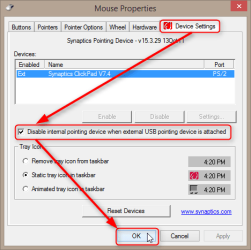
Synaptics Touchpad drivers installed, do the following:
  • Open Mouse Properties (Control Panel > All Control Panel Items > Mouse)
  • Select Device Settings tab
  • Select Disable internal pointing device when external USB pointing device is attached:
    2014-07-12_11h44_41.png
This will disable touchpad always when a USB mouse is connected and enable it again as soon as a USB mouse is disconnected. If USB mouse is present at boot, touchpad will be automatically disabled.

Kari
 

My Computer

Computer type
Laptop
Computer Manufacturer/Model Number
HP ENVY 17-1150eg
OS
Windows 10 Pro x64 EN-GB
CPU
1.6 GHz Intel Core i7-720QM Processor
Memory
6 GB
Graphics Card(s)
ATI Mobility Radeon HD 5850 Graphics
Sound Card
Beats sound system with integrated subwoofer
Monitor(s) Displays
17" laptop display, 22" LED and 32" Full HD TV through HDMI
Screen Resolution
1600*900 (1), 1920*1080 (2&3)
Hard Drives
Internal: 2 x 500 GB SATA Hard Disk Drive 7200 rpm
External: 2TB for backups, 3TB USB3 network drive for media
Cooling
As Envy runs a bit warm, I have it on a Cooler Master pad
Keyboard
Logitech diNovo Media Desktop Laser (bluetooth)
Mouse
Logitech Performance Mouse MX
Internet Speed
50/10 Mbps VDSL
Antivirus
Windows Defender 4.3.9431.0
Browser
Maxthon 3.5.2., IE11
Back
Top