bluto20
New member
- Local time
- 3:07 AM
- Messages
- 3
Step 1:
Either with Windows 7 running or not, turn on your 360 Wait until it fully loads into the dashboard. Now boot up Windows 7.
Step 2:
Once Windows 7 is up and running. Click on the Pearl(Start), and navigate to the Control Panel.

Step 3:
Now look under "Network and Internet" and click "View newtork status and tasks."

Step 4:
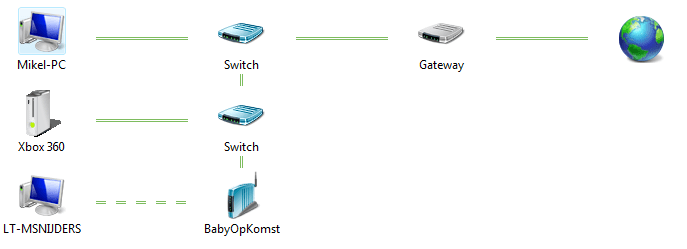
Click "See full map." This will show you your physical network.
Look at the bottom and you should see your 360 as "not being placed in the map." Double-click your 360.

Step 5:
Set your Xbox 360 to "Allowed" in the pop down list. Then hit OK.

Step 6: (if need be)
Go back to "See full map" which is in step 4. Tada! Now you can check to see if your 360 sees your Windows 7. My Xbox > Video/Music/Picture Library


Either with Windows 7 running or not, turn on your 360 Wait until it fully loads into the dashboard. Now boot up Windows 7.
Step 2:
Once Windows 7 is up and running. Click on the Pearl(Start), and navigate to the Control Panel.
Step 3:
Now look under "Network and Internet" and click "View newtork status and tasks."
Step 4:
Click "See full map." This will show you your physical network.
Look at the bottom and you should see your 360 as "not being placed in the map." Double-click your 360.
Step 5:
Set your Xbox 360 to "Allowed" in the pop down list. Then hit OK.
Step 6: (if need be)
Go back to "See full map" which is in step 4. Tada! Now you can check to see if your 360 sees your Windows 7. My Xbox > Video/Music/Picture Library
My Computer
- Computer Manufacturer/Model Number
- custom-built
- OS
- Windows 7 x64
- CPU
- Intel Core 2 Duo E7200 @ 2.53GHz
- Motherboard
- Asus P5Q-EM
- Memory
- 6GB PC2-6400 (400MHz)
- Graphics Card(s)
- NVIDIA GeForce 9500 GT
- Sound Card
- Onboard ALC1200 8ch hi-def
- Monitor(s) Displays
- Benq FP202W 20.5" LCD
- Screen Resolution
- 1680 x 1050
- Hard Drives
- 2x Maxtor 6L300S0 Satas 300GB
1x ST3400620AS Sata 400GB
1TB Total
- PSU
- CoolMaster 500w
- Case
- Ultra mATX Case (Silver/Black)
- Cooling
- fans, lotsa' fans
- Keyboard
- Logitech Classic 200 USB
- Mouse
- Logitech VX Revolution
- Internet Speed
- Molasses
- Other Info
- Hi