Tv, HDMI problem

ManOfWar

New member
Local time
10:13 AM
Messages
3
I have a big sansui Tv, and another small one. I was usually connecting my laptop to the small one with HDMI and would use my laptop normally. But the screen of the smaller one is broken now. So i tried to use the laptop with the big sansui but it would not connect, it keeps saying no signal. The problem is not with my laptop because i tried it with another tv and not with the HDMI because it works with my PS3 and Receiver and not the tv cuz it works fine with other devices so were is the conflict??. :sarc:
 
Last edited:

My Computer

Computer type
Laptop
Computer Manufacturer/Model Number
Acer
OS
Windows 7 Pro 64 bit
CPU
Intel core I3 @ 2.30 GHz
Motherboard
Acer
Memory
4 GB
Graphics Card(s)
Intel HD Graphics 3000
Hard Drives
Toshiba 500 GB
Antivirus
Avast
Browser
Opera, Firefox, Chrome, IE
How many hdmi inputs are on the Sansui ? Are you changing the input on the Sansui to the correct hdmi port ?

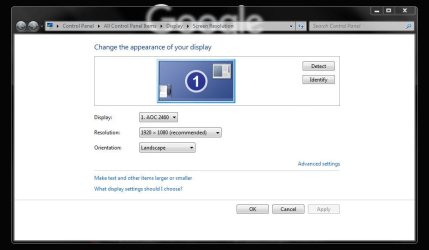
Is the Sansui even showing up here ?
 

Attachments

  • Capture.JPG
    Capture.JPG
    42 KB · Views: 1

My Computer

Computer type
PC/Desktop
Computer Manufacturer/Model Number
Skylake Special #666
OS
Windows 10 Pro x64
CPU
Intel Core i7 6700K
Motherboard
Asus Sabertooth Z170 Mark 1
Memory
GSkill TridentZ RGB 16GB 3600 16-16-16-36
Graphics Card(s)
EVGA GTX 980 Ti SC x2
Sound Card
Realtek High Definition
Monitor(s) Displays
AOC G2460PG
Screen Resolution
1920 x 1080 144Hz
Hard Drives
Samsung 860 Pro 256GB, Seagate Barracuda 4TB x2
PSU
EVGA 1000 P2, EVGA White Custom Braided Cables
Case
Corsair Vengeance C70 Gunmetal Black
Cooling
Corsair H100i v2, Corsair ML120 x2, Thermal Grizzly Kryonaut
Keyboard
Logitech G910 Orion Spectrum
Mouse
Logitech G700s
Internet Speed
Verizon Fios Quantum Gateway 75/75
Antivirus
Windows Defender, Malwarebytes Free 3.8.3
Browser
Chrome
Other Info
Corsair SP120 x4, LG Blu-ray Drive, Durabrand HT-395 100 Watt Dolby Digital Amp, Corsair H2100 Wireless 7.1 Headset
Yes it is showing as Unidentified with yellow triangle. My Sansui have 2 hdmi ports known as HDMI 1 And HDMI 2 in sources, the cable is connected at one and the tv also set as 1.
 

My Computer

Computer type
Laptop
Computer Manufacturer/Model Number
Acer
OS
Windows 7 Pro 64 bit
CPU
Intel core I3 @ 2.30 GHz
Motherboard
Acer
Memory
4 GB
Graphics Card(s)
Intel HD Graphics 3000
Hard Drives
Toshiba 500 GB
Antivirus
Avast
Browser
Opera, Firefox, Chrome, IE
Sorry but when i try to detect it it says another display not detected, so that triangle isnt from TV.
 

My Computer

Computer type
Laptop
Computer Manufacturer/Model Number
Acer
OS
Windows 7 Pro 64 bit
CPU
Intel core I3 @ 2.30 GHz
Motherboard
Acer
Memory
4 GB
Graphics Card(s)
Intel HD Graphics 3000
Hard Drives
Toshiba 500 GB
Antivirus
Avast
Browser
Opera, Firefox, Chrome, IE
Does that other display show up in Device Manager ?

If so uninstall it.
 

My Computer

Computer type
PC/Desktop
Computer Manufacturer/Model Number
Skylake Special #666
OS
Windows 10 Pro x64
CPU
Intel Core i7 6700K
Motherboard
Asus Sabertooth Z170 Mark 1
Memory
GSkill TridentZ RGB 16GB 3600 16-16-16-36
Graphics Card(s)
EVGA GTX 980 Ti SC x2
Sound Card
Realtek High Definition
Monitor(s) Displays
AOC G2460PG
Screen Resolution
1920 x 1080 144Hz
Hard Drives
Samsung 860 Pro 256GB, Seagate Barracuda 4TB x2
PSU
EVGA 1000 P2, EVGA White Custom Braided Cables
Case
Corsair Vengeance C70 Gunmetal Black
Cooling
Corsair H100i v2, Corsair ML120 x2, Thermal Grizzly Kryonaut
Keyboard
Logitech G910 Orion Spectrum
Mouse
Logitech G700s
Internet Speed
Verizon Fios Quantum Gateway 75/75
Antivirus
Windows Defender, Malwarebytes Free 3.8.3
Browser
Chrome
Other Info
Corsair SP120 x4, LG Blu-ray Drive, Durabrand HT-395 100 Watt Dolby Digital Amp, Corsair H2100 Wireless 7.1 Headset
Back
Top