tv tuner not working

ryanfrohlich

New member
Local time
9:11 PM
Messages
5
Location
Canada
every time i run windows i get two drivers with a yellow exclamination mark beside it.

Conexant does not help you at all on their website, and HP does not help at all because i have windows 7 not their 5 year old windows MCE

The two drivers i need are
Conexant 2388x MPEG Encoder (Dual-Input)
Conexant 23800 Video Capture (Blackbird NTSC Dual-Input)

each time i try to uninstall and reinstall them i get an error.

the software for this device has been blocked from starting because it is known to have problems with Windows. Contact the Hardware vendor for a new driver (Code 48)


This is weird because it worked fine on windows xp, but not windows 7 no drivers for it??? and if not how would i request them to get that driver??


Thank-you very much for the help.
 

My Computer

Computer Manufacturer/Model Number
HP Media Center M370N
OS
windows 7
Memory
1.5 gig
Monitor(s) Displays
19" HP vs19e
Cooling
2 fans
Hello Ryan, welcome to the SevenForums.

Please do not double post; you have this same (word by word) post on Graphic Cards. - Thread deleted by Dwarf.

Back to the topic: have you tried to install these drivers on compatibility mode choosing XP?

Kari
 

My Computer

Computer type
Laptop
Computer Manufacturer/Model Number
HP ENVY 17-1150eg
OS
Windows 10 Pro x64 EN-GB
CPU
1.6 GHz Intel Core i7-720QM Processor
Memory
6 GB
Graphics Card(s)
ATI Mobility Radeon HD 5850 Graphics
Sound Card
Beats sound system with integrated subwoofer
Monitor(s) Displays
17" laptop display, 22" LED and 32" Full HD TV through HDMI
Screen Resolution
1600*900 (1), 1920*1080 (2&3)
Hard Drives
Internal: 2 x 500 GB SATA Hard Disk Drive 7200 rpm
External: 2TB for backups, 3TB USB3 network drive for media
Cooling
As Envy runs a bit warm, I have it on a Cooler Master pad
Keyboard
Logitech diNovo Media Desktop Laser (bluetooth)
Mouse
Logitech Performance Mouse MX
Internet Speed
50/10 Mbps VDSL
Antivirus
Windows Defender 4.3.9431.0
Browser
Maxthon 3.5.2., IE11
Back to the topic: have you tried to install these drivers on compatibility mode choosing XP?

Kari

hey sorry about multi post, did not know where to post it...


what do you mean by compatibility mode chosing XP? I have tried to install that windows virtual PC, but it does not do anything since it is a driver, and i have the XP drivers installed, but that does not work.
 

My Computer

Computer Manufacturer/Model Number
HP Media Center M370N
OS
windows 7
Memory
1.5 gig
Monitor(s) Displays
19" HP vs19e
Cooling
2 fans
Back to the topic: have you tried to install these drivers on compatibility mode choosing XP?

Kari

hey sorry about multi post, did not know where to post it...


what do you mean by compatibility mode chosing XP? I have tried to install that windows virtual PC, but it does not do anything since it is a driver, and i have the XP drivers installed, but that does not work.
You make me now a little bit confused. Anyway, here we go:

If you have installed Windows Seven on a virtual machine running in Virtual PC, you can not install any graphics drivers. VPC runs on emulated environment using its own drivers.

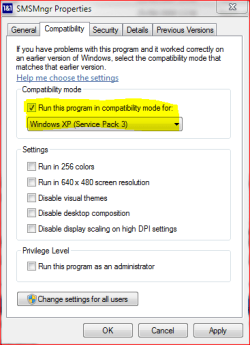
Your computer is already a bit older. The drivers HP is offering are meant to be used in a XP system. To install these drivers on Win7 you first have to download them to your computer. Right click downloaded driver installation packet, choose Properties from menu. Click Compatibility tab, check the box Run this program in compatibility mode for, choose Windows XP (Service Pack 3).

It might work.

Kari

xp_comp.PNG
 

My Computer

Computer type
Laptop
Computer Manufacturer/Model Number
HP ENVY 17-1150eg
OS
Windows 10 Pro x64 EN-GB
CPU
1.6 GHz Intel Core i7-720QM Processor
Memory
6 GB
Graphics Card(s)
ATI Mobility Radeon HD 5850 Graphics
Sound Card
Beats sound system with integrated subwoofer
Monitor(s) Displays
17" laptop display, 22" LED and 32" Full HD TV through HDMI
Screen Resolution
1600*900 (1), 1920*1080 (2&3)
Hard Drives
Internal: 2 x 500 GB SATA Hard Disk Drive 7200 rpm
External: 2TB for backups, 3TB USB3 network drive for media
Cooling
As Envy runs a bit warm, I have it on a Cooler Master pad
Keyboard
Logitech diNovo Media Desktop Laser (bluetooth)
Mouse
Logitech Performance Mouse MX
Internet Speed
50/10 Mbps VDSL
Antivirus
Windows Defender 4.3.9431.0
Browser
Maxthon 3.5.2., IE11
every time i run windows i get two drivers with a yellow exclamination mark beside it.

Conexant does not help you at all on their website, and HP does not help at all because i have windows 7 not their 5 year old windows MCE

The two drivers i need are
Conexant 2388x MPEG Encoder (Dual-Input)
Conexant 23800 Video Capture (Blackbird NTSC Dual-Input)

each time i try to uninstall and reinstall them i get an error.

the software for this device has been blocked from starting because it is known to have problems with Windows. Contact the Hardware vendor for a new driver (Code 48)


This is weird because it worked fine on windows xp, but not windows 7 no drivers for it??? and if not how would i request them to get that driver??


Thank-you very much for the help.

do you know the brand and type of the TV tuner?

Conexant is the chip manufacturer, and their chips are used on several TV cards.

Greetings
 

My Computer

OS
Win7 Build 7600 x86
CPU
Pentium II 300MHz
Motherboard
Asus
Memory
32mb EDO RAM
Graphics Card(s)
Diamond Viper
Sound Card
Soundblaster 16
Monitor(s) Displays
14" AOC CRT 16K color
Screen Resolution
800x600
Hard Drives
300mb Quantum fireball
PSU
110 Watts
Cooling
Passive
Keyboard
Trust Ergonomic
Mouse
Generic
Internet Speed
256K u 128K d
every time i run windows i get two drivers with a yellow exclamination mark beside it.

Conexant does not help you at all on their website, and HP does not help at all because i have windows 7 not their 5 year old windows MCE

The two drivers i need are
Conexant 2388x MPEG Encoder (Dual-Input)
Conexant 23800 Video Capture (Blackbird NTSC Dual-Input)

each time i try to uninstall and reinstall them i get an error.

the software for this device has been blocked from starting because it is known to have problems with Windows. Contact the Hardware vendor for a new driver (Code 48)


This is weird because it worked fine on windows xp, but not windows 7 no drivers for it??? and if not how would i request them to get that driver??


Thank-you very much for the help.

do you know the brand and type of the TV tuner?

Conexant is the chip manufacturer, and their chips are used on several TV cards.

Greetings


It is an ASUS C1VA82 tv tuner card
 

My Computer

Computer Manufacturer/Model Number
HP Media Center M370N
OS
windows 7
Memory
1.5 gig
Monitor(s) Displays
19" HP vs19e
Cooling
2 fans
Back to the topic: have you tried to install these drivers on compatibility mode choosing XP?

Kari


You make me now a little bit confused. Anyway, here we go:

If you have installed Windows Seven on a virtual machine running in Virtual PC, you can not install any graphics drivers. VPC runs on emulated environment using its own drivers.

Your computer is already a bit older. The drivers HP is offering are meant to be used in a XP system. To install these drivers on Win7 you first have to download them to your computer. Right click downloaded driver installation packet, choose Properties from menu. Click Compatibility tab, check the box Run this program in compatibility mode for, choose Windows XP (Service Pack 3).

It might work.

Kari

View attachment 31564


Thanks for that, i did try it and it did not work :(. but when i restart it says driver blocked due to incompatibility.

this driver is
CxVCap, Video Capture Driver


so that is a step closer maybe...
 

My Computer

Computer Manufacturer/Model Number
HP Media Center M370N
OS
windows 7
Memory
1.5 gig
Monitor(s) Displays
19" HP vs19e
Cooling
2 fans
Back
Top