TV tuner questions

rowuncw

New member
Local time
5:48 AM
Messages
4
Location
Raleigh, NC
Hi all. I am thinking about getting a TV tuner for my Win7 PC and had a few basic questions regarding set-up that I'm hoping can be answered by someone who's had experience with this.

What I want to be able to do, obviously, is watch cable TV on my computer but not necessarily have to rely on the over-the-air digital signal, as I'm not interesting in mounting antennas, worrying about signals, etc. In my office I have a single cable wall jack that I know for a fact puts out both basic cable and internet.

If I install a TV tuner, will it automatically recognize the cable TV signal that I know comes out of the wall in addition to the internet, or will I need to get a splitter to split the signal from the wall (one singal to my modem for internet, the other to the TV tuner for cable TV)? If I need a splitter, any particular type?

Any other advice is welcome. Not looking for a major home theater experience here, just mostly want to watch basic cable while I surf the web. Thanks in advance!
 

My Computer My Computer

Computer Manufacturer/Model Number
Dell Studio XPS 8100
OS
Windows 7 Home Premium, 64bit
CPU
Intel Core i7-860 (8MB Cache, 2.80GHz)
Memory
8GB DDR3 SDRAM at 1333MHz-4x2GB
Graphics Card(s)
ATI Radeon HD 5670
Monitor(s) Displays
Dell ST Series 21.5" Full HD Monitor
Hard Drives
1TB Serial ATA 2 7200 RPM
Keyboard
Dell Consumer Multimedia Keyboard
Mouse
Dell Studio USB Optical Mouse
Other Info
Sytem purchased June 2010
You will not necessarily need a splitter. The cable can feed from the wall into the card. The another cable exits the card and feeds into the television, dvr, or whatever.
 

My Computer My Computer

Computer Manufacturer/Model Number
Dell and Custom
OS
Systems 1 and 2: Windows 7 Enterprise x64, Win 8 Developer
CPU
System 1: i7 [email protected], System 2: AMD FX-4100 Zambezi 3.6G
Motherboard
System 1:Dell 06NWYK System 2: ASUS M5A97 AM3+
Memory
System 1: 8GB System 2: 8GB
Graphics Card(s)
System 1: ATI FirePro V4800 System 2: Radeon HD 6850
Sound Card
System 1: onboard System 2: onboard
Monitor(s) Displays
System1: Viewsonic HDMI 24"
Screen Resolution
System 1: 1920x1080 System 2: 1920x1080
Hard Drives
System 1: Mirrored .5B drives System 2: Seagate Barracuda ST1000DM003 1TB 7200 RPM 64MB Cache SATA 6.0Gb/s
Case
System 1: Dell System 2: Cooler Master
Internet Speed
10 MBPS
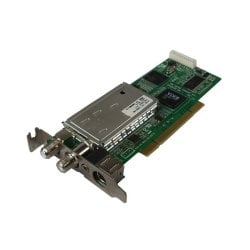
With this tuner, you can see the input and output. If your tuner does not have an output, the obviously you would need a splitter.
 

Attachments

  • tuner.jpg
    tuner.jpg
    23.5 KB · Views: 3

My Computer My Computer

Computer Manufacturer/Model Number
Dell and Custom
OS
Systems 1 and 2: Windows 7 Enterprise x64, Win 8 Developer
CPU
System 1: i7 [email protected], System 2: AMD FX-4100 Zambezi 3.6G
Motherboard
System 1:Dell 06NWYK System 2: ASUS M5A97 AM3+
Memory
System 1: 8GB System 2: 8GB
Graphics Card(s)
System 1: ATI FirePro V4800 System 2: Radeon HD 6850
Sound Card
System 1: onboard System 2: onboard
Monitor(s) Displays
System1: Viewsonic HDMI 24"
Screen Resolution
System 1: 1920x1080 System 2: 1920x1080
Hard Drives
System 1: Mirrored .5B drives System 2: Seagate Barracuda ST1000DM003 1TB 7200 RPM 64MB Cache SATA 6.0Gb/s
Case
System 1: Dell System 2: Cooler Master
Internet Speed
10 MBPS
So if I get a tuner that has both an input and output, then I could connect the wall jack to the tuner in my PC, then connect the tuner to my modem? My issue is that I only have one cable jack in the room and I would need to get both my internet and TV from that same jack.
 

My Computer My Computer

Computer Manufacturer/Model Number
Dell Studio XPS 8100
OS
Windows 7 Home Premium, 64bit
CPU
Intel Core i7-860 (8MB Cache, 2.80GHz)
Memory
8GB DDR3 SDRAM at 1333MHz-4x2GB
Graphics Card(s)
ATI Radeon HD 5670
Monitor(s) Displays
Dell ST Series 21.5" Full HD Monitor
Hard Drives
1TB Serial ATA 2 7200 RPM
Keyboard
Dell Consumer Multimedia Keyboard
Mouse
Dell Studio USB Optical Mouse
Other Info
Sytem purchased June 2010
Hi all. I am thinking about getting a TV tuner for my Win7 PC and had a few basic questions regarding set-up that I'm hoping can be answered by someone who's had experience with this.

What I want to be able to do, obviously, is watch cable TV on my computer but not necessarily have to rely on the over-the-air digital signal, as I'm not interesting in mounting antennas, worrying about signals, etc. In my office I have a single cable wall jack that I know for a fact puts out both basic cable and internet.

If I install a TV tuner, will it automatically recognize the cable TV signal that I know comes out of the wall in addition to the internet, or will I need to get a splitter to split the signal from the wall (one singal to my modem for internet, the other to the TV tuner for cable TV)? If I need a splitter, any particular type?

Any other advice is welcome. Not looking for a major home theater experience here, just mostly want to watch basic cable while I surf the web. Thanks in advance!

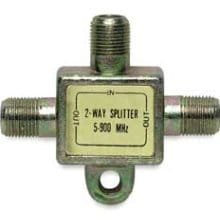
If the cable coming out of the wall right now is connected to your modem, yes you

will need a splitter, that's exactly how I have mine setup. split it coming out of the

wall, one to the modem and one to the tuner, try not to get the cheapest thing

you find, but it will look like this.
unnamed.jpg
 

My Computer My Computer

Computer type
PC/Desktop
Computer Manufacturer/Model Number
Self Built
OS
Win 10 Pro x64
CPU
Intel I5-2500K @3.3GHz
Motherboard
Asrock P67 Extreme4
Memory
16GB G.Skill Ripjaws X (4x4GB)
Graphics Card(s)
EVGA GeForce 750 Ti SC 2GB
Sound Card
ASUS Xonar DG 5.1 Channels 24-bit 96KHz PCI Interface Sound
Monitor(s) Displays
auria eq2367
Screen Resolution
1920 x 1080
Hard Drives
250GB Samsung 850 EVO SSD
1TB WD Blue
1TB Hitachi
PSU
SeaSonic X 650W 80 Plus Gold
Case
Corsair Obsidian 750D
Cooling
Corsair H60, Three 140mm case fans
Keyboard
Logitech Wireless Keyboard K520
Mouse
Logitech Wireless Mouse M310
Internet Speed
Wave Broadband ~ 100 dn 5 up
Antivirus
Windows Defender, Malwarebytes Premium
Browser
Edge, IE11, Chrome
Other Info
Laptop specs: HP g7-1365dx /
CPU: AMD A6-3420M APU with Radeon(tm) HD Graphics /
RAM: Crucial 8Gb (2x4Gb) /
SSD: Crucial M4-CT128M4SSD2 ATA Device/ FW 000F /
GFX: AMD Radeon HD 6520G /
OS: Windows 10 Pro x64
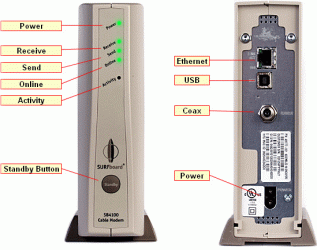
Oops. Mea culpa. I forgot about just the input on the modem.
 

Attachments

  • modem.gif
    modem.gif
    79.9 KB · Views: 2

My Computer My Computer

Computer Manufacturer/Model Number
Dell and Custom
OS
Systems 1 and 2: Windows 7 Enterprise x64, Win 8 Developer
CPU
System 1: i7 [email protected], System 2: AMD FX-4100 Zambezi 3.6G
Motherboard
System 1:Dell 06NWYK System 2: ASUS M5A97 AM3+
Memory
System 1: 8GB System 2: 8GB
Graphics Card(s)
System 1: ATI FirePro V4800 System 2: Radeon HD 6850
Sound Card
System 1: onboard System 2: onboard
Monitor(s) Displays
System1: Viewsonic HDMI 24"
Screen Resolution
System 1: 1920x1080 System 2: 1920x1080
Hard Drives
System 1: Mirrored .5B drives System 2: Seagate Barracuda ST1000DM003 1TB 7200 RPM 64MB Cache SATA 6.0Gb/s
Case
System 1: Dell System 2: Cooler Master
Internet Speed
10 MBPS
Back
Top