Tweaking boot time (classpnp.sys?)

Status
Not open for further replies.
exactly right... and why I disagree with some who say startup time is no indication of performance.. to the contrary, if you ignore the time it takes for POST and eliminate as many software and hardware variables as possible, you end up with what I consider a reasonably accurate benchmark.

Well said! +1
 

My Computer

Computer Manufacturer/Model Number
Gateway M-6862
OS
W7 x64 Ultimate
CPU
T5750 2.0 Ghz
Motherboard
PM965
Memory
4 GB
Graphics Card(s)
Mobility Radeon HD 2600
Hard Drives
WD2500BEVS 250GB
Cooling
Undervolting Works!
why I disagree with some who say startup time is no indication of performance..
Okay. So please explain if it takes 3 or 4 minutes to boot, but once booted, runs great, how is that an indication of performance?

I'm not up to speed until I start my 2nd cup of coffee, but after that, I'm running full speed all day long - not trying to be sarcastic, but is that any different?

I load my PDA's hotsync manager, MailwasherPro spam blocker, and all my security software, dual monitor manager, and have a Quicklaunch toolbar fully loaded that starts at boot, CoreTemp, and a local weather gadget - surely they slow boot times - does that mean my performance is bad? Some graphics card BIOS and drivers take longer to install than others, does that mean the longer one will have poorer performance?

Boot times are affected in a large part by loading hardware drivers. Loading files and programs (which requires disk access) always takes longer than opening the same - which requires RAM access (and maybe PF - which is faster than loading from scratch).

Nothing in startup vs everything needed in startup means nothing in terms of performance after the system has booted - assuming there are no errors with the drivers of services that start - and also assuming there is not a bunch of junk loaded that is never needed - like adobe or java update checkers, or the like.

If you can find a link that shows "boot times affects performance", please post it. I would like to read it.
 

My Computer

Computer Manufacturer/Model Number
BrightWorks Systems B4
OS
Windows 7 Profession 64-bit
CPU
Intel Core i7-860 Quad
Motherboard
Gigabyte P55-UD4P
Memory
Mushkin 4x2Gb PC12800
Graphics Card(s)
Gigabyte GTX260 896Mb
Sound Card
Integrated 7.1 HD Dolby
Monitor(s) Displays
2 Samsung 2220wm-HAS 22"
Screen Resolution
1680 x 1050 | 1680 x 1050
Hard Drives
WD HE 1Tb
PSU
Corsair TX-750W
Case
Ultra M998
Cooling
OEM
Keyboard
MS Wireless Comfort 5000
Mouse
MS Wireless 5000
Internet Speed
Cable and pretty darn fast
digerati.. I don't think you're even trying to understand what I'm saying.. most of the people who post fast boot times do so with a minimum of peripherals attached and a bare OS with minimal startup items. And I never stated that boot times affect performance, but by removing as many variables as possible (including cleaning and defragging the HDD after a few power cycles) and only considering the time it takes to load windows (ignoring the time it takes for BIOS to decide it's time to start loading the OS), you can get a pretty good base indication of how fast a computer really is. I take into consideration what hardware is installed too.. A raid array, a TPM, multiple video cards, etc are of course going to take a bit longer to initialize, but even so, there's no reason a system with an i7 and SSD and 12 GB of RAM for example should take two minutes or more to boot.. there's a word for that... bloat. You are obviously correct in stating that it takes longer to cold start an app than it does to open one that's already running in the background, but as I've said before, increasing the system load in greater proportion than it's capabilities is actually making it slower. No different than with a car... if you put a 426 hemi in a fully loaded dumptruck towing a backhoe, the engine is still just as powerful as when it was in the Cuda, but it's pretty obviously not going accelerate as quickly, and only a moron would compare them in a drag race...and because I don't have 95 other background processes running at the moment, it takes all of 10 seconds for crysis 2 to load. It takes much longer with all startup items checked off.. I don't want java, itunes, my AV or windows itself to decide it's time to start updating or an IM to pop up while I'm in the middle of a game, nor am I going to check my outlook. I only sync my Ipod 1 in about 10 times when I connect it... all the other times I'm just charging it. I have a printer, but I don't use it every day...most software manufacturers set things to run at startup by default so the user won't forget they exist, not because it's necessary make the program work. My firewall and AV still load the core processes without loading the interface, and they work just fine. My monitor works even though I disabled the ATI control panel, and when I connect a 2nd monitor, that works too.. are you beginning to see my point? It's my personal preference, and you have yours..
 
Last edited:
digerati.. I don't think you're even trying to understand what I'm saying.. most of the people who post fast boot times do so with a minimum of peripherals attached and a bare OS with minimal startup items. And I never stated that boot times affect performance,

With all due respect madtownidiot. I fully understand what you are saying. But understand this, YOU JUST SAID in your previous post
madtownidiot said:
and why I disagree with some who say startup time is no indication of performance..
And that is clearly contrary to your last statement.
 

My Computer

Computer Manufacturer/Model Number
BrightWorks Systems B4
OS
Windows 7 Profession 64-bit
CPU
Intel Core i7-860 Quad
Motherboard
Gigabyte P55-UD4P
Memory
Mushkin 4x2Gb PC12800
Graphics Card(s)
Gigabyte GTX260 896Mb
Sound Card
Integrated 7.1 HD Dolby
Monitor(s) Displays
2 Samsung 2220wm-HAS 22"
Screen Resolution
1680 x 1050 | 1680 x 1050
Hard Drives
WD HE 1Tb
PSU
Corsair TX-750W
Case
Ultra M998
Cooling
OEM
Keyboard
MS Wireless Comfort 5000
Mouse
MS Wireless 5000
Internet Speed
Cable and pretty darn fast
digerati.. I don't think you're even trying to understand what I'm saying.. most of the people who post fast boot times do so with a minimum of peripherals attached and a bare OS with minimal startup items. And I never stated that boot times affect performance,

With all due respect madtownidiot. I fully understand what you are saying. But understand this, YOU JUST SAID in your previous post
madtownidiot said:
and why I disagree with some who say startup time is no indication of performance..
And that is clearly contrary to your last statement.

Now you're misquoting me and out of context

[B said:
echo147][/B]Think I just have to accept that many of the dead quick times from that thread must be systems with the minimum of hardware connected and virtually nothing in startup.

to which I replied:
madtownidiot said:
exactly right... and why I disagree with some who say startup time is no indication of performance..

you conveniently left out the rest of the statement

madtownidiot said:
to the contrary, if you ignore the time it takes for POST and eliminate as many software and hardware variables as possible, you end up with what I consider a reasonably accurate benchmark.

where is the contradiction? And more importantly, how am I wrong? If two computers running close to the same set of programs and comparable hardware take a significantly different amount of time to boot the OS, isn't it reasonable to assume one's going to be a little faster than the other in everything else?
 
Now I am totally confused. I did not "conveniently" leave it out, it did not, and still does not change the meaning - to me anyway. It appears to me you are saying, "I disagree with some who say startup time is no indication of performance.."

Is that not true?
 

My Computer

Computer Manufacturer/Model Number
BrightWorks Systems B4
OS
Windows 7 Profession 64-bit
CPU
Intel Core i7-860 Quad
Motherboard
Gigabyte P55-UD4P
Memory
Mushkin 4x2Gb PC12800
Graphics Card(s)
Gigabyte GTX260 896Mb
Sound Card
Integrated 7.1 HD Dolby
Monitor(s) Displays
2 Samsung 2220wm-HAS 22"
Screen Resolution
1680 x 1050 | 1680 x 1050
Hard Drives
WD HE 1Tb
PSU
Corsair TX-750W
Case
Ultra M998
Cooling
OEM
Keyboard
MS Wireless Comfort 5000
Mouse
MS Wireless 5000
Internet Speed
Cable and pretty darn fast
We're both right, you just don't see it. and the second part of my statement makes all the difference in the world. Comparing boot times between two computers without eliminating as many software and hardware variables as possible 1st is pretty moronic, and really, to some people, a slow boot time can be a deal breaker no matter what's inside the case.
 
Yes, you mentioned earlier I was confused when the truth seems to be that you are. I think you are being intentionally obtuse so as to not concede the point. The point of: While boot times do not affect performance they can be considered an indicator of system performance.
 

My Computer

Computer Manufacturer/Model Number
Gateway M-6862
OS
W7 x64 Ultimate
CPU
T5750 2.0 Ghz
Motherboard
PM965
Memory
4 GB
Graphics Card(s)
Mobility Radeon HD 2600
Hard Drives
WD2500BEVS 250GB
Cooling
Undervolting Works!
Have never had a Win7 install that started up in less than 20-30 seconds, possibly because I only allow AV and gadgets to start with computer, run CCleaner and Auslogics defraggers monthly, google all Event Viewer errors to resolution.

If I had a startup delay I would create a boot log and monitor closely the Diagnostics-Performance log to see what is hanging.

I would try install without the RAID as Win7 is somewhat allergic to RAID.
 
Wonder what would happen if I put an ssd in my old dell laptop.. the bios takes all of 4 seconds when nothing else is attached, and it boots in about 30 seconds with a spinning HDD
 

Attachments

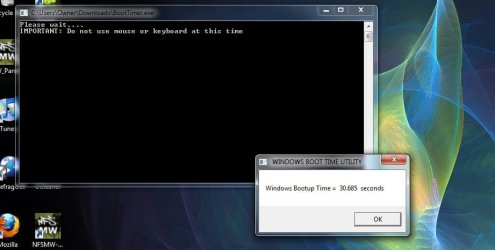
  • boot time.jpg
    boot time.jpg
    87.8 KB · Views: 32
madtownidiot said:
We're both right, you just don't see it.
Laker said:
The point of: While boot times do not affect performance they can be considered an indicator of system performance.
How? Show ANY link or study that shows where boot times are an indication of performance. All it shows me is boot times. Do slow boot times affect game play? Frames per second? How fast Word can spell check a document? How fast IE can download a webpage? How fast I can copy files?

I am not going to debate "what ifs". Two identical machines, setup identically, with the same programs set to load at start should take the same amount of time to boot. I assume we agree on that.

But by you guys saying boot times is an indicator of performance, that suggests if User A chooses to have Outlook run at startup, thus adding 10 seconds to his boot times, suddenly his machine is now somehow less of a performer than the otherwise identical machine where User B waits to load Outlook until after it boots.

That's what you guys are saying! That is, User A loads Outlook at boot, therefore User B's machine is a better performer. That's just not right.

Now if you guys want to keep saying that, then I am saying you are wrong. Whether I choose to load Outlook at boot or not is no more an indication of performance than whether I choose a 22" or a 24" inch monitor. Or a silver case or a black case. Declaring boot times is a deal breaker is an invalid argument for you are then not talking about identical machines setup identically.

And to that - if I take two identical motherboards, RAM and graphics cards, and put an Intel i5 2.66GHz on one board, and an i7 2.8GHz CPU on the other, but load up the start options on the i7 - it would be sad day if the buyer chose the i5 thinking (or worse yet, was led to believe) he was getting the better machine with the i5 simply because it booted faster.
 

My Computer

Computer Manufacturer/Model Number
BrightWorks Systems B4
OS
Windows 7 Profession 64-bit
CPU
Intel Core i7-860 Quad
Motherboard
Gigabyte P55-UD4P
Memory
Mushkin 4x2Gb PC12800
Graphics Card(s)
Gigabyte GTX260 896Mb
Sound Card
Integrated 7.1 HD Dolby
Monitor(s) Displays
2 Samsung 2220wm-HAS 22"
Screen Resolution
1680 x 1050 | 1680 x 1050
Hard Drives
WD HE 1Tb
PSU
Corsair TX-750W
Case
Ultra M998
Cooling
OEM
Keyboard
MS Wireless Comfort 5000
Mouse
MS Wireless 5000
Internet Speed
Cable and pretty darn fast
While boot times do not affect performance they can be considered an indicator of system performance.
Sorry - an after thought.

You are saying boot times do not affect performance. And you are saying boot times are (or can be considered) an indicator of performance.

You don't see a conflict there?

According to the first half of your statement, if I load up my start options, thus making it take longer to boot, it does not affect performance. But by the 2nd half of your statement, those longer boot times indicate something about system performance - it can only be make it better, worse, or remain the same. You said it does not affect it, that only leaves it remains the same.

Having programs load at boot, or as needed from the taskbar after boot is simply a matter of personal preference - NOT performance. If a buyer thinks otherwise (again with 2 identical machines) then that's the sales "pitch", not the truth.
 

My Computer

Computer Manufacturer/Model Number
BrightWorks Systems B4
OS
Windows 7 Profession 64-bit
CPU
Intel Core i7-860 Quad
Motherboard
Gigabyte P55-UD4P
Memory
Mushkin 4x2Gb PC12800
Graphics Card(s)
Gigabyte GTX260 896Mb
Sound Card
Integrated 7.1 HD Dolby
Monitor(s) Displays
2 Samsung 2220wm-HAS 22"
Screen Resolution
1680 x 1050 | 1680 x 1050
Hard Drives
WD HE 1Tb
PSU
Corsair TX-750W
Case
Ultra M998
Cooling
OEM
Keyboard
MS Wireless Comfort 5000
Mouse
MS Wireless 5000
Internet Speed
Cable and pretty darn fast
.....speeeeeaking very slowwwwlyyyyy so you can underrrrrstaaaaand.....
every system has a quantifiable limit to it's resources... memory, hdd space, cpu and gpu processing capacity, etc, which when used, even by idle processes, detracts from the available resources for other applications. So without qualification, the more processes and services are running the slower it's going to be. And yes, if you have a system with a 2.8GHz i7 and 4 GB ram loads 90+ processes at startup vs a system with a 2.4GHz i5 and 4 GB RAM that's running less than 40 (about the difference between a factory installed os and a user installed os from a retail disk), the i5 system will probably run faster with everyday use and will definitely allow you to check your email from a cold startup in less time (a very important consideration for most of my business and student customers). And I wouldn't let an i7 system that booted slower than a 4 year old dell out the door by the way, nor would I try to sell the weaker system on the merit that it boots faster
However, if both are running the same number of processes at startup, everything else will be faster in the i7 system. but exaggerating my statements to ridiculous proportions in an attempt to contradict what I'm saying only makes you look ridiculous. for someone who has a microsoft MVP tag, you don't sound very professional
 
Digerati - What he said should suffice. Please stop trying to 'twist', 'manipulate' & 'exaggerate' the opposing idea to suit your own view point.
 

My Computer

Computer Manufacturer/Model Number
Gateway M-6862
OS
W7 x64 Ultimate
CPU
T5750 2.0 Ghz
Motherboard
PM965
Memory
4 GB
Graphics Card(s)
Mobility Radeon HD 2600
Hard Drives
WD2500BEVS 250GB
Cooling
Undervolting Works!
All points of view expressed here have influenced my view on Startup time and I don't believe any are incorrect.

Previously I would have considered a one-minute Startup Time a performance problem in itself. Now I would be more inclined to offer options if Users wanted more items to start with computer.

Thanks.
 
.....speeeeeaking very slowwwwlyyyyy so you can underrrrrstaaaaand.....

Please stop trying to 'twist', 'manipulate' & 'exaggerate' the opposing idea to suit your own view point.
Whatever. It seems instead of providing links and justifications all either of you can do is attack on a personal front. And you call me unprofessional?

And I wouldn't let an i7 system that booted slower than a 4 year old dell out the door by the way

90+ processes at startup vs ... less than 40
Talk about twist and exaggerate to suit a viewpoint! I never said anything of the sort, as anyone else reading can clearly see.

So since you feel it necessary to attack me personally and to fabricate scenarios to meet your viewpoints, instead of providing links or supporting evidence, I'm done here.
 

My Computer

Computer Manufacturer/Model Number
BrightWorks Systems B4
OS
Windows 7 Profession 64-bit
CPU
Intel Core i7-860 Quad
Motherboard
Gigabyte P55-UD4P
Memory
Mushkin 4x2Gb PC12800
Graphics Card(s)
Gigabyte GTX260 896Mb
Sound Card
Integrated 7.1 HD Dolby
Monitor(s) Displays
2 Samsung 2220wm-HAS 22"
Screen Resolution
1680 x 1050 | 1680 x 1050
Hard Drives
WD HE 1Tb
PSU
Corsair TX-750W
Case
Ultra M998
Cooling
OEM
Keyboard
MS Wireless Comfort 5000
Mouse
MS Wireless 5000
Internet Speed
Cable and pretty darn fast
Gregrocker - I wholeheartedly agree that all viewpoints are valid regarding acceptable boot times. Some may want to load many/all programs they want or will use at start up. It's your machine configure it to your liking. As I stated earlier:

"Some may disagree as their computer is used for different purposes or prefer it be run a certain way. Great! That is the fun in optimizing your system to your personal tastes."

Unfortunately Digerati felt the need to not just disagree amicably or have an honest discusion. He rather seemed inclined to use examples that clearly did not relate to the proposed idea. The idea that 'While boot times do not affect performance they can be considered an effective indicator of system performance'. BUT only when run with minimal (bare bones) services & processes running at start up.

I do not think (and believe madtownidiot would agree) that users system's are performing poorly just because he/she likes to load many/all programs at start up. Even if it may take 2 minutes that idea is not what is being espoused. Compare systems 'run with minimal services & processes running at start up'. The key point that was missed. Here is when boot time comparisons becomes valuable for problems are now readily apparent and therefore more easily corrected. If you have an X25-M ssd and boot at 30 seconds compared to your friend's 20 seconds with a 5400 rpm hdd, you know there's a problem.

I will say I am disappointed with the outcome of this discussion. Especially as I have come to learn that this forum is one of the most informative, accurate & genuinely helpful communities on the net.
 

My Computer

Computer Manufacturer/Model Number
Gateway M-6862
OS
W7 x64 Ultimate
CPU
T5750 2.0 Ghz
Motherboard
PM965
Memory
4 GB
Graphics Card(s)
Mobility Radeon HD 2600
Hard Drives
WD2500BEVS 250GB
Cooling
Undervolting Works!
All points of view expressed here have influenced my view on Startup time and I don't believe any are incorrect.

Previously I would have considered a one-minute Startup Time a performance problem in itself. Now I would be more inclined to offer options if Users wanted more items to start with computer.

Thanks.
+1 Very well said.
 

My Computer

Computer Manufacturer/Model Number
Home built
OS
Windows 7 Ultimate 32 bit
CPU
Intel(R) Pentium(R) 4 CPU 3.00GHz
Motherboard
ASUS P4P800-VM Motherboard Chipset: Intel 865G + ICH5
Memory
2.50 GB RAM
Graphics Card(s)
NVIDIA GeForce 7600 GS
Sound Card
SoundMax Integrated Digital Audio (Chip)
Monitor(s) Displays
ViewSonic VX 1962 wm
Screen Resolution
1680 X 1050
Hard Drives
Seagate Barracuda 7200.10 80 GB
ST380215A ATA Device 18.6 GB
Western Digital "My Book" external hard drive 750 GB
Cooling
Fan based
Keyboard
Microsoft Comfort Curve Keyboard 2000 v10 USB
Mouse
Logitec optic USB
Internet Speed
3.01 Mb/s download 0.64 Mb/s upload
Unfortunately Digerati felt the need to not just disagree amicably or have an honest discusion. He rather seemed inclined to use examples that clearly did not relate to the proposed idea. The idea that 'While boot times do not affect performance they can be considered an effective indicator of system performance'. BUT only when run with minimal (bare bones) services & processes running at start up
Amicably? Please, where did I attack you? Where was I dishonest?

With all due respect, Laker, apparently you expect me to prove an negative (like trying to prove unicorns don't exist). Amicably? When I don't concede boot times are an indication of performance, you accuse me of being "intentionally obtuse".

I repeatedly asked you guys nicely to show ANY, just one link of supporting evidence to show that boot times are "an indication of performance" but neither of you did. I looked!!! Did you? I Googled! I Binged. All I could find is how to decrease boot times, but NOTHING on that being an indication of performance.

So I ask again, please show us a link, just one will do, to a site that tested computers and reports that boot times is indeed, or not, an indication of performance.

I'm not being amicable? I asked nicely, "Please explain if it takes 3 or 4 minutes to boot, but once booted, runs great, how is that an indication of performance?" But neither of you did, and instead, you guys accused me of not trying to understand.

Amicable? How is, ".....speeeeeaking very slowwwwlyyyyy so you can underrrrrstaaaaand....." an amicable or professional response?

My 1st example was with "identical" hardware and setup, the only difference was the 2nd computer loaded just 1 program at startup. My second example was with "identical" hardware, except an i7 instead of an i5. The response was another "personal" attack on me with accusations of, "exaggerating my statements to ridiculous proportions in an attempt to contradict what I'm saying only makes you look ridiculous. for someone who has a microsoft MVP tag, you don't sound very professional", and then, with a "by the way" we are told, "And I wouldn't let an i7 system that booted slower than a 4 year old dell out the door" and "90+ processes at startup vs ... less than 40".

I speak of identical, or near identical, and you (collectively) talk of i7s and 4-year old Dells. I speak of 1 extra process, you talk of 40 vs 90, and race cars vs dump trucks. But I get accused of exaggeration to "ridiculous proportions". :sarc:

Not once was I disrespectful to either of you. I asked "please" to provide supporting evidence but got ignored. When someone does not agree with you, you attack, not the issues, but the person, then accuse them of not being professional. :( And now you say I'm not being honest and not amicable? Please read through this thread again and see what the truth is.

************

The key point that was missed. Here is when boot time comparisons becomes valuable for problems are now readily apparent and therefore more easily corrected.
Once again, with all due respect, Laker, this key point was not missed at all. This topic was NEVER about troubleshooting problems. In fact, it was mentioned several times specifically that we were talking about a system that had ZERO problems with drivers or services loading, or with the system running normally once the boot completed. I agree 100% that when troubleshooting problems, looking at the boot process is a key area to focus on. And troubleshooting boot problems would be a good topic of discussion, for another thread - unless the OP wants to go there.

 

My Computer

Computer Manufacturer/Model Number
BrightWorks Systems B4
OS
Windows 7 Profession 64-bit
CPU
Intel Core i7-860 Quad
Motherboard
Gigabyte P55-UD4P
Memory
Mushkin 4x2Gb PC12800
Graphics Card(s)
Gigabyte GTX260 896Mb
Sound Card
Integrated 7.1 HD Dolby
Monitor(s) Displays
2 Samsung 2220wm-HAS 22"
Screen Resolution
1680 x 1050 | 1680 x 1050
Hard Drives
WD HE 1Tb
PSU
Corsair TX-750W
Case
Ultra M998
Cooling
OEM
Keyboard
MS Wireless Comfort 5000
Mouse
MS Wireless 5000
Internet Speed
Cable and pretty darn fast
Well, my take on boot times is that they only tell one side to a story that is many sided. I've had a fairly fast computer for just over a year now. It's solid as a rock, performs great, stays very cool and has handled everything that I have thrown at it flawlessly for me.

When I first stated with the machine, I went with a Seagate 7200.12 1TB hard drive as my boot device. While it was fast, I eventually changed over to an 80GB Intel X-25M G2 drive and this gave my box a serious kick in the pants performance wise.

However, even with the SSD, my machine is not the fastest booting machine in the world. It sits for about 7 seconds before the monitor comes out of sleep and it takes another 15 seconds to get completely through the BIOS. So, it's about 22-23 seconds from a power on before it even has a chance to start loading windows. From that point, it boots into Windows in about 13 seconds. Thus I have around a 40 second boot time all things considered. I've seen others with machines that boot in 20-25 second range which are clearly faster than me.....but I'm not certain those machines once at the desktop would really be doubling up the performance that I get.
 

My Computer

Computer Manufacturer/Model Number
Self-Built in July 2009
OS
Windows 7 Ultimate x64
CPU
Intel Q9550 2.83Ghz OC'd to 3.40Ghz
Motherboard
Gigabyte GA-EP45-UD3R rev. 1.1, F12 BIOS
Memory
8GB G.Skill PI DDR2-800, 4-4-4-12 timings
Graphics Card(s)
EVGA 1280MB Nvidia GeForce GTX570
Sound Card
Realtek ALC899A 8 channel onboard audio
Monitor(s) Displays
23" Acer x233H
Screen Resolution
1920x1080
Hard Drives
Intel X25-M 80GB Gen 2 SSD
Western Digital 1TB Caviar Black, 32MB cache. WD1001FALS
PSU
Corsair 620HX modular
Case
Antec P182
Cooling
stock
Keyboard
ABS M1 Mechanical
Mouse
Logitech G9 Laser Mouse
Internet Speed
15/2 cable modem
Other Info
Windows and Linux enthusiast. Logitech G35 Headset.
Status
Not open for further replies.
Back
Top