tweaking seven install

t41

The Rover
Power User
VIP
Local time
11:05 PM
Messages
226
Location
south side of the sky
Hey guys, I was reading this page: TweakHound - Tweak & Optimize Windows Vista
It says to quote -

- Proper Hard Drive Configuration Properly setting up your hard drive(s) allows for both increased performance and reliable backups.
To better understand what I mean, see how I do it: How My Drives Are Setup (I use Acronis Disk Director for partitioning.)
I'll guarantee you that if you didn't build your own computer or completely wiped the drive then your hard drive isn't properly partitioned.
Partitions - A quick example of a proper partition strategy for Vista:
Single Drive - Vista / Docs, or Vista / Docs / Other
Dual Drives - First Disk, Vista /Other
- Second Disk, Page File / Docs

If you have a Desktop:
-Add a second or even a third hard drive.
-Move your Page File and your Documents (and any other non-installed stuff) off the OS drive (I'll show you how later in this guide).
-Partition / Repartition your disks.

If you have a Laptop:
-Partition / Repartition your disks.
His set up - TweakHound - How My Drives Are Setup


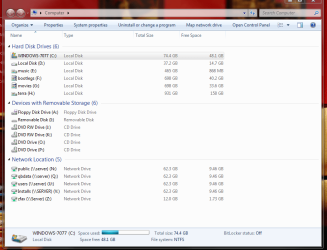
OK - my basic question is should I keep my program files on separate drive or partition than the main os? and does it help to partiton the main HD to separate these things?

I almost always keep all my pics, documents and media: ie movies in other partitions - usually external hard drives


1. 1st HD 80GB - all my os and program files

2. 2nd HD 40GB - all torrents etc

3. 5 external Hard Drives connected by fire wire or USB2 - for documents, and all other media
Should I place all my program files on HD 2 - the 40 GB drive and place torrent on external?


Yes I know the externals are way over the supposed limit, but they are all running at same time and have no noticeable cpu problem other than windows7 takes a lot longer than XP to search these drives even after they are indexed.
This is probably a much disputed topic, but am wondering what others on this forum think the best method is. Thanks


Thanks, Evan aka t41
 

Attachments
  • __2.PNG
    __2.PNG
    45 KB · Views: 74

My Computer

Computer Manufacturer/Model Number
dell optiplex - 2003
OS
windows7 7600 x86
CPU
itel pentium 4
Memory
3.00 GB
Graphics Card(s)
diamond radion x1050
Sound Card
SoundMax
Monitor(s) Displays
dell 2408wfp dell e172fp
Screen Resolution
1920 x 1200 1280 x 1024
Hard Drives
2 - 80 GB internals WD
1 - 01 TB ext
2 - 750 GB ext
1- 500 GB ext
all running on system no problems
Keyboard
old logitech cordless
Mouse
logitech wireless
Internet Speed
16 / 4
Other Info
networked into my sbs2003 server running sp1 still
it's a wonder I could even get windows 7 to connect to it
I like to move as much as windows allows off of the system partition and what the OS does not offer to move i use a junction point. I can't stand it when people install every program known to man on the system partition and then ask me to fix their computer cause it is so slow.
 

My Computer

OS
Win 7
Partitions? What are those :p

I use physical hard drives instead of partitioning, so:

1st HD: WD raptor x/150 in raid 0: OS and programs
2nd HD WD raptor 36gb: pagefile, index database, browser profiles
3rd HD samsung F1 1Tb: games
4th HD samsung F1 1Tb: user account, downloads, general files, torrents
5th HD samsung F1 1Tb: music
 

My Computer

Computer Manufacturer/Model Number
self built
OS
Windows 7 Professional 64-bit
CPU
Intel E8400 3GHz
Motherboard
Intel DX48BT2
Memory
Kingston PC3-10700H 4Gb
Graphics Card(s)
XFX Radeon HD 5850 BlackEd.
Sound Card
Asus Xonar DG
Monitor(s) Displays
2x Samsung SM-T220HD 22"
Screen Resolution
1680x1050 on two monitors
Hard Drives
OCZ Vertex 2 120gb 3.5" (OS)
Seagate Momentus XT 500gb
Samsung F3 1Tb (games)
2x Samsung F1 1Tb
PSU
Thermaltake ToughPower 850w
Case
Thermaltake Armor
Cooling
Scythe Mugen II
Keyboard
Microsoft Comfort Curve USB
Mouse
Razer Diamondback 3G
Internet Speed
8128/443
No matter what disk you install Windows to, put your page file on the other internal disk. That's been proven hundreds of times and with many different operating systems. Putting images and swap on different spindles is a no-brainer -- you just do it.

Trying to move the whole program files tree to another drive will eventually cause you pain. You can install those programs that offer to let you choose where to install on another internal disk but try to keep them all in a similar structure like d:\program files.

Files you access sequentially are fine for storage on external drives. Put your torrents wherever, they're randomly accessed on write, but it's a slow write so the disk won't be your bottleneck. Do move your profile directory to a non system disk just to make clean installing all the new builds of Windows 7 easier.
 

My Computer

Computer type
Laptop
Computer Manufacturer/Model Number
Apple
OS
El Capitan / Windows 10
CPU
i7-4980HQ
Memory
16GB
Graphics Card(s)
Iris 5200
  • Like
Reactions: t41
Partitions? What are those :p

I use physical hard drives instead of partitioning, so:

1st HD: WD raptor x/150 in raid 0: OS and programs
2nd HD WD raptor 36gb: pagefile, index database, browser profiles
3rd HD samsung F1 1Tb: games
4th HD samsung F1 1Tb: user account, downloads, general files, torrents
5th HD samsung F1 1Tb: music

This guy knows what he's doing...
 

My Computer

Computer type
Laptop
Computer Manufacturer/Model Number
Apple
OS
El Capitan / Windows 10
CPU
i7-4980HQ
Memory
16GB
Graphics Card(s)
Iris 5200
No matter what disk you install Windows to, put your page file on the other internal disk. That's been proven hundreds of times and with many different operating systems. Putting images and swap on different spindles is a no-brainer -- you just do it.

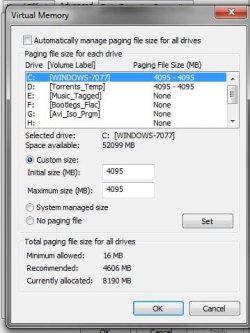
:cool:Thanks for that, I forgot about that, and really had no idea how important that is. I have turned the paging file on C and D drives.However, I am wondering if I should stop and remove the paging file on the C drive altogether and just use the paging file on the D drive, and whether or not it is really necessary to have paging files on each of the other individual hard drives. I have thumb attached with what I did and things are actually responding quicker. Just need a bit more clarification.
Thanks, these are basic questions for most, but I am still learning to be a :geek:
 

Attachments

  • __4.JPG
    __4.JPG
    37.1 KB · Views: 24

My Computer

Computer Manufacturer/Model Number
dell optiplex - 2003
OS
windows7 7600 x86
CPU
itel pentium 4
Memory
3.00 GB
Graphics Card(s)
diamond radion x1050
Sound Card
SoundMax
Monitor(s) Displays
dell 2408wfp dell e172fp
Screen Resolution
1920 x 1200 1280 x 1024
Hard Drives
2 - 80 GB internals WD
1 - 01 TB ext
2 - 750 GB ext
1- 500 GB ext
all running on system no problems
Keyboard
old logitech cordless
Mouse
logitech wireless
Internet Speed
16 / 4
Other Info
networked into my sbs2003 server running sp1 still
it's a wonder I could even get windows 7 to connect to it
Here is some info I found helpfull when I moved my page file.
I also partitioned my second hard drive, and moved the pagefile to that new partition.

I quote, "Since the hard drive controller on your computer can read and write to more than one hard drive at a time it’s possible to have 2 paging files. It’s very important that the two paging files are on separate hard drives and not different partitions on the same hard drive."

I don't use that partition for anything else.

Move and Optimize Windows Vista’s Paging File — MAXIMUMpcguides Windows Vista
 
Last edited:

My Computer

Computer type
PC/Desktop
Computer Manufacturer/Model Number
Self built.
OS
Windows 7 RTM 64bit, Windows 8 Pro 64bit
CPU
Intel i5-2500K @ 3.3Ghz
Motherboard
Asus Maximus IV GENE-Z/GEN3
Memory
16GB G.Skill RaptorX 1600MHz DDR3
Graphics Card(s)
N570GTX Twin Frozr III Power Edition
Sound Card
SupremeFX X-Fi 2
Monitor(s) Displays
BenQ XL2420T 120Hz 24 inch gaming monitor, Acer V233H 23 inc
Screen Resolution
1920x1080
Hard Drives
320GB Seagate Barracuda
WD 1TB Black Caviar
2TB WD Green Caviar
Samsung SSD 840 PRO Series
PSU
CoolerMaster Silent Pro Gold 1200WATT 80 Plus Gold
Case
CoolerMaster HAF X RC-942
Cooling
CoolerMaster V6GT Multi-Platform CPU Cooler
Keyboard
Logitech G510 Gaming Keyboard
Mouse
Logitech G700 Gaming Mouse
Antivirus
Norton Internet Security
Browser
Firefox 21
Other Info
Logitech Extreme 3D Pro Gaming Joystick, Logitech G930 Wireless Gaming Headset
If you have three internal physical disks then it's fine to have two page files, one on each and system on the other. Like I said, rule of thumb is put paging file on your fastest internal drive separate from system.
 

My Computer

Computer type
Laptop
Computer Manufacturer/Model Number
Apple
OS
El Capitan / Windows 10
CPU
i7-4980HQ
Memory
16GB
Graphics Card(s)
Iris 5200
Here is some info I found helpfull when I moved my page file.
I also partitioned my second hard drive, and moved the pagefile to that new partition.

I quote, "Since the hard drive controller on your computer can read and write to more than one hard drive at a time it’s possible to have 2 paging files. It’s very important that the two paging files are on separate hard drives and not different partitions on the same hard drive."

I don't use that partition for anything else.

Move and Optimize Windows Vista’s Paging File — MAXIMUMpcguides Windows Vista


Thanks TheBull, nice link :cool:, MAXIMUM site explains everything in a lot more detail, also moved my index file as well
 

My Computer

Computer Manufacturer/Model Number
dell optiplex - 2003
OS
windows7 7600 x86
CPU
itel pentium 4
Memory
3.00 GB
Graphics Card(s)
diamond radion x1050
Sound Card
SoundMax
Monitor(s) Displays
dell 2408wfp dell e172fp
Screen Resolution
1920 x 1200 1280 x 1024
Hard Drives
2 - 80 GB internals WD
1 - 01 TB ext
2 - 750 GB ext
1- 500 GB ext
all running on system no problems
Keyboard
old logitech cordless
Mouse
logitech wireless
Internet Speed
16 / 4
Other Info
networked into my sbs2003 server running sp1 still
it's a wonder I could even get windows 7 to connect to it
Back
Top