Solved Two BSODs while playing, error 0x0000001A

zipli

New member
Local time
8:17 PM
Messages
6
Hey,

My computer has been running without any problems for a while now, but out of nowhere I got two BSODs and there was only few hours between them. This got me concerned and I figured you guys could help me identify the problems, since I'm not that tech savvy myself.

I believe it was the same 1A error at both times, but can't be absolutely certain. In both cases I was playing a game, and had firefox + it's flash plugin running at background. I was only able to get the most recent dmp file though, but I hope it helps. At another note, there's been few weeks from the last Windows update. I got a bit paranoid, since there was an update way back which caused some random BSODs.
 

My Computer

Computer type
PC/Desktop
OS
Windows 7 Home Premium 64bit
CPU
Intel Core i5-3750K @ 3.40GHz
Motherboard
ASUS PZ P8Z77-V LX
Memory
2x4096 DDR3-SDRAM
Graphics Card(s)
NVidia GeForce GTX 560 Ti (558 cores)
Antivirus
ESET Nod32
Browser
Mozilla Firefox/Google Chrome
Welcome to the forum.

   Note
:info: Do not start the trial version of MalwareBytes
picture.php

  • Test and Diagnose RAM issues with MEMTEST86+
    • Pay close attention to Part 3 of the tutorial "If you have errors". Take the test for at least 7-10 passes. It may take up to 22 passes to find problems.
Let us know the results.
 

My Computer

Computer type
PC/Desktop
Computer Manufacturer/Model Number
Self assembled
OS
Windows 10 Home 64Bit
CPU
Intel Core i5 10400 @ 2.90GHz
Motherboard
Intel Corporation DG41WV (PROCESSOR)
Memory
8.00GB Single-Channel Unknown @ 1329MHz (16-20-20-38)
Sound Card
Realtek High Definition Audio
Monitor(s) Displays
DELL E170S
Screen Resolution
1280x1024 pixels
Hard Drives
931GB TOSHIBA DT01ACA100 (SATA)
238GB TEAM TM8PS7256G (SATA SSD)
Case
Nothing Fancy
Cooling
Fans
Keyboard
A4 Tech Co LTD
Mouse
A4 Tech Co Ltd/Logitech
Internet Speed
25 Mbps
Hey,

Thanks for your quick reply and sorry that I took some time to reply back. I'm quite busy at the moment, so I only had time to scan for viruses (nothing major found) and take the screen from the hard drives and speccy summary tab. I also reduced the number of programs at start up. Haven't had another BSOD yet, but my firefox has been crashing awfully lot in the last two days. I wonder if it could have something to do with this?

Anyway, I'll try out memtest and hard drive diag in the as soon as possible and report back.

PS. Not sure if this is relevant in any way, but my graphics card runs around 65-75 when heavily stressed. Used to run a bit higher, but I started using MSI Afterburner and created a custom fan speed profile.

PS(2). The I: and H: Hard drives in the screenshot are external HDs.
 

My Computer

Computer type
PC/Desktop
OS
Windows 7 Home Premium 64bit
CPU
Intel Core i5-3750K @ 3.40GHz
Motherboard
ASUS PZ P8Z77-V LX
Memory
2x4096 DDR3-SDRAM
Graphics Card(s)
NVidia GeForce GTX 560 Ti (558 cores)
Antivirus
ESET Nod32
Browser
Mozilla Firefox/Google Chrome
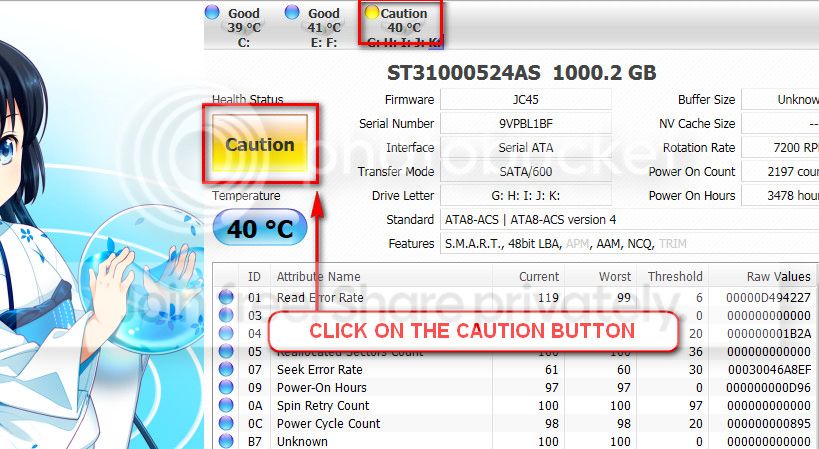
The caution indication can be converted to good using CrystalDiscInfo. Click on the caution Button, you will get another window ....
1_zps1eeadfca.jpg


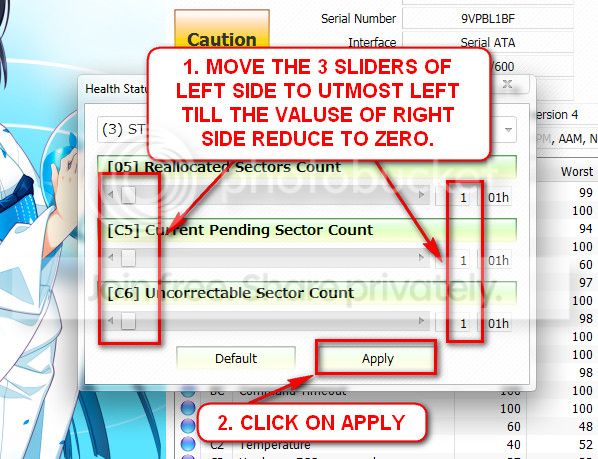
In the resulting window, there are three sliders in the left. Drag them to the ultimate left, and notice the values at the right side are converting to zeros.
2_zps50ae6eec.jpg


Now click the apply button, and notice that the caution is gone.
Also, scan the Samsung 750 GB HDD with Seatools for Windows: SeaTools | Seagate
 

My Computer

Computer type
PC/Desktop
Computer Manufacturer/Model Number
Self assembled
OS
Windows 10 Home 64Bit
CPU
Intel Core i5 10400 @ 2.90GHz
Motherboard
Intel Corporation DG41WV (PROCESSOR)
Memory
8.00GB Single-Channel Unknown @ 1329MHz (16-20-20-38)
Sound Card
Realtek High Definition Audio
Monitor(s) Displays
DELL E170S
Screen Resolution
1280x1024 pixels
Hard Drives
931GB TOSHIBA DT01ACA100 (SATA)
238GB TEAM TM8PS7256G (SATA SSD)
Case
Nothing Fancy
Cooling
Fans
Keyboard
A4 Tech Co LTD
Mouse
A4 Tech Co Ltd/Logitech
Internet Speed
25 Mbps
Sorry for the lack of updates, been quite busy. I did the seatools windows scan, (long and short generic) the samsung HD. It failed on both cases, but passed the seatools S.M.A.R.T scan.

I also had another bluescreen. I added the dmp file in a zip as an attachment. I would've uploaded the whole deal using the SF diagnostics tool, but it gave a missing file error (SysApp or something), weird.
 
Last edited:

My Computer

Computer type
PC/Desktop
OS
Windows 7 Home Premium 64bit
CPU
Intel Core i5-3750K @ 3.40GHz
Motherboard
ASUS PZ P8Z77-V LX
Memory
2x4096 DDR3-SDRAM
Graphics Card(s)
NVidia GeForce GTX 560 Ti (558 cores)
Antivirus
ESET Nod32
Browser
Mozilla Firefox/Google Chrome
That's an old dump.
 

My Computer

Computer type
PC/Desktop
Computer Manufacturer/Model Number
Self assembled
OS
Windows 10 Home 64Bit
CPU
Intel Core i5 10400 @ 2.90GHz
Motherboard
Intel Corporation DG41WV (PROCESSOR)
Memory
8.00GB Single-Channel Unknown @ 1329MHz (16-20-20-38)
Sound Card
Realtek High Definition Audio
Monitor(s) Displays
DELL E170S
Screen Resolution
1280x1024 pixels
Hard Drives
931GB TOSHIBA DT01ACA100 (SATA)
238GB TEAM TM8PS7256G (SATA SSD)
Case
Nothing Fancy
Cooling
Fans
Keyboard
A4 Tech Co LTD
Mouse
A4 Tech Co Ltd/Logitech
Internet Speed
25 Mbps
Huh, yes it is. It was the only one in the dump folder though. I wonder why it didn't create a new dump file.

As a side note, I'm going to leave my pc to run memtest86 overnight and see if it finds anything.
 
Last edited:

My Computer

Computer type
PC/Desktop
OS
Windows 7 Home Premium 64bit
CPU
Intel Core i5-3750K @ 3.40GHz
Motherboard
ASUS PZ P8Z77-V LX
Memory
2x4096 DDR3-SDRAM
Graphics Card(s)
NVidia GeForce GTX 560 Ti (558 cores)
Antivirus
ESET Nod32
Browser
Mozilla Firefox/Google Chrome
Well I ran the memtest86 (v.4.0) for just under 5 hours, 9 passes or so, and there were PLENTY of errors. I believe the only test with no errors was the first one, other had random numbers of errors if I read the summary correctly. I can't really say that I know how to read the information given by the memtest correctly, but I'm rather sure there should be absolutely no errors if the memory were good.

Should I test the ram seperately to know which one (or both) is the faulty one, or can memtest tell me that?

I've also heard that errors could be happening because of wrong memory settings in BIOS (voltage, clocks, etc.). Is there any way to confirm this?

Can the older version of memtest cause problems? I happened to have boot cd of 4.0 already and used that. The newest version is 4.3.5 or something like that.

PS. Considering the huge number of errors it gave (some tests had several thousand) I'm surprised my PC is running at all tbh
 
Last edited:

My Computer

Computer type
PC/Desktop
OS
Windows 7 Home Premium 64bit
CPU
Intel Core i5-3750K @ 3.40GHz
Motherboard
ASUS PZ P8Z77-V LX
Memory
2x4096 DDR3-SDRAM
Graphics Card(s)
NVidia GeForce GTX 560 Ti (558 cores)
Antivirus
ESET Nod32
Browser
Mozilla Firefox/Google Chrome
Now follow the "Part 3: If You Have Errors:" of How to Test and Diagnose RAM Issues with Memtest86+

Errors/red lines means one or more RAM is faulty. But the fault may occur due to a faulty DIMM slot, too, which is a motherboard component. Using memtest86+, you can discriminate between a faulty RAM and a faulty motherboard.

How? Say you have two RAM sticks and two DIMM slots. You obtained errors at the test with all RAM sticks installed. Now, remove all the sticks but one. Test it in all the available slots, one by one. Continue the same procedure for all the available sticks.
How to make the inference that is it a RAM issue or it is a motherboard issue? Suppose you have got the result like that:

test|Slot1|Slot2
RAM1| Error | Error
RAM2|Good|Good
It is a RAM, a bad RAM.

But if you have got a result like that:

test|Slot1|Slot2
RAM1| Error |Good
RAM2| Error |Good
It is a motherboard issue. The particular slot is bad.
 

My Computer

Computer type
PC/Desktop
Computer Manufacturer/Model Number
Self Assembled
OS
Microsoft Windows 10 Pro Insider Preview 64-bit
CPU
Intel(R) Core(TM) i3-4130 CPU @ 3.40GHz
Motherboard
Gigabyte Technology Co., Ltd. B85M-D3H
Memory
Corsair Vengence 4GB x2 (8.00GB Dual-Channel DDR3 @ 798MHz)
Graphics Card(s)
2047MB GeForce GTS 450 (ZOTAC International)
Sound Card
Onboard (Realtek High Definition Audio)
Monitor(s) Displays
LG Flatron E2040T
Screen Resolution
1600x900
Hard Drives
Western Digital 1 TB
Seagate 500 GB
PSU
Corsair VS550
Case
Cooler Master K380
Cooling
Cooler Master Seidon 120V Plus
Keyboard
Logitech MK260r
Mouse
Logitech MK260r
Internet Speed
PMPL Broadband
Antivirus
Windows Defender + MBAM
Browser
Firefox
Other Info
Dell Studio 15" Laptop
Well I spent better part of the night testing out the slots and the memory. Turns out that one of the RAM sticks were faulty. I replaced it and haven't had bluescreen yet. I think the problems is now fixed. Haven't had program crashes, which were freguent, and my PC starts up way faster without the faulty ram.

Thanks to both of you for your patience and help.
 

My Computer

Computer type
PC/Desktop
OS
Windows 7 Home Premium 64bit
CPU
Intel Core i5-3750K @ 3.40GHz
Motherboard
ASUS PZ P8Z77-V LX
Memory
2x4096 DDR3-SDRAM
Graphics Card(s)
NVidia GeForce GTX 560 Ti (558 cores)
Antivirus
ESET Nod32
Browser
Mozilla Firefox/Google Chrome
Good news, zipil :)

And,
 

My Computer

Computer type
PC/Desktop
Computer Manufacturer/Model Number
Self Assembled
OS
Microsoft Windows 10 Pro Insider Preview 64-bit
CPU
Intel(R) Core(TM) i3-4130 CPU @ 3.40GHz
Motherboard
Gigabyte Technology Co., Ltd. B85M-D3H
Memory
Corsair Vengence 4GB x2 (8.00GB Dual-Channel DDR3 @ 798MHz)
Graphics Card(s)
2047MB GeForce GTS 450 (ZOTAC International)
Sound Card
Onboard (Realtek High Definition Audio)
Monitor(s) Displays
LG Flatron E2040T
Screen Resolution
1600x900
Hard Drives
Western Digital 1 TB
Seagate 500 GB
PSU
Corsair VS550
Case
Cooler Master K380
Cooling
Cooler Master Seidon 120V Plus
Keyboard
Logitech MK260r
Mouse
Logitech MK260r
Internet Speed
PMPL Broadband
Antivirus
Windows Defender + MBAM
Browser
Firefox
Other Info
Dell Studio 15" Laptop
Back
Top