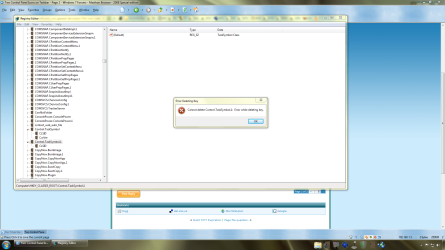
Ok guys, don't know where to put this in. So I hoping for the best. This happens to me on every build that I install (7000, 7057, 7068, and 7077). I right click on the taskbar, go to toolbars, and select Desktop to show desktop icons on my taskbar. I always get two icons for control panel settings. It doesn't bug me b/c I can right click and delete the second icon. My problem is how do I keep it from doing it again every time I reboot the PC. Is there something in the registry that is doing this?
My Computer
- Computer Manufacturer/Model Number
- Dell XPS 420
- OS
- Windows 7 RTM x64
- CPU
- Dual Core2 Quad Q6600
- Memory
- 4GB Dual Channel DDR2 SDRAM at 800MHz
- Graphics Card(s)
- PNY Verto GeForce 9600 GT 1028 MB
- Sound Card
- Creative X-Fi Titanium Fatal1ty Professional
- Monitor(s) Displays
- Dell 24" S2409W (HDMI) and Acer P205H (DVI)
- Screen Resolution
- 1920 x 1080 HDTV and 1600 x 900 HDTV (Duel Monitors)
- Hard Drives
- Primary HD: Maxthon STM3320620AS
Secondary HD: Samsung HD321KJ
- PSU
- Standard Dell XPS 420 Power Supply.
- Case
- Dell XPS 420 Case
- Cooling
- PCI Cooling Card for GPU
- Keyboard
- Microsoft Media Pro Keyboard
- Mouse
- MS Wireless Optical Mouse 2000
- Internet Speed
- DSL 1.5 Mbps
- Other Info
- Dell Photo 966 3-in-1 Wireless Printer
Altec Lansing 5.1 VS3251 Speakers
Wireless Netgear Router
Kodak EasyShare CX7300
(2) Antec Cooling Fans - Blue LED Lighting.
One on the side blowing in and one in the back blowing out.