
Two errors that I cannot fix

runedog

New member
Power User
VIP
Local time
10:12 PM
Messages
190
Hello,

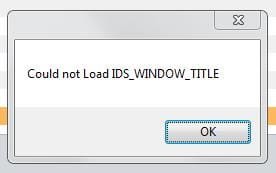
I have two errors I cannot fix: These are COM Surrogate has stopped working wchich appears at random times and the attached error that I receive when I open a graphic/photo for any reason (please see enclosed screenshot.

Regarding the first error, I have added this as a exception to my Kasperky Internet Security (fully updated) which I thought would stop it but to no avail. I have ran MalwareBytes through the system and Search and Destroy but to no avail. I even purchased Reimage in the hope it could help but no luck.

Any help would be greatly appreciated.

Many thanks

Oh, I'm running Win7 x64
 

Attachments
  • Windows error.jpg
    Windows error.jpg
    5.4 KB · Views: 47

My Computer

Computer type
PC/Desktop
Computer Manufacturer/Model Number
Arbico
OS
Windows 7 Professional x64
CPU
Intel Core i7 950 CPU (3.06Ghz Quad Core)
Motherboard
Asus P6X58D-E motherboard with SATA III support
Memory
12 gig
Graphics Card(s)
ATI HD 5970 2GB PCI Express Graphics card
Sound Card
Creative XFi Xtreme Audio 7.1 channel sound card
Monitor(s) Displays
Samsung 24" inch
Hard Drives
250gig SSD
2TB
PSU
Quiet Coolermaster 1000W Quad PCI-E PSU
Case
Quiet Coolermaster Cosmos Case
Cooling
Water cooled with multiple fans
Antivirus
Kaspersky Internet Security 2012
Browser
Firefox
See if this fix applies.
 

My Computer

Computer Manufacturer/Model Number
HP Media Center
OS
Windows 7 32 bit
CPU
AMD 5200+ dual core
Memory
2 GB
Graphics Card(s)
NVidia GeForce 6150SE 128 MB
Monitor(s) Displays
CRT
Screen Resolution
1280x1024
Hard Drives
500 GB Sata internal :

SIIG USB 3.0 docking stations w/WD Caviar Black 6 Gb/s drives
Keyboard
PS/2
Mouse
PS/2 Wheel Mouse
Other Info
SIIG USB 3.0 PCIexpress card.
Thanks for your input MilesAhead, very much appreciated.

I have already tried all those fixes and updated my drivers and codecs

Thanks again
 

My Computer

Computer type
PC/Desktop
Computer Manufacturer/Model Number
Arbico
OS
Windows 7 Professional x64
CPU
Intel Core i7 950 CPU (3.06Ghz Quad Core)
Motherboard
Asus P6X58D-E motherboard with SATA III support
Memory
12 gig
Graphics Card(s)
ATI HD 5970 2GB PCI Express Graphics card
Sound Card
Creative XFi Xtreme Audio 7.1 channel sound card
Monitor(s) Displays
Samsung 24" inch
Hard Drives
250gig SSD
2TB
PSU
Quiet Coolermaster 1000W Quad PCI-E PSU
Case
Quiet Coolermaster Cosmos Case
Cooling
Water cooled with multiple fans
Antivirus
Kaspersky Internet Security 2012
Browser
Firefox
IDS_WINDOWS_TITLE is undoubtedly a numeric constant that corresponds to the window title. It looks as if the program passed it as a stinrg such as give "IDS_WINDOWS_TITLE." However that could happen I don't know. Also I have no way to know what you've already tried if you don't post it, nor your hardware configuration if you don't fill in the system specs.

=============================


Welcome to Windows Seven Forums.


To avoid a lot of Q & A about your hardware and OS configuration, please click on this link to


Edit System Specs


Filling this out, at least partially, will save a lot of time. Another advantage is when posting a new problem, the person answering can just click the My System Specs link in the bottom of your post. No need to search for the information.


If you have multiple systems just indicate that in the System Specs so that we know why many of the fields are blank.
 

My Computer

Computer Manufacturer/Model Number
HP Media Center
OS
Windows 7 32 bit
CPU
AMD 5200+ dual core
Memory
2 GB
Graphics Card(s)
NVidia GeForce 6150SE 128 MB
Monitor(s) Displays
CRT
Screen Resolution
1280x1024
Hard Drives
500 GB Sata internal :

SIIG USB 3.0 docking stations w/WD Caviar Black 6 Gb/s drives
Keyboard
PS/2
Mouse
PS/2 Wheel Mouse
Other Info
SIIG USB 3.0 PCIexpress card.
Many thanks for getting back MilesAhead.

Apologies for not fully filling-in the specs of my PC: Corrected now.

Regarding what I have done re the could not LOAD_WINDOWS Title problem, nothing really with that issue because I have no idea where to start.

Thanks again for you time.
 

My Computer

Computer type
PC/Desktop
Computer Manufacturer/Model Number
Arbico
OS
Windows 7 Professional x64
CPU
Intel Core i7 950 CPU (3.06Ghz Quad Core)
Motherboard
Asus P6X58D-E motherboard with SATA III support
Memory
12 gig
Graphics Card(s)
ATI HD 5970 2GB PCI Express Graphics card
Sound Card
Creative XFi Xtreme Audio 7.1 channel sound card
Monitor(s) Displays
Samsung 24" inch
Hard Drives
250gig SSD
2TB
PSU
Quiet Coolermaster 1000W Quad PCI-E PSU
Case
Quiet Coolermaster Cosmos Case
Cooling
Water cooled with multiple fans
Antivirus
Kaspersky Internet Security 2012
Browser
Firefox
Any help on this guys?

Thanks
 

My Computer

Computer type
PC/Desktop
Computer Manufacturer/Model Number
Arbico
OS
Windows 7 Professional x64
CPU
Intel Core i7 950 CPU (3.06Ghz Quad Core)
Motherboard
Asus P6X58D-E motherboard with SATA III support
Memory
12 gig
Graphics Card(s)
ATI HD 5970 2GB PCI Express Graphics card
Sound Card
Creative XFi Xtreme Audio 7.1 channel sound card
Monitor(s) Displays
Samsung 24" inch
Hard Drives
250gig SSD
2TB
PSU
Quiet Coolermaster 1000W Quad PCI-E PSU
Case
Quiet Coolermaster Cosmos Case
Cooling
Water cooled with multiple fans
Antivirus
Kaspersky Internet Security 2012
Browser
Firefox
Thanks for your input MilesAhead, very much appreciated.

I have already tried all those fixes and updated my drivers and codecs

Thanks again

That pretty much leaves nowhere to go. When you say "all those fixes' it's meaningless unless you list those you have tried. Otherwise how can anyone suggest a fix? It will be assumed you've already tried it.

edit: unfortunately diagnostics is often the drudgery of trial and error/process of elimination. Now and then the lightbulb over the head happens, but it's in the minority.
 

My Computer

Computer Manufacturer/Model Number
HP Media Center
OS
Windows 7 32 bit
CPU
AMD 5200+ dual core
Memory
2 GB
Graphics Card(s)
NVidia GeForce 6150SE 128 MB
Monitor(s) Displays
CRT
Screen Resolution
1280x1024
Hard Drives
500 GB Sata internal :

SIIG USB 3.0 docking stations w/WD Caviar Black 6 Gb/s drives
Keyboard
PS/2
Mouse
PS/2 Wheel Mouse
Other Info
SIIG USB 3.0 PCIexpress card.
Back
Top