Hello, Ever since last month on October 2014 I'v noticed that I have 2 Explorer.exe's with one being my desktop (The one with the username, Afrim) and another explorer.exe process that has no username but this explorer.exe process starts off using a minimal amount of my Memory but after a few minutes this process will then use up ALL of my memory reaching at 5,000,000 K and higher. When this uses all my Memory I then open up task manager which takes me a few mins to do and then i end the Process and sometime end the Process Tree. After ending the process there is only one explorer.exe, which is my desktop but then a few mins later the Other explorer.exe with no username returns and takes up ALL of my memory again and again.
I've searched up alot for this issue but seem to find no solution so far what I have tried is going into my MSConfig and set my boot options to Safe mode and have done multiple Full Scans with Malwarebytes and Microsoft Security Essentials and nothing is found. Other then that I have also set the boot options to a Selective Startup and checked off the "Load System Services" box and nothing else I then go into the services Tab and check off Hide All Microsoft Services and then disable all the other non Microsoft services. Still even doing this the second explorer.exe returns and uses all my Memory. Also in my Folder Options > View, the "launch folder windows in a separate process" box is not ticked.
After many researching of this I am completely lost on what to do, I cannot use my PC properly anymore because of this situation and any help is much appreciated thank you for reading this and possible helping me out.
Theres is a Explorer.exe in the windows folder and it is 2,805 KB large and also another explorer.exe in the System32 folder and that one is 2,555 KB large and as for the virus total check thing i did it Dropbox.exe is detected, killed the dropbox.exe process now and will see what happens
My Computer
At a glance
Windows 7 Home Premium 64bitIntel i5 quad core CPU 3470 3.20GHz8GB Corsair RamEVGA 650 2gb
You should verify in Process Explorer who the verified signer is for both of these. Step 11 in the Tutorial.
And as mentioned in the Tutorial, you need to look at how many detections there were, for Dropbox.exe that is. If it's only one(or a few) chances are they're "false positives" which means wrongly detected and the file is likely clean. When checking with that many anti-virus products it increases the risk of false-positives.
My Computer
At a glance
Windows 7 Pro 32Intel(R) Core(TM) i5 CPU M 540 @ 2.53GHz4,00 GB (Usable 2,98)NVIDIA NVS 5100M
Computer type
Laptop
Computer Manufacturer/Model Number
HP Elitebook 8540p
OS
Windows 7 Pro 32
CPU
Intel(R) Core(TM) i5 CPU M 540 @ 2.53GHz
Motherboard
Hewlett-Packard 1521
Memory
4,00 GB (Usable 2,98)
Graphics Card(s)
NVIDIA NVS 5100M
Sound Card
NVIDIA High Definition Audio
Screen Resolution
1600x900
Hard Drives
INTEL SSDSA2CW120G3
Antivirus
F-Secure Internet Security
Browser
IE, Firefox, Opera
Other Info
Sandboxie,
SRP (Software Restriction Policy),
EMET (Enhanced Mitigation Experience Toolkit),
WFC (Windows Firewall Control by BiniSoft),
Malwarebytes Premium
So the normal Explorer.exe with the username is all good and has a Company name and is verified but the second Explorer.exe that takes all my Memory has no company name or verification at all and when hovering over it, it says "Path:[Error Opening Process]"
You need to follow every step in the Tutorial including starting Process Explorer with administrator permissions so it can check system processes too. That could also be the reason why you can't see all info about all processes.
My Computer
At a glance
Windows 7 Pro 32Intel(R) Core(TM) i5 CPU M 540 @ 2.53GHz4,00 GB (Usable 2,98)NVIDIA NVS 5100M
Computer type
Laptop
Computer Manufacturer/Model Number
HP Elitebook 8540p
OS
Windows 7 Pro 32
CPU
Intel(R) Core(TM) i5 CPU M 540 @ 2.53GHz
Motherboard
Hewlett-Packard 1521
Memory
4,00 GB (Usable 2,98)
Graphics Card(s)
NVIDIA NVS 5100M
Sound Card
NVIDIA High Definition Audio
Screen Resolution
1600x900
Hard Drives
INTEL SSDSA2CW120G3
Antivirus
F-Secure Internet Security
Browser
IE, Firefox, Opera
Other Info
Sandboxie,
SRP (Software Restriction Policy),
EMET (Enhanced Mitigation Experience Toolkit),
WFC (Windows Firewall Control by BiniSoft),
Malwarebytes Premium
Okay did all the steps once again and this time and ran it as an Admin, I have suspended explorer.exe and it is not increasing nor decreasing in the amount of memory being taken, it is verified as a Microsoft Corporation company and 0/56 is found for the Virus Total. At this point I do not know what to do. Iv followed all the instrutions from the link you gave me i will try a full scan from malwarebytes and Microsoft security essentials soon. What should i try not seeing as there is no virus total scans found for it and that it is verified.
I'm not sure, maybe someone else has some ideas. One thing you can do though is step 8 for that process to also check all DLL files used by that process.
My Computer
At a glance
Windows 7 Pro 32Intel(R) Core(TM) i5 CPU M 540 @ 2.53GHz4,00 GB (Usable 2,98)NVIDIA NVS 5100M
Computer type
Laptop
Computer Manufacturer/Model Number
HP Elitebook 8540p
OS
Windows 7 Pro 32
CPU
Intel(R) Core(TM) i5 CPU M 540 @ 2.53GHz
Motherboard
Hewlett-Packard 1521
Memory
4,00 GB (Usable 2,98)
Graphics Card(s)
NVIDIA NVS 5100M
Sound Card
NVIDIA High Definition Audio
Screen Resolution
1600x900
Hard Drives
INTEL SSDSA2CW120G3
Antivirus
F-Secure Internet Security
Browser
IE, Firefox, Opera
Other Info
Sandboxie,
SRP (Software Restriction Policy),
EMET (Enhanced Mitigation Experience Toolkit),
WFC (Windows Firewall Control by BiniSoft),
Malwarebytes Premium
when doing the CTRL + L thing for the DLL all that shows is this imgur: the simple image sharer
how can i check company name, path and, virus total for the dll's?
My Computer
At a glance
Windows 7 Home Premium 64bitIntel i5 quad core CPU 3470 3.20GHz8GB Corsair RamEVGA 650 2gb
In the lower pane window, right-click on a column header for example "Name". A small window will show up. Click "Select columns". Then select: Path, Company Name, Verified Signer, Virus Total
My Computer
At a glance
Windows 7 Pro 32Intel(R) Core(TM) i5 CPU M 540 @ 2.53GHz4,00 GB (Usable 2,98)NVIDIA NVS 5100M
Computer type
Laptop
Computer Manufacturer/Model Number
HP Elitebook 8540p
OS
Windows 7 Pro 32
CPU
Intel(R) Core(TM) i5 CPU M 540 @ 2.53GHz
Motherboard
Hewlett-Packard 1521
Memory
4,00 GB (Usable 2,98)
Graphics Card(s)
NVIDIA NVS 5100M
Sound Card
NVIDIA High Definition Audio
Screen Resolution
1600x900
Hard Drives
INTEL SSDSA2CW120G3
Antivirus
F-Secure Internet Security
Browser
IE, Firefox, Opera
Other Info
Sandboxie,
SRP (Software Restriction Policy),
EMET (Enhanced Mitigation Experience Toolkit),
WFC (Windows Firewall Control by BiniSoft),
Malwarebytes Premium
So upon starting up my PC today and doing as instructed it turns out that the Path, Company Name, Verified Signer, and virus total is checked on and still no difference but other then that the Explorer.exe that takes up all my memory has a ctfmon.exe within it which i do not recall seeing it before, heres is a picture - imgur: the simple image sharer
My Computer
At a glance
Windows 7 Home Premium 64bitIntel i5 quad core CPU 3470 3.20GHz8GB Corsair RamEVGA 650 2gb
Also another thing, I dont know if this is relevent or not but one of my svchost.exe takes usualy around 200 - 250 K memory according to task manager - imgur: the simple image sharer
My Computer
At a glance
Windows 7 Home Premium 64bitIntel i5 quad core CPU 3470 3.20GHz8GB Corsair RamEVGA 650 2gb
So I found something very interesting when working with my PC and it turns out that if I disconnect my wireless network adapter or disable my internet connection then the Second explorer.exe that takes all my memory uses only about 3,000 K Memory here is an image - imgur: the simple image sharer.
Any ideas on what to do / why this is happening?
Iv checked my firewall and had allowed only think i absolutely trust to go through
My Computer
At a glance
Windows 7 Home Premium 64bitIntel i5 quad core CPU 3470 3.20GHz8GB Corsair RamEVGA 650 2gb
I don't know. Looking at imgur: the simple image sharer several Microsoft processes are not signed in column "Verified Signer", including the 2 explorer.exe while for example Snipping Tool.exe is. But they are "clean" according to VirusTotal.
Don't know what that means but on my PC all processes by MS are signed by MS. I mainly use the Verified Signer info to check signatures only for 3rd party products, because all MS processes should be signed AFAIK.
Hope someone else can jump in here and help out. Until then you could try to scan your machine with other and IMO better products than Microsofts, for example Free Virus Scan | Online Virus Scanner from ESET
My Computer
At a glance
Windows 7 Pro 32Intel(R) Core(TM) i5 CPU M 540 @ 2.53GHz4,00 GB (Usable 2,98)NVIDIA NVS 5100M
Computer type
Laptop
Computer Manufacturer/Model Number
HP Elitebook 8540p
OS
Windows 7 Pro 32
CPU
Intel(R) Core(TM) i5 CPU M 540 @ 2.53GHz
Motherboard
Hewlett-Packard 1521
Memory
4,00 GB (Usable 2,98)
Graphics Card(s)
NVIDIA NVS 5100M
Sound Card
NVIDIA High Definition Audio
Screen Resolution
1600x900
Hard Drives
INTEL SSDSA2CW120G3
Antivirus
F-Secure Internet Security
Browser
IE, Firefox, Opera
Other Info
Sandboxie,
SRP (Software Restriction Policy),
EMET (Enhanced Mitigation Experience Toolkit),
WFC (Windows Firewall Control by BiniSoft),
Malwarebytes Premium
Well I had the same problem once but it can be tricky to pin down the cause. On my machine the problem has historically been caused by buggy shell extensions and also by security software.
Don't try running any UVK fixes as they are only needed for specific problems and only if and when needed.
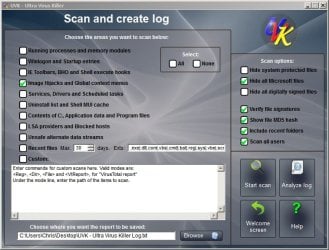
From the GUI select "Scan and create log" with the following options selected.
The resulting log should contain anything that creates a right click context menu in Explorer when you right click on a file or folder. If there's anything that you don't use - disable the entry. Whatever is left - check for updates for those products. You could upload the log and attach it to your next post if you like.
You can usually disable context menu entires from within the offending program's settings.
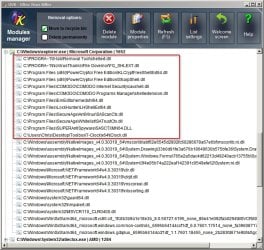
Also when running UVK take a look at "Memory Modules Manager" and use it to see what dll's the offending explorer.exe (from the PID) has loaded. You can get the PID from Process Explorer or change Task Manager view settings to show process PID.
Here's an example and you can see that the highlighted entries are shell extensions that integrate with explorer.
We would be most interested in the results shown for the problem explorer process.
Attachments
UVK - Explorer.jpg
111.6 KB
· Views: 2
My Computer
At a glance
Microsoft Windows 7 Home Premium 64-bit 7601 ...AMD C-60 APU with Radeon(tm) HD Graphics4.00 GBAMD Radeon HD 6290 Graphics
Computer type
Laptop
Computer Manufacturer/Model Number
ASUS
OS
Microsoft Windows 7 Home Premium 64-bit 7601 Multiprocessor Free Service Pack 1
CPU
AMD C-60 APU with Radeon(tm) HD Graphics
Motherboard
ASUSTeK COMPUTER INC. X501U
Memory
4.00 GB
Graphics Card(s)
AMD Radeon HD 6290 Graphics
Sound Card
(1) AMD High Definition Audio Device (2) Realtek High Defi
And here is the image for the Memory module i believe the explorer.exe that takes all the memory is highlited, with "17528" at the end of it - imgur: the simple image sharer
My Computer
At a glance
Windows 7 Home Premium 64bitIntel i5 quad core CPU 3470 3.20GHz8GB Corsair RamEVGA 650 2gb
Okay so I've only had a quick look so far. I've spotted a few things.
7-zip hasn't been updated in a long time and did cause problems on my machine at one point with two explorer.exe processes being created. A quick test would be to uninstall 7-zip as it's free - it can be reinstalled any time. Don't remove it just yet though. What method do you use to uninstall software?
You've also got WinRar alongside 7-zip. Do you need them both?
You've got an Avast file context menu entry:
<FileContextMenu> | 00avast | | No description | Hash error: Directory | Unsigned : No publisher
However it looks like your on board security is currently Kaspersky (KIS). Do you see any Avast entry in your right click context menu when right clicking on a file? Try a few file types including executables.
If you previously used Avast but have removed it -how did you do it?
There are other entries that I need to ask about. Power ISO - do you really need a folder right click context menu entry? Same goes for VLC. Media files play fine for me in VLC without enabling the context menu.
Then you're using Google Drive and Dropbox. I heard about a problem with the Dropbox shell extension some time ago. I don't use either but check for Dropbox version updates.
I'm going to take a look at the file you uploaded to Dropbox but I'll need to disable my hosts file and post again after looking at your file.
For the time being just try answering the above questions if you can. Thanks!
My Computer
At a glance
Microsoft Windows 7 Home Premium 64-bit 7601 ...AMD C-60 APU with Radeon(tm) HD Graphics4.00 GBAMD Radeon HD 6290 Graphics
Computer type
Laptop
Computer Manufacturer/Model Number
ASUS
OS
Microsoft Windows 7 Home Premium 64-bit 7601 Multiprocessor Free Service Pack 1
CPU
AMD C-60 APU with Radeon(tm) HD Graphics
Motherboard
ASUSTeK COMPUTER INC. X501U
Memory
4.00 GB
Graphics Card(s)
AMD Radeon HD 6290 Graphics
Sound Card
(1) AMD High Definition Audio Device (2) Realtek High Defi
A note: both the specs and this screenshot http://i.imgur.com/wYbXUnI.png indicates that also Microsoft Security Essentials is running. So it seems to me that more than one anti-virus product is running which is not recommended. It can cause conflicts and strange problems.
And from the latest screenshot I noticed an old and vulnerable version of Adobes Flash Player for Internet Explorer. Outdated over a year ago.
My Computer
At a glance
Windows 7 Pro 32Intel(R) Core(TM) i5 CPU M 540 @ 2.53GHz4,00 GB (Usable 2,98)NVIDIA NVS 5100M
Computer type
Laptop
Computer Manufacturer/Model Number
HP Elitebook 8540p
OS
Windows 7 Pro 32
CPU
Intel(R) Core(TM) i5 CPU M 540 @ 2.53GHz
Motherboard
Hewlett-Packard 1521
Memory
4,00 GB (Usable 2,98)
Graphics Card(s)
NVIDIA NVS 5100M
Sound Card
NVIDIA High Definition Audio
Screen Resolution
1600x900
Hard Drives
INTEL SSDSA2CW120G3
Antivirus
F-Secure Internet Security
Browser
IE, Firefox, Opera
Other Info
Sandboxie,
SRP (Software Restriction Policy),
EMET (Enhanced Mitigation Experience Toolkit),
WFC (Windows Firewall Control by BiniSoft),
Malwarebytes Premium
1) What do i use to remove programs? I either go to my Control Panel > Programs > Uninstall a Program and uninstall from there or I use CCleaner to uninstall programs
2) Do i need both winrar and 7zip? No I actualy forgot that i have winrar even installed, gonna remove it now
3) Do i see avast on my right click context menu? No there is none and I do not recall how i removed avast but I do know I had it at one point and removed it, seems like i didnt remove it completely
4)Is KIS my board security? No I use to have it at one point but i bieleve the subscriptions expired and so i therefor got rid of it and just just Microsoft security essentials. I do not recall how i removed KIS either unfortunately.
5) As for power ISO i did uninstall it from the Control Panel > Programs > Uninstall A Program. And as for the VLC right click context menu I do not know how to remove it
6)About Dropbox and Google Drive I use to use google drive for documents before I had Microsoft Office but now i never use it and as for Dropbox i keep my pictures on it mainly but I could try uninstalling both If i need to
Thanks alot for trying to help me out Callender
BTW Should i go ahead and update 7Zip/Remove it and should I also update Adobe Flash Player and Internet Explorer now or wait for later?
My Computer
At a glance
Windows 7 Home Premium 64bitIntel i5 quad core CPU 3470 3.20GHz8GB Corsair RamEVGA 650 2gb