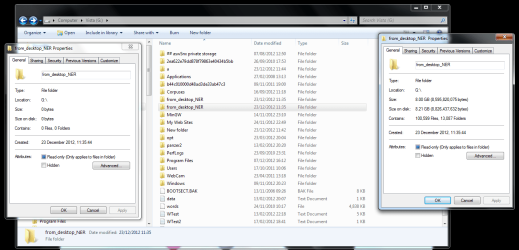
I have two folders of the same name in the same location (on an external hard-drive) and both of them have the same name. I don't know what I did but about an hour ago there was only one folder of that name. As you can see both folders are on drive G: and when I open them they are both empty but Windows is saying that one of them is 8 GB big, which is correct. All data for my project is inside but I can't get access to it and I dont want delete any of them in case I loose it.
Maybe one is a hard link to the other, as having two files with the very same name is not allowed. It also might be some serious disk corruption too. Try taking ownership and assign permission to yourself to at least view the whole folder, copy to a secure place, and then delete them both.
My Computer
Computer type
Laptop
Computer Manufacturer/Model Number
Toshiba Sattelite A665-S6092
OS
Windows 7 Ultimate x64
CPU
Intel Core i7-740QM
Memory
8 GB DDR3
Graphics Card(s)
NVIDIA GeForce 330GT
Screen Resolution
1366x768
Hard Drives
Samsung 840 SSD 500GB
1TB USB3 external HD
Cooling
Coolermaster Notepal U3 notebook cooling pad
Internet Speed
3mbps ASDL
Antivirus
ClamWin 0.98.7
Browser
Opera 12.17 x86 (main), Firefox 38 (sec), IE11 (last resort)
Sounds like a corrupted file system to me. I also recommend trying to copy it to another location before doing anything else. If you right click that drive and go to properties, there is a error checking option under the tools tab. Just be advised that that could potentially make things worse if it decides to truncate that messed up folder entry.
My Computer
Computer type
PC/Desktop
Computer Manufacturer/Model Number
Home Built
OS
Windows 10 Education 64 bit
CPU
AMD Phenom II X4 980 Black Edition Deneb 3.7GHz
Motherboard
Asus M4N68T-M V2 µATX Motherboard
Memory
8GB 4GBx2 Kingston PC10600 DDR3 1333 Memory
Graphics Card(s)
Zotac NVIDIA Geforce GT640 2 Gig DDR3 PCIe
Sound Card
VIA VT1708s High Definition Audio 8-channel Onboard
I was able to copy the data from the hard-drive using linux. It showed both folders but it also detected the data in one of them so I was able to copy it to another location on the same disk. I need to see now if WIndows 7 finds the folder from which I copied the files. I deleted the empty one using linux.