two graphics drivers and a mystery

emerald08

New member
Local time
10:45 PM
Messages
55
Location
The Great SouthWest, Arizona
two graphics drivers and a mystery *SOLVED*

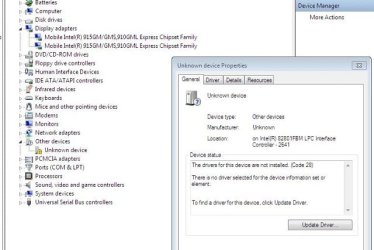
Okay this is what I see in my comp management>>Device Drivers.

Are there supposed to be two graphics drivers? And the yellow triangle. I'm not too sure about that.

Any suggestions???

I've got to leave for work so I'll check back tonight!

Cheers :)
 

Attachments

  • sysquestions.JPG
    sysquestions.JPG
    44 KB · Views: 210
Last edited:

My Computer My Computer

Computer Manufacturer/Model Number
Dell Latitude e6510
OS
W7 Professional X64
CPU
Core i5-520
Memory
4gb
Graphics Card(s)
NVIDIA NVS3100M
Monitor(s) Displays
23" Samsung
Screen Resolution
1920X1080
Hard Drives
Intel X-25M 80gb
Sometimes there are two graphics drivers (usually when second monitor is plugged).
Yellow triangle means that your computer have unrecognized hardware
 

My Computer My Computer

OS
OS
Okay. How would I go about finding out what driver is needed for it? I've tried updating it but it doesn't find any.
 

My Computer My Computer

Computer Manufacturer/Model Number
Dell Latitude e6510
OS
W7 Professional X64
CPU
Core i5-520
Memory
4gb
Graphics Card(s)
NVIDIA NVS3100M
Monitor(s) Displays
23" Samsung
Screen Resolution
1920X1080
Hard Drives
Intel X-25M 80gb
If all your hardware works it's probably just some bug (it happened to me once).
Just ignore it...
 

My Computer My Computer

OS
OS
Sassa is right,

Leave the triangle as it is, if you don't have any problems.

Sometimes people are allergic to yellow triangles and end up ruining their sytem trying all kinds of drivers for it.

I have 2 yellow triangles, but all my hardware that was in XP and Vista, is there in Win7, so I don't care about the triangles.

The two graphics drivers is indeed right.
Some drivers oem's prefer to show both VGA and DVI as separate drivers.
Others prefer to show it as one.

Greetz.
 

My Computer My Computer

OS
Win7 Build 7600 x86
CPU
Pentium II 300MHz
Motherboard
Asus
Memory
32mb EDO RAM
Graphics Card(s)
Diamond Viper
Sound Card
Soundblaster 16
Monitor(s) Displays
14" AOC CRT 16K color
Screen Resolution
800x600
Hard Drives
300mb Quantum fireball
PSU
110 Watts
Cooling
Passive
Keyboard
Trust Ergonomic
Mouse
Generic
Internet Speed
256K u 128K d
That's all I needed to know ;)

Not sure if I want to hose my system but I'll give the driver description a read!

Thanks guys :D
 

My Computer My Computer

Computer Manufacturer/Model Number
Dell Latitude e6510
OS
W7 Professional X64
CPU
Core i5-520
Memory
4gb
Graphics Card(s)
NVIDIA NVS3100M
Monitor(s) Displays
23" Samsung
Screen Resolution
1920X1080
Hard Drives
Intel X-25M 80gb
:)

I installed it!

The mystery of the Yellow Triangle is solved!


Now if it wasn't for those meddling kids ;)
 

My Computer My Computer

Computer Manufacturer/Model Number
Dell Latitude e6510
OS
W7 Professional X64
CPU
Core i5-520
Memory
4gb
Graphics Card(s)
NVIDIA NVS3100M
Monitor(s) Displays
23" Samsung
Screen Resolution
1920X1080
Hard Drives
Intel X-25M 80gb
ha ha!

Now to find out why I can't get my Fn + F3 (turn screen off) to work!

:geek:
 

My Computer My Computer

Computer Manufacturer/Model Number
Dell Latitude e6510
OS
W7 Professional X64
CPU
Core i5-520
Memory
4gb
Graphics Card(s)
NVIDIA NVS3100M
Monitor(s) Displays
23" Samsung
Screen Resolution
1920X1080
Hard Drives
Intel X-25M 80gb

My Computer My Computer

Computer Manufacturer/Model Number
Dell Latitude e6510
OS
W7 Professional X64
CPU
Core i5-520
Memory
4gb
Graphics Card(s)
NVIDIA NVS3100M
Monitor(s) Displays
23" Samsung
Screen Resolution
1920X1080
Hard Drives
Intel X-25M 80gb
Can you blank the screen using a different method? If yes, it may be best to leave the "problem" alone until you update your version of 7. Even later pre-RTM versions may correct it. There are numerous candidate causes for this issue.
 
Back
Top