Two HDD Questions

torre

New member
Power User
Local time
8:18 PM
Messages
156
Sony laptop, Win7, HPrem, 32bit, 250GB HDD (according to specs)

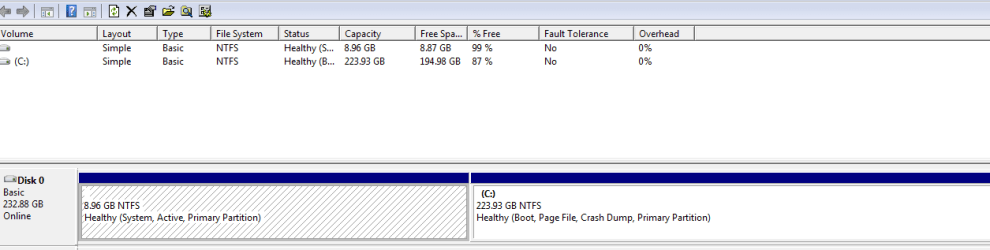
Computer states 194GB free of avail 223GB. Is this the norm ? After custom install, I have no factory bloatware, no documents, have only added Chrome, CC Cleaner, Real Player, Adobe Flash, Reader. Is something hiding on my HDD ? Win 7 should only take about 16GB, right ?

- Also, during first custom install I deleted Vista. Can it be recovered ? The second time I did custom install, Win 7 upgrade did not recognize previous Windows and I had to call Microsoft for activiation key. Would like to avoid calling in the future.

In summary, how do you evaluate what is on your HDD other than the listed programs under Windows, etc.
 

My Computer

OS
Win 7, 32bit, Premium

My Computer

Computer type
PC/Desktop
Computer Manufacturer/Model Number
Lenovo IdeaCenter 450
OS
Windows 10 Pro X64
CPU
Intel Quad Core i7-4770 @ 3.4Ghz
Memory
16.0GB PC3-12800 DDR3 SDRAM 1600 MHz
Graphics Card(s)
Intel Integrated HD Graphics
Sound Card
Realtek HD Audio
Monitor(s) Displays
HP 22" LCD
Screen Resolution
1680 x 1050
Hard Drives
250GB Samsung EVO SATA-3 SSD
2TB Seagate ST2000DM001 SATA-2
1.5TB Seagate ST3150041AS SATA
Keyboard
Dell USB
Mouse
Lenovo USB
Internet Speed
Cable via Road Runner 3MB Upload, 30MB Download
Antivirus
Windows Defender, MBAM Pro, MBAE
Browser
Seamonkey
Other Info
UEFI/GPT
PLDS DVD-RW DH16AERSH
If you google and download "SIW", ( system information for windows) it will list everything on your comp, hardware, software etc
 

My Computer

Computer type
PC/Desktop
Computer Manufacturer/Model Number
Self built
OS
Windows 7 home premium 64bit
CPU
intel Core i7 4790 3.6Ghz
Motherboard
Gigabyte H97-D3H
Memory
16Gb G.Skill Sniper
Graphics Card(s)
Nvidia GTX 760
Sound Card
Realtek ALC1150 115dB SNR HD Audio
Monitor(s) Displays
LG 32" TV as monitor
Screen Resolution
1920 x 1080
Hard Drives
Samsung 840 PRO series SATA3 256Gb SSD.
Western Digital Black SATA3 -1Tb.
Western Digital external HDD-1TB.

Pioneer DVD-RW.
PSU
Antec HCG 620w
Case
Thermaltake A41
Cooling
Stock fans x 3. After market Arctic Freezer i11 cpu cooler
Keyboard
Logitech M520r wireless
Mouse
Logitech M310t wireless
Internet Speed
Fair to middlin'
Antivirus
Avast free
Browser
Firefox
Other Info
MBAM Pro
SuperAntiSpyware free edition
AdwCleaner
Ccleaner
Revo uninstaller Pro
Capture.PNG


Is this OK ?
 

My Computer

OS
Win 7, 32bit, Premium
Every update you add to the system makes a backup. If you want, delete those and you`ll get some space back.
 

My Computer

Computer Manufacturer/Model Number
Myself
OS
Windows 7 Ultimate 64Bit
CPU
C2D E8200
Motherboard
XFX 750i
Memory
8GB PNY PC2-6400
Graphics Card(s)
BFG 9600GT x 2
Sound Card
Stock XFX Optical
Monitor(s) Displays
Gateway 22" HD Display
Hard Drives
C: 1 TB G: 500 GB H: 500 GB
PSU
Ultra LSP 550 Pro Lifetime Series
Case
Xion2
Cooling
ThermalTake
You can also install FileMenu Tools (FileMenu Tools), right-click a folder, and choose FileMenu Tools > Size of Folders. It will give you a sorted listing of all folders with sizes, and you can drill into the biggest ones to get more granular views of what's taking up so much space.

If it makes you feel any better, my OS is using 70 - 75 GB. 7 uses a lot more space than XP. One hog is the winsxs folder (Google).
 

My Computer

OS
Windows 7 Professional x64
Thanks for the above replies. Any other ideas ?

Also, as mentioned, I completely deleted Vista during clean install. Anyway to recover ? Thanks !
 

My Computer

OS
Win 7, 32bit, Premium
What`s the 8.96 GBs all about ?
 

My Computer

Computer Manufacturer/Model Number
Myself
OS
Windows 7 Ultimate 64Bit
CPU
C2D E8200
Motherboard
XFX 750i
Memory
8GB PNY PC2-6400
Graphics Card(s)
BFG 9600GT x 2
Sound Card
Stock XFX Optical
Monitor(s) Displays
Gateway 22" HD Display
Hard Drives
C: 1 TB G: 500 GB H: 500 GB
PSU
Ultra LSP 550 Pro Lifetime Series
Case
Xion2
Cooling
ThermalTake
What`s the 8.96 GBs all about ?

It's the active partition so it'll contain the boot record and is probably the recovery partition too.
 

My Computer

Computer Manufacturer/Model Number
HP Pavilion Elite 495UK
OS
Windows 7 Ultimate SP1 64-Bit
CPU
Intel Core i7 870 @ 2.93GHz
Motherboard
MSI 2A9C (CPU1)
Memory
8Gb Dual-Channel DDR3 @ 664MHz
Graphics Card(s)
nVidia GeForce GTX 460 1024MB dedicated RAM
Sound Card
Realtek HD Audio
Monitor(s) Displays
HP2310i
Screen Resolution
1920 x 1080
Hard Drives
1x1954GB Hitachi HDS22020ALA 330 (RAID), 1x1954GB Hitachi External for backup and storage
PSU
460W
Case
HP Elite
Cooling
Air cooled
Keyboard
Logitech K750 solar-powered keyboard
Mouse
Logitech Wireless M180 mouse
Internet Speed
2Mb
Other Info
Pure Avanti Flow Internet Radio with iPod Dock, 64Gb iPod, HP USB Speakers, Sony MDR-V500 Headphones, Sony Vaio F-Series Laptop
I was asking the poster. Silly
 

My Computer

Computer Manufacturer/Model Number
Myself
OS
Windows 7 Ultimate 64Bit
CPU
C2D E8200
Motherboard
XFX 750i
Memory
8GB PNY PC2-6400
Graphics Card(s)
BFG 9600GT x 2
Sound Card
Stock XFX Optical
Monitor(s) Displays
Gateway 22" HD Display
Hard Drives
C: 1 TB G: 500 GB H: 500 GB
PSU
Ultra LSP 550 Pro Lifetime Series
Case
Xion2
Cooling
ThermalTake

My Computer

Computer Manufacturer/Model Number
Myself
OS
Windows 7 Ultimate 64Bit
CPU
C2D E8200
Motherboard
XFX 750i
Memory
8GB PNY PC2-6400
Graphics Card(s)
BFG 9600GT x 2
Sound Card
Stock XFX Optical
Monitor(s) Displays
Gateway 22" HD Display
Hard Drives
C: 1 TB G: 500 GB H: 500 GB
PSU
Ultra LSP 550 Pro Lifetime Series
Case
Xion2
Cooling
ThermalTake
The 8.96 partition is the old OEM manufacturer's Vista Recovery partition.

You only have one HD Drive.
 

My Computer

OS
ME/XP/Vista/Win7
I am not certain. How could I verify what is actually on the 8GB ? When I initially upgraded to Win 7, there were 2 partitions as listed. Also, should be noted, after the clean install, I had 203G of free space which has reduced now to 194.

Seavixen's explanation sounds most plausible.


Edit: I just checked prior to posting, and I now have 200GB of free space ?
 

My Computer

OS
Win 7, 32bit, Premium
Looks like there is about 30GB being used on C:. To see what is actually using space on your hard drive, install Treesize Free.

Things that take up space:

pagefile.sys
hiberfile.sys
System Restore and Recycle Bin
Shadow Copy

Treesize will show you.
 

My Computer

Computer type
PC/Desktop
Computer Manufacturer/Model Number
Lenovo IdeaCenter 450
OS
Windows 10 Pro X64
CPU
Intel Quad Core i7-4770 @ 3.4Ghz
Memory
16.0GB PC3-12800 DDR3 SDRAM 1600 MHz
Graphics Card(s)
Intel Integrated HD Graphics
Sound Card
Realtek HD Audio
Monitor(s) Displays
HP 22" LCD
Screen Resolution
1680 x 1050
Hard Drives
250GB Samsung EVO SATA-3 SSD
2TB Seagate ST2000DM001 SATA-2
1.5TB Seagate ST3150041AS SATA
Keyboard
Dell USB
Mouse
Lenovo USB
Internet Speed
Cable via Road Runner 3MB Upload, 30MB Download
Antivirus
Windows Defender, MBAM Pro, MBAE
Browser
Seamonkey
Other Info
UEFI/GPT
PLDS DVD-RW DH16AERSH
If you right click on the 8G space will it let you explore it ?

Personally I would reinstall and delete everything.
Should look more like this.
 

Attachments

  • Disk Mang..png
    Disk Mang..png
    42.8 KB · Views: 4

My Computer

Computer Manufacturer/Model Number
Myself
OS
Windows 7 Ultimate 64Bit
CPU
C2D E8200
Motherboard
XFX 750i
Memory
8GB PNY PC2-6400
Graphics Card(s)
BFG 9600GT x 2
Sound Card
Stock XFX Optical
Monitor(s) Displays
Gateway 22" HD Display
Hard Drives
C: 1 TB G: 500 GB H: 500 GB
PSU
Ultra LSP 550 Pro Lifetime Series
Case
Xion2
Cooling
ThermalTake
No, it will not let me explore.

I deleted Vista when I reinstalled before. Can Vista be recovered for Win 7 upgrade recognition purposes. ? I hate to call Microsoft again for activation. Also, can that 8GB partition be eliminated ?
 

My Computer

OS
Win 7, 32bit, Premium
Why are you telling torre to delete his recovery partition? That is probably his only way of reinstalling XP if needed. Not a good idea, at least until Windows 7 is running correctly.

Torre, you can do a clean install with an upgrade disc:
Clean Install with a Upgrade Windows 7 Version
 

My Computer

Computer type
PC/Desktop
Computer Manufacturer/Model Number
Lenovo IdeaCenter 450
OS
Windows 10 Pro X64
CPU
Intel Quad Core i7-4770 @ 3.4Ghz
Memory
16.0GB PC3-12800 DDR3 SDRAM 1600 MHz
Graphics Card(s)
Intel Integrated HD Graphics
Sound Card
Realtek HD Audio
Monitor(s) Displays
HP 22" LCD
Screen Resolution
1680 x 1050
Hard Drives
250GB Samsung EVO SATA-3 SSD
2TB Seagate ST2000DM001 SATA-2
1.5TB Seagate ST3150041AS SATA
Keyboard
Dell USB
Mouse
Lenovo USB
Internet Speed
Cable via Road Runner 3MB Upload, 30MB Download
Antivirus
Windows Defender, MBAM Pro, MBAE
Browser
Seamonkey
Other Info
UEFI/GPT
PLDS DVD-RW DH16AERSH
Thanks, Ztruker !
 

My Computer

OS
Win 7, 32bit, Premium
Back
Top