Two Identical Laptops - One Harddrive - boots one...not the other...

Virg54

New member
Local time
7:02 AM
Messages
5
I have a Dell e1705 with 1.83GHz. I recently purchased another e1705 with 2.00GHz. I pulled the hard drive and popped it into the "new" e1705.

It starts up and the Dell logo pops up. It goes to a screen stating "loading Windows files" with a status bar. Then, it goes black and returns to the Dell logo, and the cycle starts again. Just two screens. Over and over. It does this forever, until I do a hard shut down. Both are running A10 bios...

If it matters, the "new" was running Ubuntu just fine when I purchased it.

Any ideas why the same hard drive can boot one unit and not the other?
 

My Computer My Computer

At a glance

Windows 7 Home Premium, 64 bitIntel Core 2 CPU, T7200 @2.00 GHz4.00 GB (3.25 GB usable)ATI Mobility Radeon X1400
Computer type
Laptop
Computer Manufacturer/Model Number
Dell Inspiron e1705/9400
OS
Windows 7 Home Premium, 64 bit
CPU
Intel Core 2 CPU, T7200 @2.00 GHz
Memory
4.00 GB (3.25 GB usable)
Graphics Card(s)
ATI Mobility Radeon X1400
Hard Drives
ST1000LM014-1EJ164 ATA Device
1TB Hybrid Drive
Browser
IE
Hello and welcome Virg mate so I have it right the drive has Windows installed on it in machine #1 and you have put the drive into machine #2?

Now if so mate if the Windows was a factory installed OEM or an OEM you installed then the activation code will not work using that drive in machine #2 because it's activation code is tied to the motherboard of machine #1. However if the version is a retail version then it will be possible to install it on the drive in machine #2 but it ell only be able to be used on machine #2. Plus I think because I am not 100% sure you will need to reinstall that retail version. Now also if it is a retail version I would get a new drive and do that and then transfer the data over from the old original drive - but you will not be able to use that ld drive install in any other machine.
 

My Computer My Computer

At a glance

Desk1 7 Home Prem / Desk2 10 Pro / Main lap A...Desk1 i5 3750K / Laptop i7 GTX 860M / Desk2 i...Desk1 8GB (1866) / Desk2 16GB (1333) / Laptop...Desk 1& 2NVidia GTX 650 & Laptops on board Intel
Computer type
PC/Desktop
Computer Manufacturer/Model Number
Own build (new) Desk1 / Asus ROG Win 7 / Desk2 1st build
OS
Desk1 7 Home Prem / Desk2 10 Pro / Main lap Asus ROG 10 Pro 2 laptop Toshiba 7 Pro Asus P2520 7 & 10
CPU
Desk1 i5 3750K / Laptop i7 GTX 860M / Desk2 i5 2500
Motherboard
Desk1 Asus P877-V / Desk2 Gigabyte H67 UD3H / Laptop ?
Memory
Desk1 8GB (1866) / Desk2 16GB (1333) / Laptop 8Gb DDR3
Graphics Card(s)
Desk 1& 2NVidia GTX 650 & Laptops on board Intel
Sound Card
Desk 1 & 2 -XONAR DG Realtek High Def audio Laptop
Monitor(s) Displays
Desk 1 Benq HD 2450 / Desk2 Philips 24" / Laptop 17.5"
Screen Resolution
1920x1080 D1 & D2 & Laptop 1
Hard Drives
Desk1 Samsung 120GB 830 SSD
Asus ROG 256GB 850 Pro SSD
Desk2 Samsung 840 256 SSD
Toshiba 120GB EVO
PSU
Desk 1 Corsair HX 1050/ Laptop ? / Desk 2 Corsair HX 650
Case
Desk 1 Cooler HAF XM ? Toshiba laptop / Desk2 Coolermaster
Cooling
Fans on all Desk1 -2 Desk2 - all Coolermasters 5 Laptop ?
Keyboard
Desk 1 MS Sidewinder X6 Desk 2 MS Sidewinder X 4
Mouse
Desk 1&2 - Gigabyte MS 900 gamer - laptop - Logitec wireless
Internet Speed
ADSL2+
Other Info
One other Desktop (tester) and spare Toshba laptop both with SSD's
Running Kaspersky 2016 ISS on all machines config'd identically
Logitec audio stereo systems on each machine (x3)
Canon MG5250MFC
Router/modem TP-Link running WPA2SK
No 2 systems are ever really identical. I have 2 Asus T100 purchased in a space of 2 weeks and the hardware is different. If you want Windows 7 on your new PC, you will have to install it with a valid product key.
 

My Computer My Computer

At a glance

Vista, Windows7, Mint Mate, Zorin, Windows 8from 1.6GHz Duo to i7
Computer Manufacturer/Model Number
HP, Dell, Gateway, Toshiba - 4 laptops and 2 desktops
OS
Vista, Windows7, Mint Mate, Zorin, Windows 8
CPU
from 1.6GHz Duo to i7
Monitor(s) Displays
2x HP w2207
Hard Drives
5x HDD, 7x SSD, 12x Externals
Keyboard
with trackball - no mices
Mouse
Trackball mice
Internet Speed
DSL 6000
Hello and welcome Virg mate so I have it right the drive has Windows installed on it in machine #1 and you have put the drive into machine #2?

Correct. It is a 1TB Hybrid Drive with a new installation (NOT a re-install) of Windows 7 Home Premium. It has operated beautifully in "Machine #1"

Now if so mate if the Windows was a factory installed OEM or an OEM you installed then the activation code will not work using that drive in machine #2 because it's activation code is tied to the motherboard of machine #1. However if the version is a retail version then it will be possible to install it on the drive in machine #2 but it ell only be able to be used on machine #2. Plus I think because I am not 100% sure you will need to reinstall that retail version. Now also if it is a retail version I would get a new drive and do that and then transfer the data over from the old original drive - but you will not be able to use that ld drive install in any other machine.

Sorry, I guess I am as dumb as a bag of hammers! I thought the Windows license was tied to the hard drive and it did not matter what machine you put it in. So, if I purchase a new, fresh Windows OS and install it, and the next day..., say..., the motherboard dies, I am screwed because I can not move the drive (and new OS) can not simply plugged into a "like"/identical machine...? Am I understanding this correctly?
 

My Computer My Computer

At a glance

Windows 7 Home Premium, 64 bitIntel Core 2 CPU, T7200 @2.00 GHz4.00 GB (3.25 GB usable)ATI Mobility Radeon X1400
Computer type
Laptop
Computer Manufacturer/Model Number
Dell Inspiron e1705/9400
OS
Windows 7 Home Premium, 64 bit
CPU
Intel Core 2 CPU, T7200 @2.00 GHz
Memory
4.00 GB (3.25 GB usable)
Graphics Card(s)
ATI Mobility Radeon X1400
Hard Drives
ST1000LM014-1EJ164 ATA Device
1TB Hybrid Drive
Browser
IE
So, if I purchase a new, fresh Windows OS and install it, and the next day..., say..., the motherboard dies, I am screwed because I can not move the drive (and new OS) can not simply plugged into a "like"/identical machine...? Am I understanding this correctly?
That is correct in case of OEM licenses - not for retail licenses (which are more expensive).
 

My Computer My Computer

At a glance

Vista, Windows7, Mint Mate, Zorin, Windows 8from 1.6GHz Duo to i7
Computer Manufacturer/Model Number
HP, Dell, Gateway, Toshiba - 4 laptops and 2 desktops
OS
Vista, Windows7, Mint Mate, Zorin, Windows 8
CPU
from 1.6GHz Duo to i7
Monitor(s) Displays
2x HP w2207
Hard Drives
5x HDD, 7x SSD, 12x Externals
Keyboard
with trackball - no mices
Mouse
Trackball mice
Internet Speed
DSL 6000
Well, I purchased this OS over the counter from Amazon.
 

My Computer My Computer

At a glance

Windows 7 Home Premium, 64 bitIntel Core 2 CPU, T7200 @2.00 GHz4.00 GB (3.25 GB usable)ATI Mobility Radeon X1400
Computer type
Laptop
Computer Manufacturer/Model Number
Dell Inspiron e1705/9400
OS
Windows 7 Home Premium, 64 bit
CPU
Intel Core 2 CPU, T7200 @2.00 GHz
Memory
4.00 GB (3.25 GB usable)
Graphics Card(s)
ATI Mobility Radeon X1400
Hard Drives
ST1000LM014-1EJ164 ATA Device
1TB Hybrid Drive
Browser
IE
Is it an OEM or a retail license.

But for your problem it makes no difference. Your disk from PC1 will not work on PC2 for different reasons - e.g. drivers.
 

My Computer My Computer

At a glance

Vista, Windows7, Mint Mate, Zorin, Windows 8from 1.6GHz Duo to i7
Computer Manufacturer/Model Number
HP, Dell, Gateway, Toshiba - 4 laptops and 2 desktops
OS
Vista, Windows7, Mint Mate, Zorin, Windows 8
CPU
from 1.6GHz Duo to i7
Monitor(s) Displays
2x HP w2207
Hard Drives
5x HDD, 7x SSD, 12x Externals
Keyboard
with trackball - no mices
Mouse
Trackball mice
Internet Speed
DSL 6000
And, I thought I knew a lot about computers! And, I thought I was being smart by buying a good drive and new OS and transferring to another "like" machine rather than repairing the one I had! Duh!

Can I "wipe" my 1TB hybrid drive (with the new OS), pop it into the faster e1705 (2.00GHz) machine #2, and reinstall the OS from the disk...? Or, is that too frigging logical to work in the World of Microsoft...
 

My Computer My Computer

At a glance

Windows 7 Home Premium, 64 bitIntel Core 2 CPU, T7200 @2.00 GHz4.00 GB (3.25 GB usable)ATI Mobility Radeon X1400
Computer type
Laptop
Computer Manufacturer/Model Number
Dell Inspiron e1705/9400
OS
Windows 7 Home Premium, 64 bit
CPU
Intel Core 2 CPU, T7200 @2.00 GHz
Memory
4.00 GB (3.25 GB usable)
Graphics Card(s)
ATI Mobility Radeon X1400
Hard Drives
ST1000LM014-1EJ164 ATA Device
1TB Hybrid Drive
Browser
IE
Virg mate you can use that used OEM if the motherboard dies all it needs is a call to Microsoft - they are really quite obliging and I have done this on three occasions now for friends whose machines I have fixed.

Of course if you do it more than about three times for one machine they will obviously smell a rat;) So don't stress out mate it is just a phone call:)
 

My Computer My Computer

At a glance

Desk1 7 Home Prem / Desk2 10 Pro / Main lap A...Desk1 i5 3750K / Laptop i7 GTX 860M / Desk2 i...Desk1 8GB (1866) / Desk2 16GB (1333) / Laptop...Desk 1& 2NVidia GTX 650 & Laptops on board Intel
Computer type
PC/Desktop
Computer Manufacturer/Model Number
Own build (new) Desk1 / Asus ROG Win 7 / Desk2 1st build
OS
Desk1 7 Home Prem / Desk2 10 Pro / Main lap Asus ROG 10 Pro 2 laptop Toshiba 7 Pro Asus P2520 7 & 10
CPU
Desk1 i5 3750K / Laptop i7 GTX 860M / Desk2 i5 2500
Motherboard
Desk1 Asus P877-V / Desk2 Gigabyte H67 UD3H / Laptop ?
Memory
Desk1 8GB (1866) / Desk2 16GB (1333) / Laptop 8Gb DDR3
Graphics Card(s)
Desk 1& 2NVidia GTX 650 & Laptops on board Intel
Sound Card
Desk 1 & 2 -XONAR DG Realtek High Def audio Laptop
Monitor(s) Displays
Desk 1 Benq HD 2450 / Desk2 Philips 24" / Laptop 17.5"
Screen Resolution
1920x1080 D1 & D2 & Laptop 1
Hard Drives
Desk1 Samsung 120GB 830 SSD
Asus ROG 256GB 850 Pro SSD
Desk2 Samsung 840 256 SSD
Toshiba 120GB EVO
PSU
Desk 1 Corsair HX 1050/ Laptop ? / Desk 2 Corsair HX 650
Case
Desk 1 Cooler HAF XM ? Toshiba laptop / Desk2 Coolermaster
Cooling
Fans on all Desk1 -2 Desk2 - all Coolermasters 5 Laptop ?
Keyboard
Desk 1 MS Sidewinder X6 Desk 2 MS Sidewinder X 4
Mouse
Desk 1&2 - Gigabyte MS 900 gamer - laptop - Logitec wireless
Internet Speed
ADSL2+
Other Info
One other Desktop (tester) and spare Toshba laptop both with SSD's
Running Kaspersky 2016 ISS on all machines config'd identically
Logitec audio stereo systems on each machine (x3)
Canon MG5250MFC
Router/modem TP-Link running WPA2SK
I just thought I had found a reasonable approach to managing computer "costs"...buy a big drive, new OS, move it into the same machine (but faster) when the something dies (something always does) on the machine currently being used.

So, I call MS, tell them my old machine when "belly up", and they will give me a new activation code for when I plug the hard drive (after I have wiped it clean) into another machine? Then, I just load the OS with the new activation code?
 

My Computer My Computer

At a glance

Windows 7 Home Premium, 64 bitIntel Core 2 CPU, T7200 @2.00 GHz4.00 GB (3.25 GB usable)ATI Mobility Radeon X1400
Computer type
Laptop
Computer Manufacturer/Model Number
Dell Inspiron e1705/9400
OS
Windows 7 Home Premium, 64 bit
CPU
Intel Core 2 CPU, T7200 @2.00 GHz
Memory
4.00 GB (3.25 GB usable)
Graphics Card(s)
ATI Mobility Radeon X1400
Hard Drives
ST1000LM014-1EJ164 ATA Device
1TB Hybrid Drive
Browser
IE
You can move the hard drive from one PC to another but if Win7 on it won't start then you'll need Adjust Win7 to boot on new hardware with Paragon Adaptive Restore CD.

Then if the new PC came with WIn7 you can reactivate with the Product Key on it's COA sticker providing it's the same version, or if you're using a retail Win7 Product Key use it to reactivate at Control Panel>System. It requires reactivation unless the exact same model motherboard is being used.
 
No Virg they will just let you use the old code and for the installation disk use the ISO for this tutorial
http://www.sevenforums.com/tutorials/219487-clean-reinstall-factory-oem-windows-7-a.html make sure you pick the exact version of the original as trying to go one better will end in grief.

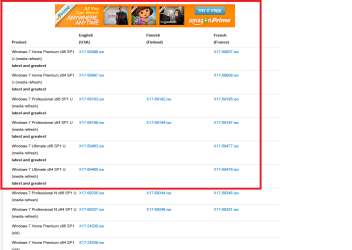
The versions from that tutorial are here Windows 7 Direct Download Links, Official Disk Images from Digital River pick one from the outlined lot in my pic

So download and save the ISO burn it to a disk or stick make sure the drive is clean disconnect all other drives and the boot from the source of the ISO and it then goes into installing the OS. You will of course contact Microsoft to tell the them what is happening .
 

Attachments

  • ISO 2.PNG
    ISO 2.PNG
    29.3 KB · Views: 0

My Computer My Computer

At a glance

Desk1 7 Home Prem / Desk2 10 Pro / Main lap A...Desk1 i5 3750K / Laptop i7 GTX 860M / Desk2 i...Desk1 8GB (1866) / Desk2 16GB (1333) / Laptop...Desk 1& 2NVidia GTX 650 & Laptops on board Intel
Computer type
PC/Desktop
Computer Manufacturer/Model Number
Own build (new) Desk1 / Asus ROG Win 7 / Desk2 1st build
OS
Desk1 7 Home Prem / Desk2 10 Pro / Main lap Asus ROG 10 Pro 2 laptop Toshiba 7 Pro Asus P2520 7 & 10
CPU
Desk1 i5 3750K / Laptop i7 GTX 860M / Desk2 i5 2500
Motherboard
Desk1 Asus P877-V / Desk2 Gigabyte H67 UD3H / Laptop ?
Memory
Desk1 8GB (1866) / Desk2 16GB (1333) / Laptop 8Gb DDR3
Graphics Card(s)
Desk 1& 2NVidia GTX 650 & Laptops on board Intel
Sound Card
Desk 1 & 2 -XONAR DG Realtek High Def audio Laptop
Monitor(s) Displays
Desk 1 Benq HD 2450 / Desk2 Philips 24" / Laptop 17.5"
Screen Resolution
1920x1080 D1 & D2 & Laptop 1
Hard Drives
Desk1 Samsung 120GB 830 SSD
Asus ROG 256GB 850 Pro SSD
Desk2 Samsung 840 256 SSD
Toshiba 120GB EVO
PSU
Desk 1 Corsair HX 1050/ Laptop ? / Desk 2 Corsair HX 650
Case
Desk 1 Cooler HAF XM ? Toshiba laptop / Desk2 Coolermaster
Cooling
Fans on all Desk1 -2 Desk2 - all Coolermasters 5 Laptop ?
Keyboard
Desk 1 MS Sidewinder X6 Desk 2 MS Sidewinder X 4
Mouse
Desk 1&2 - Gigabyte MS 900 gamer - laptop - Logitec wireless
Internet Speed
ADSL2+
Other Info
One other Desktop (tester) and spare Toshba laptop both with SSD's
Running Kaspersky 2016 ISS on all machines config'd identically
Logitec audio stereo systems on each machine (x3)
Canon MG5250MFC
Router/modem TP-Link running WPA2SK
Back
Top