
Solved Two Installed SSDs with Windows7 - How designate new one as 'C' ?

rontokyo

New member
Member
Local time
6:03 AM
Messages
64
I'm having problems with my current Win7 SSD so I cloned the drive via Macrium to a new SSD. Both are currently installed. I would like to delete the "old" one ['C' drive] and replace it with the new one ['J' drive] and change the 'J' drive designation to 'C'. I'm sure this can be done in disk manager, but as it's the OS I don't want to mess up.

What has complicated matters is that whereas the BIOS allows me to select the 'J' drive as first boot option, the computer continually boots into the original 'C' as that drive is listed as #1 priority in "boot override", which basically overrides the boot priority options. The problem is I've been unable to change the "boot override" choices. My hope is that once I've changed the replacement SSD to 'C' I'll then be able to delete the original 'C' [whose drive letter will have been changed to a different letter]. My hope is that this will "force" a boot into the new SSD.

Note that this issue is an outgrowth of my on-going BSOD problems. I currently have an open thread dealing with that issue. I'm starting this thread as I believe this is a separate issue/topic. If the mods feel otherwise, feel free to delete.
 

My Computer My Computer

At a glance

Win 7AMD FX 610016GBAMD Radeon R7 200 series
Computer type
PC/Desktop
Computer Manufacturer/Model Number
custom
OS
Win 7
CPU
AMD FX 6100
Motherboard
Asus M5A97 EVO
Memory
16GB
Graphics Card(s)
AMD Radeon R7 200 series
Sound Card
none - see "other info"
Monitor(s) Displays
Acer
Screen Resolution
1920x1080
Hard Drives
Samsung SSD 120GB
PSU
Enermax TriAthlor 650 watt
Keyboard
Happy Hacking Professional 2
Mouse
Logitech MX Revolution [bluetooth]
Antivirus
Bitdefender
Browser
Waterfox & Chrome
Other Info
I use the following DAC's:
Benchmark DAC1 USB [via Coax] to splitter with Teac A-H01 [via optical]

Hugo2 [connected via USB]
Unplug the source disk and see if it boots and loads with only the cloned disk attached.
 

My Computers My Computers

  • At a glance

    7 X64i5 84002x8gb 3200mhz
    Computer type
    PC/Desktop
    OS
    7 X64
    CPU
    i5 8400
    Motherboard
    gigabyte b365m ds3h
    Memory
    2x8gb 3200mhz
    Hard Drives
    various
    PSU
    pure power 11 400w cm
    Case
    Coolermaster
    Cooling
    cryorig m9i
  • At a glance

    7x64g54008gb ddr4 2400
    Computer type
    PC/Desktop
    OS
    7x64
    CPU
    g5400
    Motherboard
    ga b365m ds3h
    Memory
    8gb ddr4 2400
    PSU
    xfx pro 450w
Thanks, but I tried that. The "boot override" function in the BIOS continues to list the original 'C' drive as priority #1. So unplugging that drive resulted in no post 'beep' as the 'C' drive that BIOS was looking for didn't exist.
 

My Computer My Computer

At a glance

Win 7AMD FX 610016GBAMD Radeon R7 200 series
Computer type
PC/Desktop
Computer Manufacturer/Model Number
custom
OS
Win 7
CPU
AMD FX 6100
Motherboard
Asus M5A97 EVO
Memory
16GB
Graphics Card(s)
AMD Radeon R7 200 series
Sound Card
none - see "other info"
Monitor(s) Displays
Acer
Screen Resolution
1920x1080
Hard Drives
Samsung SSD 120GB
PSU
Enermax TriAthlor 650 watt
Keyboard
Happy Hacking Professional 2
Mouse
Logitech MX Revolution [bluetooth]
Antivirus
Bitdefender
Browser
Waterfox & Chrome
Other Info
I use the following DAC's:
Benchmark DAC1 USB [via Coax] to splitter with Teac A-H01 [via optical]

Hugo2 [connected via USB]
post a screenshot of disk management window.

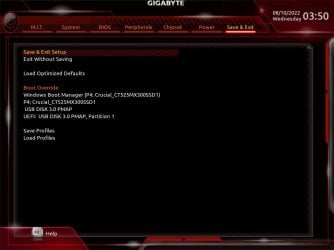
Bios shouldnt be listing a device that is not attached. What makes you think it is looking for a "c" drive?

- - - Updated - - -

It should list the attached devices something like this

220810034734.jpg

It has got nothing to do with windows drive letter allocation


220810035001.jpg
 

My Computers My Computers

  • At a glance

    7 X64i5 84002x8gb 3200mhz
    Computer type
    PC/Desktop
    OS
    7 X64
    CPU
    i5 8400
    Motherboard
    gigabyte b365m ds3h
    Memory
    2x8gb 3200mhz
    Hard Drives
    various
    PSU
    pure power 11 400w cm
    Case
    Coolermaster
    Cooling
    cryorig m9i
  • At a glance

    7x64g54008gb ddr4 2400
    Computer type
    PC/Desktop
    OS
    7x64
    CPU
    g5400
    Motherboard
    ga b365m ds3h
    Memory
    8gb ddr4 2400
    PSU
    xfx pro 450w
Thanks S1W2. What I meant by saying "the 'C' drive that BIOS was looking for didn't exist" refers to this Asus "boot override" function in the BIOS. Even though I set boot priority #1 and #2 to the new replacement SSD ['J'] drive, the "boot override" takes precedence and can override those priorities. So why not set the "boot override" to prioritize the 'J' drive? Would if I could. My attempts to click on the drop-down menu, instead of opening that menu and allowing me to select my choice, instead ends the BIOS session and restarts the computer. If this behavior seems strange to you, you're not alone. It's wacky. And until this current problem I was never even aware of this BIOS function. Choosing the standard boot priorities we're all familiar with had never been a problem.

Again, my interpreting the computer behavior when I disconnected the 'C' drive as "the 'C' drive that BIOS was looking for didn't exist," is my way of saying that as the "boot override" priority is set to the original 'C' drive -- and that drive has been disconnected -- the computer will therefore not post as it's "set" to look for a particular drive that no longer exists. True that in the standard "boot priorities" only attached drives will appear as choices. What I'm finding, however, is that that may not be the case with the "boot override" function. In my case, it remains set to 'C' drive whether that drive is connected or not.

I can well imagine that this is confusing and difficult to understand. Apologies.

You're right of course that the BIOS doesn't concern itself with drive letters. It was a mistake for me to bring that up in the first place.

I have one plan of attack left me [one I'll get to tomorrow]: When I disconnected the 'C' drive cable from the SSD [and the computer failed to post], I hadn't thought to try connecting that same cable [inserted in port 6] to the 'J' SSD drive. I'm wondering now if maybe I can fool the BIOS into booting into the 'J' drive as it will be connected to the same port that the 'C' drive was attached to.

If you've managed to read all this w/o giving up . . . well, hats off to you :-).
 

My Computer My Computer

At a glance

Win 7AMD FX 610016GBAMD Radeon R7 200 series
Computer type
PC/Desktop
Computer Manufacturer/Model Number
custom
OS
Win 7
CPU
AMD FX 6100
Motherboard
Asus M5A97 EVO
Memory
16GB
Graphics Card(s)
AMD Radeon R7 200 series
Sound Card
none - see "other info"
Monitor(s) Displays
Acer
Screen Resolution
1920x1080
Hard Drives
Samsung SSD 120GB
PSU
Enermax TriAthlor 650 watt
Keyboard
Happy Hacking Professional 2
Mouse
Logitech MX Revolution [bluetooth]
Antivirus
Bitdefender
Browser
Waterfox & Chrome
Other Info
I use the following DAC's:
Benchmark DAC1 USB [via Coax] to splitter with Teac A-H01 [via optical]

Hugo2 [connected via USB]
Yes, try attaching the cloned disk to the port formerly occupied by the source disk.

My attempts to click on the drop-down menu, instead of opening that menu and allowing me to select my choice, instead ends the BIOS session and restarts the computer.
 

My Computers My Computers

  • At a glance

    7 X64i5 84002x8gb 3200mhz
    Computer type
    PC/Desktop
    OS
    7 X64
    CPU
    i5 8400
    Motherboard
    gigabyte b365m ds3h
    Memory
    2x8gb 3200mhz
    Hard Drives
    various
    PSU
    pure power 11 400w cm
    Case
    Coolermaster
    Cooling
    cryorig m9i
  • At a glance

    7x64g54008gb ddr4 2400
    Computer type
    PC/Desktop
    OS
    7x64
    CPU
    g5400
    Motherboard
    ga b365m ds3h
    Memory
    8gb ddr4 2400
    PSU
    xfx pro 450w
Will do. Will report back tomorrow. Thanks.

- - - Updated - - -

I'm going to label this thread "solved" as there hasn't been a BSOD in almost 48 hours. How was this issues "solved"? Well, I changed the cable and moved the drive to another port [nothing more], but I continued to get BSOD's. Until I didn't. For reasons unknown to me -- after over 20 occurrences -- the problem has [so far] ceased. Weird, huh? The computer continues to boot into the original SSD drive but as there hasn't been another BSOD I won't tempt fate and will leave things as they are. Thanks again, S1W2, for your advice.
 

My Computer My Computer

At a glance

Win 7AMD FX 610016GBAMD Radeon R7 200 series
Computer type
PC/Desktop
Computer Manufacturer/Model Number
custom
OS
Win 7
CPU
AMD FX 6100
Motherboard
Asus M5A97 EVO
Memory
16GB
Graphics Card(s)
AMD Radeon R7 200 series
Sound Card
none - see "other info"
Monitor(s) Displays
Acer
Screen Resolution
1920x1080
Hard Drives
Samsung SSD 120GB
PSU
Enermax TriAthlor 650 watt
Keyboard
Happy Hacking Professional 2
Mouse
Logitech MX Revolution [bluetooth]
Antivirus
Bitdefender
Browser
Waterfox & Chrome
Other Info
I use the following DAC's:
Benchmark DAC1 USB [via Coax] to splitter with Teac A-H01 [via optical]

Hugo2 [connected via USB]
Back
Top