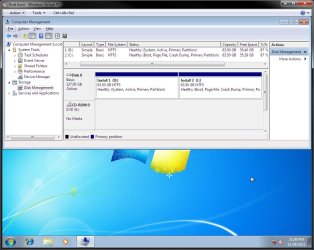
Two installs on windows 7 pro on diff partitions of same drive

cyberpine

New member
Local time
10:27 AM
Messages
25
Development/Test/ Lab machine with windows 7 pro.. having SW config issues and would like to reinstall from scratch but concerned with not having it available for a few days.

It has a 1T Hard drive currently with two partitions.. 130gb for Windows 7 pro OS and rest for Data files. I have about 500gb free. I'd like to grab another 130gb from data and have 3 partions and install windows 7 pro on the new partion to reconfigure some SQL and .NET stuff.. If I'm happy I'd like to make that my default boot, but leave the other up just in case for a few months.

1. Will Windows automatically offer a boot menu?
2. Can i set which boot comes up automatically?
3. Later, any issues installing Windows 7 pro on the original partition again for another test.
 

My Computer My Computer

At a glance

Windows 7
OS
Windows 7
Hello Cyberpine,

If you like you could use the tutorial below as an example for how to dual boot with two copies of Windows 7. Just substitute Vista in the tutorial with the other Windows 7. The procedure is the same. Do note that you will only be able to use your product key number to activate only one of the installed copies of Windows 7 Pro though.
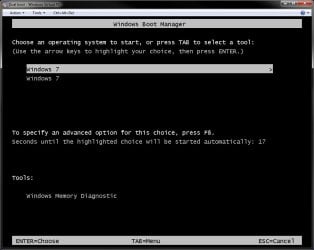
Q1) Yes, when you install a second OS to multiboot, you will see a "Windows Boot Manager" screen during boot to select what OS you would like to run at startup. By default, you have 30 seconds to make this choice before the default OS is selected automatically to run at startup. The last OS installed is the default OS to run at startup by default. You could use the tutorial below to set how long you want the Windows Boot Manager to be available for before automatically starting the default OS.
Q2) Yes, you could use any of the options in the tutorial below to set which OS you would like to be the default OS to run at startup.
Q3) Yes you can install the OS on any partition again if you like and still be able to multi-boot.


Hope this helps,
Shawn
 

My Computer My Computer

At a glance

64-bit Windows 11 Pro for WorkstationsIntel i7-8700K OC'd to 5 GHz64 GB (4x16GB) G.SKILL TridentZ RGB DDR4 3600...ASUS ROG-STRIX-GTX1080TI-O11G-GAMING
Computer type
PC/Desktop
Computer Manufacturer/Model Number
Self built custom
OS
64-bit Windows 11 Pro for Workstations
CPU
Intel i7-8700K OC'd to 5 GHz
Motherboard
ASUS ROG Maximus XI Formula Z390
Memory
64 GB (4x16GB) G.SKILL TridentZ RGB DDR4 3600 MHz
Graphics Card(s)
ASUS ROG-STRIX-GTX1080TI-O11G-GAMING
Sound Card
Integrated
Monitor(s) Displays
2 x Samsung Odyssey G7 27"
Screen Resolution
2560x1440
Hard Drives
1TB Samsung 990 PRO M.2,
4TB Samsung 990 PRO PRO M.2,
TerraMaster F8 SSD Plus NAS
PSU
Seasonic Prime Titanium 850W
Case
Thermaltake Core P3
Cooling
Corsair Hydro H115i
Keyboard
Logitech wireless K800
Mouse
Logitech MX Master 4
Internet Speed
2 Gb/s Download and 100 Mb/s Upload
Antivirus
Malwarebyte Anti-Malware Premium
Browser
Google Chrome
Other Info
Logitech Z625 speaker system,
Logitech BRIO 4K Pro webcam,
HP Color LaserJet Pro MFP M477fdn,
APC SMART-UPS RT 1000 XL - SURT1000XLI,
Galaxy S23 Plus phone
1. Will Windows automatically offer a boot menu?

Only if you dual boot 32bit & 64bit
 

My Computer My Computer

At a glance

ME/XP/Vista/Win7
OS
ME/XP/Vista/Win7
Hello Ray,

I've always gotten the "Windows Boot Manager" screen at boot to select what OS to startup no matter if the second OS was 32-bit or 64-bit, or the same as the first OS installed. :confused:
 

My Computer My Computer

At a glance

64-bit Windows 11 Pro for WorkstationsIntel i7-8700K OC'd to 5 GHz64 GB (4x16GB) G.SKILL TridentZ RGB DDR4 3600...ASUS ROG-STRIX-GTX1080TI-O11G-GAMING
Computer type
PC/Desktop
Computer Manufacturer/Model Number
Self built custom
OS
64-bit Windows 11 Pro for Workstations
CPU
Intel i7-8700K OC'd to 5 GHz
Motherboard
ASUS ROG Maximus XI Formula Z390
Memory
64 GB (4x16GB) G.SKILL TridentZ RGB DDR4 3600 MHz
Graphics Card(s)
ASUS ROG-STRIX-GTX1080TI-O11G-GAMING
Sound Card
Integrated
Monitor(s) Displays
2 x Samsung Odyssey G7 27"
Screen Resolution
2560x1440
Hard Drives
1TB Samsung 990 PRO M.2,
4TB Samsung 990 PRO PRO M.2,
TerraMaster F8 SSD Plus NAS
PSU
Seasonic Prime Titanium 850W
Case
Thermaltake Core P3
Cooling
Corsair Hydro H115i
Keyboard
Logitech wireless K800
Mouse
Logitech MX Master 4
Internet Speed
2 Gb/s Download and 100 Mb/s Upload
Antivirus
Malwarebyte Anti-Malware Premium
Browser
Google Chrome
Other Info
Logitech Z625 speaker system,
Logitech BRIO 4K Pro webcam,
HP Color LaserJet Pro MFP M477fdn,
APC SMART-UPS RT 1000 XL - SURT1000XLI,
Galaxy S23 Plus phone
You can dual boot HP 64bit & Pro x64.

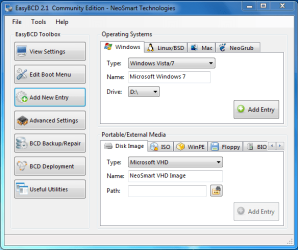
If you install two Pro x64, EasyBCD is needed to add the first install to boot menu.
Same with two XP Pro 32bit, or Vista Bus 32bit.
The last install takes over.
 

My Computer My Computer

At a glance

ME/XP/Vista/Win7
OS
ME/XP/Vista/Win7
You can dual boot HP 64bit & Pro x64.

If you install two Pro x64, EasyBCD is needed to add the first install to boot menu.
Same with two XP Pro 32bit, or Vista Bus 32bit.
The last install takes over.

Oh.. I'm looking to have two Pro x64. Any good guides on EasyBCD? I've not looked up steps, but at a high level what is it, what steps and exactly in what sequence.

Right now I'm at the step of making the 3rd partition for my new install.

Mostly I'm looking for an easy way back in case things don't go well. Right now I've got a giant mess using Windows 2005 Virtual Server (which is not really supported) and several Virtual PC VMs and I'm just looking to INSTEAD host SQL 2008 and IIS for some developing testing right on the windows 7 client.
 
Last edited:

My Computer My Computer

At a glance

Windows 7
OS
Windows 7
Hi Shawn

Just Install two HP x64's, no boot menu.

Install one

Install-1-001.PNG Install-1-002.PNG

Install two

Install-2-001.PNG Install-2-002.PNG

After EasyBCD

Install-3-001.PNG Install-3-002.PNG


Ray.
 

My Computer My Computer

At a glance

ME/XP/Vista/Win7
OS
ME/XP/Vista/Win7
Ray,

Strange, how did you install the second OS?

I'll do some more playing with this later tonight and post my results. The only difference I do notice is that I have the 100MB System Reserved partition.
 

My Computer My Computer

At a glance

64-bit Windows 11 Pro for WorkstationsIntel i7-8700K OC'd to 5 GHz64 GB (4x16GB) G.SKILL TridentZ RGB DDR4 3600...ASUS ROG-STRIX-GTX1080TI-O11G-GAMING
Computer type
PC/Desktop
Computer Manufacturer/Model Number
Self built custom
OS
64-bit Windows 11 Pro for Workstations
CPU
Intel i7-8700K OC'd to 5 GHz
Motherboard
ASUS ROG Maximus XI Formula Z390
Memory
64 GB (4x16GB) G.SKILL TridentZ RGB DDR4 3600 MHz
Graphics Card(s)
ASUS ROG-STRIX-GTX1080TI-O11G-GAMING
Sound Card
Integrated
Monitor(s) Displays
2 x Samsung Odyssey G7 27"
Screen Resolution
2560x1440
Hard Drives
1TB Samsung 990 PRO M.2,
4TB Samsung 990 PRO PRO M.2,
TerraMaster F8 SSD Plus NAS
PSU
Seasonic Prime Titanium 850W
Case
Thermaltake Core P3
Cooling
Corsair Hydro H115i
Keyboard
Logitech wireless K800
Mouse
Logitech MX Master 4
Internet Speed
2 Gb/s Download and 100 Mb/s Upload
Antivirus
Malwarebyte Anti-Malware Premium
Browser
Google Chrome
Other Info
Logitech Z625 speaker system,
Logitech BRIO 4K Pro webcam,
HP Color LaserJet Pro MFP M477fdn,
APC SMART-UPS RT 1000 XL - SURT1000XLI,
Galaxy S23 Plus phone
Hi Shawn

Just install one & set up, rebooted install 2.
But it was one way of cleaning HD, ready to reinstall Win XP.
I will try with 2 HD drive later.

Ray.
 

My Computer My Computer

At a glance

ME/XP/Vista/Win7
OS
ME/XP/Vista/Win7
Note that even though Ray did not get a Dual Boot menu after installing the second Pro on its partition, the install did leave the System boot files on the original Win7 partition (now labeled D when booted into the new Win7).

This means that if you want to delete the OS marked System you must first mark the remaining OS Active, run Startup Repair 3 separate times with reboots to write the System boot files to the desired partition.

It is strange that it didn't configure the Dual Boot Menu. Maybe MS is trying to keep from having two copies of the same OS installed on the same HD this way?
 
Note that even though Ray did not get a Dual Boot menu after installing the second Pro on its partition, the install did leave the System boot files on the original Win7 partition (now labeled D when booted into the new Win7).

This means that if you want to delete the OS marked System you must first mark the remaining OS Active, run Startup Repair 3 separate times with reboots to write the System boot files to the desired partition.

It is strange that it didn't configure the Dual Boot Menu. Maybe MS is trying to keep from having two copies of the same OS installed on the same HD this way?

You're probably right, but it seems rather self-defeating on Microsoft's part.

It is the same operating system after all. It's on the same computer and at the end of the day only one operating system can be physically used at any one time in this configuration.
 

My Computer My Computer

At a glance

Windows 7 Ultimate SP1 64-BitIntel Core i7 870 @ 2.93GHz8Gb Dual-Channel DDR3 @ 664MHznVidia GeForce GTX 460 1024MB dedicated RAM
Computer Manufacturer/Model Number
HP Pavilion Elite 495UK
OS
Windows 7 Ultimate SP1 64-Bit
CPU
Intel Core i7 870 @ 2.93GHz
Motherboard
MSI 2A9C (CPU1)
Memory
8Gb Dual-Channel DDR3 @ 664MHz
Graphics Card(s)
nVidia GeForce GTX 460 1024MB dedicated RAM
Sound Card
Realtek HD Audio
Monitor(s) Displays
HP2310i
Screen Resolution
1920 x 1080
Hard Drives
1x1954GB Hitachi HDS22020ALA 330 (RAID), 1x1954GB Hitachi External for backup and storage
PSU
460W
Case
HP Elite
Cooling
Air cooled
Keyboard
Logitech K750 solar-powered keyboard
Mouse
Logitech Wireless M180 mouse
Internet Speed
2Mb
Other Info
Pure Avanti Flow Internet Radio with iPod Dock, 64Gb iPod, HP USB Speakers, Sony MDR-V500 Headphones, Sony Vaio F-Series Laptop
Hi Shawn
Worked with 100mb System Reserved.

Install-4-001.PNG Install-4-002.PNG
Ray.
 

My Computer My Computer

At a glance

ME/XP/Vista/Win7
OS
ME/XP/Vista/Win7
Ray,

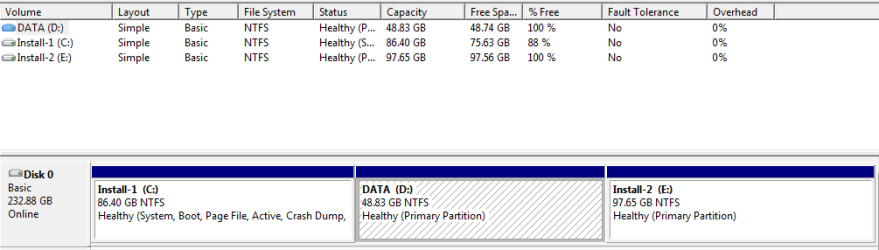
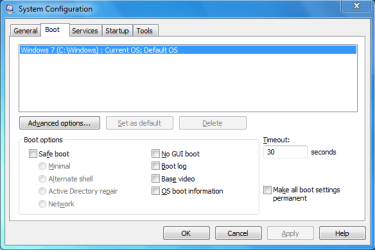
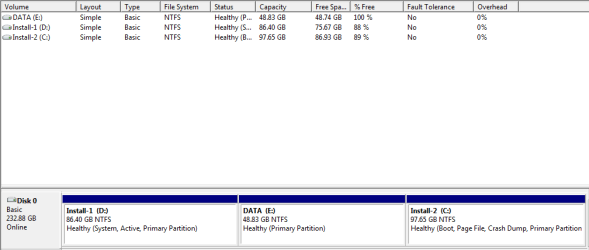
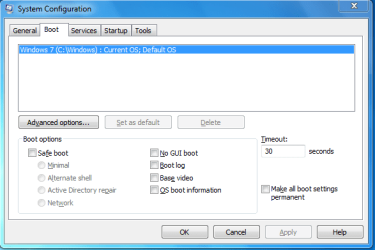
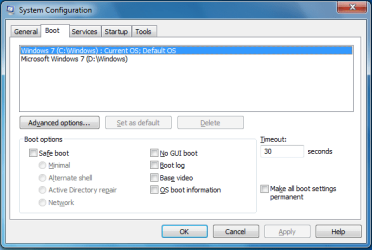
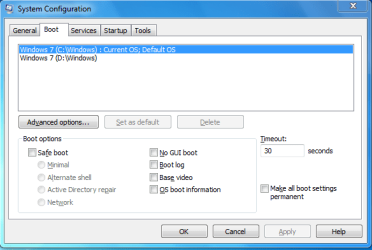
I'm not sure why it doesn't create a boot entry for your 2nd install automatically, but it does for me using the same setup you described. This is how it has always been for me. I created a VM to test this in. I first booted to a command prompt at boot to create and format the HDD so as not to install on a unallocated space and to not have the 100MB System Reserved partition. I installed Windows 7 HP SP1 32-bit, created a new partition, then installed it again on the 2nd partition. It created the boot entry for me automatically.

Boot.jpg

dskmgmnt.jpgmsconfig.jpg
 

My Computer My Computer

At a glance

64-bit Windows 11 Pro for WorkstationsIntel i7-8700K OC'd to 5 GHz64 GB (4x16GB) G.SKILL TridentZ RGB DDR4 3600...ASUS ROG-STRIX-GTX1080TI-O11G-GAMING
Computer type
PC/Desktop
Computer Manufacturer/Model Number
Self built custom
OS
64-bit Windows 11 Pro for Workstations
CPU
Intel i7-8700K OC'd to 5 GHz
Motherboard
ASUS ROG Maximus XI Formula Z390
Memory
64 GB (4x16GB) G.SKILL TridentZ RGB DDR4 3600 MHz
Graphics Card(s)
ASUS ROG-STRIX-GTX1080TI-O11G-GAMING
Sound Card
Integrated
Monitor(s) Displays
2 x Samsung Odyssey G7 27"
Screen Resolution
2560x1440
Hard Drives
1TB Samsung 990 PRO M.2,
4TB Samsung 990 PRO PRO M.2,
TerraMaster F8 SSD Plus NAS
PSU
Seasonic Prime Titanium 850W
Case
Thermaltake Core P3
Cooling
Corsair Hydro H115i
Keyboard
Logitech wireless K800
Mouse
Logitech MX Master 4
Internet Speed
2 Gb/s Download and 100 Mb/s Upload
Antivirus
Malwarebyte Anti-Malware Premium
Browser
Google Chrome
Other Info
Logitech Z625 speaker system,
Logitech BRIO 4K Pro webcam,
HP Color LaserJet Pro MFP M477fdn,
APC SMART-UPS RT 1000 XL - SURT1000XLI,
Galaxy S23 Plus phone
Hi Shawn

I did CLEAN, than made 3 partitions & quick format in Drive Options. May be a Win XP leftover.

Ray.
 

My Computer My Computer

At a glance

ME/XP/Vista/Win7
OS
ME/XP/Vista/Win7
Ah, ok. XP does tend to throw a monkey wrench in there. :)
 

My Computer My Computer

At a glance

64-bit Windows 11 Pro for WorkstationsIntel i7-8700K OC'd to 5 GHz64 GB (4x16GB) G.SKILL TridentZ RGB DDR4 3600...ASUS ROG-STRIX-GTX1080TI-O11G-GAMING
Computer type
PC/Desktop
Computer Manufacturer/Model Number
Self built custom
OS
64-bit Windows 11 Pro for Workstations
CPU
Intel i7-8700K OC'd to 5 GHz
Motherboard
ASUS ROG Maximus XI Formula Z390
Memory
64 GB (4x16GB) G.SKILL TridentZ RGB DDR4 3600 MHz
Graphics Card(s)
ASUS ROG-STRIX-GTX1080TI-O11G-GAMING
Sound Card
Integrated
Monitor(s) Displays
2 x Samsung Odyssey G7 27"
Screen Resolution
2560x1440
Hard Drives
1TB Samsung 990 PRO M.2,
4TB Samsung 990 PRO PRO M.2,
TerraMaster F8 SSD Plus NAS
PSU
Seasonic Prime Titanium 850W
Case
Thermaltake Core P3
Cooling
Corsair Hydro H115i
Keyboard
Logitech wireless K800
Mouse
Logitech MX Master 4
Internet Speed
2 Gb/s Download and 100 Mb/s Upload
Antivirus
Malwarebyte Anti-Malware Premium
Browser
Google Chrome
Other Info
Logitech Z625 speaker system,
Logitech BRIO 4K Pro webcam,
HP Color LaserJet Pro MFP M477fdn,
APC SMART-UPS RT 1000 XL - SURT1000XLI,
Galaxy S23 Plus phone
Back
Top