Two IPs??

nottaclue9

New member
I am sporadically seeing this when I switch from FF to IE or vice-versa. Is it a big deal? Do I need to do something drastic?
 

Attachments

  • Capture.PNG
    Capture.PNG
    70.6 KB · Views: 32

My Computer

Computer type
PC/Desktop
Computer Manufacturer/Model Number
Custom
OS
Windows 7 Home Premium 64-bit, service pack 1
CPU
Intel box core i5 4460
Motherboard
Asus B85MECSM 1150
Memory
Kingston Hyper X Fury BLK 1866 8GB 4x2
Monitor(s) Displays
Samsung 23" wide-screen
Screen Resolution
1920 X 1080
Hard Drives
WD Passport, 1 TB
Case
Win Z583 Mini Tower w/ USB3.0
Keyboard
Microsoft ergo wave
Mouse
Logitech wireless
Antivirus
Bitdefender; Malwarebytes Pro
Browser
IE11
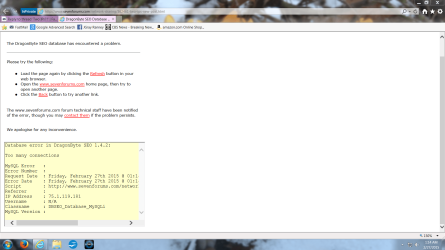
Thank you, 2xG. I did the first method, following the tutorial. Then, while using IE 11, I tried to get back to my email to reply to you. Fastmail was not responding, so I signed in again to it from Google. When I clicked on the forum link in the email, I got the page below. I then switched to Firefox and was able to connect to the forum. I do need to be able to use IE, however. So I'm not sure what happened. Any ideas?
 

Attachments

  • Capture.PNG
    Capture.PNG
    561.2 KB · Views: 4

My Computer

Computer type
PC/Desktop
Computer Manufacturer/Model Number
Custom
OS
Windows 7 Home Premium 64-bit, service pack 1
CPU
Intel box core i5 4460
Motherboard
Asus B85MECSM 1150
Memory
Kingston Hyper X Fury BLK 1866 8GB 4x2
Monitor(s) Displays
Samsung 23" wide-screen
Screen Resolution
1920 X 1080
Hard Drives
WD Passport, 1 TB
Case
Win Z583 Mini Tower w/ USB3.0
Keyboard
Microsoft ergo wave
Mouse
Logitech wireless
Antivirus
Bitdefender; Malwarebytes Pro
Browser
IE11
There should be no problem when switching to browsers.
what do you use on your internet connection?

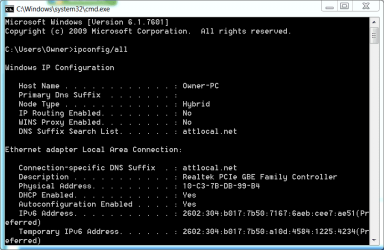
Can you post your ipconfig /all on your next reply.
 

My Computer

Computer type
PC/Desktop
Computer Manufacturer/Model Number
HP
OS
Windows 7 Pro 32bit
CPU
Dual Core
Antivirus
Trend Micro
Is it OK to do that release and renew thing again? That's the only way I can post it. My computer guy told me to stay away from the black pages, so I'm just being careful.

My apologies, but I'm not sure what you mean by what I use on my Internet connection. :o
 

My Computer

Computer type
PC/Desktop
Computer Manufacturer/Model Number
Custom
OS
Windows 7 Home Premium 64-bit, service pack 1
CPU
Intel box core i5 4460
Motherboard
Asus B85MECSM 1150
Memory
Kingston Hyper X Fury BLK 1866 8GB 4x2
Monitor(s) Displays
Samsung 23" wide-screen
Screen Resolution
1920 X 1080
Hard Drives
WD Passport, 1 TB
Case
Win Z583 Mini Tower w/ USB3.0
Keyboard
Microsoft ergo wave
Mouse
Logitech wireless
Antivirus
Bitdefender; Malwarebytes Pro
Browser
IE11
you just have to type this command on the command prompt: ipconfig /all
there's no harm with that command.

by the connection.
are you using VPN or just connected to an internet service provider.
 

My Computer

Computer type
PC/Desktop
Computer Manufacturer/Model Number
HP
OS
Windows 7 Pro 32bit
CPU
Dual Core
Antivirus
Trend Micro
OK. Just checking b/c I find ways to get myself in trouble all the time!

I use AT&T as my service provider. Not that I like them, but that's what I've got.

Incidentally, Firefox has been behaving terribly since I did the release/renew in cmd. Now I have to use IE exclusively. Probably not related, right? I'm going to try the ipconfig/all now...

~~~~~~~~~~~~~~~~~~~~~~~~~~~~~~~~~~~~~~~~~~~~~~~~~~~~~~~~~~~~~~~~

Here are the results:
 

Attachments

  • Capture.PNG
    Capture.PNG
    35.2 KB · Views: 1

My Computer

Computer type
PC/Desktop
Computer Manufacturer/Model Number
Custom
OS
Windows 7 Home Premium 64-bit, service pack 1
CPU
Intel box core i5 4460
Motherboard
Asus B85MECSM 1150
Memory
Kingston Hyper X Fury BLK 1866 8GB 4x2
Monitor(s) Displays
Samsung 23" wide-screen
Screen Resolution
1920 X 1080
Hard Drives
WD Passport, 1 TB
Case
Win Z583 Mini Tower w/ USB3.0
Keyboard
Microsoft ergo wave
Mouse
Logitech wireless
Antivirus
Bitdefender; Malwarebytes Pro
Browser
IE11
Back
Top